DIY for a Spy: Uncovering Threats in NYPD Conversations with OpenAI Whisper and NLTK
Utilize AI-tools such as Speech Recognition and Natural Language Processing to intercept and analyze NYPD communications on public frequency, aiming to detect potential threats.
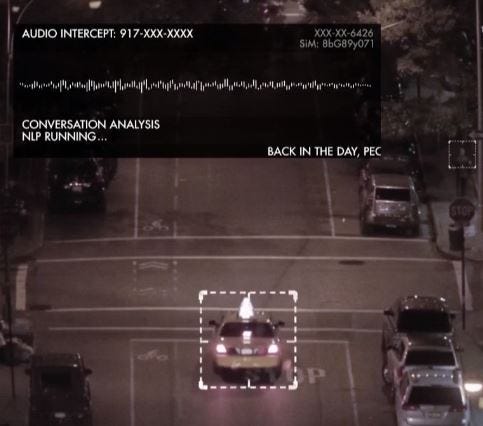
As I mentioned in one of my previous articles, No Such Agency and ‘The Machine’, there are components included in the global surveillance complex called ‘The Machine’ that enable the government to intercept and analyze communications from various sources. This is referred to COMINT (Communication Intelligence). Today, we will employ these approaches in our private mission — to protect and secure an important individual on their way to visit New York City.
Our mission, if we accept it, will involve listening to NYPD communications and reacting to threats that may arise on the route. In case of any threat is activated, the security team will respond accordingly.
An AI agent is part of the crew. It is a software module that listens to the NYPD’s public frequency in the escort vehicle, analyzes communications, and detects threats using NLP. Upon detecting a threat, the module will notify crew members to take actions to protect the person.
Prerequisites
Before our mission starts we have to do some home work. This includes checking the route and compiling a list of Police Department Precincts along our way. We will need a list of he PD’s public frequencies and broadcasting URLs utilized for policemen communications.
Next, we have a few options:
- We can directly listen to radio communications using an RTL-SDR device with the pyrtlsdr-package and a list of public radio frequencies for the NYPD;
- Or broadcasting URL from Broadcastify to the instance.
I am willing to choose the last one, — Broadcastify public URL.
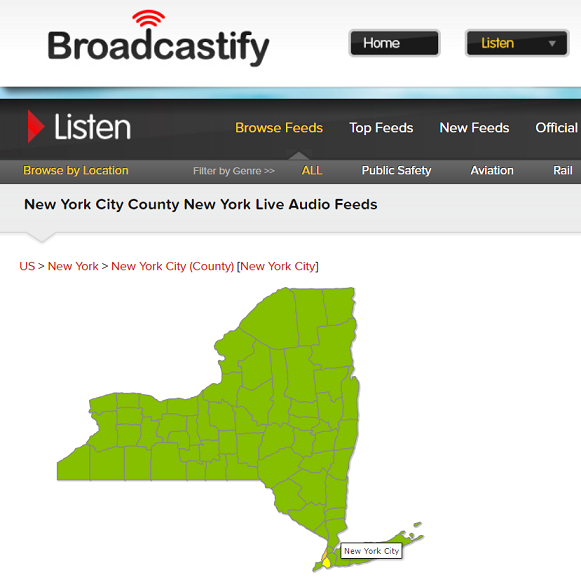
From an appropriate web page, we have to select ‘New York City’ on the map and scroll down to the list of NYPD public audio feeds to choose one we want to listen to.
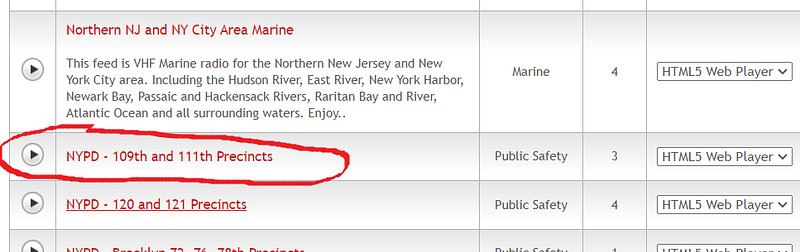
Once we identify what we need, we must click on the button located in the left corner in front of the row to open the listening page. On that page, you should verify if the feed is functioning properly. Afterward, using Browser developer tool, you have to extract the public URL available for our audio feed. Repeat these for other precincts on a route.
For the purposes of demonstration, I will use just one URL for listening to ‘NYPD — 109th and 111th Precincts’, but you can modify this program to use the whole list of precincts you need to listen to along the crew’s route.
After all, the success of your mission depends on it.
Architecture
Conversational analysis is a complex task which is included at least a few AI-based modules. One for speech recognition — OpenAI Whisper and another one for text-categorization and analysis — NLTK.
Our general process involves a few steps:
- Extracting audio files from the audio stream;
- Utilizing speech recognition to convert speech into text;
- Analyzing the text to detect any potential threats in the NYPD public channel conversations.
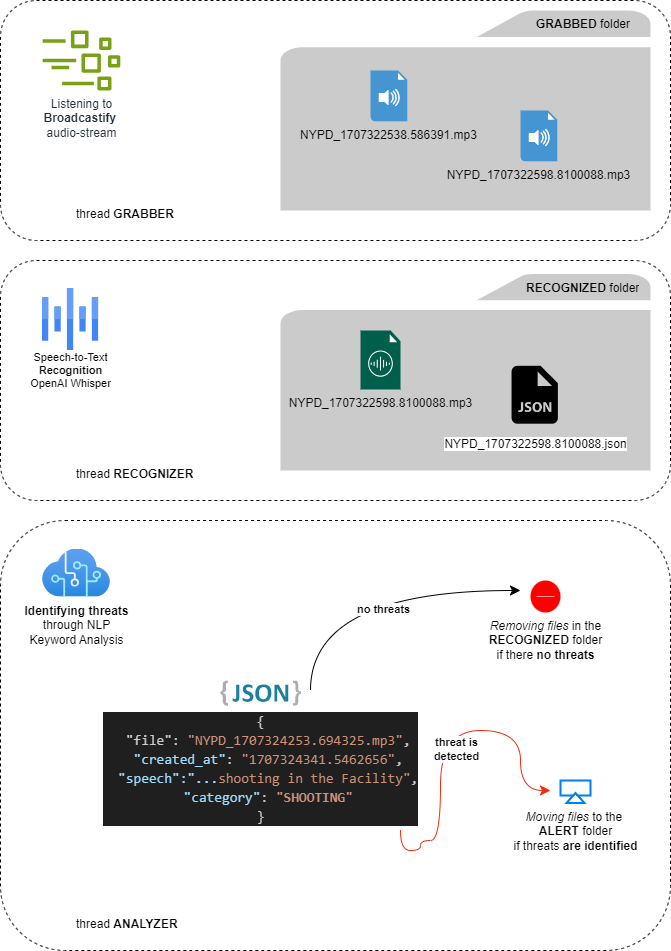
As our solution is complex and includes several parts that should work simultaneously, we will be using threading to organize each process in a separate thread.
One thread ‘Grabber’, will handle the capturing audio from the public channel of NYPD and saving each file to the ‘Grabbed’ folder, with a new file grabbed every minute.
Another thread, ‘Recognizer’, will convert audio files into metadata (JSON) by extracting text through the speech recognition process. It will then place both files, mp3 and JSON, to the ‘Recognized’ folder.
In the final step, the ‘Analyzer’ thread will cover several tasks: removing both the MP3 and JSON files from the ‘Recognized’ folder if no threat is identified, or moving the files to the ‘Alert’ folder if a threat is detected.
Furthermore, crew members will be notified about any detected threats through the application console.
Let’s delve further into implementation.
Installation
As was mentioned earlier, as we are using OpenAI Whisper and NLTK, we have to properly install them using the following code:
pip install openai-whisper
pip install nltk
As an alternative, if you download the source code and deploy it on your personal computer or computational module, you might just need to execute the next command:
pip install -r requirements.txtIf there are no errors and everything has been installed correctly, you can proceed further. Sometimes, you may be asked to update the Python-version. Also, don’t forget to properly install FFMPEG as this is used by Whisper. Ensure to add its path to your PATH environment variable.
Broadcastify grabber
Thread ‘Grabber’ is responsible for capturing audio streams from Broadcastify. The function grabber_go, is the thread-execution function. It has parameters such as the duration, in seconds, of audio fragment (max_time), file-name prefix (prefix), Broadcastify URL (broadcastify_url), output folder (output_folder), and a stop command instance (stop_command). All parameters should be passed from the main thread while initiating the capture process.
import time
import requests

def grabber_go(
        max_time, prefix,
        broadcastify_url,
        output_folder,
        stop_command):

    while not stop_command.is_set():

        start_time = time.time()
        response = requests.get(broadcastify_url, stream=True)

        with open(f'{output_folder}/{prefix}_{start_time}.mp3', 'wb') as f:
            try:
                for block in response.iter_content(512):
                    f.write(block)
                    if (time.time() - start_time) > max_time or stop_command.is_set():
                        break
            except Exception as e:
                print(f"An error occurred: {e}")

    stopped_time = time.strftime("%H:%M:%S, %Y, %d %B", time.localtime())
    print(f'thread \033[93mGrabber\033[0m, DONE at {stopped_time}.')
Within a continuous loop it runs until the stop command is set from the main thread (main.py). Thread streams data from the Broadcastify URL in chunks and writes them to mp3-files in the specified output folder (‘Grabbed’ folder). Each file’s name includes the prefix and the start Unix time-stamp ending with ‘.mp3’ extension.
For example: NYPD_1707324253.694325.mp3 where ‘NYPD_’ is the prefix, and ‘1707324253.694325’ is the Unix time-stamp.
Speech to text recognizer
Based on the official documentation, OpenAI Whisper is an automatic speech recognition (ASR) system trained on 680,000 hours of multilingual and multitask supervised data collected from the web. This makes it well-suited for our solution.
The process of converting mp3-files into metadata, with text recognized from speech, operates within the ‘Recognizer’ thread and includes multiple components, which I will discuss next.
import time
import json
import shutil

def move_file(source_path, output_folder):
    try:
        shutil.move(source_path, output_folder)
    except Exception as e:
        print(f"Error moving file: {e}")

def create_metadata(file_path, output_folder, text):
    try:
        file_name = file_path.split('/')[1]
        metadata = {
            "file": f"{file_name}",
            "created_at": f"{time.time()}",
            "speech": f"{text}",
            "category":""
        }
        base_name = '.'.join(file_name.split('.')[:-1])
        metadata_file_path = f"{output_folder}/{base_name}.json"

        with open(metadata_file_path, 'w') as metadata_file:
            json.dump(metadata, metadata_file, indent=2)
        return metadata_file_path
    except Exception as e:
        print(f"Error creating metadata: {e}")
As you may see from the code above, in the Utils.py code-file we have two functions: move_file and create_metadata.
The move_file function moves a file from a specified source path to an output folder using shutil.move. We use this function in both proceses ‘Recognixer’ and ‘Analyzer’. While the create_metadata function generates metadata JSON-file (as shown below) for each mp3-file, including its name, creation timestamp, recognized speech, and an empty category field.
{
  "file": "NYPD_1707324253.694325.mp3",
  "created_at": "1707324341.5462656",
  "speech": ",..., shooting in the Facility",
  "category": "SHOOTING"
}
In the same way as we used in ‘Grabber’ thread, ‘Recognizer’ thread (Recognizer.py) uses the same approach. It executes within a continuous loop until the stop command is set from the main thread (main.py) to stop the process.
While it implements a speech recognition process (recognizer_go) that continuously transcribes audio files using an OpenAI model loaded with whisper.load_model("base"), it waits for files in an input folder ('Grabbed' folder), transcribes them, and moves successfully recognized ones to an output folder ('Recognized' folder). It generates a JSON metadata file for each transcribed audio file, as discussed earlier.
import os
import time
import whisper
import utils

model = whisper.load_model("base")

def recognizer_go(
        wait_time,
        broadcastify_title,
        input_folder,
        output_folder,
        stop_command):

    while not stop_command.is_set():

        time.sleep(wait_time)
        files = os.listdir(input_folder)

        if len(files) > 1:
            print(f'\n\033[92m\033[1m{broadcastify_title}\033[0m')

        for file in files[:-1]:
            try:
                if stop_command.is_set():
                    break
                file_path = f'{input_folder}/{file}'
                audio = whisper.load_audio(file_path)
                result = model.transcribe(audio, fp16=False, language='English')
                if result["text"]:
                    print(f'{file}: {result["text"]}')
                    utils.move_file(file_path, output_folder)
                    utils.create_metadata(file_path, output_folder, result["text"])
                else:
                    print('...')
                    os.remove(file_path)
            except Exception as e:
                print(f"An error occurred: {e}")

    stopped_time = time.strftime("%H:%M:%S, %Y, %d %B", time.localtime())
    print(f'thread \033[93mSpeech recognizer\033[0m, DONE at {stopped_time}.')
The thread opens each mp3-file one by one, reads it, and proceeds with the speech-to-text recognition. If transcription fails or the recognized text is empty, the file is deleted.

This process continues until the stop command is received from the main thread (main.py) or the entire process is terminated.
Threats detector
NLTK (Natural Language Toolkit) is a widely used python-library for natural language processing (NLP) tasks. It includes tokenization, a useful technique for threat detection. And we are gonna utilize it to detect threats, aligning with our initial mission objectives.
In the script below (analyzer.py), we begin with a predefined list of keywords threat_keywords_list to identify various threat categories such as terrorism, gang-related activities, hate crimes, weapons, shootings, and more. For each category, we have a list of words representing the category.
import os
import time
import json
import utils
import nltk
from nltk.tokenize import word_tokenize

nltk.download('punkt')

threat_keywords_list = [
    {"category": "TERRORISM", "keywords": ["terror", "extremist", "radical", "insurgency"]},
    {"category": "GANG-RELATED", "keywords": ["gang", "territory", "rivalry", "faction"]},
    {"category": "HATE-CRIME", "keywords": ["hate", "discrimination", "bias", "prejudice", "bigotry", "intolerance"]},
    {"category": "WEAPON", "keywords": ["gun", "knife", "firearm", "explosive", "ammunition", "blade"]},
    {"category": "SHOOTING", "keywords": ["shooting", "gunfire", "sniper", "shootout", "gunshot", "fire"]},
    {"category": "CAR-RELATED", "keywords": ["carjacking", "accident", "collision", "car-theft", "speeding", "wrong-way"]},
    {"category": "VIOLENCE", "keywords": ["assault", "attack", "threaten", "harm", "aggression", "violence"]},
    {"category": "CRIMINAL", "keywords": ["robbery", "burglary", "drug", "kidnapping", "felony", "heist"]},
    {"category": "HOSTAGE", "keywords": ["hostage", "abduction", "ransom", "detention", "confinement"]},
    {"category": "CRISIS", "keywords": ["crisis", "emergency", "disaster", "calamity"]},
    {"category": "CYBERSECURITY", "keywords": ["hacking", "malware", "breach", "cybercrime"]}
]

def detect_threat(message):
    tokens = word_tokenize(message)
    tokens_lower = [token.lower() for token in tokens]
    for category_keywords in threat_keywords_list:
        if any(keyword in tokens_lower for keyword in category_keywords["keywords"]):
            return category_keywords["category"]
    return "REGULAR"

def analyzer_go(
        wait_time,
        input_folder,
        output_folder,
        stop_command):

    while not stop_command.is_set():

        time.sleep(wait_time)
        json_files = [file for file in os.listdir(input_folder) if file.endswith(".json")]

        for file in json_files:
            try:
                if stop_command.is_set():
                    break

                json_file_path = f'{input_folder}/{file}'
                with open(json_file_path, 'r') as file:
                    data = json.load(file)
                threat_category = detect_threat(data['speech'])
                if threat_category != 'REGULAR':
                    data['category'] = threat_category
                    with open(json_file_path, 'w') as file:
                        json.dump(data, file, indent=2)
                    utils.move_file(json_file_path, output_folder)
                    utils.move_file(f'{input_folder}/{data["file"]}', output_folder)
                    print(f'THREAT FOUND -- \033[91m{threat_category}\033[0m' +
                          f' in file {data["file"]}: {data["speech"]}')
                else:
                    os.remove(json_file_path)
                    os.remove(f'{input_folder}/{data["file"]}')

            except Exception as e:
                print(f"An error occurred: {e}")

    stopped_time = time.strftime("%H:%M:%S, %Y, %d %B", time.localtime())
    print(f'thread \033[93mAnalyzer\033[0m, DONE at {stopped_time}.')
The analyzer_go function continuously monitors an input folder ('recognized' folder) for metadata files, representing speech data. For each file, it detects threats using the detect_threat function, which tokenizes the speech message and checks for matches with the keyword lists. If a threat is identified, it updates the JSON file with the threat category, moves both the JSON and corresponding MP3 file to an output folder ('alert' folder). Otherwise, it removes the files from the ‘recognized’ folder.
The process continues until either the stop command is received from the main thread (main.py) or the entire process is terminated, ensuring continuous threat analysis capabilities for the mission.
Threads launcher
As mentioned earlier, we employ a multi-threaded approach to analyze conversations from a live audio stream (NYPD conversation analysis). This facilitates concurrent execution of three key processes: audio grabbing, speech recognition, and threat detection.
import os
import threading as th
import grabber as gr
import recognizer as re
import analyzer as an

broadcastify_title = 'NYPD - 109th and 111th Precincts'
broadcastify_url = "https://broadcastify.cdnstream1.com/27526"
grabber_output_folder = "grabbed"
recognizer_output_folder = "recognized"
alert_output_folder = "alert"

if not os.path.exists(grabber_output_folder):
    os.makedirs(grabber_output_folder)
if not os.path.exists(recognizer_output_folder):
    os.makedirs(recognizer_output_folder)
if not os.path.exists(alert_output_folder):
    os.makedirs(alert_output_folder)

stop_command = th.Event()

th_grabber = th.Thread(
    target=gr.grabber_go,
    args=[60, 'NYPD', broadcastify_url, grabber_output_folder, stop_command])
th_recognizer = th.Thread(
    target=re.recognizer_go,
    args=[10, broadcastify_title, grabber_output_folder, recognizer_output_folder, stop_command])
th_analyzer = th.Thread(
    target=an.analyzer_go,
    args=[5, recognizer_output_folder, alert_output_folder, stop_command])

th_grabber.start()
th_recognizer.start()
th_analyzer.start()

os.system('clear')
print('\033[93m[CONVERSATION ANALYSIS: STARTED]\033[0m')
input('Press enter to stop process...')
print('\033[93m[STOPPING THREADS]\033[0m')
stop_command.set()

th_grabber.join()
th_recognizer.join()
th_analyzer.join()

print('\033[93m[CONVERSATION ANALYSIS: DONE]\033[0m')
As you can see from the list above (main.py), it initializes parameters such as the Broadcastify URL and output folders for grabbed, recognized, and alert files. Then, it checks for the existence of these folders and creates them if they do not yet exist.
After that, it creates three threads:
- Grabber — captures audio from the specified Broadcastify URL and saves it to the grabber output folder (‘grabbed’ folder), one file per minute;
- Recognizer — converts audio files into text using speech recognition from OpenAI Whisper and saves the results along with metadata to the recognizer output folder (‘recognized’ folder);
- Analyzer — analyzes the recognized text for threats detection based on predefined keywords and moves files to the alert output folder (‘alert’ folder) if threat is detected.
Upon starting the threads, the main process (main.py) displays a message indicating that conversation analysis has begun. It waits for user input to stop the process. Once the user presses enter, a stop command is issued to terminate all threads. Then we wait for all threads to be stopped before printing a message indicating that analysis is completed.
Outcome
Grate, we are approaching the conclusion of our mission. Before we finalize everything, let me walk you through the directory structure we established at the beginning. As the process can generate multiple files, the folder structure may look like the one shown in the picture below.
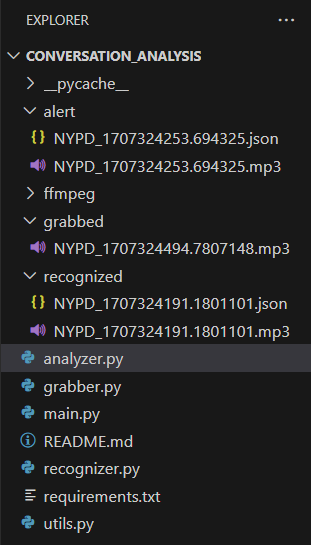
While files in the ‘grabbed’ and ‘recognized’ folders are temporary and constantly appear and disappear, files in the ‘alert’ folder remain permanent until manually removed. As shown on the picture above, there are two files: the MP3 audio file and the JSON metadata file. Their presence in the ‘alert’ folder indicates that a threat has been identified and demands your urgent attention. Do not wait — urgently review these files if you encounter them.
Alongside system information, the console can also contain recognized messages and links to the files, along with detected threats and their respective categories displayed next to the message.
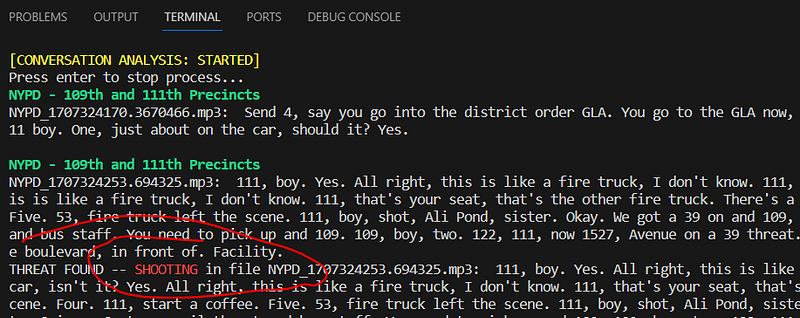
As illustrated in the picture above, the system has just detected a threat categorized as ‘SHOOTING’ in the file ‘NYPD_1707324253.694325.mp3’ file. This underscores the necessity to be more attentive for the security crew along their route, especially within the zone of responsibility of the NYPD Precincts 109th and 111th.
Mission completed
Thanks to the collaborative efforts of the crew and this AI module, the important person is safely delivered to their destination address in the New York City, ensuring peace of mind and cash on board.
If everything is as I described, congratulations! Simply press Enter to stop all the threads correctly. Avoid terminating the process pressing CTRL+C, as this will not stop the child threads; they will keep running because the stop_command was not set.
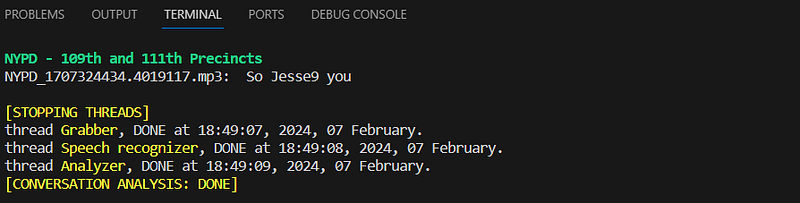
If you press ENTER, all sub-threads will be correctly stopped as per the design and implementation in the main process (main.py).
Besides this example, such techniques can be used in various other missions, starting with community engagement, where urgent collaboration among residents is necessary, and ending with supporting law enforcement agencies during Emergency Response situations, as well as in your own private missions.
REMEMBER … listening to the public police radio is absolutely legal. However, providing criminals with information you extracted from the law enforcement agencies radio broadcasting and supporting their operations is a federal crime!
Actively listening to the public police radio can be very interesting and is absolutely legal. However, providing criminals with information and supporting their operations is a federal crime. Don’t forget to avoid violating the law.
X-Files
To experiment with all the concepts mentioned in this article, you will need to utilize a Python-environment with preinstalled FFMPEG and the source code, which you can download from the GitHub-link provided below.
Source code: NYPD Conversation Analysis with OpenAI Whisper
Get in touch
Feel free to ask me about anything you want on Twitter; however, you are already aware of that.
Twitter: https://twitter.com/dmytro_sazonov


