avatarSantosh Joshi

Free AI web copilot to create summaries, insights and extended knowledge, download it at here

2254

Abstract

ng">"ram"</span>, age=<span class="hljs-number">7</span>), Row(<span class="hljs-built_in">id</span>=<span class="hljs-number">3</span>, name=<span class="hljs-string">"abdul"</span>, age=<span class="hljs-number">5</span>), Row(<span class="hljs-built_in">id</span>=<span class="hljs-number">4</span>, name=<span class="hljs-string">"john"</span>, age=<span class="hljs-number">5</span>), Row(<span class="hljs-built_in">id</span>=<span class="hljs-number">5</span>, name=<span class="hljs-string">"john"</span>, age=<span class="hljs-number">5</span>), Row(<span class="hljs-built_in">id</span>=<span class="hljs-number">6</span>, name=<span class="hljs-string">"john"</span>, age=<span class="hljs-number">5</span>), Row(<span class="hljs-built_in">id</span>=<span class="hljs-number">7</span>, name=<span class="hljs-string">"john"</span>, age=<span class="hljs-number">5</span>) ])</pre></div><p id="2263">The data appears as follows: the first two rows are duplicates, and rows four through seven contain duplicate values in the ‘name’ and ‘age’ columns.</p><figure id="e418"><img src="https://cdn-images-1.readmedium.com/v2/resize:fit:800/1*LMKH0rsuFUVXEP50x_cRAQ.png"><figcaption></figcaption></figure><p id="efd8">When we apply distinct to the DataFrame, it removes duplicates and selects one record from each set, resulting in a total of 7 records.</p><div id="ed92"><pre>df.distinct().show()</pre></div><p id="7c1d">As you can see from the first 2 records (id = 1) only one is returned.</p><figure id="7df7"><img src="https://cdn-images-1.readmedium.com/v2/resize:fit:800/1*OK9q6D1Bn_jZiYa08UpZ7Q.png"><figcaption></figcaption></figure><p id="30e5">Let’s apply dropDuplicates() to the dataframe df without specifying any columns, the results returned is similar to distinct()</p><div id="e9d8"><pre>df.dropDuplicates().show()</pre></div><figure id="1653"><img src="https://cdn-images-1.readmedium.com/v2/resize:fit:800/1*6R4UKfTZk67XiA6TtouXig.png"><figcaption></figcaption></figure><p id="52b4">Similarly with the alias of dropDuplicates, which is drop_duplicates() the result is same.</p><div id="f94b"><pre>df.drop_duplicates().show()</pre></div><figure id="3d86"><img src="https://cdn-images-1.readmedium.com/v2/resize:

Options

fit:800/1*KRExpIStqFt5tcZRx9bwjw.png"><figcaption></figcaption></figure><blockquote id="8703"><p>⚠️The choice between distinct and dropDuplicates can also be influenced by performance. distinct is generally faster when all columns need to be considered because of internal optimizations PySpark implements for full-data comparisons.</p></blockquote><p id="c126">If you require complete uniqueness across all rows, use distinct. Now, let’s apply dropDuplicates to the ‘name’ and ‘age’ columns.</p><div id="1fd9"><pre>df.dropDuplicates([<span class="hljs-string">"name"</span>, <span class="hljs-string">"age"</span>]).show()</pre></div><p id="ed15">You can see it remove duplicates and pick one of the records from ID = 4 to 7.</p><figure id="6392"><img src="https://cdn-images-1.readmedium.com/v2/resize:fit:800/1*R92RKHa9obVDTGJmscP9mw.png"><figcaption></figcaption></figure><p id="85af">Although there were four duplicate column values, Spark selected the first one with id = 4, which is non-deterministic.</p><blockquote id="f92e"><p>🧰 To control which row Spark picks, you can sort the DataFrame first. For example, to select the row with id = 7, where the name is ‘John’ and the age is 5, instead of the previously selected id = 4, use the following code:</p></blockquote><div id="4025"><pre><span class="hljs-comment"># Sort the DataFrame by 'name' and 'id' in descending order</span> df_sorted = df.sort( col(<span class="hljs-string">"id"</span>).desc())

<span class="hljs-comment"># Drop duplicates based on 'name' to ensure the highest 'id'</span> df_deduplicated = df_sorted.dropDuplicates([<span class="hljs-string">"name"</span>, <span class="hljs-string">"age"</span>])

<span class="hljs-comment"># Show the result</span> df_deduplicated.show()</pre></div><figure id="9d0f"><img src="https://cdn-images-1.readmedium.com/v2/resize:fit:800/1*uTIyGOndlNCtPqbgtczrQg.png"><figcaption></figcaption></figure><blockquote id="be9a"><p>🎯 Thanks for reading all the way to the end! If you found value here, please consider giving a clap, leaving a comment, following me and <a href="https://medium.com/@santosh_joshi_data/subscribe">subscribing</a> to my articles. <b>Your feedback and support mean a lot. </b>❤️</p></blockquote></article></body>

distinct() vs dropDuplicates() in PySpark

A Deep Dive into distinct(), dropDuplicates() and drop_duplicates()

Photo by Joshua Sukoff on Unsplash

In this short article, we will explore the nuances of the distinct and dropDuplicates functions in PySpark, providing a deeper understanding of how these two essential functions work and when to use them effectively.

  • Distinct returns a new DataFrame containing the distinct rows in this DataFrame.
  • dropDuplicates returns a new DataFrame with duplicate rows removed, optionally only considering certain columns.
  • drop_duplicates() is an alias for dropDuplicates().

📌In PySpark, drop_duplicates() is another name for dropDuplicates(). You can use either one to remove duplicates from a DataFrame. This naming helps keep things consistent with libraries like Pandas and makes it easier to work with specific columns.

Let’s explore the concept using few coding examples.

Below is code to create the data frame having few duplicate records and duplicate data inside the columns.

from pyspark.sql import Row
from pyspark.sql.functions import col

# Create the DataFrame
df = spark.createDataFrame([
    Row(id=1, name="santosh", age=30),
    Row(id=1, name="santosh", age=30),
    Row(id=2, name="ram", age=7),
    Row(id=3, name="abdul", age=5),
    Row(id=4, name="john", age=5),
    Row(id=5, name="john", age=5),
    Row(id=6, name="john", age=5),
    Row(id=7, name="john", age=5)
])

The data appears as follows: the first two rows are duplicates, and rows four through seven contain duplicate values in the ‘name’ and ‘age’ columns.
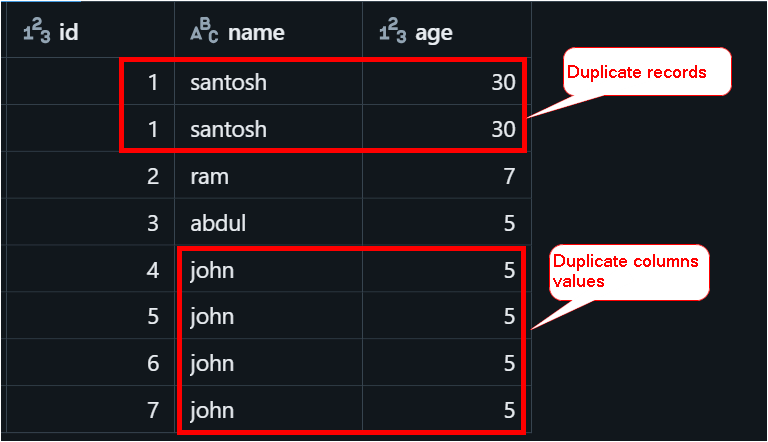
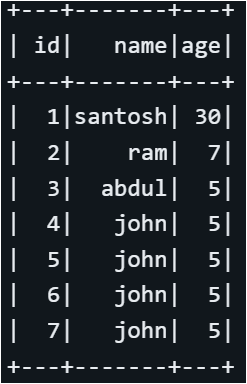
When we apply distinct to the DataFrame, it removes duplicates and selects one record from each set, resulting in a total of 7 records.

df.distinct().show()

As you can see from the first 2 records (id = 1) only one is returned.

Let’s apply dropDuplicates() to the dataframe df without specifying any columns, the results returned is similar to distinct()

df.dropDuplicates().show()
Similarly with the alias of dropDuplicates, which is drop_duplicates() the result is same.

df.drop_duplicates().show()

⚠️The choice between distinct and dropDuplicates can also be influenced by performance. distinct is generally faster when all columns need to be considered because of internal optimizations PySpark implements for full-data comparisons.

If you require complete uniqueness across all rows, use distinct. Now, let’s apply dropDuplicates to the ‘name’ and ‘age’ columns.

df.dropDuplicates(["name", "age"]).show()

You can see it remove duplicates and pick one of the records from ID = 4 to 7.
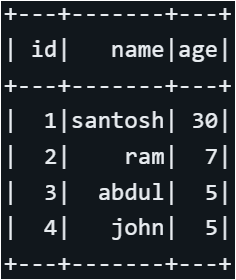
Although there were four duplicate column values, Spark selected the first one with id = 4, which is non-deterministic.

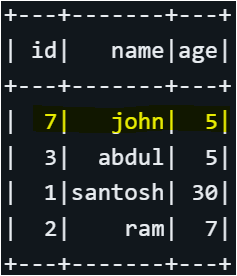
🧰 To control which row Spark picks, you can sort the DataFrame first. For example, to select the row with id = 7, where the name is ‘John’ and the age is 5, instead of the previously selected id = 4, use the following code:

# Sort the DataFrame by 'name' and 'id' in descending order
df_sorted = df.sort( col("id").desc())

# Drop duplicates based on 'name' to ensure the highest 'id'
df_deduplicated = df_sorted.dropDuplicates(["name", "age"])

# Show the result
df_deduplicated.show()
🎯 Thanks for reading all the way to the end! If you found value here, please consider giving a clap, leaving a comment, following me and subscribing to my articles. Your feedback and support mean a lot. ❤️

Pyspark
Distinct
Duplicate
Dataframes
Recommended from ReadMedium