avatarTeri Radichel

Free AI web copilot to create summaries, insights and extended knowledge, download it at here

2342

Abstract

plug a switch into one of your ports and plug all your IoT devices into that port like your refrigerator and iRobot or whatever. You think you’re protected from those devices because you plugged in your laptop into a separate port.</p><p id="77f4">Nope. You need to create firewall rules to disallow traffic to restrict traffic from one port to another.</p><p id="517a">I found and implemented a solution to make the ports discrete on a 3100. I believe this is the documentation to do that but I have moved on to a newer product.</p><div id="8ece" class="link-block"> <a href="https://docs.netgate.com/pfsense/en/latest/solutions/sg-3100/configuring-the-switch-ports.html"> <div> <div> <h2>Netgate 3100 Security Gateway Manual - Configuring the Switch Ports | Netgate Documentation</h2> <div><h3>We provide leading-edge network security at a fair price - regardless of organizational size or network sophistication…</h3></div> <div><p>docs.netgate.com</p></div> </div> <div> <div style="background-image: url(https://miro.readmedium.com/v2/resize:fit:320/0*_FHzc30DCS7ciceU)"></div> </div> </div> </a> </div><p id="006a">The newer models seem to come out of the box with discrete ports if I remember correctly. I’m just getting back to this after doing about a million other things. However, I still create very specific rules and monitor traffic between ports to ensure something is not happening that I don’t expect.</p><p id="7e25">You can do this in a couple of ways.</p><p id="7551">First you need to select the Interface to which the rule applies. Notice below that I’ve got the x_4 interface I just enabled in the list below now.</p><figure id="bcc4"><img src="https://cdn-images-1.readmedium.com/v2/resize:fit:800/1*clcxZmMVfQNQw7OiUnesLg.png"><figcaption></figcaption></figure><p id="ad2d">For the source or destination I can choose the interface network I configured as the source or destination. Let’s say I configured the range 10.10.10.0/24 to the x_4_net interface. I can select x_4_net as the source and the rule will apply to any traffic from 10.10.10.0/24.</p><figure id="42bc"><img src="https://cdn-images-1.readmedium.com/v2/resize:fit:800/1*DnC_8G0W-

Options

tHBUlDcjPAopg.png"><figcaption></figcaption></figure><p id="c9af">I could also just use the CIDR block 10.10.10.0/24 in the rule.</p><p id="ce39">So on a Netgate 3100 you’ll want to set up those rules if that is what you intended when you plugged devices into different ports.</p><p id="880b">On newer devices you may not need to do that but I still do just to be sure. If something did get misconfigured or changed I would then see the rejected traffic in my logs, which I tend to filter on a lot, and know something is wrong.</p><p id="6dc5">I will just also mention that if you are setting up VLANs make sure you know what you are doing in relation to the trunk port configuration. :) That is a topic beyond this post.</p><p id="b5f8">Follow for updates.</p><p id="4a3a">Teri Radichel | <i>© <a href="https://2ndsightlab.com/?source=post_page---------------------------">2nd Sight Lab</a> 2023</i></p><div id="8b5f"><pre><span class="hljs-section">About Teri Radichel:

⭐️ Author: Cybersecurity Books
⭐️ Presentations: Presentations by Teri Radichel
⭐️ Recognition: SANS Award, AWS Security Hero, IANS Faculty
⭐️ Certifications: SANS ~ GSE 240
⭐️ Education: BA Business, Master of Software Engineering, Master of Infosec
⭐️ Company: Penetration Tests, Assessments, Phone Consulting ~ 2nd Sight Lab</pre></div><div id="caae"><pre><span class="hljs-section">Need Help With Cybersecurity, Cloud, or Application Security?
~~~~~~~~~~~~~~~~~~~~~~~~~~~~~~~~~~~~~~~~~~~~~~~~~~~~~~~~~~~~~</span>
🔒 Request a penetration test or security assessment
🔒 Schedule a consulting call
🔒 Cybersecurity Speaker for Presentation</pre></div><div id="afb0"><pre>Follow <span class="hljs-keyword">for</span> more stories like <span class="hljs-keyword">this</span>:

❤️ Sign Up my Medium Email List ❤️ Twitter: <span class="hljs-meta">@teriradichel</span> ❤️ LinkedIn: https:<span class="hljs-comment">//www.linkedin.com/in/teriradichel</span> ❤️ Mastodon: <span class="hljs-meta">@teriradichel</span><span class="hljs-meta">@infosec</span>.exchange ❤️ Facebook: 2nd Sight Lab ❤️ YouTube: @2ndsightlab</pre></div><figure id="faf5"><img src="https://cdn-images-1.readmedium.com/v2/resize:fit:800/0*H9Ew1KCl-29nZiPR.jpeg"><figcaption></figcaption></figure></article></body>

Discrete Ports on PFSense

Protecting devices plugged into different ports on your firewall

~~~~~~~~~~~~~~~~~~~~~~~~~~~~~~~~~~~~~~~~~~~~~~~~~~~~~

⚙️ Check out my series on Automating Cybersecurity Metrics | Code.

🔒 Related Stories: pfSense | Ubiquiti Dream Machine Pro | Network Security

💻 Free Content on Jobs in Cybersecurity | ✉️ Sign up for the Email List

~~~~~~~~~~~~~~~~~~~~~~~~~~~~~~~~~~~~~~~~~~~~~~~~~~~~~

I used to use a PFSense on a Netgate 3100 and just want to explain this topic before moving on to other posts.

Physical Ports

The PFSense is no a Netgate product with multiple physical ports. When I say physical ports I mean the slots where you can plug in a network cable in the back of the device, not a logical port like TCP 443.
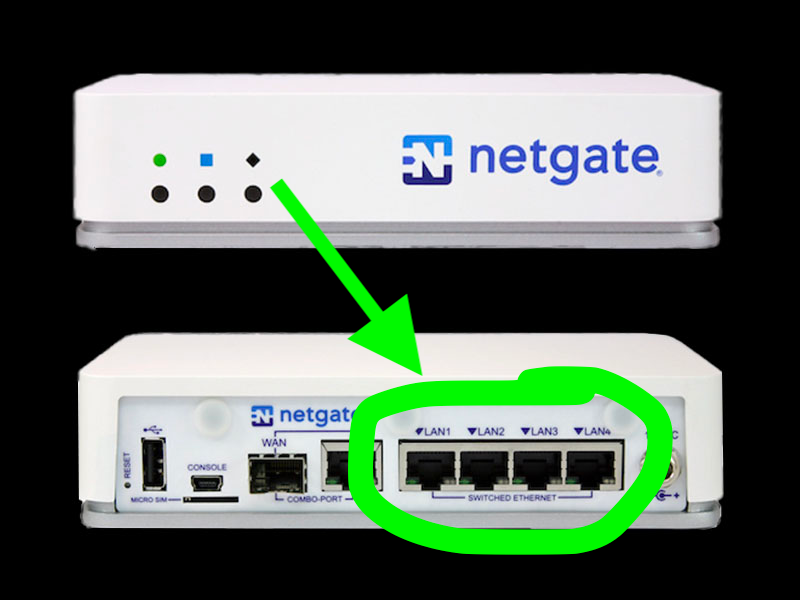
You can configure each of those ports in different ways within PFSense. You can give them a name and set up VLANs (virtual private networks) associated with each port.
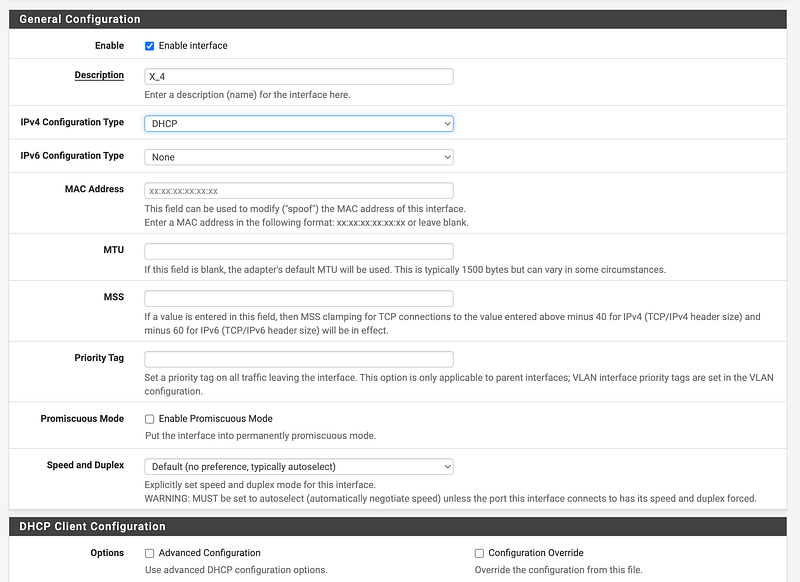
Discrete Ports

The selection of Netgate products has some security implications. If you are using an older Netgate product like the 3100, I noticed that the ports are not discrete, meaning if you plug a device into port one and port two the devices can see each other and communicate on the network.

So let’s say you think you’re going to plug a switch into one of your ports and plug all your IoT devices into that port like your refrigerator and iRobot or whatever. You think you’re protected from those devices because you plugged in your laptop into a separate port.

Nope. You need to create firewall rules to disallow traffic to restrict traffic from one port to another.

I found and implemented a solution to make the ports discrete on a 3100. I believe this is the documentation to do that but I have moved on to a newer product.

The newer models seem to come out of the box with discrete ports if I remember correctly. I’m just getting back to this after doing about a million other things. However, I still create very specific rules and monitor traffic between ports to ensure something is not happening that I don’t expect.

You can do this in a couple of ways.

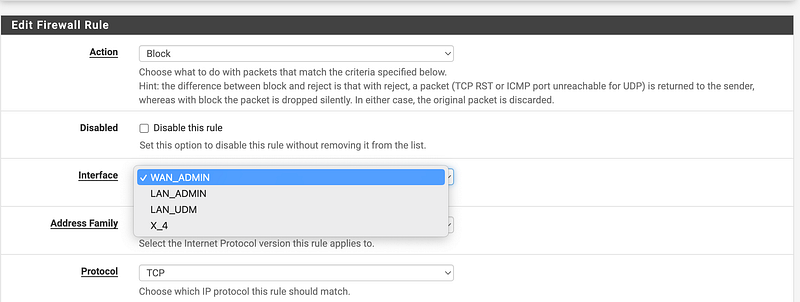
First you need to select the Interface to which the rule applies. Notice below that I’ve got the x_4 interface I just enabled in the list below now.
For the source or destination I can choose the interface network I configured as the source or destination. Let’s say I configured the range 10.10.10.0/24 to the x_4_net interface. I can select x_4_net as the source and the rule will apply to any traffic from 10.10.10.0/24.
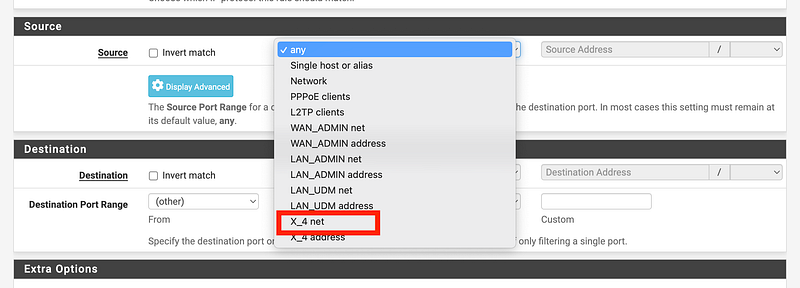
I could also just use the CIDR block 10.10.10.0/24 in the rule.

So on a Netgate 3100 you’ll want to set up those rules if that is what you intended when you plugged devices into different ports.

On newer devices you may not need to do that but I still do just to be sure. If something did get misconfigured or changed I would then see the rejected traffic in my logs, which I tend to filter on a lot, and know something is wrong.

I will just also mention that if you are setting up VLANs make sure you know what you are doing in relation to the trunk port configuration. :) That is a topic beyond this post.

Follow for updates.

Teri Radichel | © 2nd Sight Lab 2023

About Teri Radichel:
~~~~~~~~~~~~~~~~~~~~
⭐️ Author: Cybersecurity Books
⭐️ Presentations: Presentations by Teri Radichel
⭐️ Recognition: SANS Award, AWS Security Hero, IANS Faculty
⭐️ Certifications: SANS ~ GSE 240
⭐️ Education: BA Business, Master of Software Engineering, Master of Infosec
⭐️ Company: Penetration Tests, Assessments, Phone Consulting ~ 2nd Sight Lab
Need Help With Cybersecurity, Cloud, or Application Security?
~~~~~~~~~~~~~~~~~~~~~~~~~~~~~~~~~~~~~~~~~~~~~~~~~~~~~~~~~~~~~
🔒 Request a penetration test or security assessment
🔒 Schedule a consulting call
🔒 Cybersecurity Speaker for Presentation
Follow for more stories like this:
~~~~~~~~~~~~~~~~~~~~~~~~~~~~~~~~~~~~~~~~~~~~~~~~~~~~~~~~~~~~~ 
❤️ Sign Up my Medium Email List
❤️ Twitter: @teriradichel
❤️ LinkedIn: https://www.linkedin.com/in/teriradichel
❤️ Mastodon: @teriradichel@infosec.exchange
❤️ Facebook: 2nd Sight Lab
❤️ YouTube: @2ndsightlab

Pfsense
Ports
Network Security
Vlan
Discrete
Recommended from ReadMedium