avatarCaleb

Free AI web copilot to create summaries, insights and extended knowledge, download it at here

3711

Abstract

<h3>Use the new App Router with Next.js' and React's latest features, including Layouts, Server Components, Suspense, and…</h3></div> <div><p>nextjs.org</p></div> </div> <div> <div style="background-image: url(https://miro.readmedium.com/v2/resize:fit:320/0*B4Rg3jSvg_ee-Zt3)"></div> </div> </div> </a> </div><h2 id="a7d9">4. TypeScript Support</h2><p id="3ea8">TypeScript is a statically compiled language to write clear and simple JavaScript code, offering you insights and autocompletion that helps avoid bugs before they occur.</p><p id="637f">Next.js supports TypeScript out-of-the-box, making your development process even smoother.</p><h2 id="a11c">5. Built-in CSS and Sass Support, Image Optimization</h2><p id="b008">Next.js offers support for global CSS, modular CSS, and Sass, making the styling of your web application effortless.</p><p id="0015">It also has built-in image optimization.</p><h1 id="f84f">Your First Ride: Getting Started with Next.js</h1><p id="f075">By now, you’re probably itching to jump in and take Next.js for a spin.</p><p id="0e2f">Fortunately, getting started with Next.js is straightforward.</p><p id="5153">Here’s a step-by-step guide to creating your first Next.js application:</p><h2 id="92e0">Step 1: Setting Up Your Environment</h2><p id="ee61">To create a Next.js app, you first need to have Node.js and npm (Node Package Manager) installed on your machine. You can download Node.js and npm from <a href="https://nodejs.org/">the official website</a>.</p><h2 id="22fb">Step 2: Create a New Next.js Application</h2><p id="f598">To create a new Next.js application, you can use the <code>create-next-app</code> command, which sets up everything automatically for you.</p><p id="d62d">To create a new app, navigate to the directory where you want to store your project and run:</p><div id="8039"><pre>npx <span class="hljs-built_in">create</span>-<span class="hljs-built_in">next</span>-app@latest</pre></div><p id="1435">This command creates a new Next.js application.</p><h2 id="ed30">Step 3: Run the Application</h2><p id="c14a">Navigate to your new project’s directory:</p><div id="d022"><pre><span class="hljs-built_in">cd</span> my-app</pre></div><p id="5633">Start the development server:</p><div id="429f"><pre>npm run dev</pre></div><p id="13a2">Now, open your browser and visit <code>http://localhost:3000</code>. Voilà! You should see your new Next.js app up and running.</p><figure id="075c"><img src="https://cdn-images-1.readmedium.com/v2/resize:fit:800/1*vuLlQEA4rrcqy3VdjGL1ag.png"><figcaption>http://localhost:3000</figcaption></figure><h1 id="f759">Conclusion</h1><p id="64f2">With its powerful features, Next.js offers a fantastic blend of flexibility, power, and convenience, making it a compelling choice for both junior and seasoned developers.</p><p id="b85e">Its inbuilt SEO capabilities, hot module replacement, and TypeScript support, among other features, make it an incredibly robust and versatile framework to work with.</p><p id="bbed">Remember, learning a new technology is a journey, and Next.js is a hybrid beast built to traverse the diverse landscape of web development. You might encounter bumps along the road, but the rewards at the end make it worth your while.</p><p id="82b4">Take the leap, delve into Next.js, and take your web development game to the next level.</p><ol><li><a href="https://nextjs.org/docs"><i>Next.js Official Documentation</i></a><i>: The first and foremost place to visit. It’s comprehensive, well-written, and provides in-depth insights into every aspect of Next.js.</i></li><li><a href="https://nextjs # Options .org/learn"><i>Learn Next.js</i></a><i>: A free, interactive, in-depth tutorial about Next.js. It’s like having a personal trainer guiding you through each step.</i></li><li><a href="https://github.com/vercel/next.js/"><i>Next.js GitHub Repository</i></a><i>: Dig into the codebase itself, contribute, and stay updated with the latest changes and releases.</i></li><li><a href="https://github.com/vercel/next.js/tree/canary/examples"><i>Next.js Examples</i></a><i>: A huge collection of example projects with Next.js for different use cases.</i></li><li><a href="https://vercel.com/guides"><i>Vercel’s Guides</i></a><i>: They offer a number of detailed guides to help you integrate Next.js with different technologies and platforms.</i></li><li><a href="https://flaviocopes.com/nextjs/"><i>The Next.js Handbook by Flavio Copes</i></a><i>: This free online book provides a good understanding of Next.js fundamentals, components, pages, data fetching, and more.</i></li></ol><p id="536c"><i>Enjoyed the read? For more on Web Development, JavaScript, Next.js, Cybersecurity, and Blockchain, check out my other articles here:</i></p><div id="7e3a" class="link-block"> <a href="https://readmedium.com/a-roadmap-to-my-medium-writings-fd04e14cffd7"> <div> <div> <h2>A Roadmap to My Medium Writings</h2> <div><h3>undefined</h3></div> <div><p>undefined</p></div> </div> <div> <div style="background-image: url(https://miro.readmedium.com/v2/resize:fit:320/1*AlnhijwuyBibB3GNPODX5Q.png)"></div> </div> </div> </a> </div><p id="8496"><i>If you have questions or feedback, don’t hesitate to reach out at [email protected] or in the comments section.</i></p><p id="c73a"><i>[Disclosure: Every article I pen is a fusion of my ideas and the supportive capabilities of artificial intelligence. While AI assists in refining and elaborating, the core thoughts and concepts stem from my perspective and knowledge. <a href="https://readmedium.com/how-does-ai-help-me-write-my-articles-5df265d16527">To know more about my creative process, read this article.</a>]</i></p><div id="6c10" class="link-block"> <a href="https://readmedium.com/how-does-ai-help-me-write-my-articles-5df265d16527"> <div> <div> <h2>How Does AI Help Me Write My Articles?</h2> <div><h3>The Medium landscape has seen a transformation, with an increasing number of articles appearing to have the distinct…</h3></div> <div><p>medium.com</p></div> </div> <div> <div style="background-image: url(https://miro.readmedium.com/v2/resize:fit:320/1*sURudlO3SS5ntthELFumcg.jpeg)"></div> </div> </div> </a> </div><h1 id="2693">In Plain English</h1><p id="926b"><i>Thank you for being a part of our community! Before you go:</i></p><ul><li><i>Be sure to <b>clap</b> and <b>follow</b> the writer! 👏</i></li><li><i>You can find even more content at <a href="https://plainenglish.io/"><b>PlainEnglish.io</b></a><b> 🚀</b></i></li><li><i>Sign up for our <a href="http://newsletter.plainenglish.io/"><b>free weekly newsletter</b></a>. 🗞️</i></li><li><i>Follow us on <a href="https://twitter.com/inPlainEngHQ"><b>Twitter</b></a><b>(X</b></i>), <a href="https://www.linkedin.com/company/inplainenglish/"><b><i>LinkedIn</i></b></a>, <a href="https://www.youtube.com/channel/UCtipWUghju290NWcn8jhyAw"><b><i>YouTube</i></b></a>, and <a href="https://discord.gg/XxRS92b2"><b><i>Discord</i></b></a><b><i>.</i></b></li></ul></article></body>

Discovering Next.js: The Key to Modern Web Development

With a myriad of technologies available for web development, choosing the right stack can often feel like hunting for a needle in a haystack.

Should you opt for simplicity or flexibility?

Performance or developer experience?

It’s like trying to find a perfect car: you might want speed, affordability, efficiency, and luxury all in one.

And that’s where Next.js comes into play. Like a mythical hybrid vehicle, Next.js offers an impressive combination of speed, simplicity, and scalability. Today, we’re going to dive into the world of Next.js, exploring its benefits and why it might just be your new go-to tool for web development.

Next.js: The Hybrid Beast of Web Development

Next.js is an open-source, Javascript-based framework developed by Vercel.

Built on React, Node.js, and JavaScript (or TypeScript, if you prefer), Next.js takes the best parts of these technologies and bundles them into a versatile, easy-to-use package for server-side rendering (SSR), static site generation (SSG), and much more.

Unpacking the Benefits of Next.js

1. Out-of-the-box SEO Friendly: Server-Side Rendering and Static Site Generation

Traditionally, React.js applications suffer from SEO issues because search engines struggle to index JavaScript-heavy apps.

Next.js overcomes this by offering server-side rendering and static site generation out-of-the-box.

With SSR, every time a client sends a request, the server responds with a fully rendered HTML page. This happens dynamically for each request, making your website easily discoverable and indexable by search engines.

Static Site Generation, on the other hand, generates the HTML at build time.

The pages are then served from a global CDN, enhancing your application’s performance. It’s like having a roadmap before setting off on a journey, allowing you to bypass traffic and enjoy a smoother ride.

2. Automatic Code Splitting and Hot Module Replacement

Imagine you’re driving a car, and you could instantly swap out a failing engine part without having to stop — that’s what hot module replacement (HMR) is like.

It allows you to inject updated modules into an active application, without needing a full refresh. This speeds up your development process significantly.

Next.js also performs automatic code splitting, meaning each page only loads what’s necessary, nothing more. It’s like having a car that only burns as much fuel as it needs to get to your destination, improving efficiency.

3. API Routes

Next.js provides a solution for building an API alongside your Next.js app on the same project. You simply need to create a file inside the pages/api directory, and Next.js will automatically treat it as an API endpoint.

Info: On this point, it should be noted that a new routing system has been developed recently (App Router). Creating an API endpoint is slightly different, but the principle remains the same: it’s very easy to open an endpoint with Next.js

4. TypeScript Support

TypeScript is a statically compiled language to write clear and simple JavaScript code, offering you insights and autocompletion that helps avoid bugs before they occur.

Next.js supports TypeScript out-of-the-box, making your development process even smoother.

5. Built-in CSS and Sass Support, Image Optimization

Next.js offers support for global CSS, modular CSS, and Sass, making the styling of your web application effortless.

It also has built-in image optimization.

Your First Ride: Getting Started with Next.js

By now, you’re probably itching to jump in and take Next.js for a spin.

Fortunately, getting started with Next.js is straightforward.

Here’s a step-by-step guide to creating your first Next.js application:

Step 1: Setting Up Your Environment

To create a Next.js app, you first need to have Node.js and npm (Node Package Manager) installed on your machine. You can download Node.js and npm from the official website.

Step 2: Create a New Next.js Application

To create a new Next.js application, you can use the create-next-app command, which sets up everything automatically for you.

To create a new app, navigate to the directory where you want to store your project and run:

npx create-next-app@latest

This command creates a new Next.js application.

Step 3: Run the Application

Navigate to your new project’s directory:

cd my-app

Start the development server:

npm run dev

Now, open your browser and visit http://localhost:3000. Voilà! You should see your new Next.js app up and running.
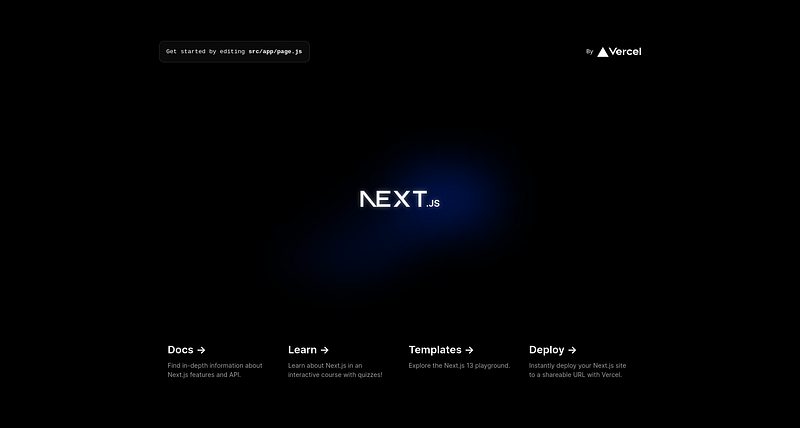
http://localhost:3000

Conclusion

With its powerful features, Next.js offers a fantastic blend of flexibility, power, and convenience, making it a compelling choice for both junior and seasoned developers.

Its inbuilt SEO capabilities, hot module replacement, and TypeScript support, among other features, make it an incredibly robust and versatile framework to work with.

Remember, learning a new technology is a journey, and Next.js is a hybrid beast built to traverse the diverse landscape of web development. You might encounter bumps along the road, but the rewards at the end make it worth your while.

Take the leap, delve into Next.js, and take your web development game to the next level.

  1. Next.js Official Documentation: The first and foremost place to visit. It’s comprehensive, well-written, and provides in-depth insights into every aspect of Next.js.
  2. Learn Next.js: A free, interactive, in-depth tutorial about Next.js. It’s like having a personal trainer guiding you through each step.
  3. Next.js GitHub Repository: Dig into the codebase itself, contribute, and stay updated with the latest changes and releases.
  4. Next.js Examples: A huge collection of example projects with Next.js for different use cases.
  5. Vercel’s Guides: They offer a number of detailed guides to help you integrate Next.js with different technologies and platforms.
  6. The Next.js Handbook by Flavio Copes: This free online book provides a good understanding of Next.js fundamentals, components, pages, data fetching, and more.

Enjoyed the read? For more on Web Development, JavaScript, Next.js, Cybersecurity, and Blockchain, check out my other articles here:

If you have questions or feedback, don’t hesitate to reach out at [email protected] or in the comments section.

[Disclosure: Every article I pen is a fusion of my ideas and the supportive capabilities of artificial intelligence. While AI assists in refining and elaborating, the core thoughts and concepts stem from my perspective and knowledge. To know more about my creative process, read this article.]

In Plain English

Thank you for being a part of our community! Before you go:

Nextjs
Programming
JavaScript
Typescript
Web Development
Recommended from ReadMedium