
Different lifecycle variants of Fragment

Fragment is no longer stranger to anyone who consider himself competent in Android Development. But I notice there are still some confused over it’s variants of its live-cycle. Hopefully this blog clarifies them.
In case you’re still wonder Activity or Fragment, refer to this blog.
Understand these different variants would also be helpful for QA testing, to ensure all flows are intact (this is usually a source of bugs, when developer focus on fixing one flow and hurt the other one).
TL;DR;
Let me start off with a summary table for them. I break them into showing and hiding the Fragment, and the
I use showing and hiding term as it represent the creating the entire fragment, creating just the view, resurfacing the view and it’s corresponding destroying, destroying view and put to background action.
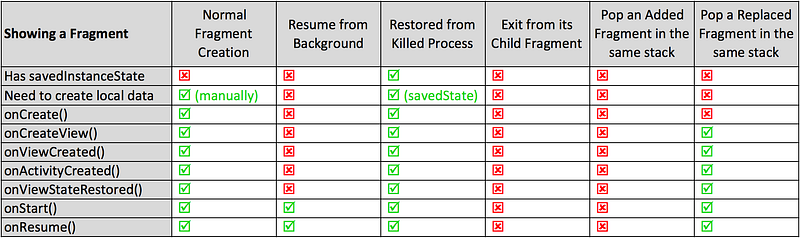
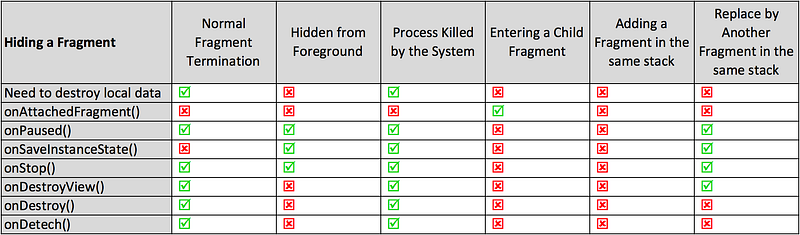
If any of the flow above you are not clear about, feel free to read on the below section.
Showing Fragment
1. Normal Flow Creation
From an Activity, you could create a Fragment and put into the container
supportFragmentManager.beginTransaction()
    .replace(R.id.container, MyFragment(), MyFragment.TAG)
    .addToBackStack(MyFragment.TAG) // Optional
    .commit()
Nothing fancy, most basic step. All initial data in the Fragment you need will need to be manually created.
2. Resume from Background
This is for the case where after your put your App into the background (or a phone right when you use the App), and restore the App to it’s state, only onStart() and onResume() will be called.
All previous data available in the Fragment is still intact. Hence recreation of data is not needed.
3. Restored from Killed Process
This is similar to 2 above, but instead of just being on the background, for some reason (perhaps limited memory on the phone), the System decided to killed the App. And when you resurface the App again, the Fragment will AUTOMATICALLY get restored (please don’t commit() a new one again).
When this happens, the flow be the same as 1. above, with the exception that the savedInstanceState variable is containing whatever state you saved previously. So create your local data from it, instead of manually recreating your local data.
Note 1: If you are creating your fragment in the Activity’s onCreate(), you might want to perform to check to ensure you don’t create a new one when it is restored from the saved stated.
override fun onCreate(savedInstanceState: Bundle?) {
    super.onCreate(savedInstanceState)
    setContentView(R.layout.activity_main)
if (savedInstanceState == null) {
supportFragmentManager.beginTransaction()
.replace(R.id.container, MainFragment(), MainFragment.TAG)
.addToBackStack(MainFragment.TAG)
.commit()
}
}Tip 1: In case you don’t want the Fragment to AUTOMATICALLY restored after being killed by the process, just send in the
NULLto theonCreate()'s parent
override fun onCreate(savedInstanceState: Bundle?) {
    super.onCreate(null)
setContentView(R.layout.activity_main) supportFragmentManager.beginTransaction()
.replace(R.id.container, MainFragment(), MainFragment.TAG)
.addToBackStack(MainFragment.TAG)
.commit()
}4. Exit from It’s Child Fragment
A Fragment could contain Child Fragment. When a Child Fragment got pop back to resurface the containing Fragment, no life cycle event in the containing Fragment is triggered. The containing Fragment view is there always, and it’s never got hidden.
Tip 2: Child fragment is useful and could be a model with transparent background, showing the containing Fragment behind.
5. Pop an Added Fragment in the Same Stack
Assuming another fragment is added in the same stack using the below command
supportFragmentManager.beginTransaction()
    .add(R.id.container, AnotherFragment(), AnotherFragment.TAG)
    .addToBackStack(AnotherFragment.TAG)
    .commit()
When it gets pop out, the main fragment under will resurface to be visible in the device. However, no life cycle event will be triggered, as the Fragment itself is always visible there. Just the Another Fragment is now removed away.
Tip 3: Avoid using
.addFragment as it keeps the below fragment view visible and stack up. This will slow down the drawing and added memory footprint. Use.replaceas much as possible.
The exception is when you want the below Fragment state to resume quickly (e.g. WebView Fragment that you don’t want to reinitialize again)
6. Pop a Replaced Fragment in the Same Stack
Assuming another fragment is used to replace in fragment the same stack using the below command
supportFragmentManager.beginTransaction()
    .replace(R.id.container, AnotherFragment(), AnotherFragment.TAG)
    .addToBackStack(AnotherFragment.TAG)
    .commit()
When it gets pop out, the main fragment under will resurface to be visible in the device. This will involve recreation of the Fragment View.
However because the Fragment itself is not destroyed, hence onCreate() is not triggered, and no onSavedInstanceState is provided. And all the local data to the Fragment is still in tact.
Tip 5: When restoring from a replaced fragment pop, don’t recreate the RecyclerView adapter, as that will just destroy all it’s stored state.
Hiding Fragment
1. Normal Fragment Termination
When a fragment if pop from it’s stack, it would then call all the basic fragment flow except onSaveInstanceState(), since nothing need to be stored.
It is also important to remember to remove all local data that is not needed, e.g. cancel all spawn threads, dispose the RX disposable of network call etc.
2. Hidden from Foreground
This is simply pressing the Show Tasks button on the phone and put the App behind the background. In most of the time, the Fragment will still be fully in fact, and all context will be available to it. (e.g. keep the network call continue fetching the data etc).
onPaused(), onStop() and onSaveInstanceState() is called. The onSaveInstanceState() is still called here, in case while the Fragment is paused, and being killed later, we have the s
3. Process Killed by System
This is similar to 2, but System due to some reason (e.g. limited memory), have decided to kill it.
In this state, the termination step is the same as 1, except it has the onSaveInstanceState() called. So it is most important to save all your data state here if you plan to restore it fully later.
4. Entering a Child Fragment
A Fragment can contain a Fragment. So when a Child Fragment is created as below
childFragmentManager.beginTransaction()
    .replace(R.id.container, ChildFragment(), ChildFragment.TAG)
    .addToBackStack(ChildFragment.TAG)
    .commit()
When a Child Fragment is created, the containing Fragment is still very much visible and not changed. The only event triggered is onAttachedFragment().
So even thought one could use a Child Fragment to hide away a Fragment, but it is not really doing so, as the actual Fragment is still fully alive underneath.
5. Adding a Fragment in the same stack
When another Fragment is added to the stack using the command below
supportFragmentManager.beginTransaction()
    .add(R.id.container, AnotherFragment(), AnotherFragment.TAG)
    .addToBackStack(AnotherFragment.TAG)
    .commit()
the current Fragment in the stack will have no lifecycle event triggered. If it fully in tact and in the memory (both the Fragment and it’s View).
So that’s the reason add Fragment is not ideal as it is more memory and performance intensive (e.g. drawing of many layer of views), compared to replace.
6. Replace a Fragment in the same stack
When another Fragment is used to replace the current Fragment in the stack using the command below
supportFragmentManager.beginTransaction()
    .replace(R.id.container, AnotherFragment(), AnotherFragment.TAG)
    .addToBackStack(AnotherFragment.TAG)
    .commit()
the current Fragment view will be destroyed, while the Fragment itself is still in memory.
The lifecycle triggered is same as Step 3 above, except onDestroy() and onDetech().
The onSaveInstantState() is still called in case if the App process got killed by the system, it could be restored later.
I hope this post is helpful to you. You could check out my other interesting topics here.
Follow me on medium, Twitter or Facebook for little tips and learning on Android, Kotlin etc related topics. ~Elye~


