Did You Know Your Phone Has a Panic Emergency Button?
Here’s useful information on how to set up your device.
Sarah Everard’s disappearance has put women's safety under the spotlight and prompted a serious online discussion about the dangers women can face when they are out alone, and the measures they can take to avoid them.
A very useful iPhone tip that is unknown by many has been circulating on social media. The emergency SOS feature is actually something everyone needs to be aware of, men and women alike, as it could really help us all feel and stay safe.
The approach differs depending on your operating system. Here’s how it works.
iOS
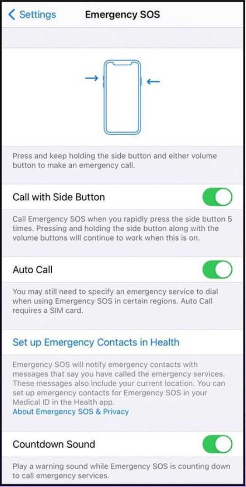
If you have an iPhone 8 and later, press and hold the side button and one of the volume buttons until the Emergency SOS slider appears. Drag the Emergency SOS slider to call emergency services. If you continue to hold down the side button and volume button, instead of dragging the slider, a countdown will start and a loud siren alert will sound.
On iPhone 7 and earlier models, rapidly press the side button five times to activate the SOS Emergency alarm. In India, you only need to press the button three times to call emergency services automatically.
Your phone will emit a loud siren, it will count to three, then it will call the emergency services and notify your emergency contacts with a text message.
Make sure you go to your Settings and search for “Emergency”. Here you can set up your device and add your emergency contacts.
Android
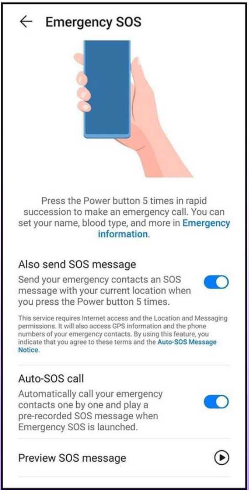
These features vary depending on the manufacturer; you can find the details you need by searching in your phone’s settings for phrases like “emergency” or “SOS message”.
Samsung phones have a feature called Send SOS Messages that allows you to press the side key three times to automatically message someone with your location. The phone will automatically attach pictures using your rear and front camera, as well as an audio recording of the moments before the message was sent.
Xiaomi phones have a feature called Emergency SOS that will send a message plus your location after you’ve pressed the power button on your phone five times in quick succession.
Not all Android phones are able of messaging your contacts directly though, so make sure you understand your phone’s manufacturer details to see if there’s anything you’re missing.