avatarAbhay Parashar

Free AI web copilot to create summaries, insights and extended knowledge, download it at here

1946

Abstract

h2><div id="b883"><pre>from fer import FER import matplotlib<span class="hljs-selector-class">.pyplot</span> as plt <span class="hljs-selector-tag">img</span> = plt<span class="hljs-selector-class">.imread</span>(<span class="hljs-string">"img.jpg"</span>) detector = <span class="hljs-built_in">FER</span>(mtcnn=True) <span class="hljs-function"><span class="hljs-title">print</span><span class="hljs-params">(detector.detect_emotions(img)</span></span>) plt<span class="hljs-selector-class">.imshow</span>(img)</pre></div><p id="5e33">Save It With emotion.py and simply run it using python emotion.py.</p><p id="9f43"><b>Output — </b><i>[OrderedDict([(‘box’, (160, 36, 99, 89)), (’emotions’, {‘angry’: 0.0, ‘disgust’: 0.0, ‘fear’: 0.0, ‘happy’: 1.0, ‘sad’: 0.0, ‘surprise’: 0.0, ‘neutral’: 0.0})])]</i></p><figure id="ac9b"><img src="https://cdn-images-1.readmedium.com/v2/resize:fit:800/1*ENj4nNRf0FBCB7FI1E33JQ.png"><figcaption></figcaption></figure><h2 id="0cb0">Web App Code For Realtime Predictions</h2><div id="af0b"><pre><span class="hljs-title">from</span> fer <span class="hljs-keyword">import</span> FER <span class="hljs-keyword">import</span> matplotlib.pyplot <span class="hljs-keyword">as</span> plt <span class="hljs-keyword">import</span> streamlit <span class="hljs-keyword">as</span> st <span class="hljs-title">from</span> <span class="hljs-type">PIL</span> <span class="hljs-keyword">import</span> Image, ImageOps</pre></div><div id="39d4"><pre>st.write(<span class="hljs-string">'''

Emotion Detector

'''</span>)</pre></div><div id="f56e"><pre>st.write<span class="hljs-comment">("A Image Classification Web App That Detects the Emotions Based On An Image")</span></pre></div><div id="6a14"><pre><span class="hljs-keyword">file</span> = <span class="hljs-keyword">st</span>.file_uploader(<span class="hljs-string">"Please Upload an image of Person With Face"</span>, <span class="hljs-built_in">type</span>=[<span class

Options

="hljs-string">'jpg'</span>,<span class="hljs-string">'png'</span>])</pre></div><div id="612f"><pre><span class="hljs-keyword">if</span> <span class="hljs-keyword">file</span> <span class="hljs-keyword">is</span> None: <span class="hljs-keyword">st</span>.text(<span class="hljs-string">"Please upload an image file"</span>) <span class="hljs-keyword">else</span>: image = Image.<span class="hljs-keyword">open</span>(<span class="hljs-keyword">file</span>) detector = FER(mtcnn=True) result = detector.detect_emotions(image) <span class="hljs-keyword">st</span>.<span class="hljs-keyword">write</span>(result) <span class="hljs-keyword">st</span>.image(image, use_column_width=True)</pre></div><p id="21b5">Save The Python File With Emotion_web.py.</p><p id="97a8">Run it using</p><div id="ff2d"><pre>streamlit <span class="hljs-built_in">run</span> FILENAME.py</pre></div><figure id="84d2"><img src="https://cdn-images-1.readmedium.com/v2/resize:fit:800/0*V1w0-DAUjQlO0VWW.png"><figcaption></figcaption></figure><p id="380d">Copy The URL and Paste it into your browser to see the web app in action.</p><p id="a897">To Learn More About Streamlit and How To Create awesome web apps using it check out Streamlit 101: An in-depth introduction an article by <a href="undefined">Shail Deliwala</a></p><div id="6c25" class="link-block"> <a href="https://towardsdatascience.com/streamlit-101-an-in-depth-introduction-fc8aad9492f2"> <div> <div> <h2>Streamlit 101: An in-depth introduction</h2> <div><h3>Deep dive into Streamlit with Airbnb data</h3></div> <div><p>towardsdatascience.com</p></div> </div> <div> <div style="background-image: url(https://miro.readmedium.com/v2/resize:fit:320/1*aG4aAXDyepK4ra2jcHyd6g.png)"></div> </div> </div> </a> </div></article></body>

Detect Face Emotions With 10 Lines Of Code

Face Emotion Recognition (FER), A Libray To Detect Emotions

Photo by Tengyart on Unsplash

Facial Emotions Show the inside of a human heart. They help us to identify whether the person is angry, sad, happy, or normal. Medical Researcher also uses facial emotions to detect and understand the mental health of a person.

Artificial Intelligence Can play a big role in identifying a person's emotions. with the help of a convolutional neural network, it is possible to identify a person's emotions based on his image or a real-time video.

Facial Expression Recognition is a python library that can be used to detect a person’s emotion with less effort and fewer lines of code. It is developed with a deep neural network using Tensorflow and Keras libraries implemented in python. Dataset used in it is from Kaggle competition Challenges in Representation Learning: Facial Expression Recognition Challenge.

Installation

We Can Use PIP to install the library in our local systems. Just run the below command and you will see your library is installing.

pip install per

The Installation Will Take Some Time. The Library is around 500 MB in size with all its supported packages.

Dependencies: 1. OpenCV 3.2+ 2. Tensorflow 1.7+ 3. Python 3.6+

Predicting Emotions On an Image

from fer import FER
import matplotlib.pyplot as plt 
img = plt.imread("img.jpg")
detector = FER(mtcnn=True)
print(detector.detect_emotions(img))
plt.imshow(img)

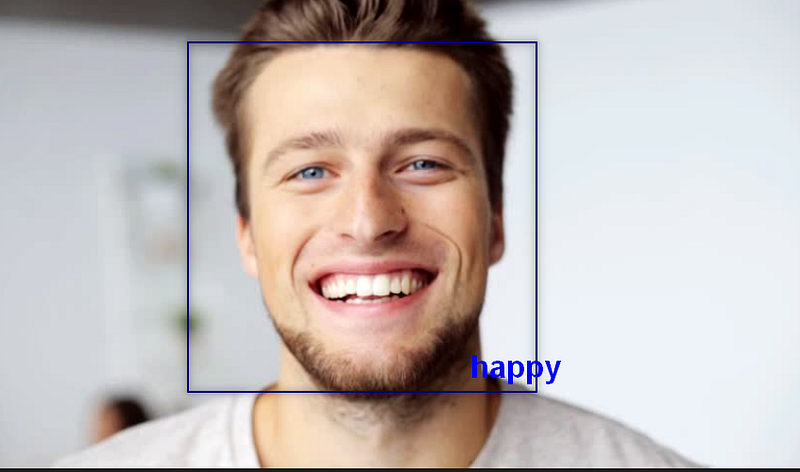
Save It With emotion.py and simply run it using python emotion.py.

Output — [OrderedDict([(‘box’, (160, 36, 99, 89)), (’emotions’, {‘angry’: 0.0, ‘disgust’: 0.0, ‘fear’: 0.0, ‘happy’: 1.0, ‘sad’: 0.0, ‘surprise’: 0.0, ‘neutral’: 0.0})])]
Web App Code For Realtime Predictions

from fer import FER
import matplotlib.pyplot as plt
import streamlit as st
from PIL import Image, ImageOps
st.write('''
#  Emotion Detector
''')
st.write("A Image Classification Web App That Detects the Emotions Based On An Image")
file = st.file_uploader("Please Upload an image of Person With Face", type=['jpg','png'])
if file is None:
  st.text("Please upload an image file")
else:
  image = Image.open(file)
  detector = FER(mtcnn=True)
  result = detector.detect_emotions(image)
  st.write(result)
  st.image(image, use_column_width=True)

Save The Python File With Emotion_web.py.

Run it using

streamlit run FILENAME.py

Copy The URL and Paste it into your browser to see the web app in action.

To Learn More About Streamlit and How To Create awesome web apps using it check out Streamlit 101: An in-depth introduction an article by Shail Deliwala

Python
Emotions
Education
Programming
Coffee2021
Recommended from ReadMedium