
Detect Objects in Images using C# and ML.NET Machine Learning
There’s an old saying in AI that computers are great at things that humans find hard (like doing complex math) and computers really struggle with things that humans find easy (like catching a ball or recognizing objects).
Let’s take recognizing objects as an example. Check out the following collection of images:
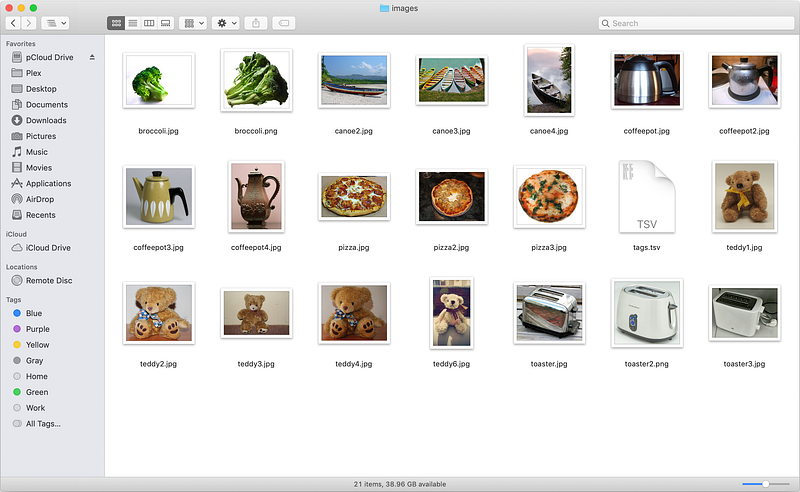
These 20 images depict a broccoli, a canoe, a coffee pot, a pizza, a teddy bear, and a toaster. How hard would it be to build an app that can recognize the object in every image?
Really hard, actually.
In fact, it’s so difficult that there’s an annual challenge called the ImageNet Large Scale Visual Recognition Challenge. The challenge requires apps to classify a collection of 1.2 million images into 1,000 unique categories.
Here are the competition results up to 2016:
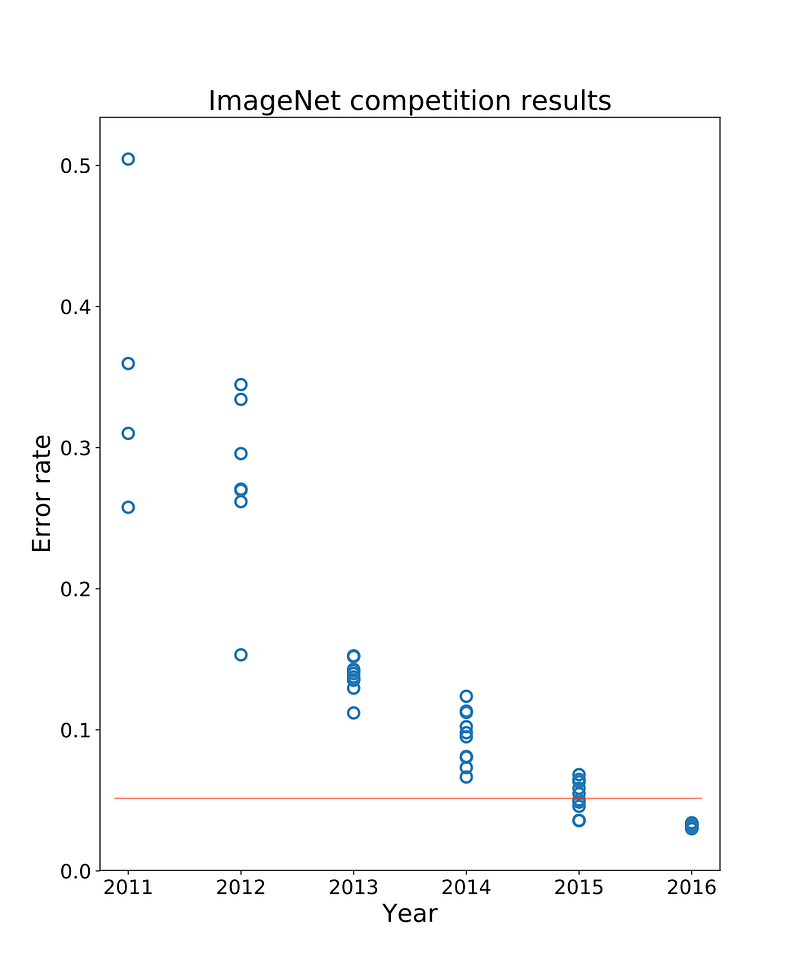
The red line depicts the 5% human error rate on the image classification challenge. Only in 2015 a team finally developed an app that could beat human performance levels.
That was 4 years ago. Can I build a C# app today with ML.NET and NET Core that can do the same?
ML.NET is Microsoft’s new machine learning library. It can run linear regression, logistic classification, clustering, deep learning, and many other machine learning algorithms.
And NET Core is the Microsoft multi-platform NET Framework that runs on Windows, OS/X, and Linux. It’s the future of cross-platform NET development.
My first thought was to build a convolutional neural network in ML.NET, train it on the 1.2 million images in the ImageNet set, and then use the trained network to predict the 20 images in my test set.
But there’s no need to go through all that trouble. Fully-trained object-detection networks are readily available, and ML.NET can easily host and run a neural network that has already been trained.
So my best course of action is to grab a TensorFlow neural network that has been trained on the ImageNet data, and just drop it into ML.NET for immediate use.
I’ll use the Google Inception network in my app. What makes the Inception model unique is its use of stacked ‘Inception Modules’: special neural submodules that run convolutions with different kernel sizes in parallel, like this
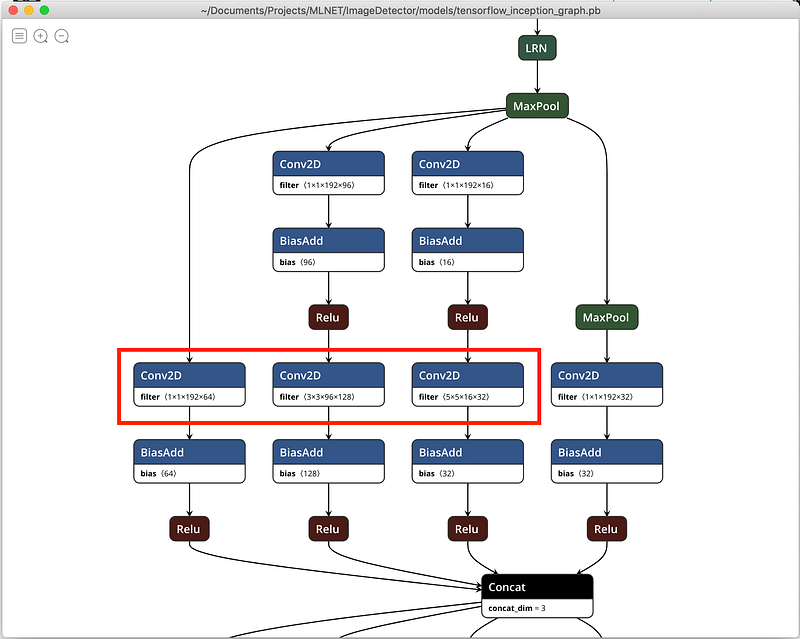
This is a single inception module shown in Netron, a popular neural network viewer. The three convolution kernels (1x1, 3x3, and 5x5) are highlighted in red and run in parallel.
This trick of running several different convolutions in parallel gives Inception excellent predictive ability on a wide range of images.
You can download the Inception model from here.
I’ll also use a folder with test images and corresponding labels. I’ll use this small 20-image set from a Microsoft ML.NET code sample.
The set includes a TSV file which looks like this:
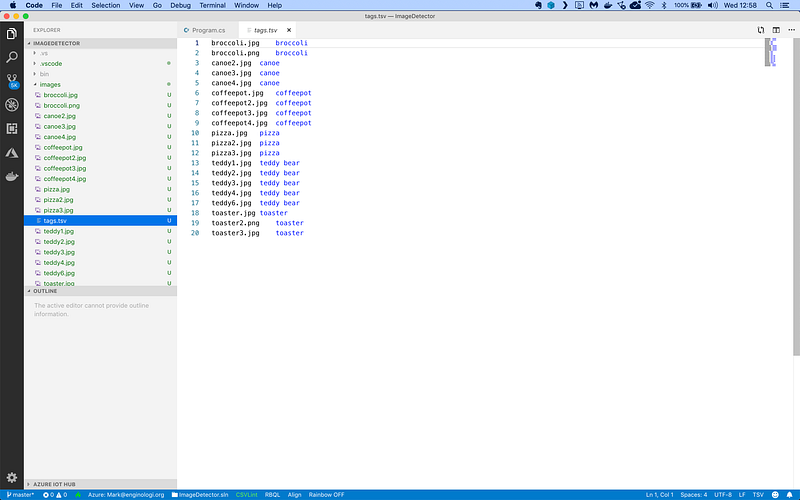
It’s a tab-separated file with only 2 columns of data:
- The filename of the image to test
- The type of object in the image
Let’s get started. Here’s how to set up a new console project in NET Core:
$ dotnet new console -o ImageDetector
$ cd ImageDetector
Next, I need to install the ML.NET packages:
$ dotnet add package Microsoft.ML
$ dotnet add package Microsoft.ML.ImageAnalytics
$ dotnet add package Microsoft.ML.TensorFlow
The ImageAnalytics package contains libraries that help ML.NET deal with image data. And the Tensorflow package adds support for running pretrained TensorFlow models.
Now I’m ready to add some classes. I’ll need one to hold an image record, and one to hold my model’s predictions.
I will modify the Program.cs file like this:
The ImageNetData class holds one single image record. Note how each field is tagged with a LoadColumn attribute that tells the CSV data loading code which column to import data from.
There’s also a ReadFromCsv method which manually reads a file and returns a sequence of ImageNetData objects. I’ll use this method later.
I’m also declaring a ImageNetPrediction class which will hold a single image prediction.
Now I’m going to load the images in memory:
This code uses the method LoadFromTextFile to load the TSV data directly into memory. The class field annotations tell the method how to store the loaded data in the ImageNetData class.
Now I’m ready to start building the machine learning model:
Machine learning models in ML.NET are built with pipelines, which are sequences of data-loading, transformation, and learning components.
My pipeline has the following components:
- LoadImages which loads images from disk. The component needs the name of the input column holding the file names, the folder in which to look for images, and the name of the output column to load images into.
- ResizeImages which resizes images. This is a required step because the inception model has been trained on 224x224 pixel images. So I need to present my images using the same size for the model to work (*)
- ExtractPixels which flattens the image data into a 1-dimensional array of floats. Note that I interleave color channels and use an offset of 117, because that’s what the Inception model has been trained on (*)
- LoadTensorFlowModel which will load a TensorFlow model from disk.
- ScoreTensorFlowModel which will feed the image data into the TensorFlow model and collect the scores from the dense classifier at the output side.
(*) As a rule when working with pre-trained neural networks, we need to preprocess our images in the exact same way as the data the network has been trained on. In case of ImageNet this means resizing all images to 224x224, interleaving color channels, and using a pixel offset value of 117.
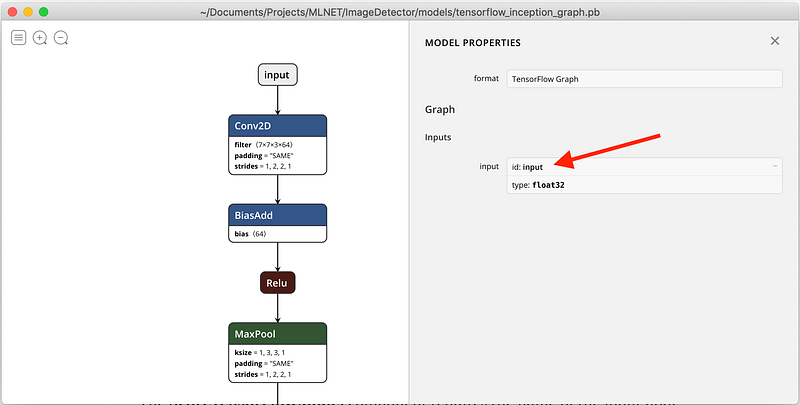
The ScoreTensorFlowModel component requires the name of the input node that will receive the image data and the name of the output node that holds the softmax predictions.
I can easily find these nodes by viewing the Inception model in Netron. This is the neural network input, with an id of ‘input’:
And here is the softmax classifier at the output, with an id of ‘softmax2’:
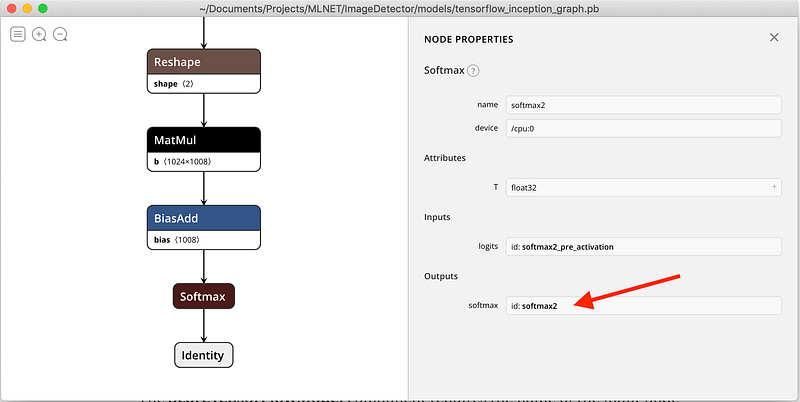
So the two node names I have to provide to ScoreTensorFlowModel are ‘input’ and ‘softmax2’.
With the pipeline fully assembled, I can train the model with a call to Fit(…).
Note that training doesn’t actually do anything here. The TensorFlow model is already fully trained and all model parameters are frozen. So in this case, the Fit method just assembles the pipeline and returns a model instance.
To wrap up, I’m going to load the test images and ask the model to make a prediction for each image:
I use the CreatePredictionEngine method to set up a prediction engine. The two type arguments are the input data class and the class to hold the prediction.
Next, I load the complete list of ImageNet labels. This text file is in the Inception model folder you downloaded earlier and looks like this:
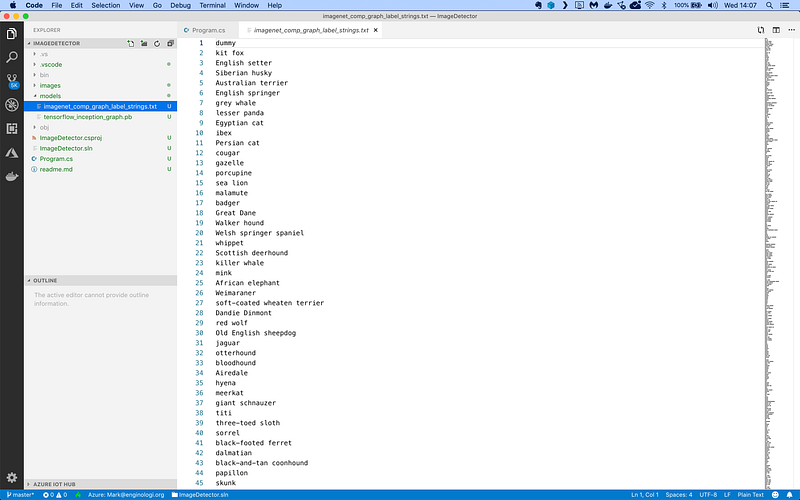
It’s just a list of all 1,000 unique ImageNet category labels.
Then I use the ReadFromCsv method to load the 20 test images, and call Predict on each one. That gives me an array of 1,000 floats with the probabilities that the image belongs to each category.
In other words, prediction[1] is the probability that the image contains a Kit Fox, prediction[2] is the probability that the image contains an English Setter, and so on.
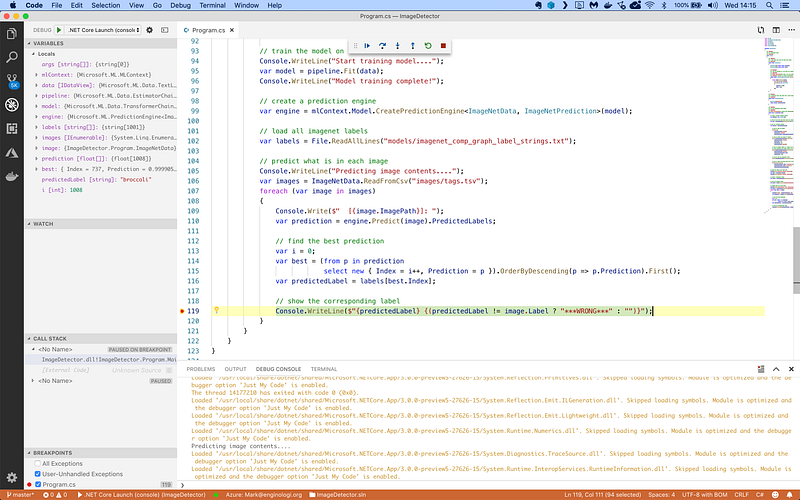
I’m only interested in the best prediction, so I use a LINQ query to find the highest value and the corresponding category label.
Here’s the code running in the Visual Studio Code debugger on my Mac:
… and in a zsh shell:
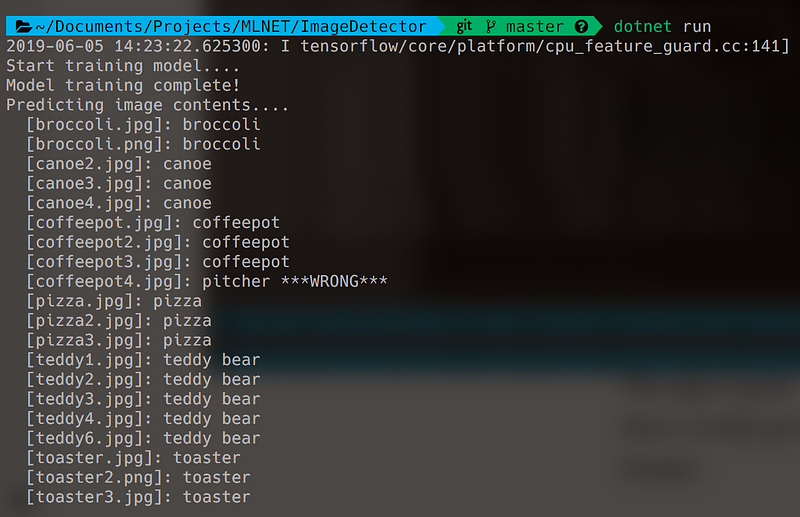
The app is quite fast and can identify an image in a fraction of a second. It does a really good job on the test set and correctly identifies 19 out of 20 images. That’s an accuracy of 95%.
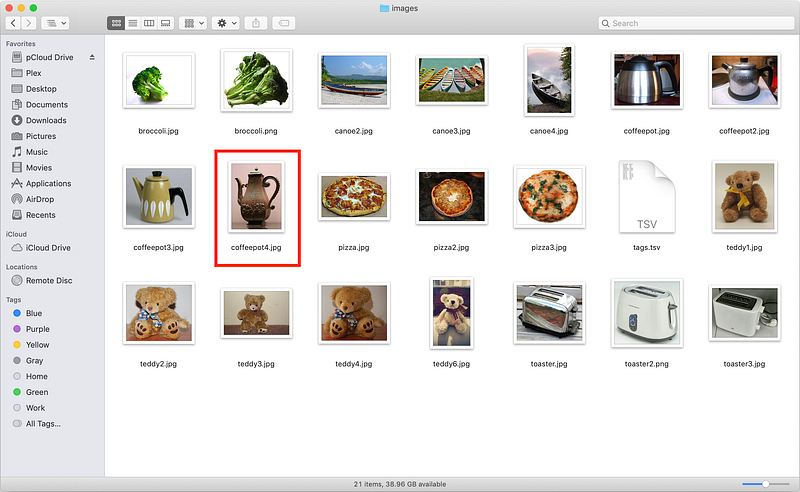
The app only made one single mistake and predicted that coffeepot4.jpg is actually a pitcher of water:
So what do you think?
Are you ready to start writing C# machine learning apps with ML.NET?
This article is based on a homework assignment from my machine learning course: Machine Learning with C# and ML.NET.


