
Detailed Guide on Android Clean Architecture
Best way to write Android Apps
Every developer starts from scratch with eager to learn and write fast, many of us lack the idea of writing clean code. At the initial stage, we fight to learn fast and make things look better without knowing their results in the future. I was not exceptional I to had done the same at the initial stage of my career as an Android Developer.
But after spending years on development I understood that getting results by doing something is not a good way of development. It took me years to understand the importance of architecture in development. However, if you are smart it may take less time for you.
Is there a need that we should fallow architecture for an Android App development?
The answer would be obviously YES because fallowing good architecture helps in many ways like reducing the development time, easy understanding, low maintenance, etc.
Writing clean and quality code for applications requires effort and experience. An application should not only meet the UI and UX requirements but also should be easy to understand, flexible, testable, and maintainable.
Previously there is no much importance of architectures for app development but the scenario has changed drastically. Because as the application grows the complexity also increases. Most of the apps out there are following one or the other architectures.
There are many architectures out there like MVC, MVP, MVVM, MVI, etc extending with clean code. They may sound odd but once you know the inner thing that would be very easy to understand and follow. There are many resources out there explaining about MVC, MVP, MVVM, etc.
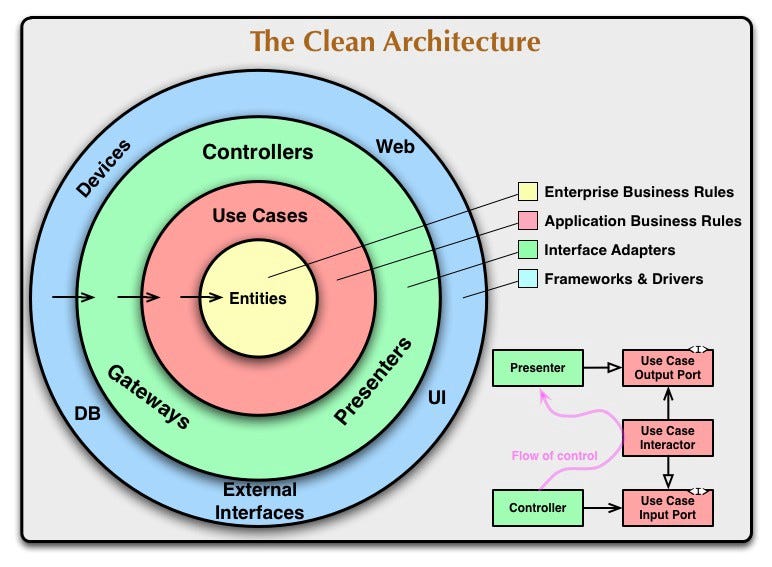
Robert C. Martin, also known as Uncle Bob, came up with the Clean Architecture concept in the year 2012. Checkout clean code blog for better understanding. In this article, we will review the concept of Clean Architecture in Android applications and an example.
Why Clean Architecture?
- Separation of Concerns — Separation of code in different modules or sections with specific responsibilities making it easier for maintenance and further modification.
- Loose coupling — flexible code anything can be easily be changed without changing the system
- Easily Testable
Layers of Clean Architecture
Clean architecture is also referred to as Onion architecture as it has different layers. As per our requirement, we need to define the layers, however, architecture doesn’t specify the number of layers.
For a basic idea, let us consider there are three layers for now
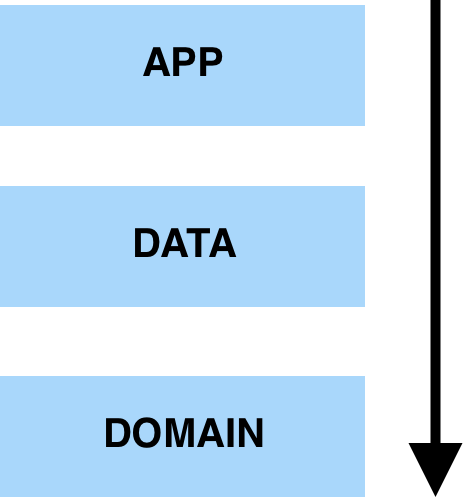
- Presentation or APP: A layer that interacts with the UI, mainly Android Stuff like Activities, Fragments, ViewModel, etc. It would include both domain and data layers.
- Domain: Contains the business logic of the application. It is the individual and innermost module. It’s a complete java module.
- Data: It includes the domain layer. It would implement the interface exposed by domain layer and dispenses data to app
How it applies to Android?
In Android App, we need to have different modules to make things work out of the box. Let’s have a look at how the clean architecture applies to Android with the different section as below
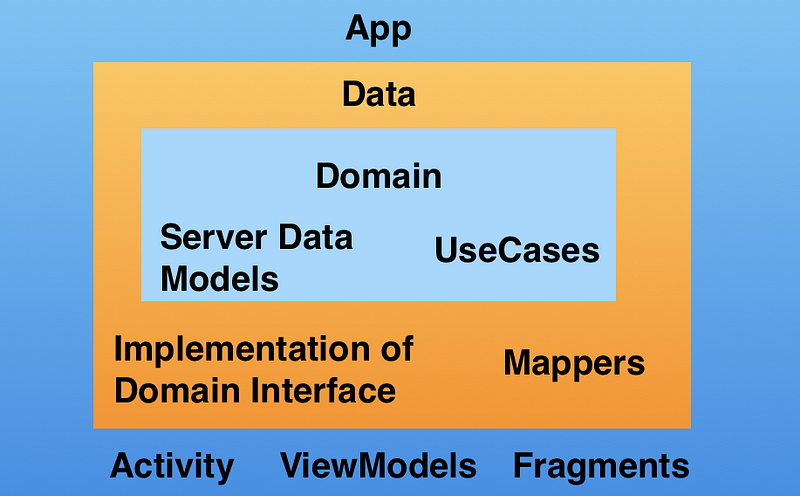
To implement the clean architecture in Android we need to first understand a few things.
UseCases
Repositories
Mappers
UseCases
These are also known as interactors. Each individual functionality or business logic unit can be called a use case. Like fetching data from a network or reading data from database, preferences, etc can be referred to as use cases. Usecases are the business logic executors that fetch data from data source either remote or local and gives it back to the requester in our case it would be the app layer.
Repository
The repository is an interface that we create in our domain module. And Repository Implementation will be in the data module. Here use cases acts as a mediator between our Repository interface and app module.
Mappers
Mappers by the name itself are suggesting that it maps from one type to another type. Actually, in our apps, we use the same object which we receive from the server to set details to UI.
However, it would be a good practice to map the server model to the app model, where the app model contains only the data required to be consumed nothing else. Do not get confused POJO(Plain Old Java Object) or Data Model or Object class or Entity refers to the same term.
Data Flow
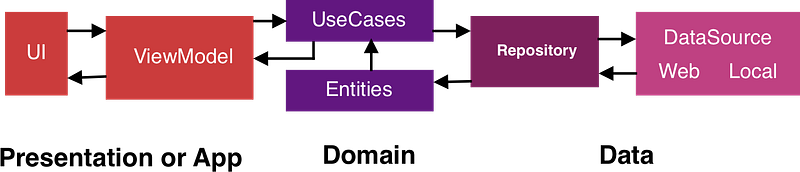
Let’s get started with Data flow. If a user event is triggered in UI then we communicate it with ViewModel or presenter to take necessary action. Then ViewModel connects with the use case to get the result for the action.
The use case then interacts with the repository class to get the solution from appropriate data sources like network or database or preference. Following is the image of data flow we discussed
Before proceeding further into sample its best to have an idea of following frameworks because the example is completely based on these frameworks
- Dagger 2 -A fully static, compile-time dependency injection framework
- RxJava 2 -is a library for asynchronous and event-based programs using observable sequences.
- Retrofit 2 -A type-safe HTTP client for Android for Network calls
- ViewModel -is a class that is responsible for preparing and managing the data for an Activity or a Fragment.
- Kotlin -Kotlin is a cross-platform, statically typed, general-purpose programming language with type inference
Example
Let’s practice Clean Architecture with an example of making a network call to fetch share details on the click of a button.
To start, we need to create three modules: app, data, and domain. The b module is a complete Java, there will be no Android-related things. So we can create a Java Library module for the domain. The folder structure will be looking as below.
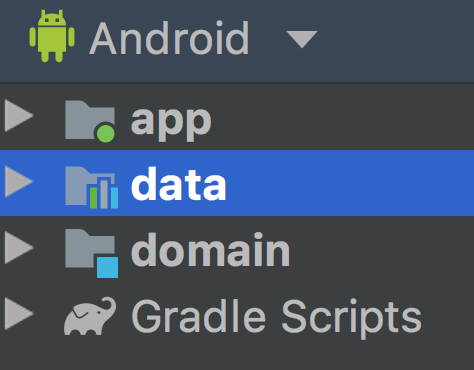
Here domain is included in all the modules and data is included in the app. The approach is bottom-up, which means we will start with domain and move to the app
Domain Layer
As we know the domain layer consists of models, use cases, repositories create separate directories for each of them. The domain layer would like below
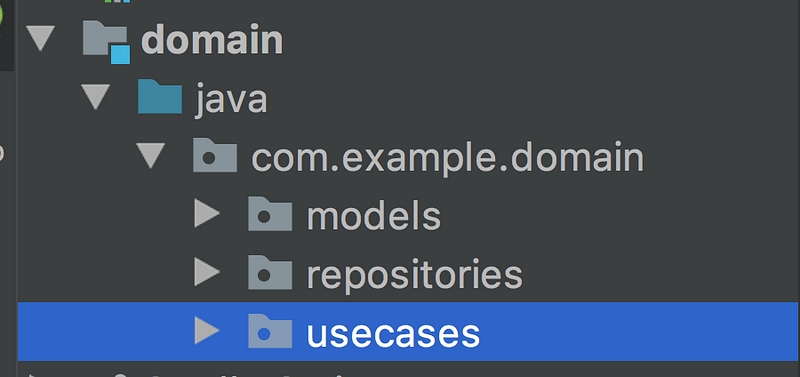
Now let us first start creating model objects or entities or POJO classes in the models' directory.
Now Let’s create Repository, nothing but an interface with name RemoteRepo
Let's create a use case to fetch data from the data source. As it was a common procedure to remove the redundant code which needs to be used at multiple places firstly, we create a base class for use cases for easy extension and usage in future
Later extend this class where ever required. We need to inject the repository class using the Dagger framework and call the repo method to get data from the destination.
For reference, have a look at the Gradle file of the domain module
As we created everything required at the domain layer we will move to the data layer.
Data Layer
The data module consists of server models, mappers, API services, and repo implementations. The Data module directory would look like below
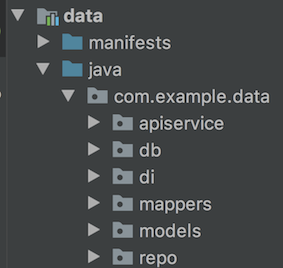
Initially create the class ShareDataModel to read data from the server response.
Secondly, let's create ApiService
Now we need a mapper class that maps the server data to the data model required by the app.
Now we need to create a Repository Implementation class for the repository interface in the domain module which handles the data fetching
Finally, lets set up the di(Dependency Injection) part. There will be two classes one NetworkModule which contains provide methods for retrofit, Okhttp, and second ApiModule which has the API service endpoint to fetch the data.
NetworkModule class
ApiModule class
That's it we are done with the data module now its time to move back to the app or presentation layer.
App or Presentation Layer
The directory structure would be as below.
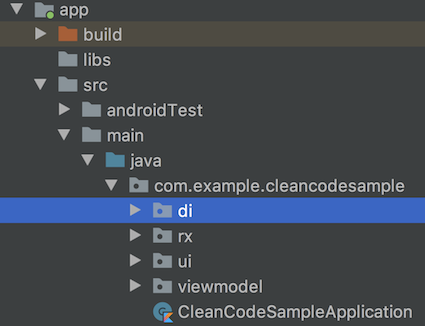
Lets set up the base di module
The di directory has the ActivityBindingModule, AppComponent, AppModule, ViewModelFactory, ViewmodelKey, ViewModelModule classes. If you are familiar with dagger2 you would understand the importance of each class.
ViewModelFactory
ViewModelKey
ViewModelModule: Here we declare all our view models present in the app so that dagger takes care of the rest of the things
ActivityBindingModule: Need to define all the Views related stuff like Activities and Fragments so that dagger can inject things at those places.
AppModule
AppComponent
For Rx related stuff we have SchedulersProvider Interface and SchedulersFacade class which implements that interface
SchedulerProvider
package com.example.cleancodesample.rx

import io.reactivex.Scheduler

interface SchedulersProvider {
    fun ui(): Scheduler
    fun io(): Scheduler
    fun computation(): Scheduler
}
SchedulersFacade
Now let's move to our UI part that is regarding activity and ViewModel
XML
MainViewModel
MainActivity
Now finally Applications class
Many of us have different views on placing the classes in different directories it's up to you, the above was just a sample of my View on Clean architecture.
Please let me know your suggestions and comments.
You can find me on Medium and Linkedin!
Thank you for reading.


