
Designing the Midjourney Text Prompt the RIGHT Way
A List of all Elements that Need to be Present in the Midjourney Prompts
Designing the text prompt properly is key to getting a good result out of Midjourney.
When writing, you will need to speak the language of photographers and designers.
You will need to define as specifically as possible things like depth of field, volumetric lighting, camera settings and HEX color codes.
Don’t worry, I’ve got this for you.
Here are some of the most important elements you need to have in every prompt:
- Main subject: use as much descriptive words as possible, just describe what it is. Also, use all the five senses: how does it look like, what are the colors, shapes, sizes and textures, how does it smell, how does it feel when touched, how does it taste, how does it sounds. Add as much details as possible. For example: instead of “flower”, you can say “a blooming red rose”. And if you have a specific shade of red in mind, better use the HEX color code. You can use a free tool online called imagecolorpicker.com to check the exact code of your image.
- Scene: Outdoors or indoors or maybe studio? Describe the surrounding objects, add more details about the objects around it and again use as many of the five senses as possible. Make sure you cover the whole environment.
- Composition: is it a bird’s-eye or a closeup shot or maybe a portrait or a product photography? Specify it as much as possible. For example, say where the focus should be.
- Lighting: is it studio light, or daylight, and what time of the day? Also, you can add the weather condition.
- Effects: Most popular effects in images are depth of field and bokeh, which make the distance objects a bit blurry and add more realistic looks. You could also want to use glitches, glows, pixilations, anaglyph and sparkles.
- Style: Is it anime, pixel art, digital art, 3D rendered, pastel painting, a photo or a watercolor? Maybe a line art drawing, street art or tattoo art? Give it the exact specifics.
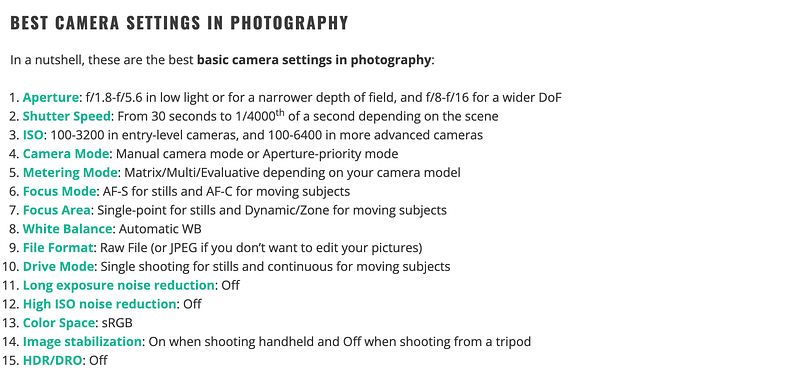
- Shooting Camera Model and Settings: You can even add the brand and the model of the shooting camera, and if it is 3D rendered art or digital art, you can add the name of the software — for example: Nikon d850 or Cinema4D. Here are some of the best camera settings according to capturetheathlas.com:
8. Quality: Specify if you want it to be HD, SD, 4k, 8k, etc. Here you can also add words like ultra realistic, crispy details, sharp focus, hyperrealistic, etc.
9. Vibes: This is the expression of your image, the effect you want your image to have upon the viewer. For example: summer vibes, candid moment, family quality time. Here you can also add adverbs like mesmerizing, enchanting, hypnotic, etc., or even humorous elements.
Don’t add aspect ratio, this is done with the parameters.
Pro TIP: If you’re stuck, you can always use the command /describe and upload an image — Midjourney will give you a very detailed text description about how Midjourney “sees” that image. You will get multiple variations of descriptions. Use them to create similar prompts and get similar images. This turned out to be very useful and time saving for me personally.
One more thing: you don’t need the text prompting if you just want to generate a new image out of few existing images. You can easily do so by using the command /blend — it will ask you to only upload the images.
Text Prompts for Crafting Brand Compliant Images
If you have a brand to comply with, you will need the following elements in the text prompts in Midjourney (make sure you get them from the brand book — brands usually have this kind of thing).
- Exact color codes — the HEX color codes of the brand. Those from the logo, but also those that are allowed for creatives.
- Brand Name — Add it as it is pronounced. You can use the new text feature in Midjourney 6 and put it in quotes if you want it to be written somewhere in the image.
- Logos — add it in case it has to be used in the visuals, but keep in mind that Midjourney does not recreate exact images, so maybe you can add this on top of the generated visuals.
- Target audience — Add demographics and lifestyle, income, family status, etc.
- Business area — What is the business area of the company you’re making images for?
- Slogan — Add the slogan if there is such.
- Values — Add every brand value there is.
- Allowed or restricted elements — Specify if there are elements or signs that must be present or must be excluded, for example clouds or stars or hearts. For exclusion you might wanna use the — no parameter, read about parameters here:
10. Anything in addition from the brand book.
Make sure you get everything correct in order to get a high quality brand complaint image as a result out of Midjourney.
And there you have it: the complete list of elements needed for an advanced text Midjourney prompt for brand compliant images.
Thanks for reading! If you have any questions, please leave a comment down below!
See you next time :)


