Designing a user-friendly autosave functionality
[ A follow-up for this, with more focus on the code can be found here: Designing a user-friendly autosave functionality — Part 2 | by Rameez Kakodker | May, 2023 | Medium]
Autosaves are a simple, but an overlooked feature within most of the application design. Modern always-online applications have used the functionality to ensure users don’t lose their work in case of browser exit or unintentional page navigation (more on this later).
When it comes to enterprise solution design, time is money (though you could say the same thing about consumer product design). And in those situations, it becomes imperative that the user is notified when their work is not saved or has changed.
For this article, let’s consider a simple application where a user is performing some CRUD actions. We’ll assess the autosave functionality under various scenarios and understand the impact & the background work that goes into making this possible. We’ll explore an ideal scenario (as done by Google Sheets & the like…) in the absence of collaboration, first and then add the complexities of collaboration later on.
The Ideal Scenario
In an ideal scenario, every change made by the user is pushed into a queue and sent to the application server to update. The flow is simple:
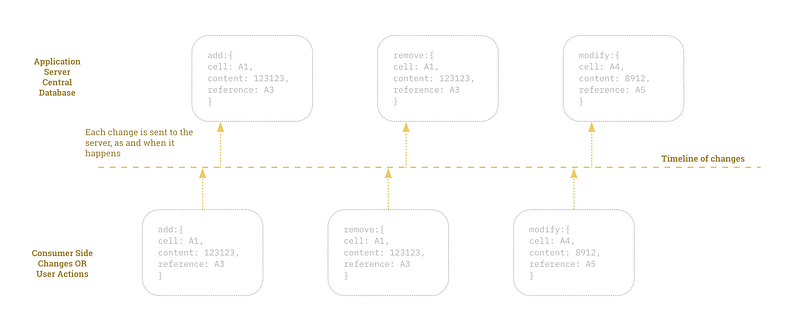
And subsequently, error scenarios are easy to handle — everything is sent to the server and if the first one is not sent, a retry mechanism is added that sequentially sends the updates. Additionally, users can manually save all the pending work.
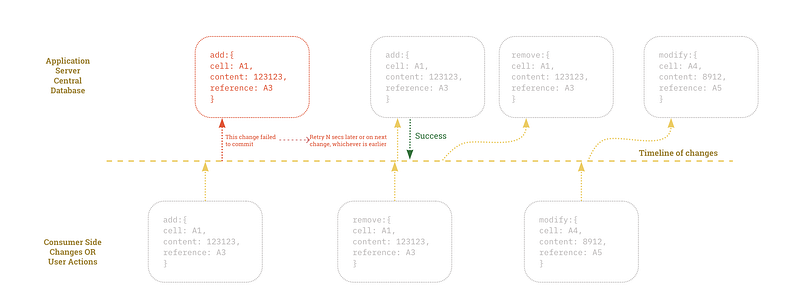
User Experience in Failed to Autosave state
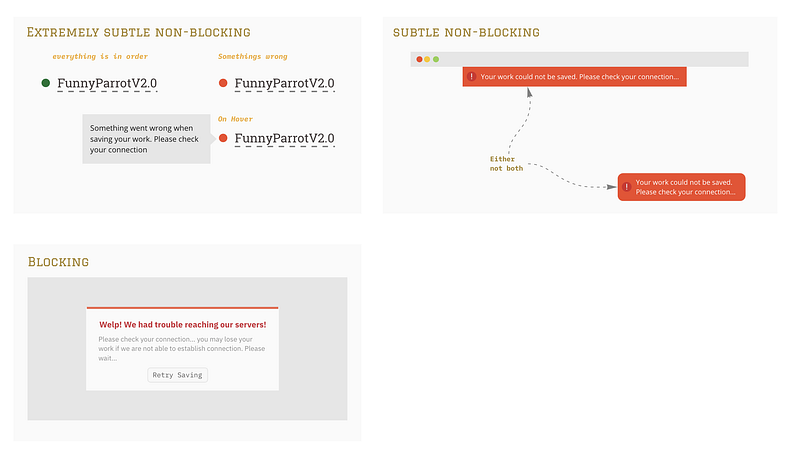
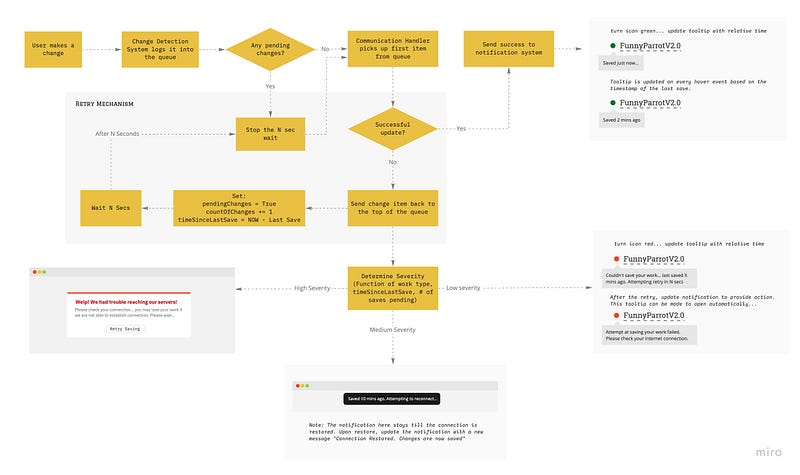
In a failure state, the experience is a function of the importance of the notification. If the work being done is a critical function that cannot be replicated or undone (i.e. there is no versioning and the impacts are severe) the notification should be of high visual importance. Otherwise, a simple subtle notification would work. Here are some of the factors I would use to determine the (visual) severity of the notification:
A. Type of work (is it destructive or permanent?) B. Quantity of work — how many changes are made since the last save C. Time since last save
Visually, the notifications can appear in the following manner:
Language in Notifications
The language in notifications is important. While it is easy to dismiss this as a user problem, the message plays an important role in guiding user action. A “There was a problem connecting to our server” doesn’t guide the user to do much and in fact, confuses the user. Messages should have a head and a tail — i.e. inform the user about the problem & its severity and the steps they can take to alleviate the problem.
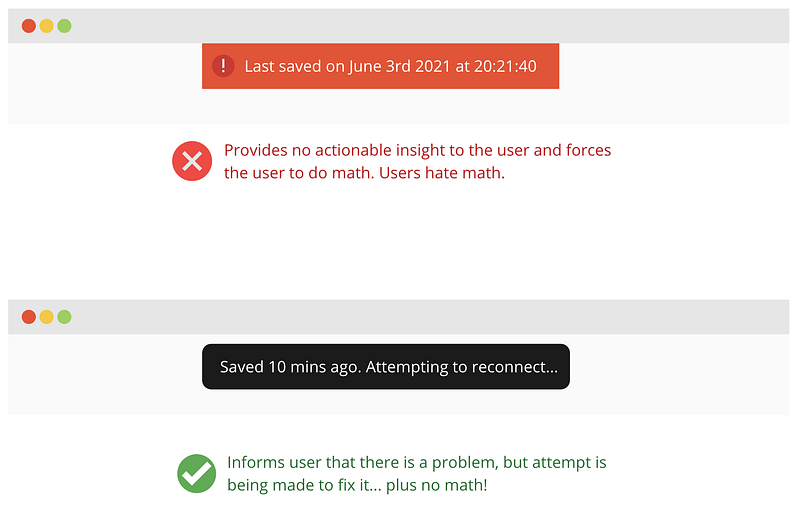
A “Last Saved On 3rd June 2021 08:30:30” doesn’t help the user either as they have to do the math to figure out when the save happened relative to their time. A “Last saved 3 mins ago…” is a better option with a hover tooltip informing the user that “We weren’t able to reach our servers to save your work. Please check your connection & manually save your work” is more informative and actionable.
Language in the notification has to depict the severity. A “Warning! Your work is not being saved. Please check your connection and save your work” conveys more severity than “Last saved 10 mins ago. Click save to save your work”. Again, if the notification is blocking or repetitive, it can cause intentional downtimes. Sometimes the user just wants to disconnect and focus on their work — sending blocking notifications is irritating (looking at you Figma😡)
Systems in charge of Autosave
We have the following systems within the autosave functionality:
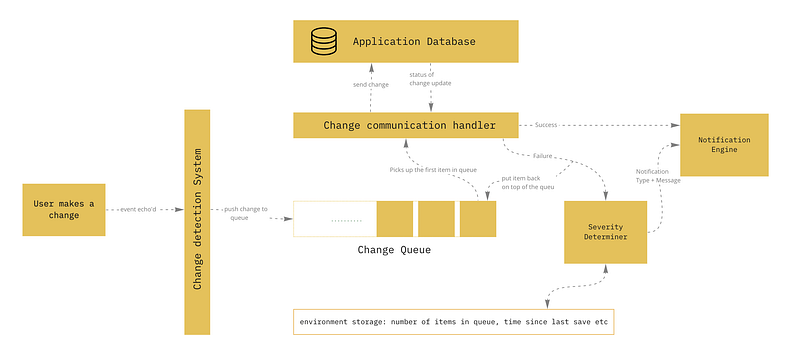
Each function is fairly self-explanatory here.
Collaboration Complexities
When it comes to collaboration, I’ve found that there are two types of collaboration systems (in no way I’m saying these are the only two types):
Locking The Entire Object
This is a more common enterprise-y solution. When anyone starts working on an existing object within the application (this may be a content block or a particular configuration in the system), a system-wide lock is applied on it. Only the user & the admin can release the lock. This locking simply takes us down the ideal scenario path as before initiating the instance, the entire object is locked and no one else can work on it. Changes can then be sent as a snapshot or as and when they happen.
Locking only parts of the objects when you activate it
This is the more common, consumer-facing option. You’d have seen it in Google Sheets, Microsoft Word & Figma. Each user gets a cursor and the area that you’re working on (a cell or a frame) is locked till the time your work is complete on it.
The ideal scenario for autosaving still stays true — the only difference is that the CDC is overloaded with external changes:
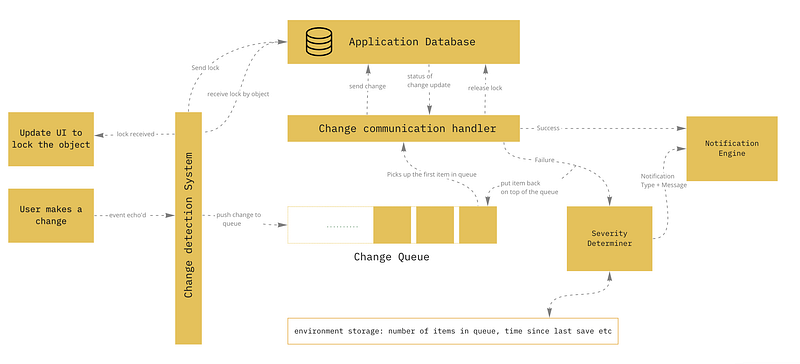
Ideal Autosave Flow
Based on what we discussed above, we can now create an ideal autosave flow that incorporates all the elements (except collaboration):
What can be done for unintentional page navigations?
Or as the Stackoverflow question states: “How to block users from closing a window in Javascript?”. To be fair, this can be easily abused by spammers, but for some enterprise solutions, this can make or break their users’ experience.
In my opinion, a constant update to the servers should be made mandatory to avoid situations like this. In fact, with local storage, the changes that are pending can be stored (and eventually sent to the server, if there are no conflicting changes during that time) and the user can be shown the latest version of their work, from their local storage. If they use a different device to log in, well, that’s a bad life choice! :)
Please let me know in the comments if there is something I missed out on or if there are better ways of doing this. I like how services like Miro/Marvel keep things subtle about autosaving, in that they never let you bother with it. However, in my opinion, the enterprise user is more concerned about the status of their work, as it determines their productivity for the day.
Thank you for reading. I took upon this topic as a similar situation took place when I was working on working on an enterprise product and we were stuck at determining autosaving options. I guess Work Inspires Art(icles)!


