
Design your Landing Zone — Design Considerations Part 1 (Google Cloud Adoption Series)
Yes, it’s another installment of my Google Cloud Adoption and Migration: From Strategy to Operation series.
In the previous part, I told you about best practices for establishing SRE in your organisation. This included how to set up SRE teams, how to upskill, and best practices for things like: toil reduction, and establishing SLIs, SLOs, error budgets, and alerting policies.
In this part, I’m going to talk about something absolutely essential to your Google Cloud success: landing zones!!
This isn’t the first time I’ve written about landing zones. So let me start by telling you about a couple of my other articles that might be useful:
- Landing Zones on Google Cloud: What It Is, Why You Need One, and How to Create One — In this article I describe what a landing zone is, how it is beneficial, and then I describe some ways you can go about building one.
- Google Cloud Landing Zone with Terraform and Cloud Foundation Fabric FAST — In this article I provide a walkthrough of how to create a Google Cloud LZ using Google’s open source Fabric FAST: a Terraform-based solution to bootstrapping and building a GCP LZ, from scratch.
Landing Zone Overview
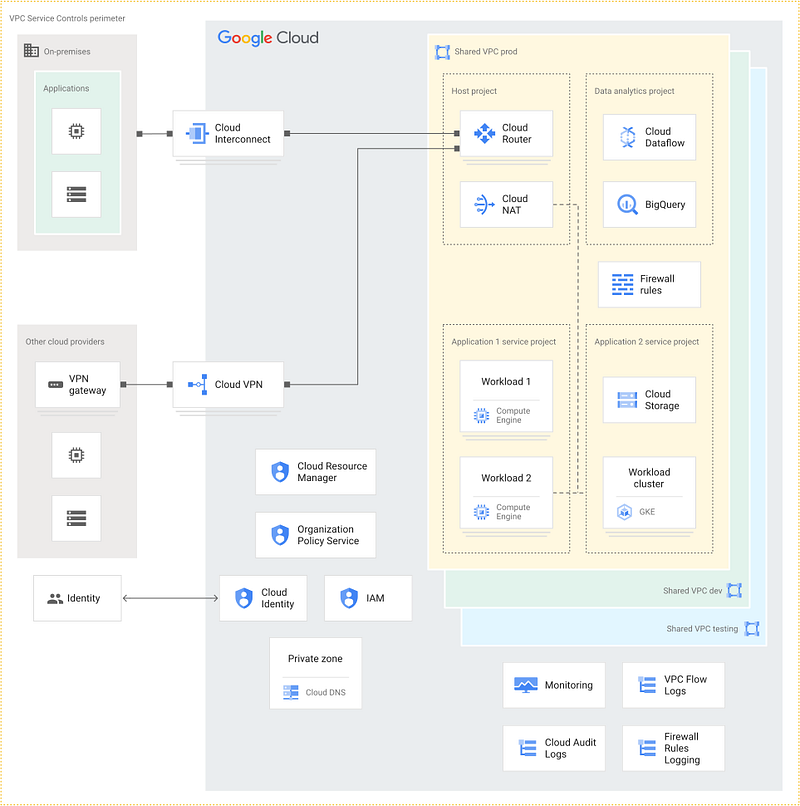
What is a Landing Zone?
(I’m going to repeat some of the content from one of my previous articles here.)
Google says:
A landing zone — also called a Cloud Foundation — is a modular and scalable configuration that enables organizations to adopt Google Cloud for their business needs. It is a prerequisite to deploying enterprise workloads in a cloud environment.
A landing zone is an organisation-level construct. You would typically deploy one landing zone for your organisation. (Though some enterprises might choose to have more than one, if they have independent subsidiaries under their top-level Google Cloud organisation.) It contains a collection of resources that implement your early Google Cloud design decisions, such as:
- Your organisation resource hierarchy.
- Your top-down organisational policies.
- Your shared VPC(s).
- Your hybrid connectivity.
- Shared networking and security resources that tenants should use, e.g. for Internet egress, or for connectivity to on-prem resources.
- Resource factories — such as tenant and project factories — which provide an IaC approach to creating tenant resources in a manner that adheres to your organisation’s constraints and policies.
Side note: What is a tenant? A tenant is an independent consumer of the platform. The tenant could be an individual, but is more likely to be a team that is responsible for an application, or a related set of applications.
After you build your LZ, you end up with something that looks a bit like this:
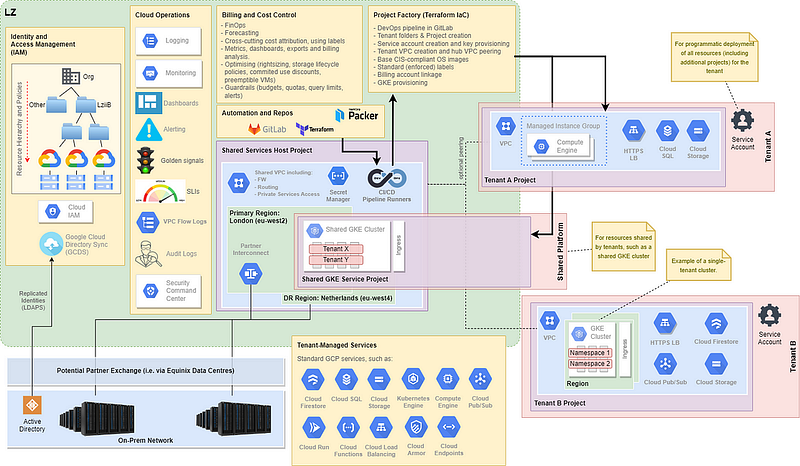
This example LZ provides:
- A defined organisational hierarchy, with organisational policies configured and a predefined set of folders.
- Hybrid connectivity between on-premises and two Google Cloud regions.
- A shared VPC that provides common services, such as: connectivity to on-prem, Internet egress, and a multitenant GKE environment.
- Centrally managed CI/CD pipelines for deployment of infrastructure services.
- A project factory, that allows self-service creation of tenant projects running tenant-specific workloads. These may be peered to the “hub” shared VPC, or may utilise resources in the shared VPC directly.
Why Do You Need a Landing Zone?
Landing zones are a way for an organisation / enterprise to build their Google Cloud environment in a structured and consistent way, following proven best practice. It ensures that all the tenants running on the landing zone avoid re-inventing the wheel, are using appropriate shared components, are adhering to your policies, and are only building their environments using approved infra-as-code (IaC).
Thus, the landing zone:
- Minimises engineering overhead by providing an automated Infrastructure-as-Code (IaC) driven approach to creating an organisation in GCP, and for subsequently deploying tenants and their resources to this GCP organisation.
- Provides speed, through automation and repeatability.
- Enforces best practices.
- Ensures consistency across your organisation and tenants. It prevents projects with different compliance postures coming up with different approaches to the same problems.
- Avoids unnecessary complexity. I.e. because all solutions align to a prescribed way of doing things.
- Provides centralised capabilities that can (and should) be reused by multiple tenants.
- Allows you to enforce the use of certain shared capabilities to meet security and compliance needs.
- Delegates appropriate levels of resource control to tenants, so that they can create their own resources, within the framework of the LZ.
- Avoids unmanaged (Google) project sprawl. I.e. because projects are deployed within standard
tenantfolder, with standard naming conventions, and with a standardised approach to labelling resources.
Moreover, creation of a landing zone forces the organisation to make a number of early (and important) design decisions. This is ensures that the LZ is built according to the current and future requirements of your organisation.
If you skip LZ design, then your Google Cloud adoption will likely be naive and unstructured. You will soon struggle to manage your estate. You will struggle with estate visibility and you will lose visibility of your projects. You will struggle to implement FinOps best practices and you will lose control of your costs. You will hit scaling issues, and likely hit avoidable Google Cloud limitations. You will organise your teams badly, and waste unnecessary engineering effort managing your cloud.

So consider yourselves warned! If you don’t design and build a landing zone, you will eventually hit these issues. And these issues will be much more painful and costly to fix later in your cloud adoption journey.
Landing Zone Design Process Overview
The overall design process should look something like this:
- Create a “design topics” checklist.
- Establish your design approach, and any support / consultancy needs.
- Establish an LZ Project Team.
- Agree your LZ design decisions and document in an LZ Design Document.
- Establish your LZ management and consumption roles and responsibilities, i.e. platform versus tenants.
- Create tenant onboarding documentation and (ideally self-service) processes.
After design, we should then:
- Deploy the LZ.
- Deploy a pilot workload to test the LZ and the tenant onboarding process.
In this article, I’ll quickly run through the first half of the major design topics, and highlight some of the key decisions to be made. We’ll cover on the remaining steps in the next couple of articles.
Design Topics
Here I provide a checklist of the main topics that need to covered during LZ design. Each of these topics will contain a number of design decisions that ultimately need to be made. I’m only scratching the surface in this article, because many of these topics are highly complex and have many options for consideration.
1. Identity and access management
Google Cloud uses Cloud Identity to authenticate users (identitites), and uses Google Cloud Identity and Access Management (IAM) for authorisation; i.e. to control who can do what, with which resources.
We must decide which system will act as the master identity provider (IdP).
The challenge is that most enterprises will already have an existing IdP. If the organisation already uses an existing IdP that you want to retain — such as Active Directory, Entra ID (formerly Azure AD), Okta or Ping Identity — then we can choose to federate from this IdP into Google Cloud Identity or Google Workspace. With this approach, users attempting to sign in to Google services are redirected to the existing external identity provider for single sign-on, and the users can then authenticate using their existing credentials. When an organisation already has Active Directory or Entra ID, a common approach is to use Google Cloud Directory Sync (GCDS) to perform a one-way synchronisation of user identities from AD into Google Cloud Identity:
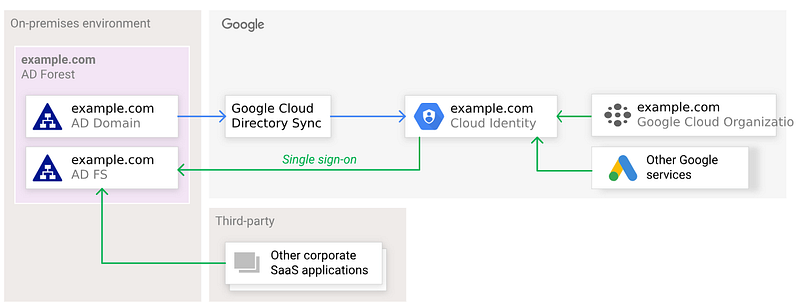
An important thing to note is that passwords are never synchronised from AD to Cloud Identity. Authentication still happens against the external identity provider.
However, if:
- You don’t have an existing IdP;
- Or you have an existing IdP you don’t want to keep;
- Or you’re already using Google Cloud Workspace or Google Cloud Identity…
… Then the recommended approach is to adopt either Google Cloud Identity or Google Workspace, as your master IdP. Cloud Identity is a Software-as-a-Service (SaaS) identity management platform, which comes in both free and paid flavours. Google Workspace includes all the capabilities of Cloud Identity, but also includes applications like gmail, Google Drive, Google Docs, Google Sheets, Google Calendar, Google Meet, and so on.
Let’s recap some key decisions to be made:
- How many Cloud Identity domains are needed?
- Cloud Identity or Google Workspace?
- Will Cloud Identity by the IdP, or are we federating from another IdP?
- If federating, how will user’s and groups be synchronised?
- What, if anything, do we do with existing unmanaged Google users?
2. Resource hierarchy
The resource hiearchy is the overall organisational structure that allows us to:
- Define boundaries of resource responsibilities.
- Define boundaries for billing and cost management.
- Aggregate projects into sensible management collections.
- Apply top-down security policies, at varying levels of granularity. Note that policies are inherited down the hierarchy.
- Allow for sensible inheritence of policies.
- Allow for sensible aggregation of logs.
Here:
- The root node of the hierarchy is called the
organisation. This will typically align to an organisation’s domain name. - A resource is any service or object that is consumed within Google Cloud, such as a GCE instance, a GCS storage bucket, a load balancer, or whatever.
- A project is the most basic unit of organisation of GCP resources. All resources belong to one and only one project. And all billing is initially captured at project level.
- A folder is an optional aggregation of folders, or of nested folders.
There are many ways you can organise your hierarchy. But it is important to think about it carefully, and design the hierarchy in advance. If you don’t, you’ll soon find that your projects become impossible to manage.
Remember that the resource hierarchy will be a significant influence on your target team structure. (Or vice versa.)
Here is a sample organisation hierarchy:
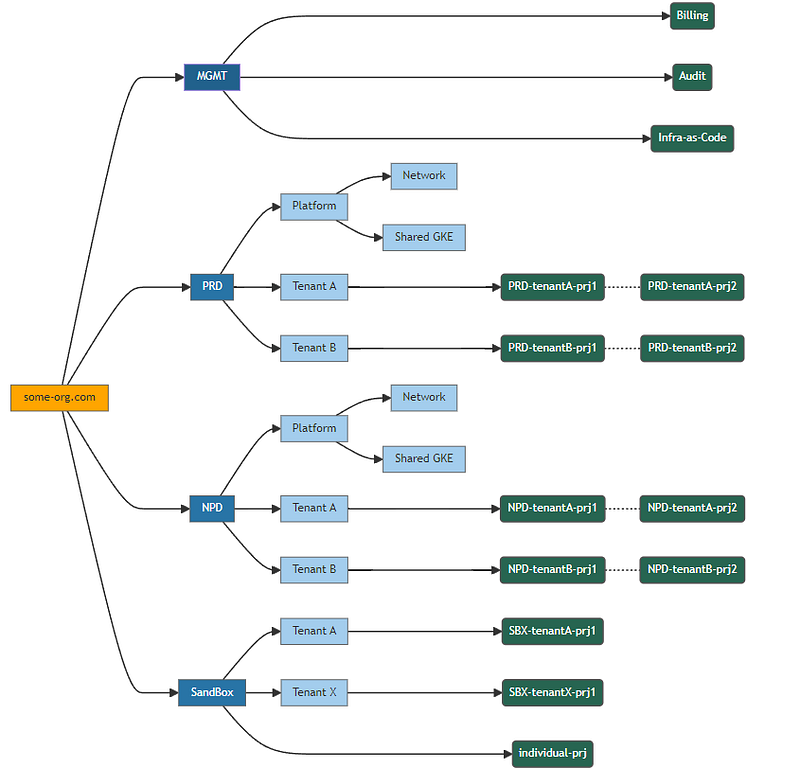
In this hierarchy:
- There is a single top level organisation, and no subsidiaries.
- At the first folder level, we split up by environment
PRD= production,NPD= non-production(e.g. Dev, QA),SBX= Sandbox, andMGMTis for shared management resources that are not part of any of these environments. - At the next level, we will create a folder for each tenant, and we will ultimately do this in an automated way, using a tenant factory.
- Also, under each top level folder, we have resources that will be shared amongst tenants, and which will be managed by some sort of platform team. E.g. a shared GKE environment.
- And finally, we have the projects themselves, which will be created by project factory automation.
Let’s recap some key decisions:
- Will we have any subsidiaries in our resource hiearchy?
- How will we organise the hierarchy? E.g. which folders?
Lastly: don’t just create projects under the organisation node. This results in a horrific, flat project structure. It results in unmanaged project sprawl.
3. Group creation and resource naming conventions
Here we need to:
- Agree the naming standards for user groups.
- Define the initial set of Google groups that will be used to manage access to Cloud resources. We will need to assign users to these groups early in the LZ build process.
Our group naming standards will also need to align to our resource hierarchy.
For example, a useful group naming standard might be:
gcp-{env}-{tenant}-{functional-role}
Here, {env} is an optional parameter that might be used split groups across environments such as prd(production), npd (non-production — e.g. Dev and QA environments), and sbx (sandbox — for relatively unrestricted experimentation).
And {tenant} is an optional parameter that allows groups to be created at tenant level. And a functional-role is a descriptive functional role that will usually depend on the assignment of one or more Google IAM roles.
Using these standards, we might end up with groups like:
gcp-organisation-admins— A highly privileged role that can administer all GCP resources, including IAM assignments.gcp-billing-admins— Able to setup and view billing accounts, view costs, setup budget alerts, link projects to billing accounts, etc.gcp-network-admins— Able to create networks, subnets, firewall rules, VPNs, etc.gcp-security-admins— Able to define and manage security policies.gcp-billing-viewer— Able to view project spend. Useful for a finance team.gcp-audit-viewer— Able to view audit logs.gcp-platform-viewer— Able to view resources across the organisation.
The above are all examples of groups that are defined at the organisation level. But we can also define groups at tenant level. And furthermore, we will typically have our IaC create these groups automatically, when we create a tenant. E.g.
gcp-npd-sales-viewergcp-sbx-hr-admin
Time to recap the key decisions:
- What naming scheme will we use for our group names?
- What groups do we need?
- What roles will be mapped to each group?
4. Organisation policies
Organisation policies are a set of constraints that can be applied across the entire Google Cloud resource hierarchy. They allow you to define a central set of guardrails which are inherited. Thus, they support both repeatable best practices, but also help you adhere to your compliance requirements.
They can be applied at org or folder level, and they are inherited by all descendents.
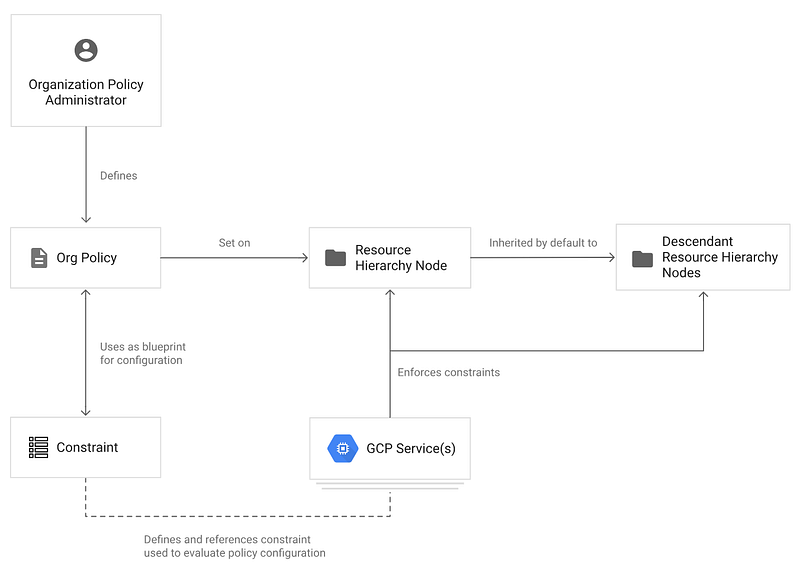
It is definitely a good idea to identify org policies that you might want to apply from the start. There are many org policy constraints to choose from, but here are just a few examples:
- Skip default network creation — Ensure that the default network does not exist in a project.
- Enforce uniform bucket-level access — Ensure all Cloud Storage objects have the same permissions applied, i.e. that of the bucket. This prevents setting ACLs at individual object level, making it much easier to manage and audit access to objects in buckets.
- Define allowed external IPs for VM instances — Limits which VM instances are allowed to use external IP addresses. This helps to ensure that your VMs are not reachable from the Internet, without going through managed mechanisms.
- Restrict Public IP access on Cloud SQL instances — Again, helps to secure your databases by prevening them from being accessible using public IP addresses.
- Google Cloud Platform Resource Location Restriction — Defines the Google Cloud (geographic) regions where resources may be deployed.
5. Hybrid and/or Multi-Cloud Connectivity
Here we decide if your Google Cloud environment needs connectivity to an on-premises environment and/or to another public cloud. Consider your target state and your transition state. Remember that you can expose your Google Cloud workloads through appropriate external IP addresses, and it may be sufficient to always connect to these external IP addresses over the Internet. This is a good target state.
But often you may have a need to connect your Google Cloud workloads to existing on-premises workloads, or to another cloud, using private RFC1918 IP addresses. If so, then you broadly have these options:
- Cloud VPN — where we want low volume (less than 3Gbps) private (RFC1918) connectivity, and we can tolerate relatively high latency. The traffic is encrypted and routed over the public Internet. This can be deployed in an highly available manner, and supports up to 99.99% SLA.
- Interconnect — where we high volume (>3Gpbs) low-latency private connectivity. The exact Interconnect option you choose — and the architecture — depends on your specific requirements, and the Interconnect capability options based on your datacentre or colo.
For example a typical HA VPN design looks something like this:
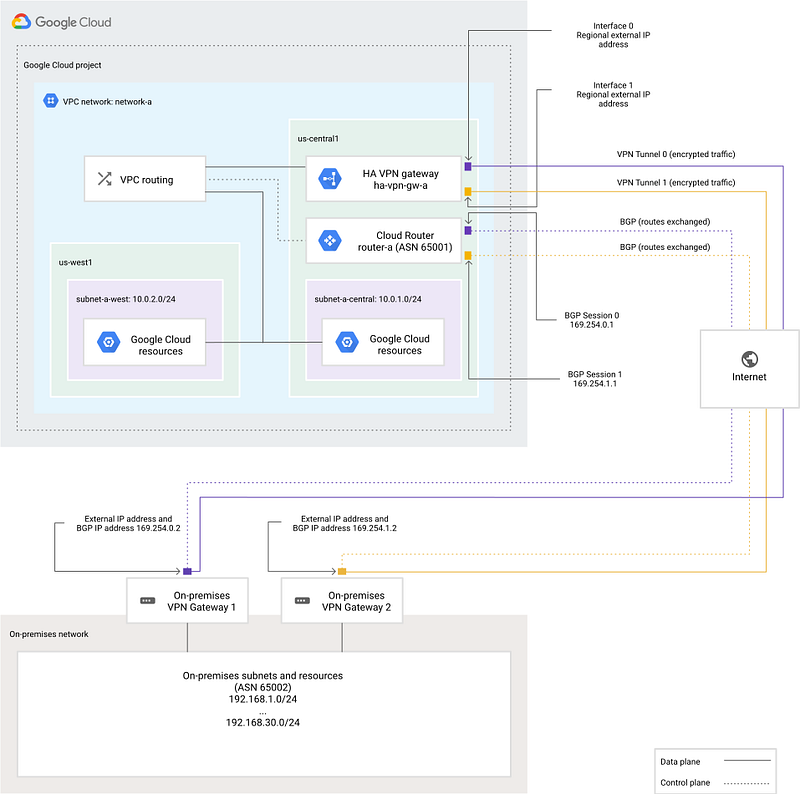
Some key decision points:
- Do you require private RFC 1918 connectivity to on-prem or to another cloud?
- Do you require high bandwidth and low latency?
- Do you require highly available connectivity, backed by SLA?
6. Network Design
This is where we decide the overall network topology. It is important to get this right. There are many considerations and decision points, and I’ll briefly cover some of them here.
Where do we want to host our workloads? I.e. what regions?
There are a few factors here. First, if you work in regulated industry (like banking) with data sovereignty requirements, you may need to store your data in a particular region.
Second, you generally want your workloads to be hosted close to your consumers. This helps to minimise latency and thus improves the performance of your applications.
Third, you need to consider costs. Network egress isn’t usually free. And with premium tier networking, egress costs are highly correlated to the distance your data must travel. Also, some regions are simply cheaper than others, for running your workloads.
Fourth, consider that some regions are more eco-friendly than others. Google Cloud has great green credentials, and publishes its eco credentials by region. Furthermore, it flags which regions have the lowest CO2 emmissions.
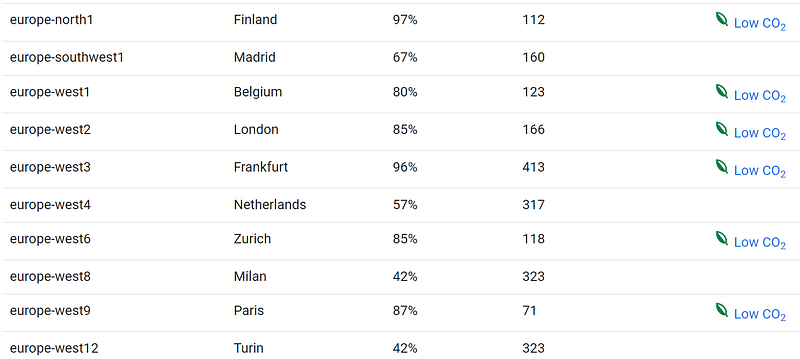
Lastly, we must consider high availability and DR. But I’ll cover these later.
Do we want to centrally manage and/or consume shared network services, e.g. hybrid connectivity?
It is common to provide a centralised shared VPC, for providing network services that will be centrally administered. For example:
- We can manage subnets, routes and firewall rules centrally.
- We can host a Cloud Router in a shared VPC and connect this Cloud Router to our Interconnect, to provide hybrid connectivity.
- We can host Cloud NAT and/or Cloud Secure Web Proxy, for providing Internet connectivity. E.g. for VMs with no external IP addresses.
When using a Shared VPC, the networking resources are deployed in a “host” project, and these resources are managed centrally. But application workloads are deployed into “service” projects, which are associated with the same shared VPC. Thus, we have multiple projects using the same VPC:
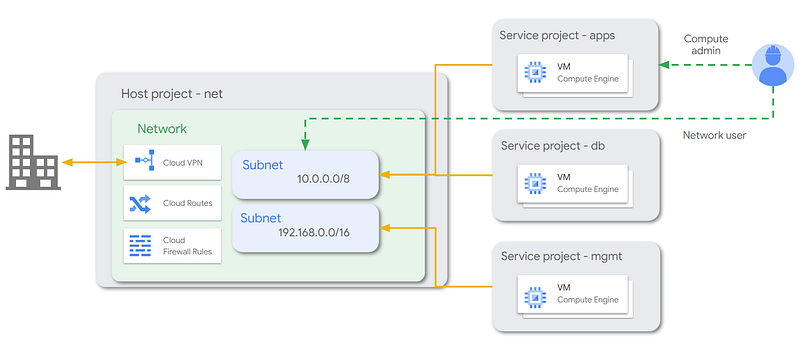
Additionally, we often want to separate these shared VPCs across Prod and Non-Prod environments. This ensures that Prod and Non-Prod workloads are hosted separately and have no direct connectivity. The resulting topology is called Dual Shared VPC network topology.
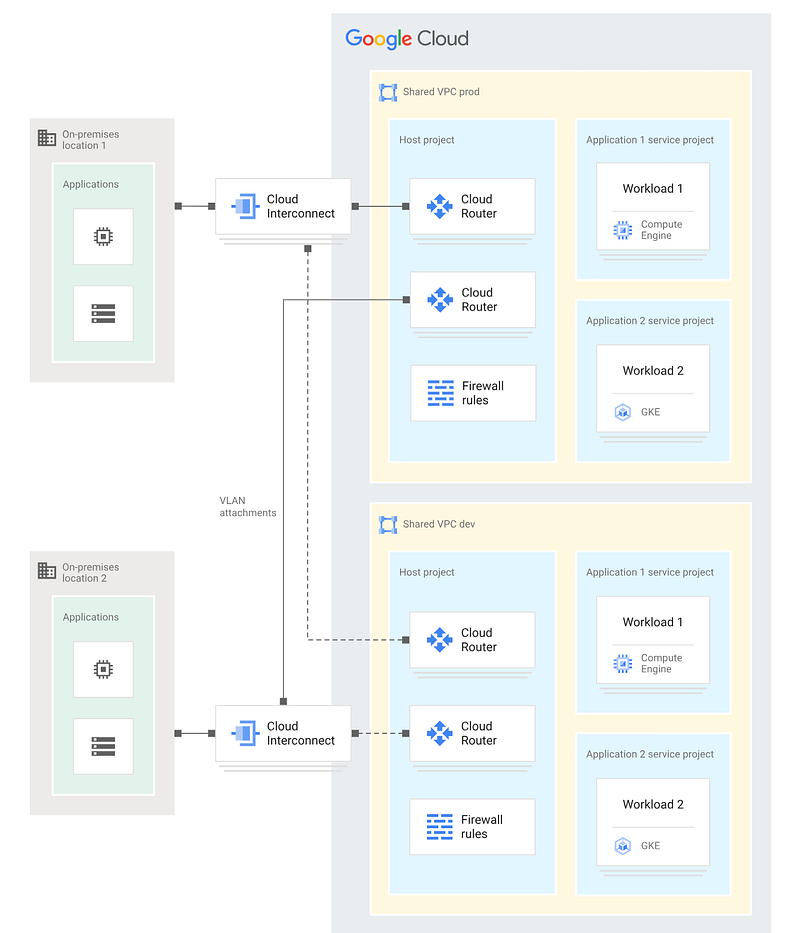
How do we want to provide Internet connectivity for our cloud-hosted workloads? And do we have a need to run specific (non-Google) network or security appliances in our cloud network? For example, third-party next-gen firewalls (NGFW), or third party secure web gateways.
Some organisations will mandate the use of specific third-party security products or appliances, which can be deployed onto Google Cloud GCE instances. Traffic is routed via these appliances when:
- Making outbound connections to the Internet.
- Connecting to on-premises.
- Connecting between Google VPCs.
In this scenario, Google recommends the Hub-and-Spoke topology:
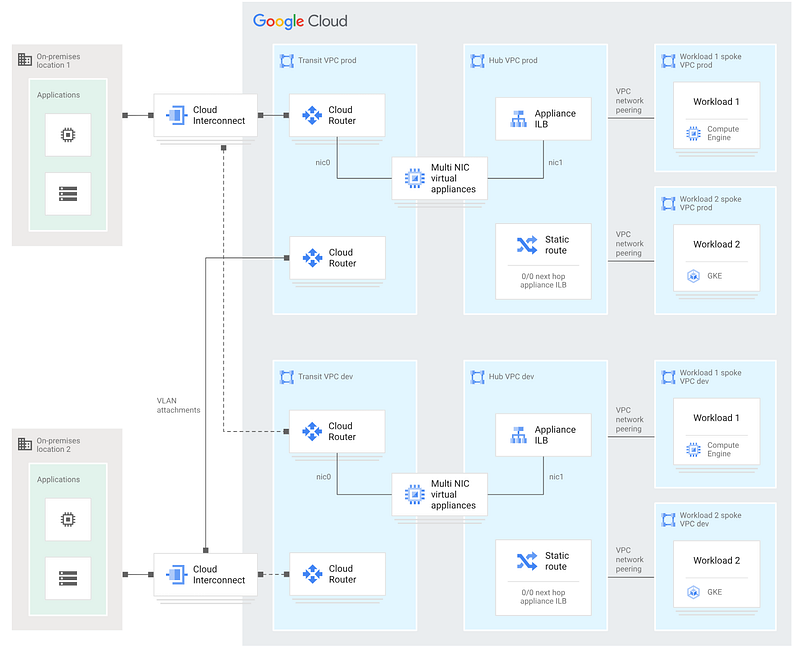
In this topology:
- A central “hub” VPC (or, typically, a VPC per environment) hosts the network virtual appliance (NVA). The NVA is typically deployed onto redundant GCE instances in this VPC.
- Application workloads are hosted in separate “spoke” VPCs.
- Spoke VPCs are not connected directly to one another. All traffic from application workloads is routed through the centralised appliance in the hub VPC. This is regardless of whether the traffic is destined for on-prem, for another spoke VPC, or the Internet.
- The spoke VPCs are typically connected to the hub by VPC network peering. VPC peering provides private RFC1918 connectivity between VPCs, and is free. However, if you expect to have many spokes and you think you might exceed the Google VPC peering limit (which is 25, at the time of writing), then you can connect VPCs using Cloud VPN instead. However, this increases the cost, the complexity, and the latency of the traffic.
Note that these two topologies are not mutually exclusive. You can have a hub-and-spoke topology that is built on top of a dual shared VPC topology; as is the case in the example above.
Another option is to have only a single “Common Services” VPC, but to peer this with both Prod and Dev Shared VPCs. That way, we only have one “Hub” to administer. Without a security appliance, it will look something like this:
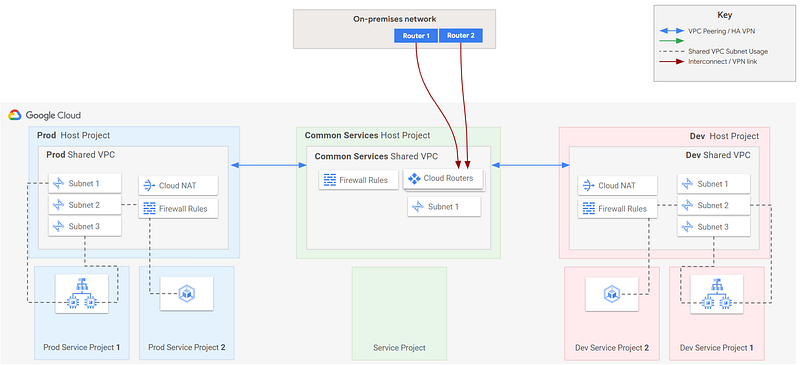
If we add a security appliance, we’ll want the appliance to connect to separate VPCs, and then peer the VPCs, like this:
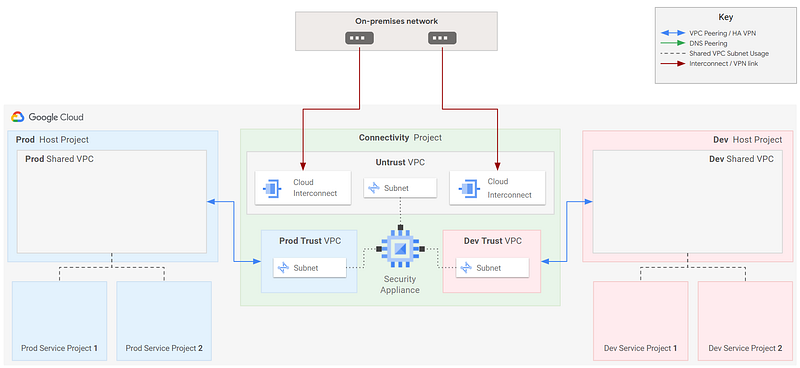
How do we want to manage DNS?
DNS is the service that maps IP addresses to more user-friendly domain names. When designing your landing zone, you need to make decisions about which DNS service is responsible for resolving domain names.
If you’re only deploying into Google Cloud, and you don’t have any hybrid cloud concerns, then the answer is easy: use Cloud DNS. This is a low-latency, highly available DNS service, supporting both public (visible to the public Internet) and private (visible to specified VPC networks) zones.
However, organisations with an existing on-premises footprint probably already have an authoritative DNS system. For many organisations, this is provided by Microsoft Active Directory. In this scenario, we must choose our overall hybrid DNS architecture, and we start by selecting one of these options:
- Use a hybrid DNS approach, where the existing on-prem DNS system is authoritative for on-prem requests, and Cloud DNS is authoritative for Google Cloud-hosted workloads. DNS forwarding happens in both directions, as required. Google generally recommends this approach.
- Make the existing on-prem DNS system authoritative for all requests, and forward DNS requests from Google Cloud to the existing system, using DNS forwarding. However, this means that even Google-side DNS requests will be reliant on on-prem DNS servers. This adds latency, and increases your reliance on data centre infrastructure. This is not recommended, if your goal is to pivot increasingly away from on-prem to Google Cloud.
- Make Google Cloud DNS authoritative for all requests, and forward on-prem requests to Cloud DNS, using inbound DNS forwarding. This is also a good approach, if your intent is to eliminate the data centre.
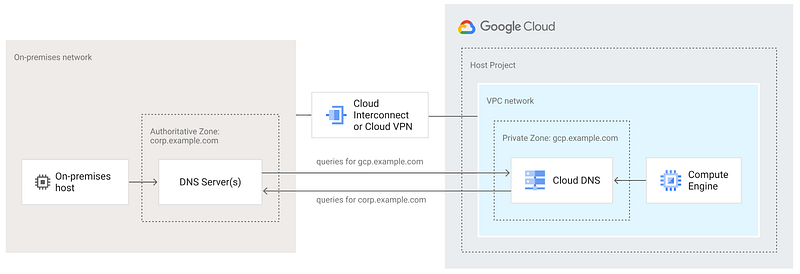
If we now incorporate this into our Hub-and-Spoke topology, we end up with something like this:
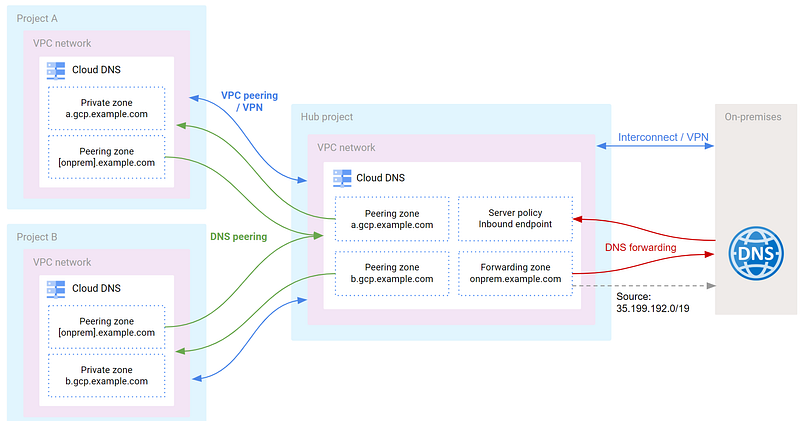
In this topology, we’ve also introduced DNS peering, to allow DNS queries to be sent between VPCs. And we forward to and from the on-prem DNS service, as required.
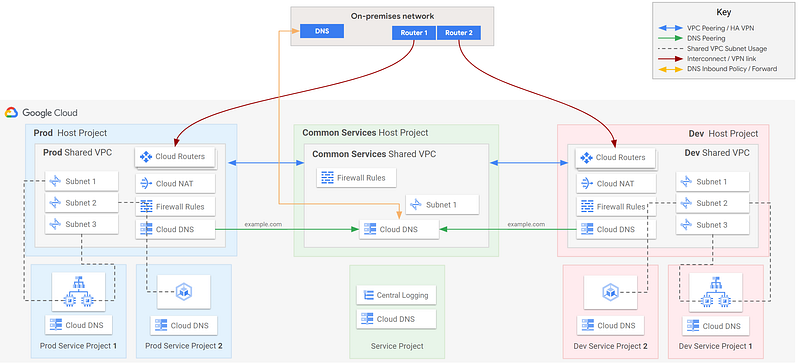
Note that in our Shared VPC network topologies, Cloud DNS is centrally managed in the Shared VPC, by the central network team (who have IAM permissions against the host project). However, you may also want to allow application teams to be responsible for their own DNS configuration. In this case, you can configure Cloud DNS in each service project, and make it authoritative for specific sub-domains. E.g. a per-team sub-domain.
Putting it all together, we end up with a network topology that looks something like this:
7. Availability and DR strategy
This is a big and interesting topic. But for the purposes of LZ design, I’ll try to keep it brief. (I’ll do a full article on this topic soon!)
Availabity and DR planning in cloud requires a different mindset and approach, compared to on-prem. On-prem, we deploy multiple redundant servers with redundant components. We have to ensure that our data centre services — like power, cooling, switching and WAN connectivity — are redundant. We have to plan for entire data centre failures; typically by deploying into more than one data centre. If we use DR strategies like active/standby across a pair of DCs, then we must size the capacity in both data centres to be able to handle our peak demand. But because our standby DC is rarely delivering any production workloads (except for storage and DB mirroring), we must come up with strategies for utilising this otherwise redundant infrastructure.
A common on-prem strategy (and certainly one that I’ve designed and implemented in my career) is to host non-production workloads in our “DR” data centre, on the same physical hardware as our standby DR workloads. Even though our chosen virtualisation solution (like VMware) can help us manage this, it’s still a layer of management and complexity that we need to care about.
In Google Cloud, virtually all of these considerations are taken care of by Google.
- We don’t care about infrastructure components like servers or storage arrays. We only care about Google services, and their SLAs.
- We don’t care about how data centre resilience is provided. Instead, we only care about whether resources are zonal, regional, or multi-regional.
- If we want dual region DR capability, then instead of deploying redundant DR workloads in advance, we can use infrastructure-as-code to deploy to a second region on-demand. Remember that we can now typically deploy and start entire environments in a few minutes.
- We no longer need to worry about keeping our utilisation high to justify our spend on physical tin; we’re now only paying for what we use (or deploy).
Our availability and recoverability requirements are typically expressed using three measures:
- Recovery Time Objective (RTO) — the maximum amount of time we want to allow for our service to be restored to a usable state, following detection of a service-disrupting incident. Typically expressed in seconds, minutes or hours.
- Recovery Point Objective (RPO) — the maximum duration of data loss that is tolerable, up to the moment that a failure occurred. Typically expressed in seconds, minutes or hours.
- Availability — the proportion of time that a service is able to adequately perform its intended function. Typically expressed as a percentage of required uptime, using the familiar “nines” approach. Although we must also consider our operational hours, and allowed/planned maintenance windows. (Non-operational hours and planned maintenance should not be included in the availability goal.)
We should define our RTO, RPO and availability goals at application level. And we will typically meet these goals — for any given application — by selecting appropriate Google Cloud resources, and by using one of a few availability/DR blueprints that we will design as part of our cloud adoption strategy. These blueprints will ensure that we’re deploying our resources in a manner that meets our availability and recoverability goals. (This is a typical artefact that our CCoE should own.)
But for LZ design purposes, we need to ensure that our LZ is able to meet the RTO, RPO and availability goals of our most critical workloads. So here are some considerations that are important for LZ design:
- Do we require multi-regional redundancy? If so, we need to factor this into our network design. In Google Cloud, zones are independent failure domains hosting the cloud infrastructure; i.e. each zone has a high degree of separation from other zones. Regions are composed of three or more zones. Note that whilst it is often the case that the zones in a region might be completely separate data centres, this is not always guaranteed. Zonal outages are rare, and well-architected solutions will generally be tolerant of a zonal outage. Regional outages are extremely rare, but they can happen. Most notably, Google Cloud suffered an entire outage of the Paris europe-west9 region in April 2023, and the regional outage lasted more than a day. (Notably, it was misconfiguration of Google’s control plane that caused a zonal outage to propagage into a regional outage. The zones were indeed in different data centres.)
- If we use multi-regional redundancy, what are the implications for latency to our users? Will we run our workloads as active/active across our regions, or will we run an active/standby model? (Will we want both?)
- If we run active/standby, what is our strategy for deploying and running our standby workloads? Will we deploy on-demand using Infra-as-Code? If we do this, we only pay for what we use. Or will we pre-provision (or reserve) our infrastructure? This can be very costly. Don’t do this simply because it’s what you used to do on-premises!
- If we have hybrid connectivity to on-prem, does this connectivity need to be tolerant of a regional outage? And if so, do we require hybrid connectivity that will be underpinned by Google’s highest hybrid connectivity availability SLA (which is 99.99%, at the time of writing)? To achieve the 99.99% SLA, hybrid connectivity must be to at least two Cloud Routers, each hosted in a different region.
Let’s Pause Here
Since this article is getting quite long, I think now is a good point to take a break! I’ll cover the remaining Landing Zone Design Considerations in the next installment!
Before You Go
- Please share this with anyone that you think will be interested. It might help them, and it really helps me!
- Feel free to leave a comment 💬.
- Follow and subscribe, so you don’t miss my content. Go to my Profile Page, and click on these icons:

Links
- Landing Zones on Google Cloud: What It Is, Why You Need One, and How to Create One
- Landing zone design in Google Cloud
- Decide a resource hierarchy
- Org policies
- List of org policy constraints
- Resource factories
- Google Cloud Architecture Framework
- Enterprise Foundations Blueprint
- Authentication and Authorisation
- Challenge Lab Walkthrough: HA VPN connectivitiy between Google Cloud and AWS
- Carbon-free energy for Google Cloud regions
- Google Cloud network topologies
- Cloud Secure Web Proxy
- Cloud DNS
- Google Cloud DNS Best Practices
Series Navigation
- Series overview and structure
- Previous: Site Reliability Engineering (SRE), and Best Practices for SLI / SLO/ SLA
- Next: Design your Landing Zone — Design Considerations Part 2


