
Dona. The app to help you donate blood
We all know how necessary it is to donate blood. Many surgeries rely on donated blood in order to treat their patients, create specific medicine compatible with the patient’s type, give blood to accident victims who have lost big amounts of it and are in need…
Remember it is always necessary to donate. If you can, please do it.
So the other day I was at the hospital donating and previous to the donation moment, the doctor asked me when was the last time I donated. I didn’t know the specific date (I know it was an enough time ago in order to donate again without any problem), but didn’t know the specifics.
I also left the hospital with the question in my mind of how my blood was going to be used and how it specifically was going to be helpful.
And all of these questions gave me an idea to create an app, and here’s the result of my divagation about it.
What the app must have
I decided that the main points which should be present in the application must be:
- Information about the last time I donated & the number of times per year that I have accumulated already.
- Information about what my blood is going to be used for, who is going to help, what is going to happen to it after that (which many times we are not conscious of the exact way it is used for).
- Information about the waiting time which must pass after your last trip to another country (due to health measures, some countries have, let’s say “quarantine” times during which you cannot, or shouldn’t, donate).
- A place where I can access my information and do modifications to my personal data.
Some screenshots
Let me show you some of the screens that I have thought for this app. (as a disclaimer, none of the information you’ll see in this screens is my personal data, everything is mocked).
Login & Register screens
The first screens that I want to show are the splash, login and register screens.
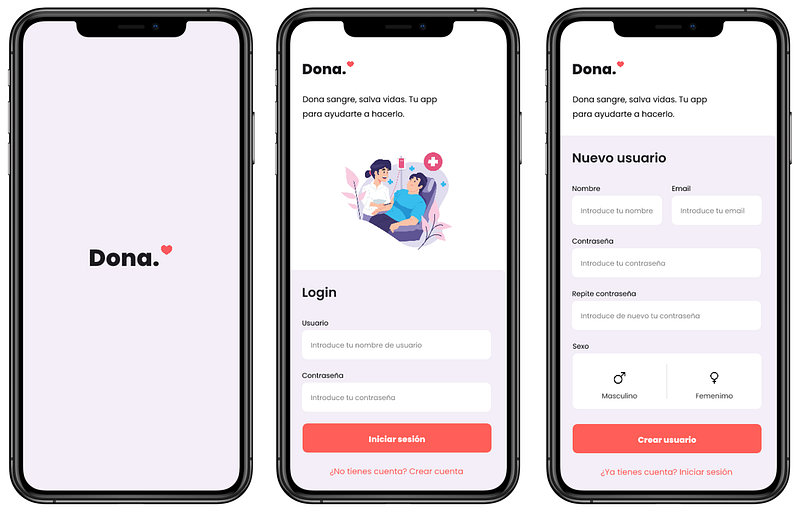
The splash screen will be the screen which will appear for a few seconds everytime we open the app, basically showing the logo, and the main colors you will find in the app. It’s a common practice for a mobile app.
The register screen has the basic required data needed in order to be able to login later, to communicate with the user and to know the user’s sex in order to calculate the number of donations for later (there are differences between men and women when donating blood in the number of donations recommended per year).
Home & “Around Me” screens
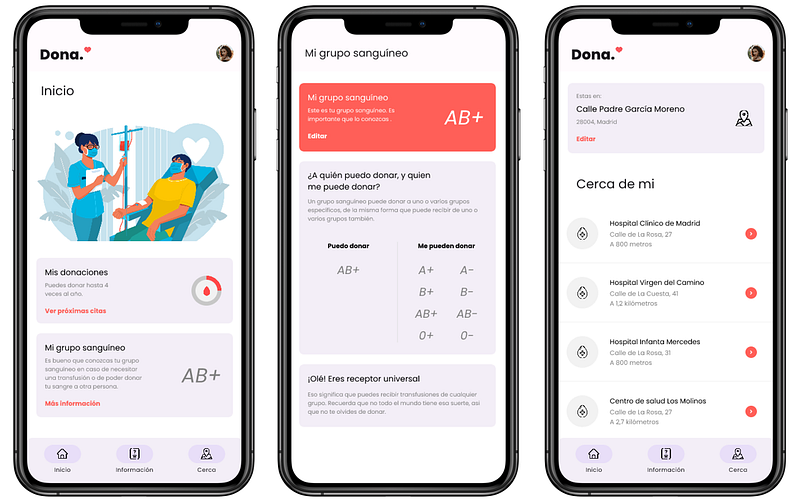
The next three screens are as you can see above. The Home Screen will show two basic data. The first one is the number of donations that you have accumulated for the year in course. Every time you donate, the circle will keep on closing and by entering its specific screen, you will be able to see the historic of donations and when was the last time you donated blood. I like this design because it also helps create a “need” to close the circle (similar to what Apple does with the Apple Watch circles).
Next is the blood type information screen. Here you will be able to input your blood type and the app will give you information about who you can donate to, and who can donate to you. Pretty handful information which is always the main question that pops whenever the topic of the blood donations. I’m letting the users edit this info, not because you can change your blood type anytime you want (of course not), but just in case you made a mistake and selected the wrong one, I’m going to let you change it. It might be an option to let just 2 or 3 edits, so that it reinforces the idea that it’s just for letting you correct a mistake, nothing else.
Finally, the “Around me” screen will tell you which donations centers or hospitals are around you, so that it can make it easier for you to find the nearest center where you can go to donate. Maybe if you are in your home you already know where to go for this purpose, but in case you are not at home, or on vacations, or just moved to a new residence, this feature might help you.
Blood Info & Country Info screens
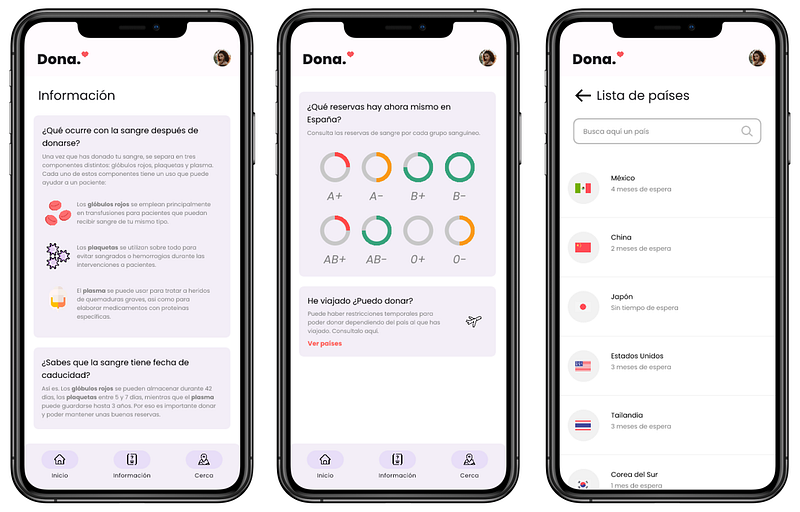
Two main functionalities are shown here.
First, on the first two screens shown in the image (which in reality is the same screen scrolled) you will be able to see information about what will happen to your blood once you donate it. It is also a very unknown topic what happens to the blood once donated. Which trip it takes, how it is decomposed, in which specific way it is used for the patients in need. Here you can find all the information related to those questions.
It would be also helpful to have what we can see in the second screen, a kind of dashboard where you can check the blood type reserve levels in the country, and see which types are in more need of donation. This might also help undecided donors go and donate blood.
At the end of the screen, another helpful functionality. To know the “quarantine” periods you need to wait in order to be able to donate blood after a trip. Some countries are considered of higher risk than other in terms of flexibility for blood donations. For example, when I came back from a trip to Mexico, I tried to donate blood, only to be told once in the hospital that since I have done that trip, I now needed to wait 4 months in order to be able to donate again safely. By checking this screen I can at least be informed beforehand.
Profile screen
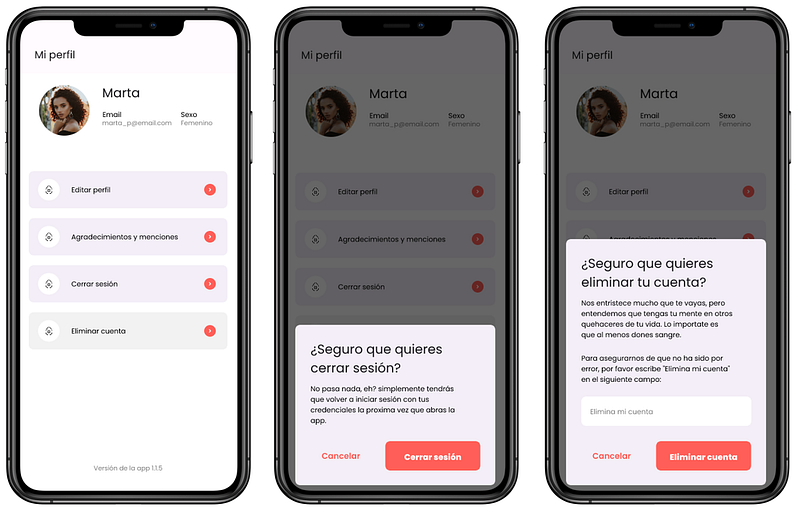
Not much to explain here. Since I’m allowing for user creation in this app, there should be a place as well where the user can access their personal information, correct any mistake or update outdated info, as well as letting them log off their account or even fully delete it.
I tried to make it in a visually pleasing way, not overloading in with elements and having all the main functionality on the first level, avoiding unnecesary 2nd or 3rd level navigation.
Conclusions
This is it. To put it simply, an app to facilitate all the necessary information and tools to help you go and donate blood.
I have no intentions of pursuing the development of this app, since it is actually very complicated to manage personal medical data (from a security point of view, this data is considered as highly personal and needs to be extremely secured), and also some of these funcionalities require a connection to public information (such as knowing the blood reserves, or the quarantine times for the countries) which is very difficult to obtain as of today (taking into account a lack of accesible IT infrastructure from the public sector in these matters. As an example, doctors were checking the quarantine times for each country on an excel sheet, not through any program or API). This just remains as a cool concept that would be nice to see in real life sometime, but will simply remain as a design project.
Hope you liked it, and as always, feedback is more than welcomed!
Thank you!


