Design and Technical Implementation Details of Message Display Mechanism in Various SAP Products
My working experience sharing in SAP Labs China Development Team
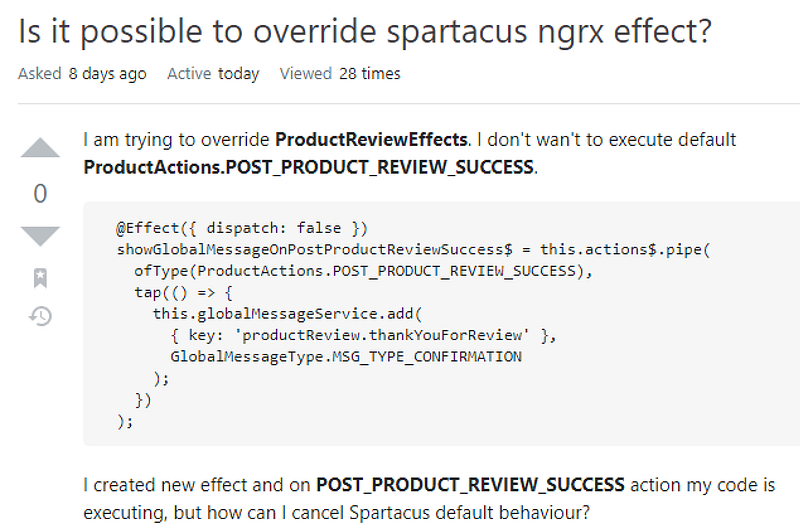
The inspiration for this article comes from a customization request for the SAP Commerce Cloud Spartacus UI on the StackOverflow community by Partner.
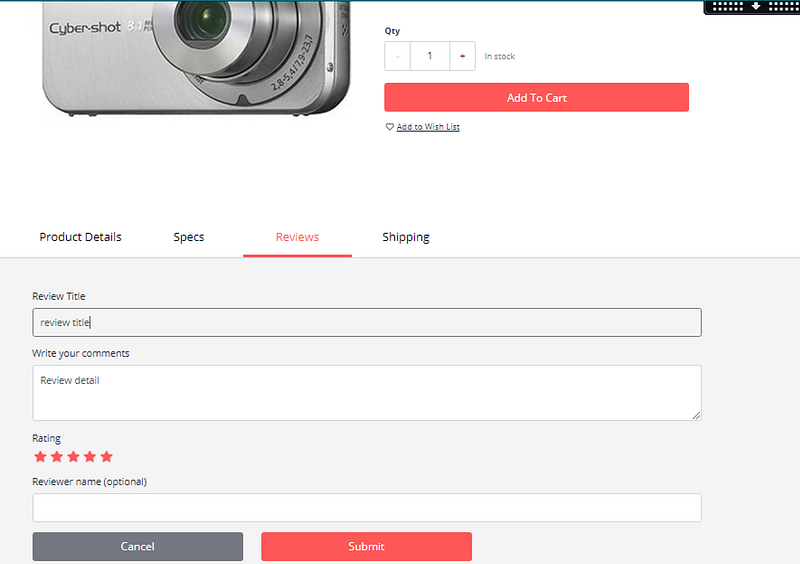
The context of this requirement is that customers can leave their reviews on the product detail page of the SAP Commerce Cloud and submit them by clicking the Submit button.
After submission, a prompt message saying “Thank you for your review” is displayed.
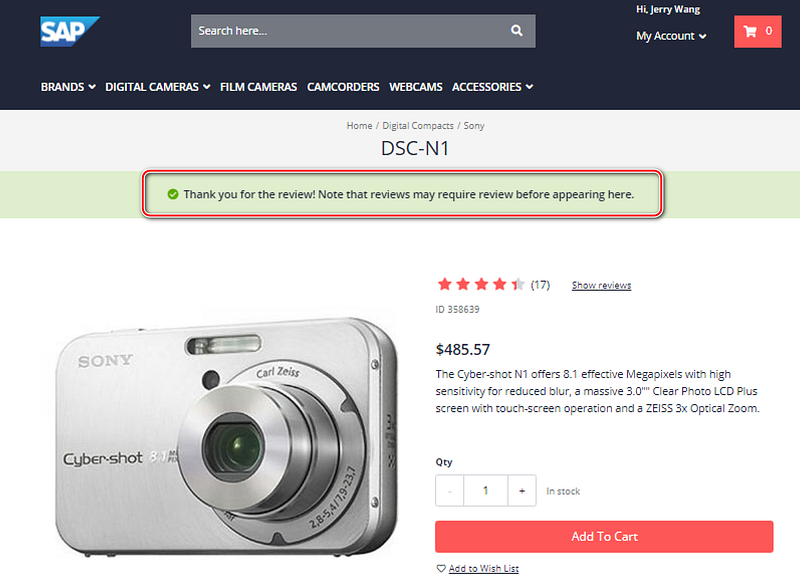
The customer’s customization request is to bypass the default logic of displaying this message. Instead of showing the message, they want to execute alternative logic, such as sending SMS or email notifications.
Let’s first briefly review the UI message display mechanism of other SAP products.
Messages are an important channel for providing feedback to users during the execution process of an application, usually triggered directly by a user action and displayed on the product interface. Of course, application background jobs can also trigger message displays when certain conditions are met at specific stages. Concise, clear, and accurate messages can help users understand the current status of the program and guide their next steps.
The text of messages displayed in SAP product UIs is reviewed and published by a professional Knowledge Management (KM) team.
For SAP developers, the context in which these messages are displayed is of greater concern; in other words, upon seeing a message displayed on the UI, they aim to efficiently locate the exact code position that threw the message in the shortest possible time.
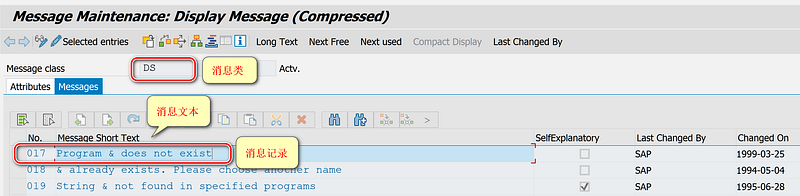
As shown in the following figure, in the classic SAPGUI SE38 ABAP program editor, entering a non-existent report name will display a message:
Program XX does not exist.
Where XX is a placeholder that will be replaced by the report name actually entered by the user.
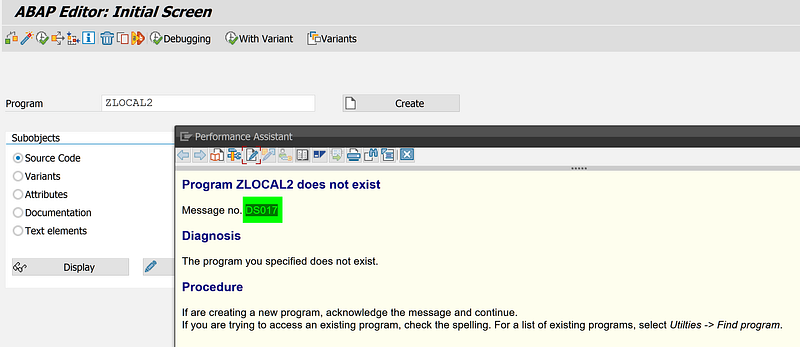
All SAP products implemented with ABAP, such as SAP CRM, SAP SRM, SAP S/4HANA, and SAP Cloud for Customer, have a corresponding message record in the ABAP backend for each message displayed on the UI, maintained in transaction code SE91.
Taking the above message as an example, its code is DS017, where DS is the message class and 017 is the message number, uniquely identifying a message record.
In the SAP CRM WebClient UI, every message seen on the browser, like the following “Data Contains errors and cannot be saved”, still uniquely corresponds to a backend message record CRM_BUPA_BOL/036:
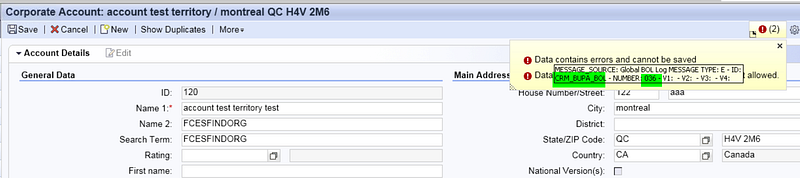
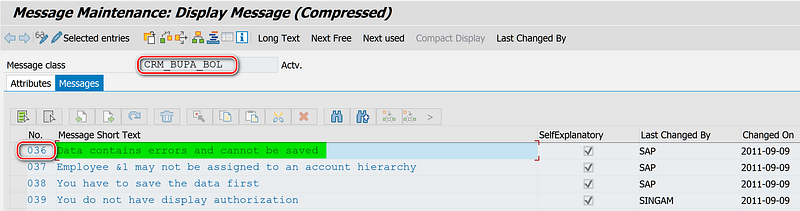
This message is maintained by the Business Partner application.
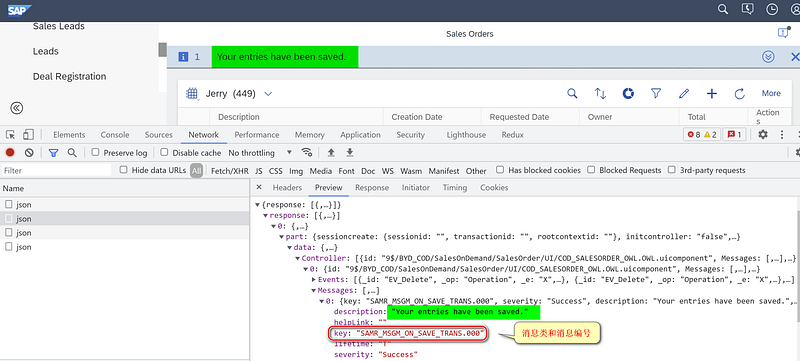
In SAP Cloud for Customer, although Partners cannot log in to the ABAP backend directly, they can still obtain the message class and message number of the UI message corresponding to the ABAP backend message record through Chrome developer tools:
In SAP Cloud for Customer, Partners can create new UI messages through the Cloud Application Studio:
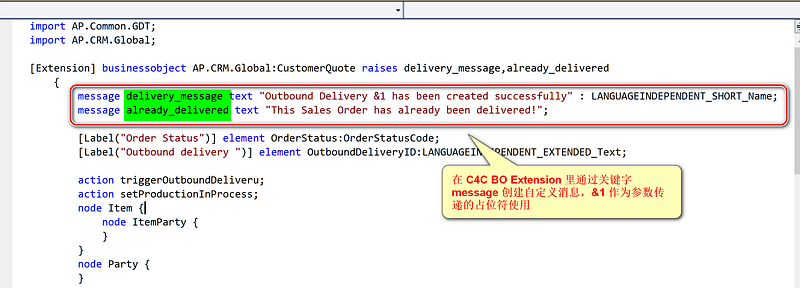
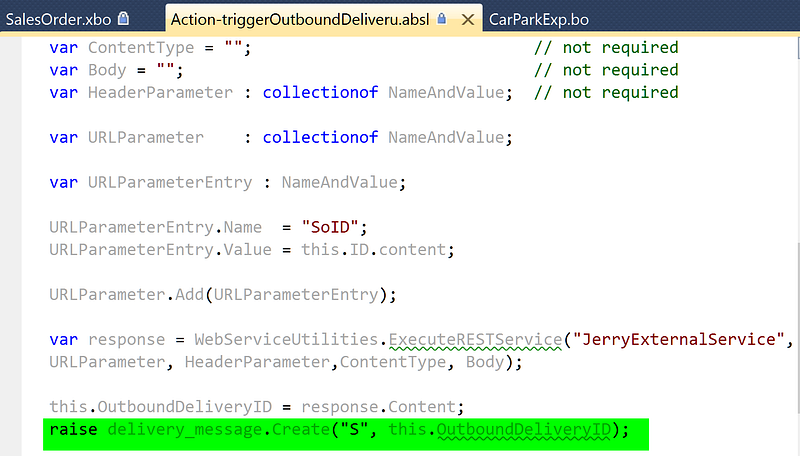
In the ABSL code, the message is displayed on the UI using the raise statement:
raise delivery_message.Create("S", this.OutboundDeliveryID);At runtime, the &1 in the message text defined by delivery_message will be replaced by the value of the this.outboundDeliveryID field.
In SAP S/4HANA, all Fiori apps created based on Fiori Elements share the same set of view templates and controller implementations, hence most messages are no longer defined by the applications themselves but are maintained by the framework.
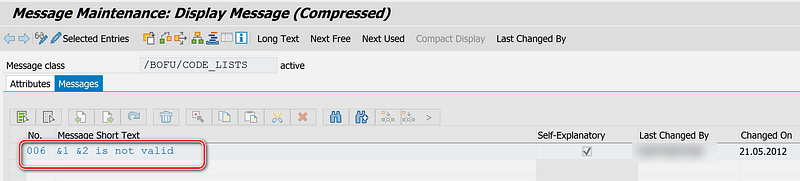
For example, the following error message when maintaining S/4HANA material master data:
Product Type 03 is not valid
This message is maintained within the message class /BOFU/CODE_LISTS of the so-called Business Suite Foundation Reusable Components development package.
Now, let’s analyze the customization request for message display in SAP Commerce Cloud mentioned at the beginning of this article.
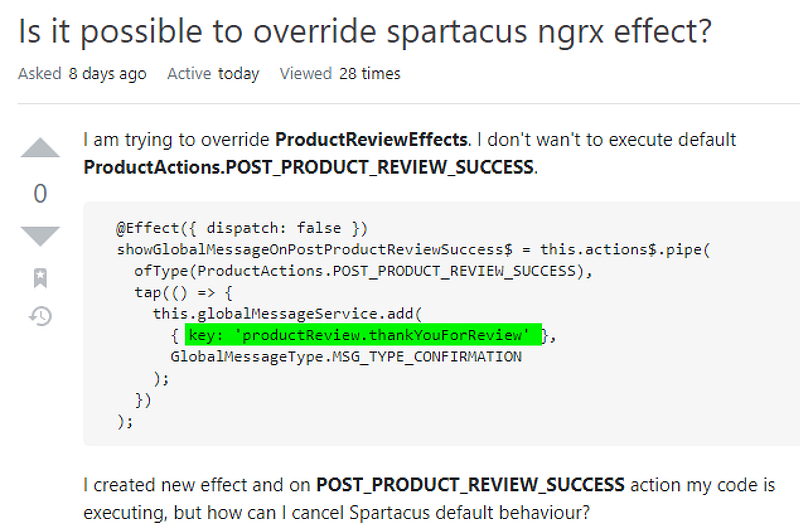
The text ID for the “Thank you for your review” message is productReview.thankYouForReview, which is displayed on the UI through MessageService after ProductReviewEffects receives the POST_PRODUCT_REVIEW_SUCCESS Action.
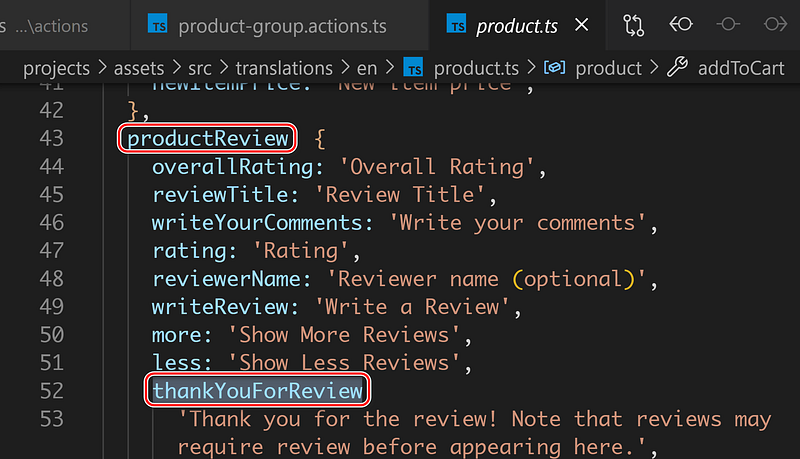
A conventional approach to secondary development is to inherit the standardly published ProductReviewEffects class of SAP Commerce Cloud UI and override the implementation code received after POST_PRODUCT_REVIEW_SUCCESS, removing the code that calls MessageService to throw out the thank-you review message.
However, all Effects implementation classes released by SAP Commerce Cloud UI are non-extendable, making this approach unfeasible.
The logic of Spartacus’s communication with the Commerce backend, as shown in the following figure:
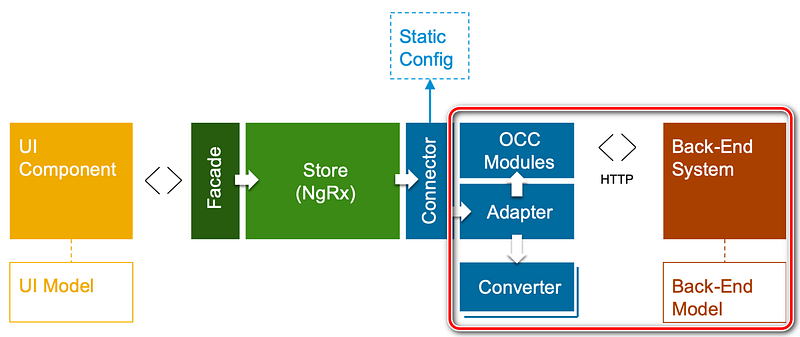
Communication between Spartacus and the Commerce system is completed through HTTP protocol calls to the OCC API. The Connector initiates HTTP calls, maintaining static configuration information, i.e., API endpoint.
For example, when reading product master data from the Commerce system, the list of fields to be read appears in the API endpoint as URL parameters. These field lists can be configured in the static configuration point of the Connector.
The Connector does not interact directly with Commerce but forwards requests to the Adapter, which completes the specific communication, with the Connector only responsible for dispatching the Adapter. The Adapter released by Spartacus defaults to using the OCC Module, i.e., Commerce’s standard OCC Restful API, but customers can also implement their own Adapter to connect to backend systems other than Commerce.
The Connector hands over the data retrieved by the Adapter to the NgRx Store structure for unified management, whose complexity is hidden by the Facade layer. Spartacus UI components only interact with the Facade layer for data binding and page display, reflecting the principle of separation of concerns.
Returning to the customization request mentioned at the beginning of this article, to implement this requirement, we need to delve into the details of the interaction between the NgRx Store and the SAP Spartacus Connector highlighted in red in the following figure.
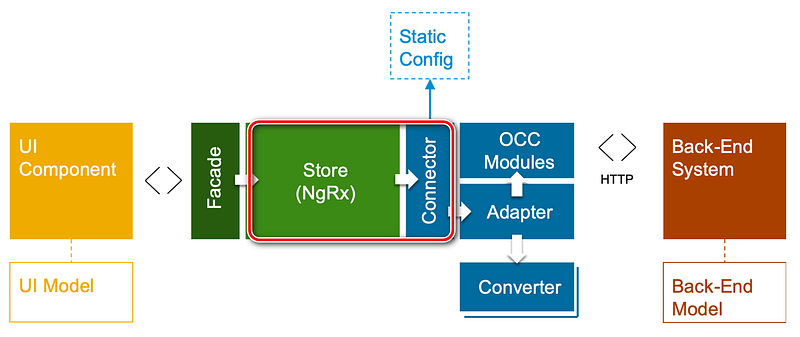
NgRx is a reactive state management library for Angular based on RxJs, including the following core concepts, which I will illustrate with actual use cases of NgRx in SAP Commerce Cloud UI.
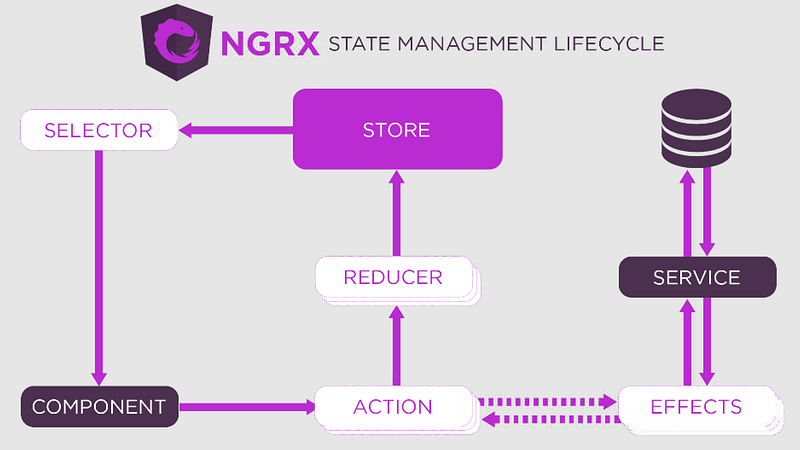
Action: Essentially, an alias for events in the programming domain. SAP Commerce Cloud UI components can respond to user operations and dispatch corresponding Actions through the component’s Service instance. The sender and receiver of the Action are decoupled from each other, unaware of each other’s existence.
The following figure shows the code of the Service class throwing out the PostProductReview Action after the Submit button on the SAP Commerce Cloud product detail page’s review section is clicked:
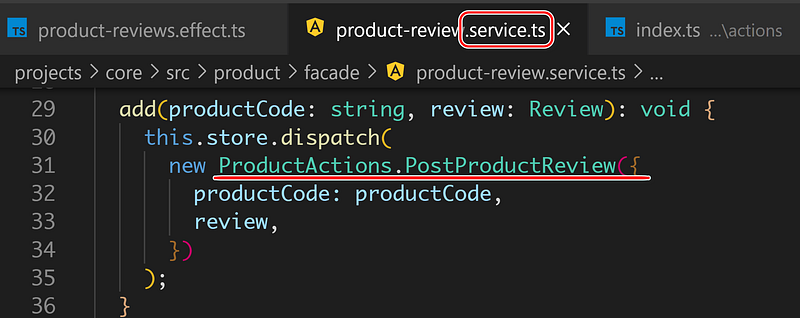
ProductActions.PostProductReview is a subclass of NgRx Action, with the type field being POST_PRODUCT_REVIEW. The constructor’s parameter payload defines the data structure needed to persist user reviews via the Commerce OCC API call:

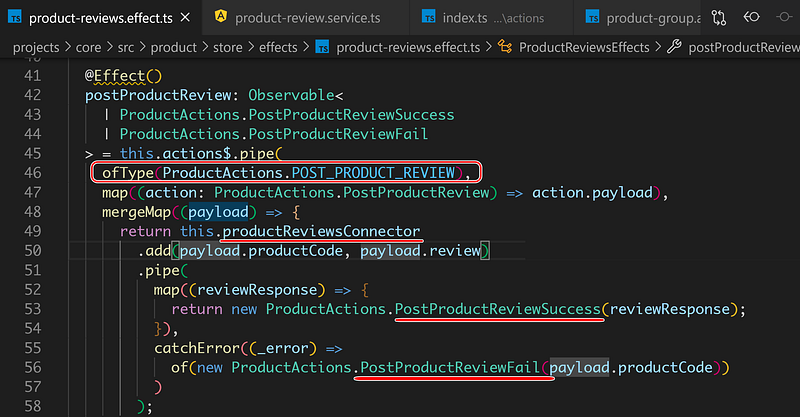
Effects: One of the receivers of SAP Commerce Cloud UI Action. The semantics of the following Effects code is to receive Actions of type POST_PRODUCT_REVIEW (line 46), call the previously introduced Connector to initiate OCC API calls to the Commerce backend (line 49), and depending on the API return results, dispatch either the review save success or failure Action:
PostProductReviewSuccess (line 53) PostProductReviewFail (line 56)
Store: A storage structure maintained in memory by Angular applications, containing runtime data for all components of the SAP Commerce Cloud UI. Whenever Effects fetch new data from the Commerce OCC API, they invoke a Reducer to incorporate the incremental data into the Store.
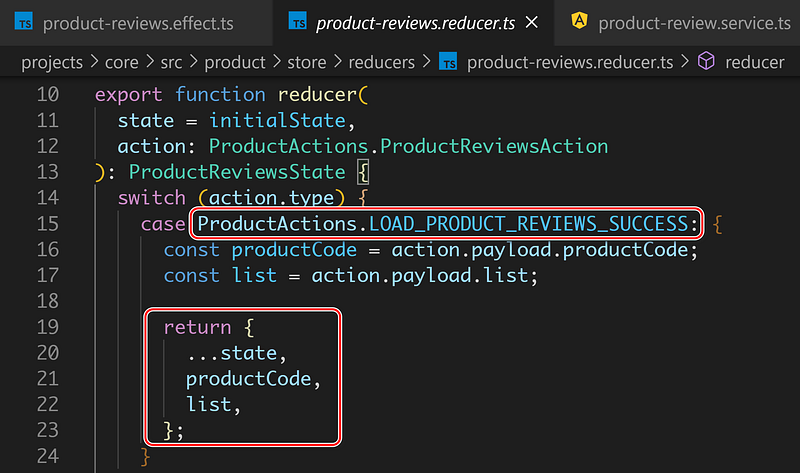
Reducer: Essentially a finite state machine that, upon receiving an Action indicating changes in data from the Commerce backend, drives the corresponding Reducer to adjust the data in the Store based on the payload contained in the new Action.
For example, when the product detail page is rendered for the first time, Effects need to retrieve all review data from the Commerce backend. Upon successful retrieval, a LOAD_PRODUCT_REVIEWS_SUCCESS Action is dispatched. The ProductReviewsReducer, upon receiving this Action, parses the actual review data from its payload and returns it. This returned data is then received by the NgRx framework and merged into the Store.
Selector: Pure functions serving as the interface for the application to read the latest data from the NgRx Store.
Understanding the details of state management using NgRx in the SAP Commerce Cloud UI facilitates the realization of client-specific requirements outlined at the beginning of the article.
Given that the standard Effects illustrated in the SAP Commerce Cloud UI cannot be extended, we note that the Service layer of UI components is the starting point of all event flows. Therefore, we can implement a new Service to replace the standard Service of the SAP Commerce Cloud UI, and based on this customized Service, develop corresponding Effects and Action.
Thus, the standard logic flow related to user reviews, as illustrated in figures 1–2–3, will no longer be executed. Instead, our customized execution flow, as shown in figures A-B-C, where the blue legends represent the customized code to be developed by Partners, will take its place.
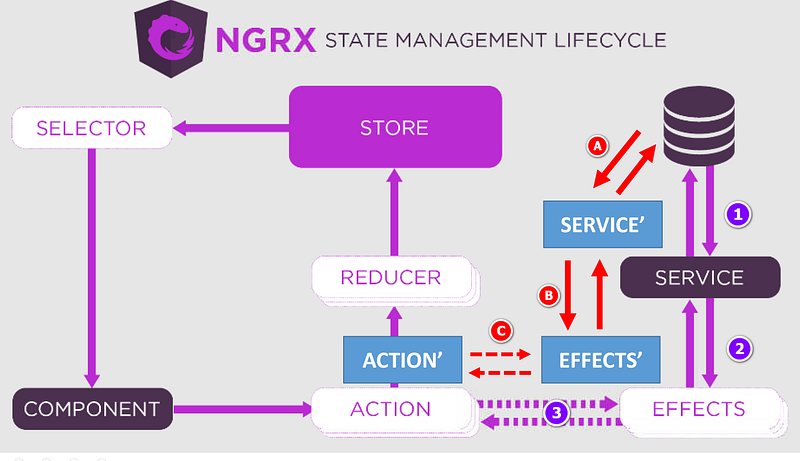
A brief introduction to this solution:
(1) Create new Actions CustPostProductReview, CustPostProductReviewSuccess, and CustPostProductReviewFail. Essentially, this involves prefixing the standard implementation classes with “Cust.”
(2) Create a new CustProductReviewService, inheriting from the standard ProductReviewService. Override its add method to dispatch the new CustPostProductReview Action.
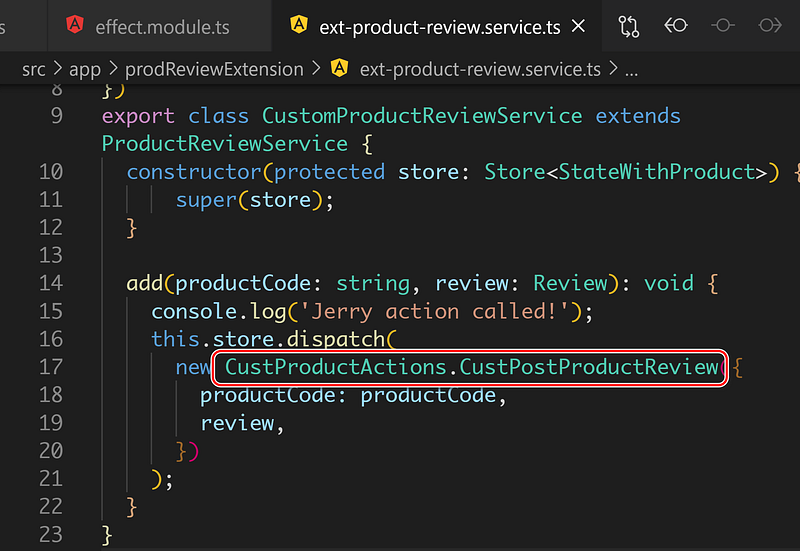
(3) Develop CustProductReviewsEffects, which receives the new Action CUST_POST_PRODUCT_REVIEW (line 25), still calls the Connector to persist user reviews to the Commerce backend (line 28), and then dispatches the new Action CustPostProductReviewSuccess.
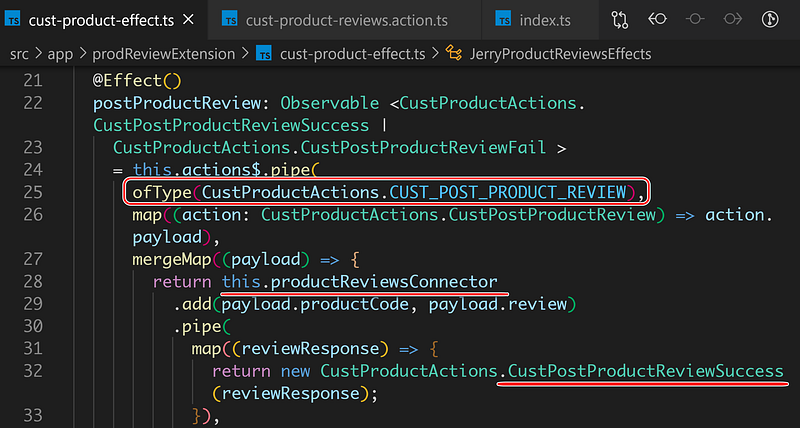
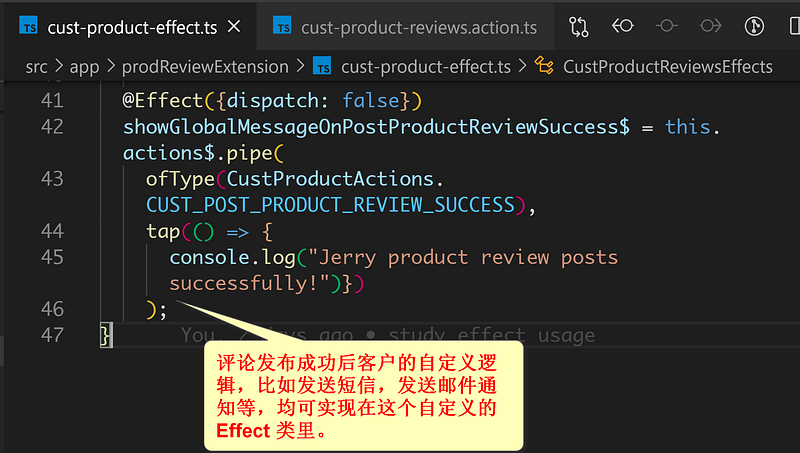
Upon receiving the new Action CUST_POST_PRODUCT_REVIEW_SUCCESS, the custom Effect can proceed with writing custom logic.
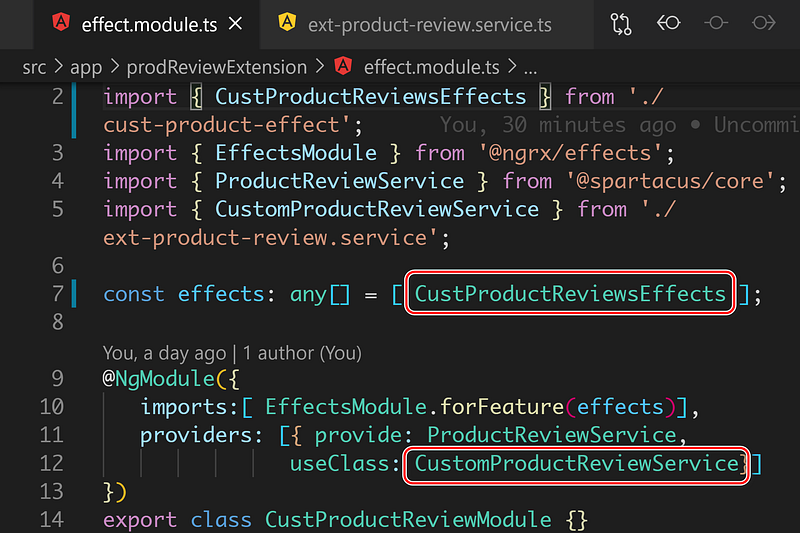
(4) Implement the custom Effect and Service, configuring them into the corresponding Module through the Angular dependency injection framework.
This article delves into the design and implementation technical details of messaging mechanisms that I have been involved in across various product development projects at SAP. It is my hope that this will inspire fellow SAP practitioners. Thank you for reading.