
Design an AutoComplete Widget | FrontEnd System Design Interview
Today let’s look at a commonly asked frontend system design interview question — Design an Autocomplete/Typeahead widget.
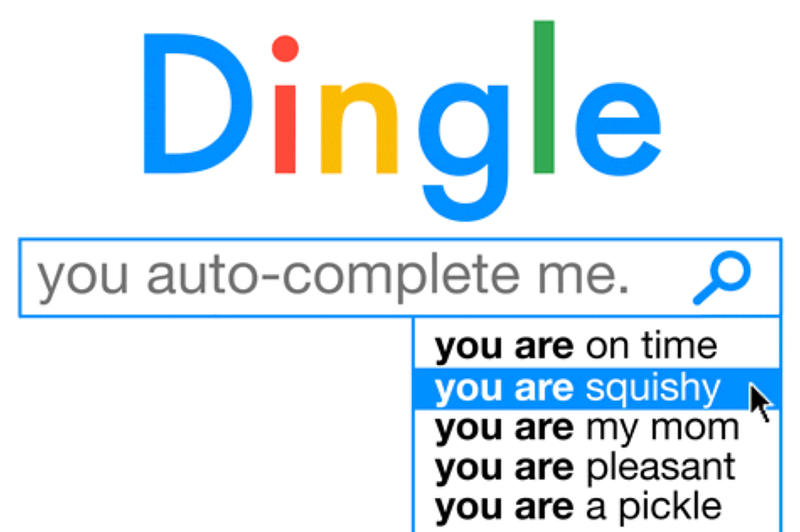
Autocomplete widget can be seen almost everywhere, google uses it, facebook uses it and AWS use it. It provides a search experience by providing suggestions relevant to user’s query. I made a video if you prefer the video format.
Table of contents
- Requirements
- Component Architecture
- Component APIs
- Data flow
- Cache
- Optimizations
- Accessibility
Requirements
- Should return a list of top suggestions, based on user input
- Suggestions should be ordered based on user input’s recency and frequency
- The autocomplete widget should have great extensibility
- Performance
- Cross-browser compatibility
Component architecture
Let’s first take a look at the component architecture,
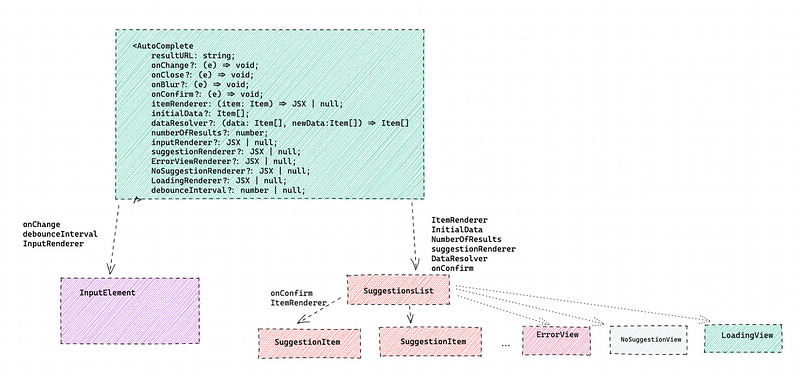
I think the autocomplete widget could be broken down into 3 parts, the parent component:
- Autocomplete component
- Input element
- Suggestions list.
Autcomplete component is like a parent component that orchestrates everything together, it has two separate children components
Input element and Suggestions list,
Input element is a controlled component that takes user input,
SuggestionsList component takes the suggestion data and output a list of items.
Suggestion List could have different views:
- When there is not a matching suggestion OR
- When there is an error OR
- When the result is loading.
Props
Let’s take a closer look at the parent autocomplete component and see what APIs should the widget expose?
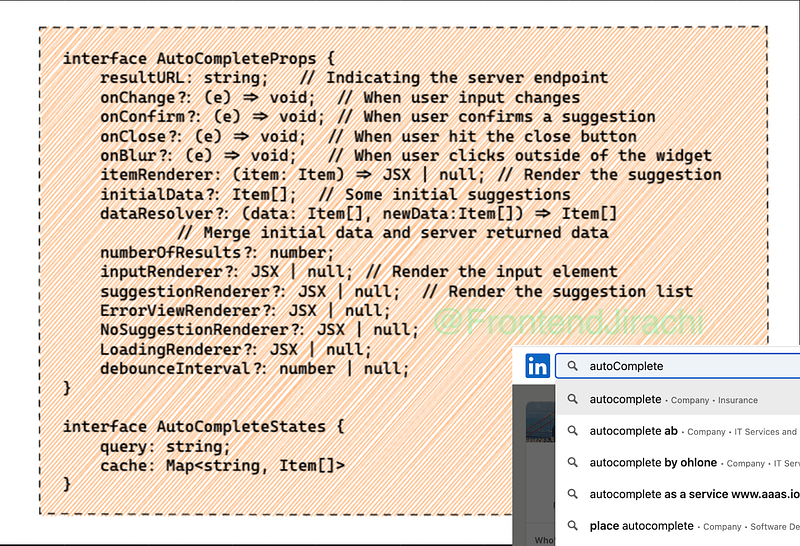
The first property — resultURL indicates what endpoint we wanted to load data from,
Below, there are different hooks that handles different events, for example, we can specify
- onChange method to do something when the user input changes,
- onConfirm to do something when user confirms a suggestion,
- onClose when user clicks on the close button inside the input element,
- onBlur handles when user clicks outside of the widget.
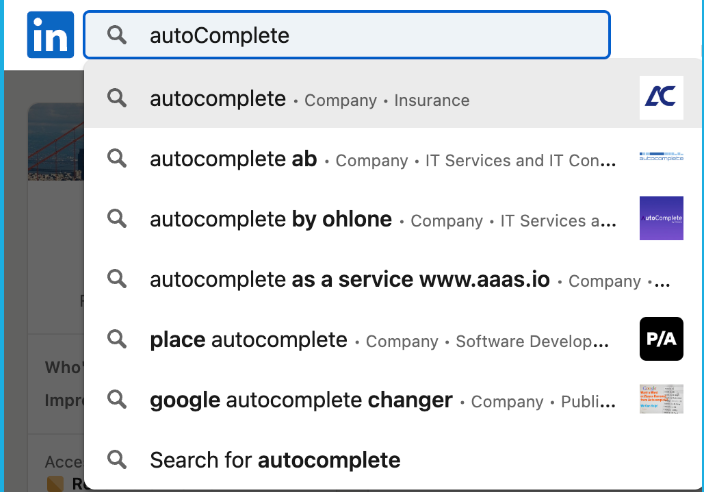
- ItemRenderer is specified to decide what the suggestion item look like, you can see in this linkedin example, we can specify the item renderer to return a suggestion with its name, type and industry
- NumberOfResults is pretty obvious,
Below we have:
- InputRenderer, SuggestionRenderer to specify how to render the input element and suggestions list.
- ErrorViewRenderer, NoSuggestionMatchedRenderer and LoadingRenderer define what the view will look like when there is error, not matched suggestion, when the view is loading.
In the end, we have
- DebounceInterval, when specified, indicating how long the request is debounced.
- DataResolver, a method useful to define how the existing cache should be merged with the incoming data from server.
I think the autocomplete widget could have internal states for query(user input) and the client side cache.
Data flow
Next let’s talk a little bit about how do we load the suggestions when user types queries.
Suppose we have a GET API like this: GET /autocomplete?q={query}
If we decide to load everything from server, the pros & cons look like this:
- Network request & response waiting time is the bottleneck — Bad
- We can offload the data handling/matching to server — Good
- We can have more up-to-date data — Good
However, we can do even better by:
1. Preloading important data, this takes a lot of experimentation and heuristics to understand what might be the most important and performant thing to preload.
2. On top of that, we should have a client side cache that serves the read. And only when there is a read miss, we request data from server. And whenever we request data from server, we update the client side cache using that data
3. The other things we could utilize is debounce or throttle the request.
Debounce
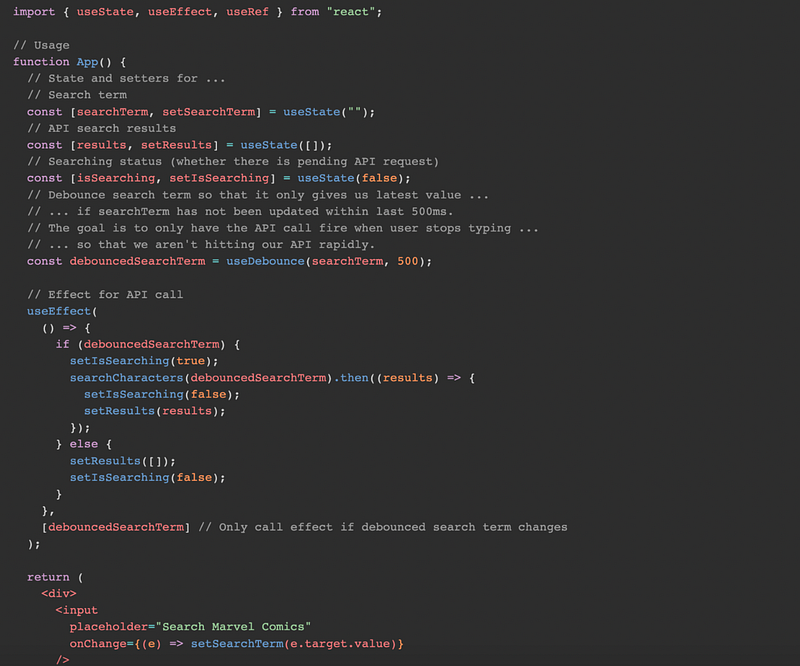
I will show you some approaches to do debounce in react specifically. In react, you can create your own useDebounce hook:
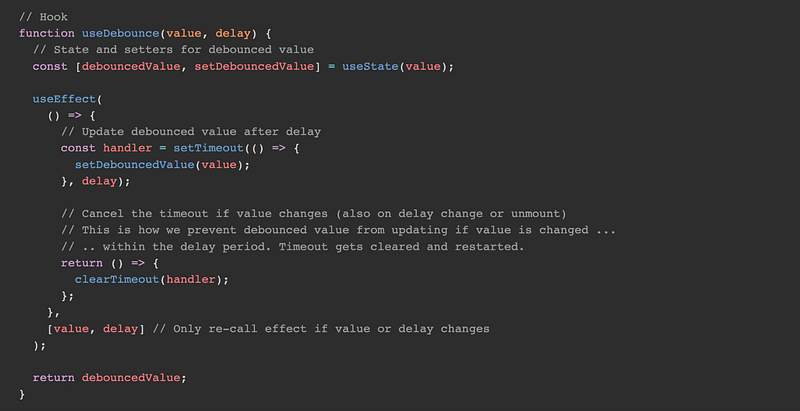
Inside the autocomplete component, you can define a searchTerm state, and use useDebounce hook on the search term, which creates a debouncedSearchTerm, Then you create a useEffect hook that takes the dependency on debouncedSearchTerm.
Multiple inflight XHR request
Another concern is when user types very quickly, there may be multiple requests and their responses could return asynchronously in a different order.
When this happens, we have a couple of approaches to handle it,
- We could have a variable that holds the last query, and if the response is not for the last query, then we just use the response to update the client side cache, otherwise, we use the response for last query to update the suggestions list and then also update the client side cache.
- The other approach requires the response to include the search term, and then we can compare the search term in the client side state with the query in the response.
We should consider decouple the data and view when updating the view.
Client side cache
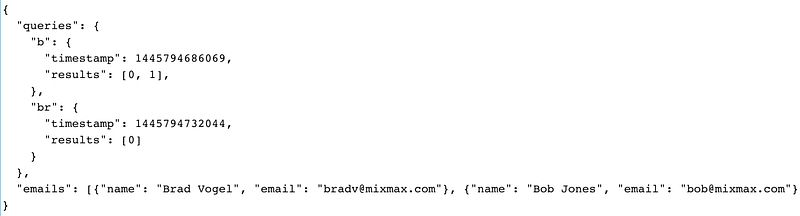
So how do we create the client side cache. I think intuitively, we can use a map (key value pair), the key is the search term and the value is the array of matches.
This approach is okay but there could still be:
- Read miss
- Duplications.
Let’s just look at this example and see why there could be duplications:
Key Value Cache:

in this example, when user queries `b` or `br`, the result is the same, but the whole entry is duplicated, we can optimize the data structure to use an id instead thats point to the index in the result array.
Here are some more optimizations from mix-max’s article:
- Use indexDB and pre-warm the cache.
2. Here are some other optimizations when the response is huge, we can use paginiation or infinite scroll so that we can reduce the data transfered over the network
Accessibility
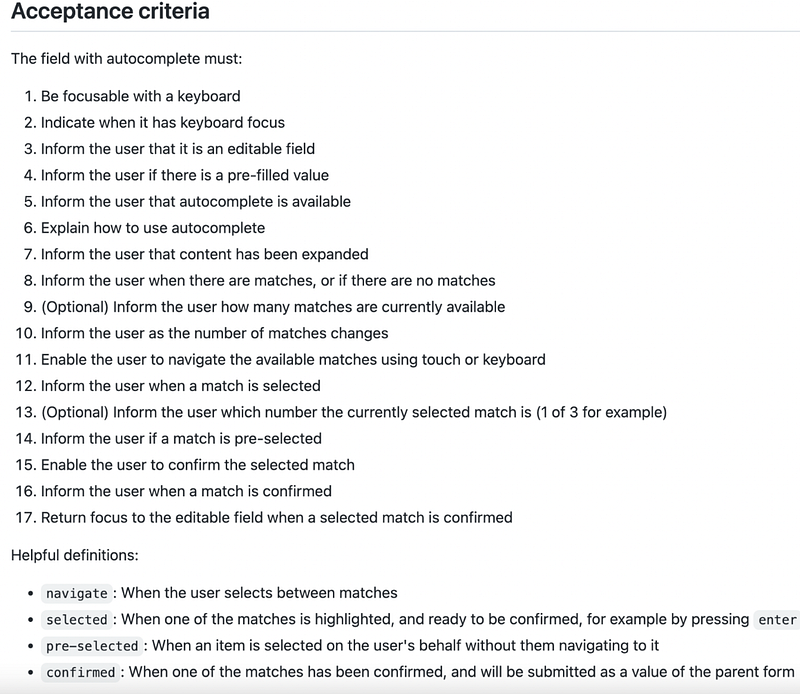
Here is a list of acceptance criteria.
If you enjoyed the article, kindly support and consider following. Thank you :)


