
Deploying Applications in Kubernetes Using Flux
Introduction to Flux
Flux is an Open and extensible continuous delivery solution for Kubernetes. Flux is a GitOps tool for Kubernetes that synchronizes the state of manifests in a Git repository to what is running in a cluster. So what is GitOps? Is it a new tool in the market? GitOps provides a way for developers to manage operational workflow for using Kubernetes using Git. It is all about using a version-controlled system for the deployment of applications in Kubernetes. So Developers can directly push the code into production from the version-controlled system like Git. Moreover, any changes made can be easily tracked and reverted in case of any chaos. There are multiple tools in the market to run GitOps. Today in this article we would be experimenting with a tool called Flux.
Features of Flux:
- Automated synchronization between a version control repository and a cluster.
- Any changes made to the repository are instantly reflected in the cluster.
- Developers can directly push the code into production from the repositories.
- All the configuration is stored in the version control system and is up to date.
- Built-in support for kustomize and helm.
- It can also be integrated with flagger.
- In case of a disaster, the new cluster can be brought up with the same configuration.

What is the entire story all about? (TLDR)
- We will be using Flux to synchronize the Helm Charts stored in a version control system to our Kubernetes cluster.
- We will use HelmRelease ( CRD ) with Flux.
Story Resources
- GitHub Link: https://github.com/pavan-kumar-99/medium-manifests
- GitHub Branch: fluxcd-demo
Installing Flux
Let us now Install fluxcd in our Kubernetes cluster using a helm chart. If you are not familiar with what a helm chart is, refer to this guide. Before we Install fluxcd we will have to Install the HelmRelease CRD ( Explained later in the article ).
helm repo add fluxcd https://charts.fluxcd.io
#Adding the Flux Repo
kubectl apply -f https://raw.githubusercontent.com/fluxcd/helm-operator/master/deploy/crds.yaml
#Installing the HelmRelease CRDkubectl create namespace flux
#Create the namespace for flux InstallationFlux connects to the Git Repository using an ssh key. If the ssh key already exists, A Kubernetes secret can be created from the key. Else configure the key with your GitHub given by fluxcd after installation. Since I already have an existing key pair I would be creating a Kubernetes Secret from the Private Key.
kubectl create secret generic flux-git-deploy --from-file=identity=./id_rsa -n flux --dry-run=client -o yaml | kubectl apply -f -
#This would create the kubernetes secret for flux to communicate with GitHub
Since we have made the configuration for our flux deployment to communicate with our git repo let us deploy fluxcd and HelmOperator deployment.
helm install flux fluxcd/flux --set git.url[email protected]:pavan-kumar-99/medium-manifests.git --set git.branch=fluxcd --set git.secretName="flux-git-deploy" --set git.user=flux-user --set git.path=helm-releases --namespace flux#Install fluxcd deployment helm upgrade -i helm-operator fluxcd/helm-operator --set git.ssh.secretName=flux-git-deploy --namespace flux#Install helm-operator deploymentkubectl create ns fluxcd-demo #Create a namespace to deploy our HelmReleaseHelm Operator
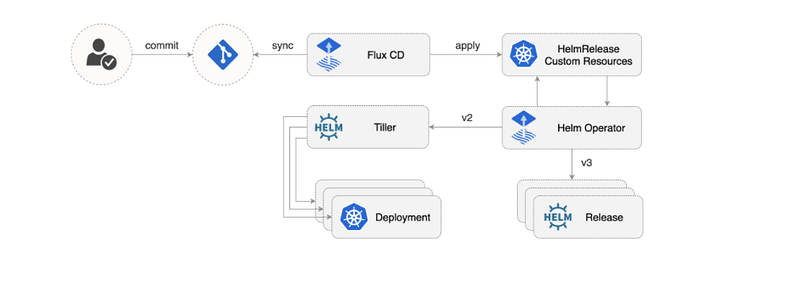
The Helm Operator is a Kubernetes Operator, allowing one to declaratively manage Helm chart releases. The desired state of a Helm release is described through a Kubernetes Custom Resource named HelmRelease. . Based on the creation, mutation, or removal of a HelmRelease resource in the cluster, Helm actions are performed by the operator.
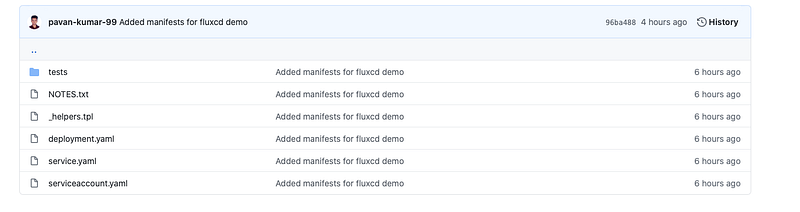
Here is a sample repo which contains some sample helm charts and a sample HelmRelease file. We would now understand what is written in the HelmRelease file.
- kind: HelmRelease ( Kubernetes CRD ).
- metadata.name: The name of the HelmRelease.
- metadata.namespace: The namespace in which the HelmRelease is supposed to be deployed in.
- metadata.annotations: fluxcd.io/automated: To enable automation for fluxcd.
- spec.releaseName: The name of the helm chart release name.
- spec.targetNamespace: The namespace into which the helm chart has to be installed. ( Make sure you create the namespace before the HelmRelease gets Installed )
- spec.chart.git: The Git Repository URL from which the helm charts has to be installed.
- spec.chart.path: The path from GitHub Repository.
- spec.chart.ref: The name of the GitHub branch.
Demo
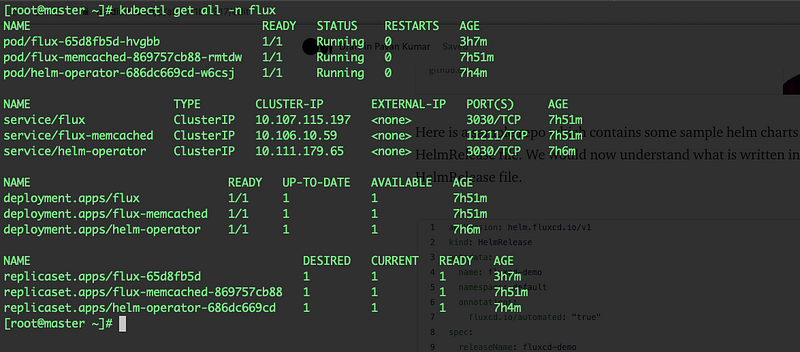
Once the fluxcd and helm operator charts are installed you should see the flux components created in the flux namespace.
Now go grab a cup of coffee and wait for 5 minutes. You should now have all your resources created in your cluster defined in the helm chart. These are the resources defined in our helm chart.
Let us watch the resources in the fluxcd-demo namespace ( spec.targetNamespace-> HelmRelease file )
watch -n 5 kubectl get all -n fluxcd-demo
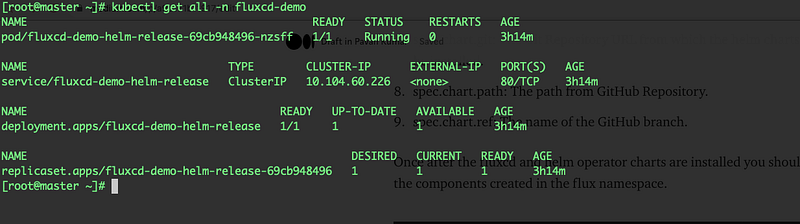
And now you have all the resources defined in the helm chart created in your Kubernetes Cluster.

As we know that fluxcd will watch, pick up the changes from git, and will update our cluster, let us update the number of replicas of fluxcd-demo deployment.

Let us edit our HelmRelease manifests to override the values defined in the values.yaml file of the Helm Chart.
I have updated the number of replicas to 5 in GitHub by overriding the replicaCount value in the HelmRelease file.
Now go grab another cup of coffee and wait for 5 minutes.
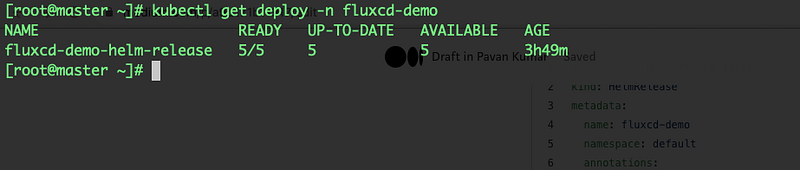
We have now successfully deployed our first HelmRelease using fluxcd.
Conclusion
Thanks for reading my article. Here are some of my other articles that may interest you.
Reference
https://docs.fluxcd.io/en/latest/tutorials/get-started/


