

Deploying 2-Tier Architecture in AWS using Terraform Modules
Hello Devops Practitioners!!, In this article, I have deployed a 2 Tier Garage and Car Buying Application using Terraform Modules. In all my previous Blogs I have talked About how we can leverage the power of Terraform Provisioning in different scenarios and Projects. One such scenario is when you want to deploy a 2 two-tier architecture application with the power of reusable code. Using this Tutorial you can even Deploy 3 Tier Application by just adding one more layer between the Database Tier and Web Tier. Let’s first start by knowing the Architecture.
Understanding Architecture
As it is a 2 Tier Architecture we will be having Only Web Tier and Database Tier. The web Tier is where we have our application visible to the public and the Database tier contains the RDS(MySQL) database instance which remains private and can only be contacted using the web Tier. Let's Understand step by step:
Client Request: A client sends a request to the Application Load Balancer (ALB) endpoint. DNS Resolution: The client’s request is resolved to the ALB’s DNS name or IP address. ALB Routing: The ALB examines the request headers and path to determine which target group to forward the request to. The target group can contain instances for your application server tier. Application Server Instances: The ALB routes the request to one of the instances in the target group, which is part of your application server tier. Application Processing: The application server processes the incoming request and may need to interact with a database to retrieve or update data. Database Interaction: If the application server needs to interact with the database, it connects to the Database tier. This typically involves making SQL queries or database calls to the database servers. Database Servers: The database tier consists of an RDS Database Servers. These servers are separate from the application servers and host the application’s database. Database Processing: The database servers process the database requests, and perform data retrieval, updates, or other operations requested by the application. As the application is a Car Garage service it fetches the information. Response to Application Server: The database returns the data or response to the application server. Response to Client: The application server processes the database response and sends the overall response back to the client through the ALB. Health Checks and Elasticity: The ALB periodically performs health checks on the application server instances. The Auto Scaling group manages the application server instances’ scaling based on the application’s load. If additional application server instances are required, Auto Scaling launches them and registers them with the ALB. We have also set the cloud watch alarm which gets triggered based on CPU Utilization to scale up and down the instances.
There are components like Internet Gateway and Nat Gateway which help in routing the application based on their Tier.
Let's Deep Dive into the code now!!
Terraform Modules
Modules are containers of multiple resources that can be used to separate some infrastructure provisioning code in different folders for better code reusability and management. There can be two types of modules that we can define, The root Modules and the Child Modules.
In every Configuration, there is a Root module that calls other modules in the main configuration file. Child Modules are the modules called by other modules(Mostly Root) to use their functionality in the main(root).tf file. Terraform modules encapsulate the underlying resources enabling users to use the same code in a similar environment.
A typical child module contains a main.tf, variables. tf and output.tf file
.
├── main.tf
├── outputs.tf
├── README.md
└── variables.tf
Backend Configuration in Terraform:
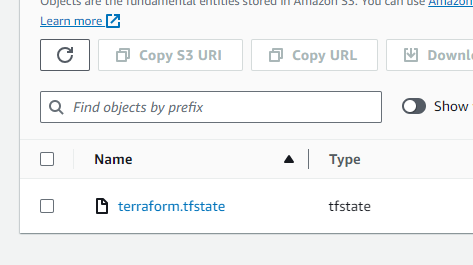
Backet in Terraform preserves the state file by storing it in a secured environment with Lock to prevent multiple execution of the same resource parallelly by different users. Here We’ll be using S3 as the Remote Backend and Dynamo DB for Locking. I won’t discuss the creation in detail to know more about Terraform Remote Backend check my Terraform best Practices Blog.
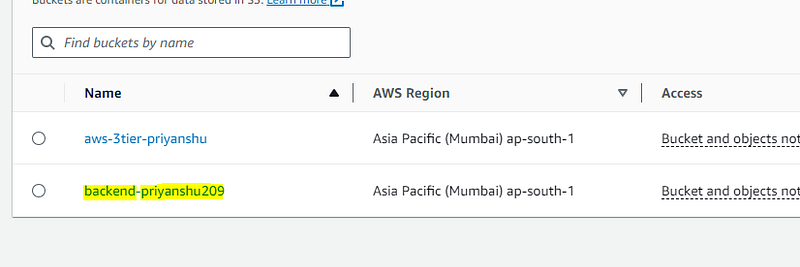
S3 bucket created:
You can create this Bucket manually or by Terraform code:
resource "aws_s3_bucket" "backend_bucket" {
  bucket = "backend-priyanshu209"
}
resource "aws_s3_bucket_versioning" "version" {
  bucket = aws_s3_bucket.backend_bucket.id
  versioning_configuration {
    status = "Enabled"
  }
}
resource "aws_s3_bucket_server_side_encryption_configuration" "encryption" {
  bucket = aws_s3_bucket.backend_bucket.bucket
  rule {
    apply_server_side_encryption_by_default {
      sse_algorithm = "AES256"
   }
  }
}
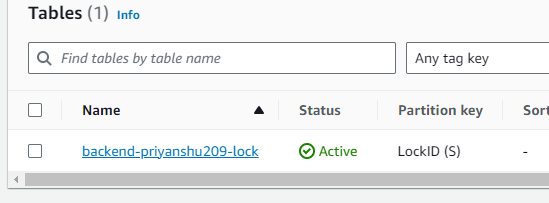
After creating Bucket create the DynamoDB table with lock enabled.
resource "aws_dynamodb_table" "locking" {
name         = "backend-priyanshu209-lock"
  billing_mode = "PAY_PER_REQUEST"
  hash_key     = "LockID"
attribute {
    name = "LockID"
    type = "S"
  }
}
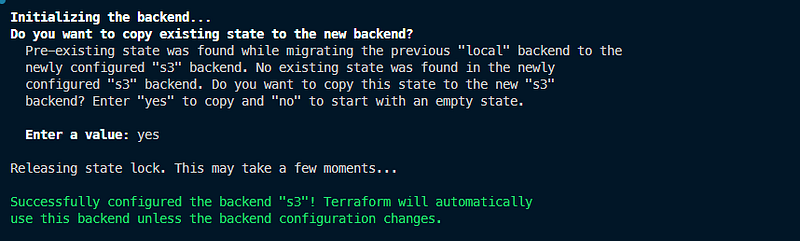
After creating the S3 Bucket and Dynamo DB Table, Add the Terraform backend block in the Terraform provider block in the provider.tf file.
terraform {
  required_providers {
    aws = {
      source = "hashicorp/aws"
      version = "4.67.0"
    }

  }
  backend "s3"{
      bucket = "backend-priyanshu209"
      key = "backend/terraform.tfstate"
      region = "ap-south-1"
      dynamodb_table = "backend-priyanshu209-lock"
      encrypt = true
}}
Creating Modules
The code base will be divided into two portions, the Root folder and the Modules folder. The Modules Folder contain code for various component which are then called in the root main.tf file. The root folder also contains the terraform.tfvars and variables.tf file which are used to inject values in the configuration. Let's look at the modules file:
- VPC Module:
VPC module contains three files main.tf, variable.tf, and output.tf. The main.tf file contains code for vpc creation(aws_vpc), internet gateway(aws_internet_gateway), data source for availability zones(aws_availability_zones), 2 public and private subnets, Route tables(aws_route_table) and Route Table Association(aws_route_table _assocation).
The output file is used to share the values with the parent/root. Output files are not limited to just the parent module. They can be accessed and used by other parts of your Terraform configuration. For example, you might have a child module that provisions a network infrastructure, and you want to use the subnet IDs defined in the child module’s outputs to configure other resources, like security groups or RDS instances.
# main.tf file

# create vpc
resource "aws_vpc" "vpc" {
  cidr_block              = var.vpc_cidr
  instance_tenancy        = "default"
  enable_dns_hostnames    = true
  enable_dns_support =  true

  tags      = {
    Name    = "${var.project_name}-vpc"
  }
}

# create internet gateway and attach it to vpc
resource "aws_internet_gateway" "internet_gateway" {
  vpc_id    = aws_vpc.vpc.id

  tags      = {
    Name    = "${var.project_name}-igw"
  }
}

# use data source to get all avalablility zones in region
data "aws_availability_zones" "available_zones" {}

# create public subnet pub_sub_1a
resource "aws_subnet" "pub_sub_1a" {
  vpc_id                  = aws_vpc.vpc.id
  cidr_block              = var.pub_sub_1a_cidr
  availability_zone       = data.aws_availability_zones.available_zones.names[0]
  map_public_ip_on_launch = true

  tags      = {
    Name    = "pub_sub_1a"
  }
}

# create public subnet pub_sub_2b
resource "aws_subnet" "pub_sub_2b" {
  vpc_id                  = aws_vpc.vpc.id
  cidr_block              = var.pub_sub_2b_cidr
  availability_zone       = data.aws_availability_zones.available_zones.names[1]
  map_public_ip_on_launch = true

  tags      = {
    Name    = "pub_sub_2b"
  }
}


# create route table and add public route
resource "aws_route_table" "public_route_table" {
  vpc_id       = aws_vpc.vpc.id

  route {
    cidr_block = "0.0.0.0/0"
    gateway_id = aws_internet_gateway.internet_gateway.id
  }

  tags       = {
    Name     = "Public-rt"
  }
}

# associate public subnet pub-sub-1a to public route table
resource "aws_route_table_association" "pub-sub-1a_route_table_association" {
  subnet_id           = aws_subnet.pub_sub_1a.id
  route_table_id      = aws_route_table.public_route_table.id
}

# associate public subnet az2 to "public route table"
resource "aws_route_table_association" "pub-sub-2-b_route_table_association" {
  subnet_id           = aws_subnet.pub_sub_2b.id
  route_table_id      = aws_route_table.public_route_table.id
}

# create private app subnet pri-sub-3a
resource "aws_subnet" "pri_sub_3a" {
  vpc_id                   = aws_vpc.vpc.id
  cidr_block               = var.pri_sub_3a_cidr
  availability_zone        = data.aws_availability_zones.available_zones.names[0]
  map_public_ip_on_launch  = false

  tags      = {
    Name    = "pri-sub-3a"
  }
}

# create private app pri-sub-4b
resource "aws_subnet" "pri_sub_4b" {
  vpc_id                   = aws_vpc.vpc.id
  cidr_block               = var.pri_sub_4b_cidr
  availability_zone        = data.aws_availability_zones.available_zones.names[1]
  map_public_ip_on_launch  = false

  tags      = {
    Name    = "pri-sub-4b"
  }
}

# create private data subnet pri-sub-5a
resource "aws_subnet" "pri_sub_5a" {
  vpc_id                   = aws_vpc.vpc.id
  cidr_block               = var.pri_sub_5a_cidr
  availability_zone        = data.aws_availability_zones.available_zones.names[0]
  map_public_ip_on_launch  = false

  tags      = {
    Name    = "pri-sub-5a"
  }
}

# create private data subnet pri-sub-6-b
resource "aws_subnet" "pri_sub_6b" {
  vpc_id                   = aws_vpc.vpc.id
  cidr_block               = var.pri_sub_6b_cidr
  availability_zone        = data.aws_availability_zones.available_zones.names[1]
  map_public_ip_on_launch  = false

  tags      = {
    Name    = "pri-sub-6b"
  }
}
Output.tf :
output "region" {
  value = var.region
}

output "project_name" {
  value = var.project_name
}

output "vpc_id" {
  value = aws_vpc.vpc.id
}

output "pub_sub_1a_id" {
  value = aws_subnet.pub_sub_1a.id
}
output "pub_sub_2b_id" {
  value = aws_subnet.pub_sub_2b.id
}
output "pri_sub_3a_id" {
  value = aws_subnet.pri_sub_3a.id
}

output "pri_sub_4b_id" {
  value = aws_subnet.pri_sub_4b.id
}

output "pri_sub_5a_id" {
  value = aws_subnet.pri_sub_5a.id
}

output "pri_sub_6b_id" {
    value = aws_subnet.pri_sub_6b.id
}

output "igw_id" {
    value = aws_internet_gateway.internet_gateway
}
variable.tf :
variable region {}
variable project_name {}
variable vpc_cidr {}
variable pub_sub_1a_cidr {}
variable pub_sub_2b_cidr {}
variable pri_sub_3a_cidr {}
variable pri_sub_4b_cidr {}
variable pri_sub_5a_cidr {}
variable pri_sub_6b_cidr {}
Similarly, you will create all the resources for the other components such as Application load Balancer, Auto scaling group, NatGateway, RDS(Database), security group, vpc. Check out the code.
Setting Up Root Module
The Root in the configuration file is used to call the child modules by sourcing it in the main file of the root/parent module. The parent or root module is the primary entry point for your infrastructure code and serves as the starting point for defining and managing your infrastructure. It serves as the entry point for your Terraform configuration. When you run Terraform commands like terraform init, terraform plan, or terraform apply, Terraform looks in the directory where you're executing the command to find the configuration files for the parent module.
The root folder contains Main.tf, variables.tf, terraform.tfvars, backend, and provider files.
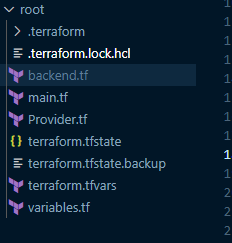
In the main.tf file you will call the modules. source keyword is used to provide the path for the child module. The variables declaration is also added in that particular block of that module.

If you want to share the variable from the child module to another child module use the module.ModuleName.variable. The terraform.tfvars file contains the values for the variables defined in the Variable.tf file.
#variable.tf

variable "project_name" {
    description = "This is the name of my project"

}
variable "region" {
    description = "this is region"

}
variable "vpc_cidr" {}
variable "pub_sub_1a_cidr" {}
variable "pub_sub_2b_cidr" {}
variable "pri_sub_3a_cidr" {}
variable "pri_sub_4b_cidr" {}
variable "pri_sub_5a_cidr" {}
variable "pri_sub_6b_cidr" {}
variable "db_username" {}
variable "db_password" {}
#terraform.tfvars
project_name = "terraform-2Tier"
region = "ap-south-1"
vpc_cidr = "10.0.0.0/16"
pub_sub_1a_cidr = "10.0.1.0/24"
pub_sub_2b_cidr = "10.0.2.0/24"
pri_sub_3a_cidr = "10.0.3.0/24"
pri_sub_4b_cidr = "10.0.4.0/24"
pri_sub_5a_cidr = "10.0.5.0/24"
pri_sub_6b_cidr = "10.0.6.0/24"
db_username = "admin"
db_password = "Priyanshu123"After all the configuration code, Run the 3 magical Terraform commands to solidify your setup.
Terraform init
Terraform init will configure all the modules, providers, and backend.
terraform init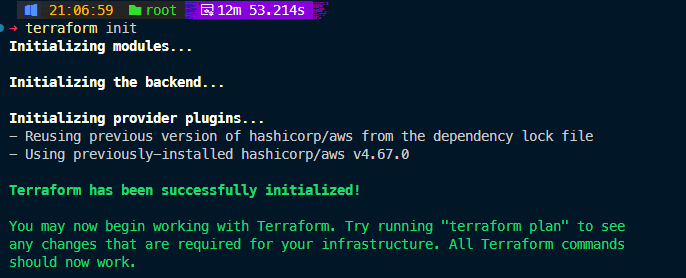
Terraform plan
A terraform plan is used to check the complete workflow of the configuration code. It acts as a blueprint for the apply command.
Terraform Apply
It is used to create or modify infrastructure resources based on the definitions in your Terraform configuration files. When you run terraform apply, Terraform reads your configuration, plans the changes required to reach the desired state, and then applies those changes to your infrastructure.

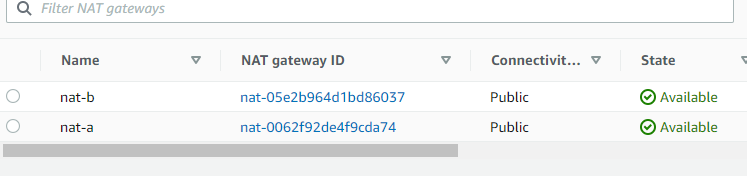
After the above command runs successfully, You can check the provisioning in the AWS.
Instances:

Launch Template:

Database:
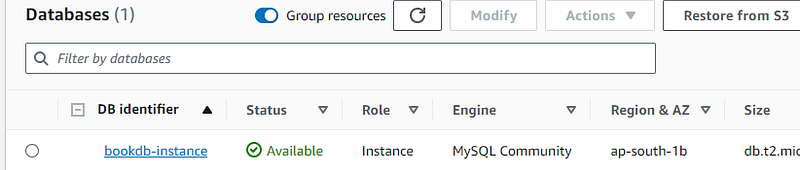
Nat Gateways:
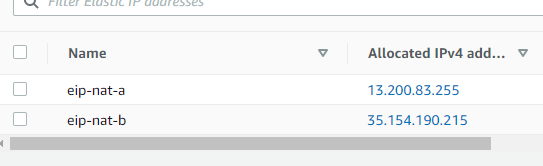
Elastic Ip’s:
AutoScaling Group:

Internet Gateway:

These are some of the components created successfully. Go to the Load Balancer page, copy the DNS name for the Terraform-2Tier-alb, and hit it.

Website is up and running:


Code:
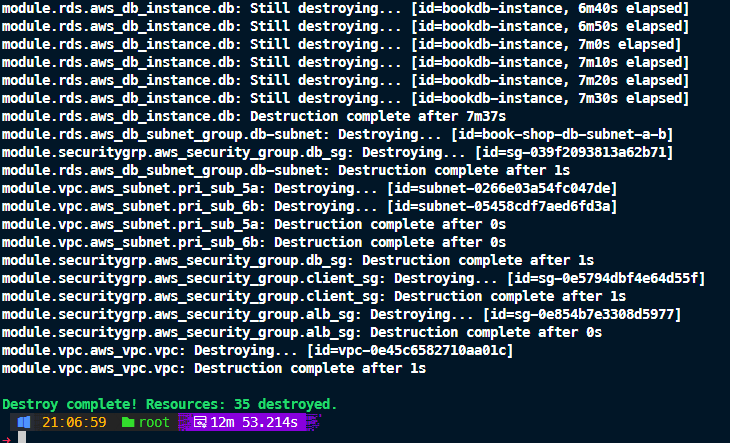
Clean Up:
Use the terraform Destroy command to delete the setup.
terraform destroy
Conclusion
In this article, I have deployed a 2 Tier Application in AWS using Terraform Modules. I hope this blog will help you and guide you to move forward with terraform modules. In case of any query or doubt please refer to my detailed Terraform Blogs which explains Terraform Fundamentals and Best Practices.
Thanks For Reading!!


