
Dependency management in Flutter
Part 4 in my “Flutter from a complete beginner” series.
Tiger asks … where goes what in a Flutter project?
Ok, so we have our demo application set up in IntelliJ from the previous part in this series. Let’s try to make sense of what was generated and figure out how to handle dependencies.
In my next part, we’ll then use that knowledge to set up a widget library.
Basic folder structure
For the most part, things are self-explanatory:
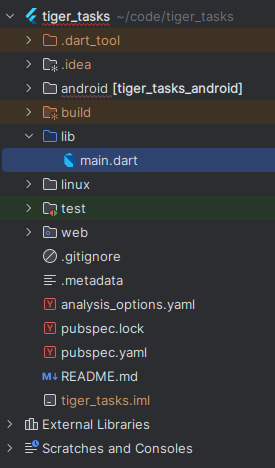
lib/contains your application APIlib/src/(doesn’t yet exist in the screenshot) will contain your application implementation. we’ll talk more about this in the section about packages and pluginstest/, unsurprisingly, will contain your tests- asset folders like
image/,font/, etc. I don’t have yet, but judging by the they would be on the same level as thelib/andtest/directories android/,web/,ios/, etc. contain platform-specific code, generated by flutter. I only targetedandroid/,web/andlinux/when I created the project, so that’s the folders we have..metadatasome flutter-internal tracking file, “should be version controlled and should not be manually edited”.analysis_options.yamlconfigures your static code analyserpubspec.yamlthis is where you define your dependenciespubspec.lockgenerated, keeps track of exact version numbers as well as transitive dependencies. “If your package is an application package, you will typically check this into source control. For regular packages, you usually won’t.”
Interesting things to note:
testalready contains a basic test, and they mention:
To perform an interaction with a widget in your test, use the
WidgetTesterutility in theflutter_testpackage.
- the
androiddirectory is a gradle sub-project
If you open e.g. the MainActivity in IntelliJ, the Flutter plugin offers you to “Open for editing in Android Studio”. Of course I’m not going to do that, as I have decided to use IntelliJ for my code editor, but the presence of a build.gradle file should mean that I can quite easily open the android part as a project in IntelliJ and edit files there, if I need to.
Dependency management in Flutter
pubspec.yaml
As mentioned, this is where you define your dependencies. It first keeps track of the application name and version, the SDK version and then offers three dependency sections:
dependencies:dependencies anybody using the package will needdev_dependencies:dependencies only needed to develop the package itself, these will not be exported as “transitive” dependenciesflutter:flutter-specific configurations
Annoyingly, its being a .yaml file means whitespace matters.
The comments in the generated pubspec.yaml file do a good job in explaining things, but roughly speaking, the dependencies section will look like this:
dependencies:
  flutter: #required
    sdk: flutter

  # dependencies clients need
  cupertino_icons: ^1.0.2

dev_dependencies:
  # dependencies clients don't need
  flutter_test: #required (if you write tests, which you should)
    sdk: flutter
  flutter_lints: ^2.0.0
flutter:
  # flutter-specific stuff
  uses-material-design: true
  assets:
    - images/foo.jpeg
    - images/bar.jpeg
Download dependencies after clone
Dependency management happens using dart’s pub tool.
if your current directory holds a Flutter app or other Flutter-specific code, use
flutter pub <subcommand>(instead ofdart pub <subcommand>)
Right after a git clone , we may want to run
flutter pub getget makes all the dependencies listed in the pubspec.yaml file in the current working directory and their transitive dependencies available. The pubspec.lock file controls which versions it gets.
IntelliJ already did this for us, but it’s useful to know how to do it anyway.
Installing new dependencies
Let’s say I want to add mockito to my dev dependencies so I can mock stuff in my tests.
flutter pub add dev:mockitothis will look up the depencency and add it for me. At the time of writing, this will add mockito: ^5.4.4 under dev_dependencies and gets its transitive dependencies.
(If I leave away the dev: , the dependency will be added under dependencies:, instead.)
In this case, mockito is a hosted on pub.dev and therefore dart knows how to resolve it. There are other ways to specify a dependency in your pubspec.yaml file:
- Hosted on a different server
dependencies:
  tiger:
    hosted: https://some-package-server.com
version: ^8.8.8- Hosted in a git repository
dependencies:
  tiger:
    git: [email protected]:tigerasks/tiger.git
which optionally also allows ref and path to specify more clearly where exactly the package is:
dependencies:
  tiger:
    git:
      url: [email protected]:tigerasks/tiger.git
      ref: some-branch
path: path/to/tiger- Path on disk
dependencies:
  tiger:
    path: /path/to/tiger
Removing dependencies
flutter pub remove cupertino_iconswill remove the cupertion_icons dependency.
Updating dependencies
Versions added to pubspec.yaml can be configured to be auto-upgradable.
5.4.4— use this exact version and only this exact version^5.4.4— use this version, or any newer5.X.Y'>=5.4.0 <6.0.0'— self-explanatory (and probably a bit dated): anything between5.4.0(inclusive) and6.0.0(exclusive) is acceptable
To update all upgradable dependencies, run
flutter pub upgradeupgrade ignores the current constraints in pubspec.lock and instead tries to upgrade the listed dependencies based on the upgradability constraints in the pubspec.yaml file.
In my case, this informs me, that it cannot automatically upgrade, but that there are upgrades:
Resolving dependencies... (1.4s)
  _fe_analyzer_shared 64.0.0 (66.0.0 available)
  analyzer 6.2.0 (6.4.0 available)
  flutter_lints 2.0.3 (3.0.1 available)
  lints 2.1.1 (3.0.0 available)
  matcher 0.12.16 (0.12.16+1 available)
  material_color_utilities 0.5.0 (0.8.0 available)
  meta 1.10.0 (1.11.0 available)
  path 1.8.3 (1.9.0 available)
  test_api 0.6.1 (0.7.0 available)
  web 0.3.0 (0.4.2 available)
No dependencies changed.
10 packages have newer versions incompatible with dependency constraints.
Try `flutter pub outdated` for more information.
If we run
flutter pub outdatedwe get a much shorter list of dependencies that we can change in our pubspec.yaml :
Showing outdated packages.
[*] indicates versions that are not the latest available.
Package Name   Current  Upgradable  Resolvable  Latest
direct dependencies: all up-to-date.
dev_dependencies:
flutter_lints  *2.0.3   *2.0.3      3.0.1       3.0.1
1 dependency is constrained to a version that is older than a resolvable version.
To update it, edit pubspec.yaml, or run `flutter pub upgrade --major-versions`.
and I absolutely love this feature as it makes it easy to find dependencies for which it’s worth looking at the release notes.
flutter pub upgrade --major-versionswill then upgrade all upgradable dependencies even to the next major version, whereas
flutter pub upgrade flutter_lints --major-versionswill only upgrade the flutter_lints dependency.
Assets
Assets (i.e. images, videos, etc.) are stored wherever you want (most often somewhere in the working directory), you then define their paths in the pubspec.yaml file:
flutter:
  assets:
    - icons/my_icon.png
    - images/
on build, Flutter bundles these assets into an AssetBundle. You get the AssetBundle from the BuildContext and retrieve assets by specifying their path as their key.
To display images, use an AssetImage widget:
const Image(image: AssetImage('images/foo.png'))There’s a lot more we could go into, but we’ll cross that bridge when we actually come to it.
Packages and Plugins
Types of packages
- ordinary
dart package flutter package: dart package with a dependency on flutterplugin: a package with a dart API and at least one platform-specific implementation (e.g. Kotlin implementation for Android)ffi plugin: a plugin where the implentation uses dart ffi
Our widget library will be a flutter package. I may cover how to create a flutter plugin if and when I actually need native code.
What does a package look like?
According to dart, the minimum requirement for a package are:
- a
pubspec.yamlfile lib/subdirectory containing your exported codelib/srcby convention code that is to be considered private to the package
Inside the lib/ and lib/src folders, you can create any arbitrary structure you please.
Exporting private code
To make APIs under lib/src public, you can export lib/src files from a file that’s directly under lib.
we do this by usingexport … show … in a dart file in lib/
export 'src/foobar.dart' show foo, bar;we can do this conditionally:
export 'src/hw_none.dart' // Stub implementation
    if (dart.library.io) 'src/hw_io.dart' // dart:io implementation
if (dart.library.html) 'src/hw_html.dart'; // dart:html implementation- all three implementations must implement the same interface
- conditional import or export checks only whether the library is available for use on the current platform, not whether it’s actually imported or used.
Depending on a package
Dependencies on a different package need be declared with the package: prefix in import statements:
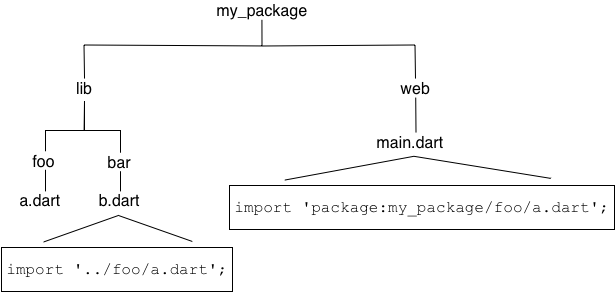
Conditional import works like conditional export, except with the import keyword.
Creating a package
Dart package:
dart create -t package <PACKAGE_NAME>Flutter package
flutter create --template=package <PACKAGE_NAME>And I think that concludes what I think is useful to know about packages and dependency management in flutter, for now.
Now let’s get to using that knowledge:


