
The iOS View Drawing Cycle Demystified
Understand the methods that are called in order to lay out our views

Difficulty: Beginner | Easy | Normal | Challenging
Prerequisites
- Some understanding of OO would be beneficial.
Main Run Loop of an iOS App
Apple has enabled the iOS SDK to handle user events and trigger responses within the application through use of the event queue.
When a user interacts with an application, the event is added to the event queue, which can then be handled by the application and potentially dispatched to other objects in the application. Once the events are handled, they then return control to the main run loop and begin the update cycle, which is responsible for laying out and drawing views.
The Update Cycle
Once control is returned to the main run loop, the system renders layout according to constraints on view instances.
When a view is marked as requiring a change in the next update cycle, the system executes all the changes.
The system works through the run loop, then constraints before the deferred layout pass.
Deferred layout pass
Constraints would usually be created during the creation of the view controller (perhaps in the viewDidLoad() function).
However, during runtime, dynamic changes to constraints are not immediately acted on by the system. Unfortunately, the change would be left in a stale state, waiting for the next deferred layout pass and — actually, that might never happen. The user is looking at an out-of-date view. Awful.
Equally, other changes to objects (like changing a control’s properties) can also change the constraints on other objects, potentially leading to the same problem.
The solution to this is to request a deferred layout pass by calling setNeedsLayout() on the relevant view (or setNeedsUpdateConstraints()).
Technically, the deferred layout pass (according to the documentation) involves two passes:
- The update pass updates the constraints, as necessary. This calls
updateViewConstraintsmethod on all view controllers andupdateConstraintsmethod on all views. - The layout pass repositions the view’s frames, as necessary. This calls
viewWillLayoutSubviewson all view controllers andlayoutSubviewson each view.
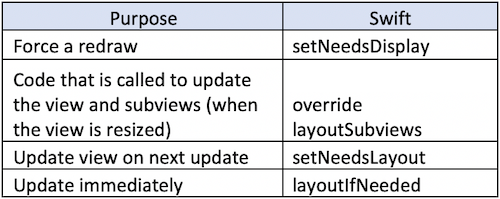
The relevant methods? They are right below but explored in depth further on in the article.
The Risk of Infinite Loops
We are placing views onto a list to request an update on a deferred layout pass. The risk of doing so is that through every pass, another request for a deferred layout pass is made.
- Always call the superclass when overriding a method.
- Do not call
setNeedsLayout()insidelayoutSubviews. - Do not call
setNeedsUpdateConstraints()insideupdateConstraints().
Force a Redraw With setNeedsDisplay
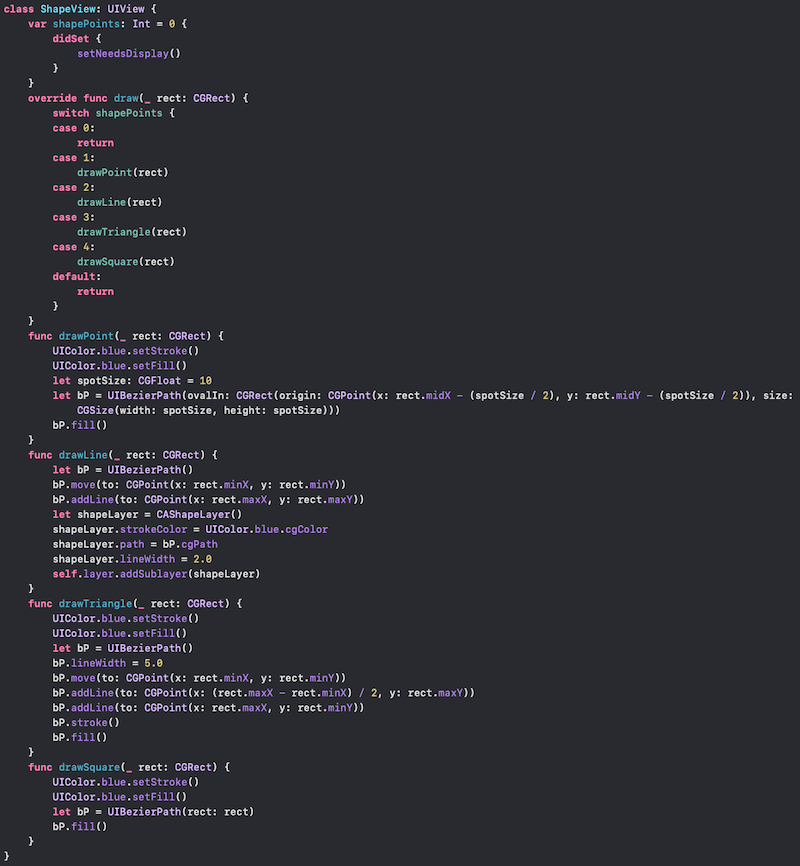
setNeedsDisplay() forces a redraw of a particular view. Because you should never call draw(_ rect: CGRect) directly, you can think of setNeedsDisplay() as a method of asking UIKit for a redraw. Another way of thinking of this is that calling setNeedsDisplay() marks a view as dirty; that is, on the next update cycle, the view will be redrawn through a deferred layout pass.
Since the pass is deferred, it will occur during the next update cycle, during which func draw(_:) will be called on all such views.
This seems a little bewildering to the beginner since most UI components take care of this for us. However, there can be a property that is not directly tied to a UI component, and we need to inform Swift of what’s what with our call.
Trigger Layout Refreshes with setNeedsLayout
When a view changes, the layout changes, and this requires a recalculation by Auto Layout.
Usually, the layout is automatically updated. That is, when a view is resized, it’s added to the view hierarchy, constraints are updated, and the device is rotated or the user scrolls.
There are situations where we need to force the layout of a particular view instance to be recalculated. and these are covered by the next couple of methods.
setNeedsLayout()
setNeedsLayout() asks for a layout update on a particular view. This will take place on the next update cycle, which, due to the quick refresh of iOS device screens, should be fast enough that the user does not experience any lag.
layoutIfNeeded()
This is similar to layoutIfNeeded() in that it forces an immediate update of the layout. One particular instance where this is used is for the animation of constraints, which, due to animation, would need to be updated immediately.
layoutSubview
The layoutSubview method is called when the view resizes, including the very first time it is set. This means that overriding this would be a suitable place to set corner radius of a UIView, or similar.
Rather than being called directly, this is triggered by the system when the view is first laid out (that is, on the first draw) as well as on rotation. It can be requested with setNeedsLayout() for the next drawing update or forced immediately through layoutIfNeeded().
If you are working in a view controller viewDidLayoutSubviews(), is your similar method here.
Update Constraints
When views are updated, the func draw(_ rect: CGRect) method is called (if there is one).
Don’t use updateConstraints() for the initial setup of your view. Use it for best performance when you need to add, modify, or delete lots of constraints within a single layout pass. But in practice, it usually makes sense to change them in place in any case. So there may be performance reasons for using this method, but in general, you should not.
UpdateConstraints also has a sibling function for a viewController, updateViewConstraints(), which can be useful.
Understanding Coordinates
Understanding how a view updates and how it relates to the methods in UIView are essential to your journey as a developer focusing on Swift.
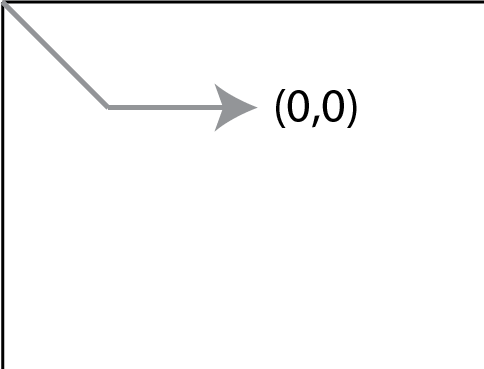
The coordinates for any particular UIView start in the top-left hand corner, as the following diagram shows:
Conclusion
Within UIKit, using views is extremely important. There is quite a lot to understand and get used to, but it’s important to come to grips with the concepts to help you on your journey as a developer.
Extend Your Knowledge
- Read Apple’s documentation about drawing concepts.
- Apple has documentation on the deferred layout.


