avatarValentin Despa

Free AI web copilot to create summaries, insights and extended knowledge, download it at here

4070

Abstract

specialized variables below (like environment variables).</li></ul><blockquote id="600c"><p><b>👉 Subscribe</b> to the <a href="http://eepurl.com/gPwpU1"><b><i>Testing and automation with Valentine</i></b></a> newsletter for bi-weekly tutorials, tips, and news from the industry.</p></blockquote><h1 id="c9a1">Environment variables</h1><p id="9fb4">You should be using environment variables if you want to <b>use the same collection but against different environments</b>. Like for example, you use the collection to develop an API locally (using localhost) but you want to reuse the same collection for the testing or production server.</p><figure id="989e"><img src="https://cdn-images-1.readmedium.com/v2/resize:fit:800/1*-gHwWSlsyKbJ8WhrM8aDMA.png"><figcaption>Using environment variables when dealing with multiple servers</figcaption></figure><p id="df12">But they can also be useful if you only have one environment but want to separate yourself from the global scope.</p><h2 id="58d4">When to use?</h2><ul><li>Storing <b>environment-specific</b> information (like URLs, authentication credentials) when you have <b>multiple environments</b> (localhost, testing, production)</li><li>Passing data to other requests</li><li>Passing data from the pre-request script to the request/tests</li></ul><h2 id="4943">Best practice</h2><ul><li><b>Don’t use environment variables if you only have one environment</b>. Use collection variables. Having a single environment connected to the collection creates more overhead.</li><li><b>Clear / remove variables</b> once you do not need them</li><li><b>Avoid</b> mixing with other variables types, as it may cause confusion</li><li>Get variables in scripts using the scoped getter pm.variables.get() so that you can later change the variable scope without having to update all the scripts</li></ul><blockquote id="411a"><p>If you enjoy this content and it help you solve a problem, help me create more content like this. <b>Consider supporting me on <a href="https://www.patreon.com/vdespa">Patreon</a>.</b></p></blockquote><h1 id="90bb">Collection variables</h1><p id="6836">Collection variables were recently introduced in Postman and try to provide <b>a way of defining variables within a collection</b>. This makes the collection independent of any environment.</p><figure id="5741"><img src="https://cdn-images-1.readmedium.com/v2/resize:fit:800/1*qB1iegyOsHzy5axWhKmQQw.png"><figcaption>Changing collection variables can only be done by using the Postman GUI</figcaption></figure><p id="9099">With Postman 7.9.0 released in October 2019, it is possible for <b>collection variables to be created, updated, or deleted from scripts.</b></p><blockquote id="d142"><p>If you want to <b>learn how to use Postman for API testing</b>, I have created an online course that starts with the basics of Postman and helps you understand the fundamentals of API testing. <a href="https://vdespa.com/courses/?q=MEDIUM">Learn more about the course.</a></p></blockquote><h2 id="b23d">When to use?</h2><ul><li><b>Anytime you are working with a single environment</b></li><li>For storing URLs / authentication credentials</li><li>Passing data to other requests</li><li>Passing data from the pre-request script to the request/tests</li></ul><h2 id="916b">Best practice</h2><ul><li><b>Avoid</b> mixing with other variable types as it may cause confusion</li><li>Get variables in scripts using the scoped getter pm.variables.get() so that you can later change the variable scope without having to update all the scripts</li></ul><h1 id="53ba">Local variables</h1><p id="80ef">Local variables are almost unknown and <b>have caused a lot of confusion</b> in the community because their usage is not properly documented and a different behavior within the Postman App compared to the Collection Runner or Newman.</p><p id="32ff">They are more or less nice to have and they provide a way of <b>passing data within the request (when in Postman) or within the entire collection or between iterations when using the Collection Runner or Newman</b>.</p><

Options

h2 id="0230">What are local variables anyway?</h2><p id="41d9"><b>Really hard to explain.</b> You define them, use them once and they disappear in the dark — or something like that. <b>Local variables can only be created from scripts.</b> There is no GUI that allows you to define such variables or to inspect them.</p><p id="0e23">Here is an example involving passing data from the pre-request script to the request itself or to the test script (<b>but this is not the best example on how to use them!</b>).</p><p id="ec2a">Let's imagine you need to compute a value before the request is sent. You would generate that value and save it to a global or environment variable OR <b>you could use a local variable</b>, like this:</p><figure id="84fd"><img src="https://cdn-images-1.readmedium.com/v2/resize:fit:800/1*KnXKYeW_TvZsLRh6yCwxkg.png"><figcaption>Defining a local variable in Postman</figcaption></figure><p id="a371">Once the local variable has been defined, this will be pick-up when sending the request.</p><figure id="3595"><img src="https://cdn-images-1.readmedium.com/v2/resize:fit:800/1*gr0zwrkVFHWqZ_SEn9vE4w.png"><figcaption>Sending a request using a local variable</figcaption></figure><p id="7d37">The same goes if you need to access the local variable in the test script.</p><figure id="5ef1"><img src="https://cdn-images-1.readmedium.com/v2/resize:fit:800/1*m4tFe3msusn-a2yyFBoqyQ.png"><figcaption>Accessing a local variable in Postman</figcaption></figure><p id="ea3c">When you are using the Postman App, local variables will cease to exist once the request has been executed.</p><p id="360b">When using the Collection Runner or Newman, local variables will exist during the entire collection run or even between multiple iterations.</p><h2 id="f93d">When to use?</h2><ul><li>Whenever you would like to <b>override all other variable scopes</b> — for whatever reason. Not sure though then this is needed.</li></ul><p id="f462"><b><i>Do you know other use-cases?</i></b><i> I would be more than happy to hear from you. Just leave a comment in the section below.</i></p><h2 id="1d5b">Best practice</h2><ul><li><b>Try to avoid them</b> as they can be hard to understand and can lead to unwanted side effects when used.</li><li><b>Try to avoid them as they </b>behave differently in the Postman App compared to the Collection runner and Newman — so be aware of that.</li></ul><h1 id="b2b0">Data variables</h1><p id="db01">If you need to run the same request or collection against multiple data-sets, the most common solution is to define the data-sets as external files and to run the collection using the Collection Runner or Newman. There are not a lof alternatives to data variables if you go this way.</p><p id="b40c">Data variables can only be set from a CSV or a JSON file and they will exist only during the execution of an iteration.</p><p id="dcdb">Read more about <a href="https://learning.getpostman.com/docs/postman/collection_runs/working_with_data_files/">working with data variables and iterations</a>.</p><h1 id="6264">Conclusion</h1><p id="dc0b">I hope this article has given you an overview of the different variable types in Postman and that you can now make an informed decision next time you use them.</p><p id="e767"><b>Thank you for sticking with this article until the end. If you enjoyed it, please leave a comment, share, and press that 👏 a few times (up to 50 times). It will help others discover this information and maybe it will help someone else as well.</b></p><p id="b58b"><b>Follow me on Medium or <a href="https://www.youtube.com/channel/UCUUl_HXJjU--iYjUkIgEcTw?view_as=subscriber">YouTube</a> if you’re interested in more tutorials like this one.</b></p><h1 id="a653">Want to learn more about Postman?</h1><p id="91ac">I am not only writing posts but I am also an online instructor. So if you are interested in learning more about Postman, maybe you want to take a look at my <a href="https://vdespa.com/courses/?q=MEDIUM"><b>Postman: The Complete Guide to REST API Testing</b></a> online course.</p></article></body>

Demystifying Postman Variables: HOW and WHEN to use Different Variable Scopes

Are you confused about the different variable types in Postman, like global, collection, environment, local, data variables? Hopefully, this will make your life easier.

Variables are a very powerful feature of Postman. Not only it allows you to save and manage some repeating information (like URLs, authentication tokens or keys, and so on) but by using scripts, you can pass data from one request to the next thus creating some very advanced workflows. But they can also cause a lot of confusion and uncertainty.

✅ UPDATED in January 2021. All the information in this article is up-to-date.

I have documented how to use the Postman variables within scripts in the Postman Quick Reference Guide which you can view online or download a PDF.

Similar to many programming languages, Postman uses scopes when defining variables. Currently, the following scopes are available:

  • Global
  • Collection
  • Environment
  • Local
  • Data

Let's next try to understand what is the deal with these scopes, why they are needed, and when to use them.

So how does the variable scope affect me?

Let's take a look at a simple example here. I have defined a variable in two variables into two different scopes: global and environment.
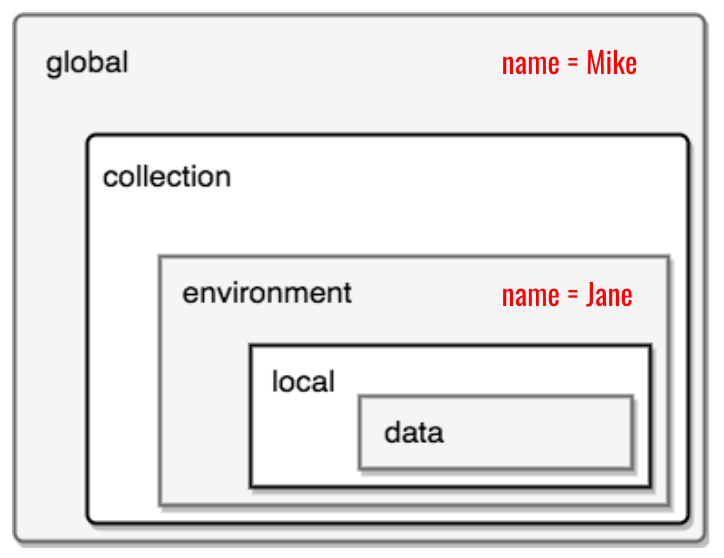
Variable scopes in Postman.

Which value will be sent when the following request is sent? Mike or Jane?
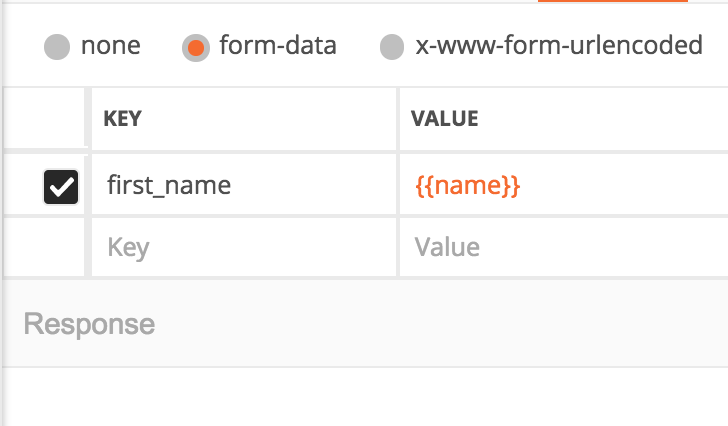
And the winner is …. Jane!
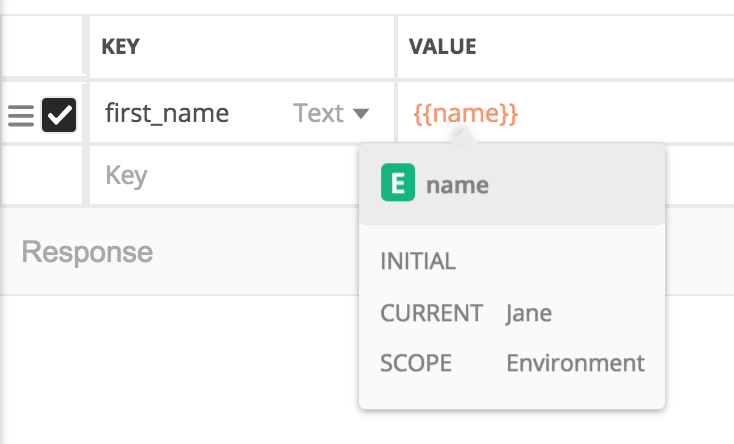
Why is that? Because the environment variable has a much narrower scope. Meaning it is more specific than the global variable.

You can remember it like this: Postman checks all the scopes, starting from outside to inside (so from global towards data). The last scope that has defined the variable Postman is looking for wins!

I hope this is now clear. Now we have all these scopes for variables to choose from. Next, review all the scopes and see what they can do for us.

Are just getting started with Postman? I have created a Postman online course in which I teach Postman from a beginner level up to expert topics such as test automation with Jenkins.

Global variables

Global variables are general-purpose variables, ideal for quick results and prototyping. You can use them for everything but ideally, you will not be using them at all — continue reading to see why.

When to use?

  • Ideal for quick results, when you are just starting and do not want to worry too much.
  • Passing data to other requests or sharing some data between multiple collections
  • Passing data from the pre-request script to the request/tests

Best practice

  • Try to limit their usage. It will avoid confusion, reduce the possibility of data loss or interference between different collections.
  • Delete variables once they are no longer needed.
  • Use other variable types. Please consider using one of the more specialized variables below (like environment variables).

👉 Subscribe to the Testing and automation with Valentine newsletter for bi-weekly tutorials, tips, and news from the industry.

Environment variables

You should be using environment variables if you want to use the same collection but against different environments. Like for example, you use the collection to develop an API locally (using localhost) but you want to reuse the same collection for the testing or production server.
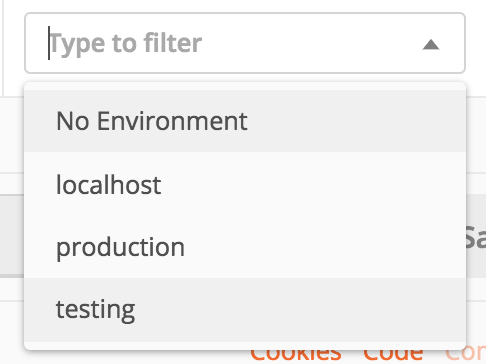
Using environment variables when dealing with multiple servers

But they can also be useful if you only have one environment but want to separate yourself from the global scope.

When to use?

  • Storing environment-specific information (like URLs, authentication credentials) when you have multiple environments (localhost, testing, production)
  • Passing data to other requests
  • Passing data from the pre-request script to the request/tests

Best practice

  • Don’t use environment variables if you only have one environment. Use collection variables. Having a single environment connected to the collection creates more overhead.
  • Clear / remove variables once you do not need them
  • Avoid mixing with other variables types, as it may cause confusion
  • Get variables in scripts using the scoped getter pm.variables.get() so that you can later change the variable scope without having to update all the scripts

If you enjoy this content and it help you solve a problem, help me create more content like this. Consider supporting me on Patreon.

Collection variables

Collection variables were recently introduced in Postman and try to provide a way of defining variables within a collection. This makes the collection independent of any environment.
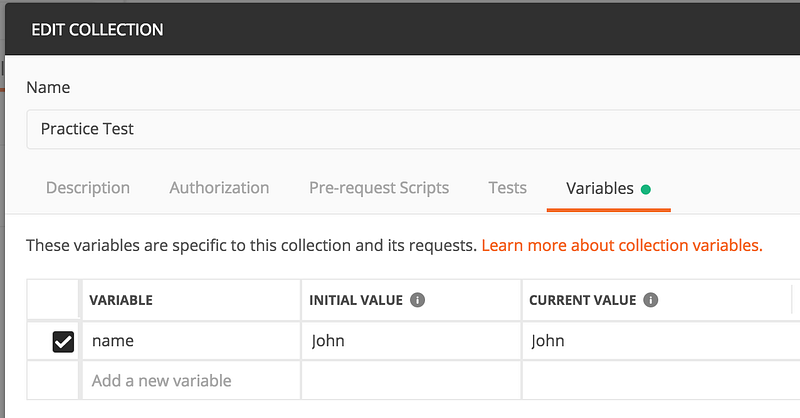
Changing collection variables can only be done by using the Postman GUI

With Postman 7.9.0 released in October 2019, it is possible for collection variables to be created, updated, or deleted from scripts.

If you want to learn how to use Postman for API testing, I have created an online course that starts with the basics of Postman and helps you understand the fundamentals of API testing. Learn more about the course.

When to use?

  • Anytime you are working with a single environment
  • For storing URLs / authentication credentials
  • Passing data to other requests
  • Passing data from the pre-request script to the request/tests

Best practice

  • Avoid mixing with other variable types as it may cause confusion
  • Get variables in scripts using the scoped getter pm.variables.get() so that you can later change the variable scope without having to update all the scripts

Local variables

Local variables are almost unknown and have caused a lot of confusion in the community because their usage is not properly documented and a different behavior within the Postman App compared to the Collection Runner or Newman.

They are more or less nice to have and they provide a way of passing data within the request (when in Postman) or within the entire collection or between iterations when using the Collection Runner or Newman.

What are local variables anyway?

Really hard to explain. You define them, use them once and they disappear in the dark — or something like that. Local variables can only be created from scripts. There is no GUI that allows you to define such variables or to inspect them.

Here is an example involving passing data from the pre-request script to the request itself or to the test script (but this is not the best example on how to use them!).

Let's imagine you need to compute a value before the request is sent. You would generate that value and save it to a global or environment variable OR you could use a local variable, like this:

Defining a local variable in Postman

Once the local variable has been defined, this will be pick-up when sending the request.
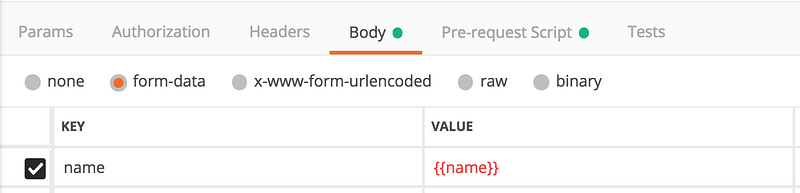
Sending a request using a local variable

The same goes if you need to access the local variable in the test script.
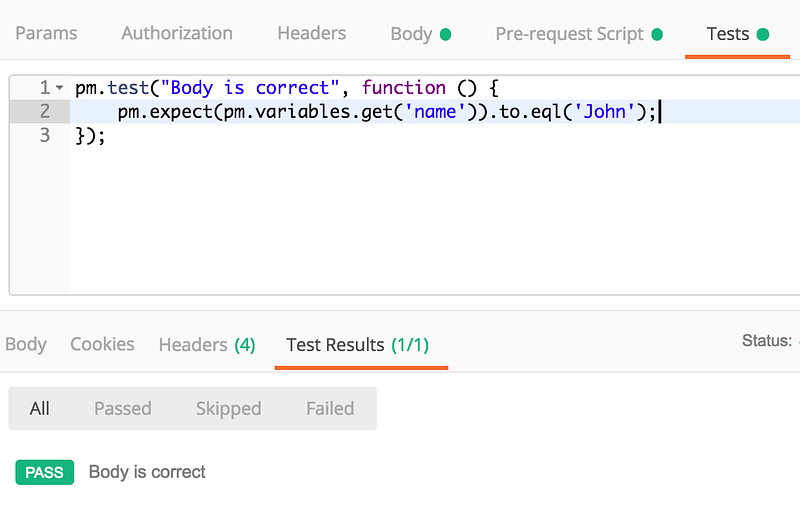
Accessing a local variable in Postman

When you are using the Postman App, local variables will cease to exist once the request has been executed.

When using the Collection Runner or Newman, local variables will exist during the entire collection run or even between multiple iterations.

When to use?

  • Whenever you would like to override all other variable scopes — for whatever reason. Not sure though then this is needed.

Do you know other use-cases? I would be more than happy to hear from you. Just leave a comment in the section below.

Best practice

  • Try to avoid them as they can be hard to understand and can lead to unwanted side effects when used.
  • Try to avoid them as they behave differently in the Postman App compared to the Collection runner and Newman — so be aware of that.

Data variables

If you need to run the same request or collection against multiple data-sets, the most common solution is to define the data-sets as external files and to run the collection using the Collection Runner or Newman. There are not a lof alternatives to data variables if you go this way.

Data variables can only be set from a CSV or a JSON file and they will exist only during the execution of an iteration.

Read more about working with data variables and iterations.

Conclusion

I hope this article has given you an overview of the different variable types in Postman and that you can now make an informed decision next time you use them.

Thank you for sticking with this article until the end. If you enjoyed it, please leave a comment, share, and press that 👏 a few times (up to 50 times). It will help others discover this information and maybe it will help someone else as well.

Follow me on Medium or YouTube if you’re interested in more tutorials like this one.

Want to learn more about Postman?

I am not only writing posts but I am also an online instructor. So if you are interested in learning more about Postman, maybe you want to take a look at my Postman: The Complete Guide to REST API Testing online course.

Postman
Postman Variables
Api Testing
Recommended from ReadMedium