avatarHarsha Koushik

Free AI web copilot to create summaries, insights and extended knowledge, download it at here

1149

Abstract

age there is a Type and corresponding Code. Type tells us what is the type of message and Code breaks this further down to a clear message, example —if ‘<i>System is Shut Down’</i> is the Type, ‘<i>System is Shut Down due to File System Crash’</i> is the Code. It is really an elegant way to communicate Queries and Error Report messages with just 2 bytes instead of wasting large space to transmit these messages.</p><h2 id="612c">List of ICMP Types and Codes</h2><figure id="1d14"><img src="https://cdn-images-1.readmedium.com/v2/resize:fit:800/1*SMGiHDi9BTwC2CzvEFFyTg.jpeg"><figcaption>ICMP Types and Codes</figcaption></figure><p id="734b">Each ICMP Type can have 1 or more Codes related to it. For example the Type 0 has only 1 Code, but Type 3 has 16 Codes — Type 3 is Destination Unreachable, Destination could be unreachable due to any of the reasons mentioned in the 16 Codes corresponding to this Type starting from 0 to 15.</p><p id="c289">Let us look at a live example in Wireshark to understand this whole thing. Let me Ping my Local Host and then we’ll take a look at ICMP Header in Wireshark —</p><figure id="3e84"><img src="https://

Options

cdn-images-1.readmedium.com/v2/resize:fit:800/1*JSMzaCyXJNZaGjid6T_lXA.png"><figcaption>Ping Request | Frame 106</figcaption></figure><p id="df3f">Ping Request in Frame no 106 — In the ICMP Header we can clearly see that the Type is 8 and Code is 0, which corresponds to Type 8 — Code 0 in the Table.</p><figure id="8251"><img src="https://cdn-images-1.readmedium.com/v2/resize:fit:800/1*-F0BYwRkyRlDyhyvGleecg.png"><figcaption>Ping Reply | Frame 107</figcaption></figure><p id="1773">Ping Reply in Frame no 107 — In the ICMP Header, Type is 0 and Code is 0 in the reply, which corresponds to Type 0 — Code 0 in the table.</p><h2 id="33c5">Conclusion</h2><p id="e9ff">With all this said, i hope you now can clearly understand what Types and Codes in an ICMP header are. You need not remember any Type or its corresponding Codes, all you need to know is the meaning of it, you can always go to Google and refer these tables to understand the message.</p><p id="bebd">Thank you for reading. You can connect with me on <a href="http://linkedin.com/in/hkoushik">Linkedin</a> . Happy to answer your queries.</p><p id="6d63">Good Luck!</p></article></body>

Demystifying ICMP Types and Codes

ICMP Types and Codes explained

Introduction

ICMP stands for Internet Control Message Protocol, operates at Network Layer. It is used for Network Diagnostic and Control purposes. ICMP will not have any Port number as such because it operates at Network Layer.

The famous network protocol PING uses ICMP. PING stands for Packet InterNet Groper. Basically used to test reachability of a Host by sending an echo request and expects a reply back.

ICMP Header

Before diving into Types and Codes directly, let us look at ICMP header. ICMP Header looks like this —

ICMP Header

ICMP header is super simple. 1 Byte for Type, 1 Byte for Code , 2 for Checksum and 4 Bytes are unused, then follows the actual Payload.

ICMP messages can be simply classified into Query Messages and Error-Reporting messages. For every message there is a Type and corresponding Code. Type tells us what is the type of message and Code breaks this further down to a clear message, example —if ‘System is Shut Down’ is the Type, ‘System is Shut Down due to File System Crash’ is the Code. It is really an elegant way to communicate Queries and Error Report messages with just 2 bytes instead of wasting large space to transmit these messages.

List of ICMP Types and Codes
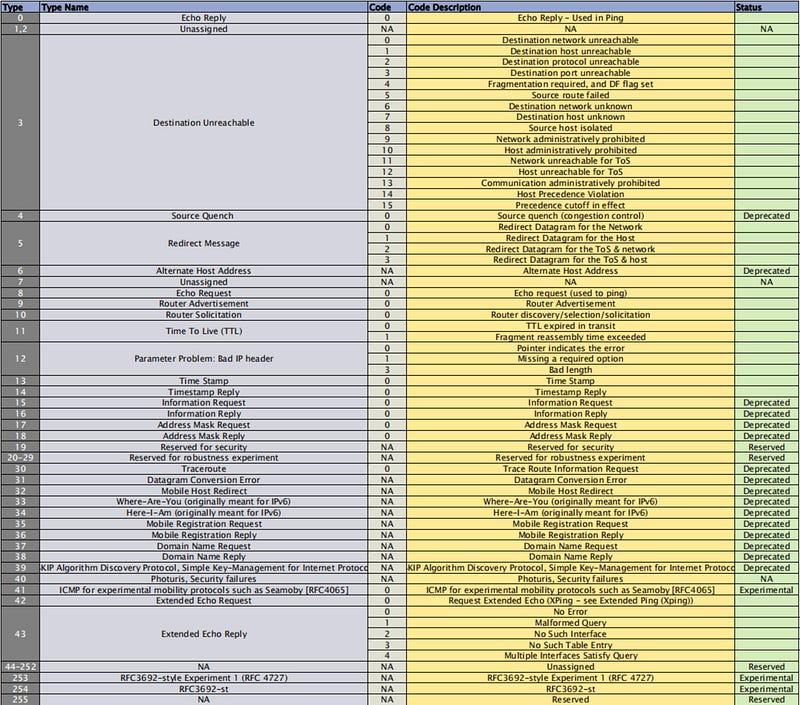
ICMP Types and Codes

Each ICMP Type can have 1 or more Codes related to it. For example the Type 0 has only 1 Code, but Type 3 has 16 Codes — Type 3 is Destination Unreachable, Destination could be unreachable due to any of the reasons mentioned in the 16 Codes corresponding to this Type starting from 0 to 15.

Let us look at a live example in Wireshark to understand this whole thing. Let me Ping my Local Host and then we’ll take a look at ICMP Header in Wireshark —
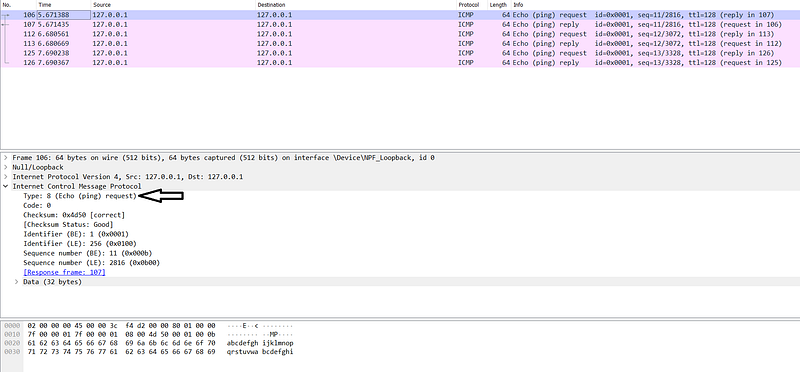
Ping Request | Frame 106

Ping Request in Frame no 106 — In the ICMP Header we can clearly see that the Type is 8 and Code is 0, which corresponds to Type 8 — Code 0 in the Table.
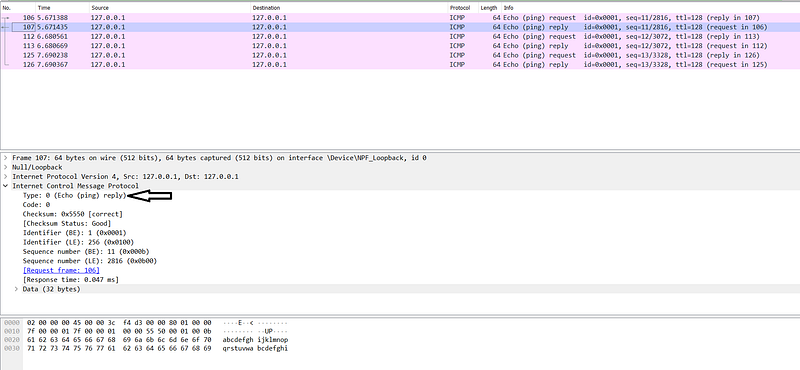
Ping Reply | Frame 107

Ping Reply in Frame no 107 — In the ICMP Header, Type is 0 and Code is 0 in the reply, which corresponds to Type 0 — Code 0 in the table.

Conclusion

With all this said, i hope you now can clearly understand what Types and Codes in an ICMP header are. You need not remember any Type or its corresponding Codes, all you need to know is the meaning of it, you can always go to Google and refer these tables to understand the message.

Thank you for reading. You can connect with me on Linkedin . Happy to answer your queries.

Good Luck!

Icmp
Networking
Security
Wireshark
Internet
Recommended from ReadMedium