
Democratizing LLMs: 4-bit Quantization for Optimal LLM Inference
A deep dive into model quantization with GGUF and llama.cpp and model evaluation with LlamaIndex

Quantizing a model is a technique that involves converting the precision of the numbers used in the model from a higher precision (like 32-bit floating point) to a lower precision (like 4-bit integers). Quantization is a balance between efficiency and accuracy, as it can come at the cost of a slight decrease in the model’s accuracy, as the reduction in numerical precision can affect the model’s ability to represent subtle differences in data.
This has been my assumption from learning LLMs from various sources.
In this article, we will explore the detailed steps to quantize Mistral-7B-Instruct-v0.2 into a 5-bit and a 4-bit model. We will then upload the quantized models to the Hugging Face hub. Lastly, we will load the quantized models and evaluate them and the base model to find out the performance impact quantization brings to a RAG pipeline.
Does it conform to my original assumption? Read on.
Why do we quantize a model?
The benefits of quantizing a model include the following:
- Reduced Memory Usage: Lower precision numbers require less memory, which can be crucial for deploying models on devices with limited memory resources.
- Faster Computation: Lower precision calculations are generally faster. This is particularly important for real-time applications.
- Energy Efficiency: Reduced computational and memory requirements typically lead to lower energy consumption.
- Network Efficiency: When models are used in a cloud-based setting, smaller models with lower precision weights can be transmitted over the network more efficiently, reducing bandwidth usage.
- Hardware Compatibility: Many specialized hardware accelerators, particularly for mobile and edge devices, are designed to handle integer computations efficiently. Quantizing models to lower precision allows them to fully utilize these hardware capabilities for optimal performance.
- Model Privacy: Quantization can introduce noise and make model extraction more difficult, potentially enhancing model security and privacy in certain scenarios.
How do we quantize a model?
There are multiple techniques to quantize a model, such as NF4, GPTQ, and AWQ. We are going to explore quantizing Mistral-7B-Instruct-v0.2 with GGUF and llama.cpp.
GGUF
GGUF, short for “Georgi Gerganov Universal Format”, introduced by the llama.cpp team in August 2023, is a binary file format specifically designed for storing quantized large language models. It was developed by Georgi Gerganov, the creator of llama.cpp, a C++ library for running inference with the Llama models.
GGUF offers a compact, efficient, and user-friendly way to store quantized LLM weights. It is designed for a single-file model deployment and fast inference. It supports various LLM architectures and quantization schemes. GGUF allows users to use the CPU to run an LLM but also offload some of its layers to the GPU for a speed up. It democratizes LLMs by reducing model costs, simplifying model loading and saving, and making the models more accessible and efficient.
llama.cpp
llama.cpp provides a lightweight and efficient C++ library for running inference with LLMs stored in GGUF format. llama.cpp’s main features include cross-platform support, fast inference, easy integration, and Hugging Face compatibility.
LlamaIndex offers the LlamaCPP class for integration with the llama-cpp-python library.
Together, GGUF and llama.cpp offers a compelling combination of efficiency, performance, and user-friendliness that can significantly enhance your LLM applications.
Quantizing Mistral-7B with GGUF and llama.cpp
Inspired by Maxime Labonne’s Quantize Llama models with GGUF and llama.cpp, let’s explore how to use GGUF and llama.cpp to quantize Mistral-7B-Instruct-v0.2. Check out my Colab notebook for the detailed steps.
Step 1: Install llama.cpp
Let’s first install llama.cpp by running the following commands:
# Install llama.cpp
!git clone https://github.com/ggerganov/llama.cpp
!cd llama.cpp && git pull && make clean && LLAMA_CUBLAS=1 make
!pip install -r llama.cpp/requirements.txt
Step 2: Download and quantize Mistral-7B-Instruct-v0.2
First, I store my Hugging Face token in Colab’s secrets tab; see the screenshot below. The benefit of storing my token in this secrets tab is that I don’t expose the token in my notebook, and I can reuse this secret configuration for all my Colab notebooks.
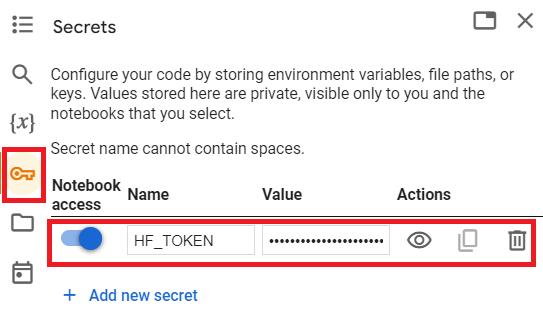
See the code snippet below to log into the Hugging Face hub:
# first, log into hugging face hub
from google.colab import userdata
from huggingface_hub import HfApi

HF_TOKEN = userdata.get("HF_TOKEN")
api = HfApi(token=HF_TOKEN)
username = api.whoami()['name']
print(username)
Now, let’s download our base model mistralai/Mistral-7B-Instruct-v0.2. We will quantize it in two different methods out of a dozen methods listed on TheBloke/Mistral-7B-Instruct-v0.2-GGUF model card:
Q5_K_M: 5-bit, recommended, low quality loss.Q4_K_M: 4-bit, recommended, offers balanced quality.
After downloading the base model, we convert it to fp16(16-bit floating-point), a quantization technique that reduces model size and accelerates inference speed while maintaining reasonable model accuracy.
Lastly, we loop through the two quantization methods to quantize our base model. We call llama.cpp/quantize for this activity. See below the code snippet:
MODEL_ID = "mistralai/Mistral-7B-Instruct-v0.2"
QUANTIZATION_METHODS = ["q4_k_m", "q5_k_m"]

MODEL_NAME = MODEL_ID.split('/')[-1]

# Download model
!git lfs install
!git clone @huggingface.co/{MODEL_ID">@huggingface.co/{MODEL_ID">https://{username}:{HF_TOKEN}@huggingface.co/{MODEL_ID}

# Convert to fp16
fp16 = f"{MODEL_NAME}/{MODEL_NAME.lower()}.fp16.bin"
!python llama.cpp/convert.py {MODEL_NAME} --outtype f16 --outfile {fp16}

# Quantize the model
for method in QUANTIZATION_METHODS:
    qtype = f"{MODEL_NAME}/{MODEL_NAME.lower()}.{method.upper()}.gguf"
    !./llama.cpp/quantize {fp16} {qtype} {method}
We see from the log the quantized model sizes have shrunk drastically from the base model, and each quantization process took around 4 minutes:


Step 3: Run inference to test the quantized model
Now that we have two quantized models, let’s run an inference test by calling llama.cpp/main. See the code snippet below:
import os

model_list = [file for file in os.listdir(MODEL_NAME) if "gguf" in file]
print("Available models: " + ", ".join(model_list))
prompt = input("Enter your prompt: ")
chosen_method = input("Name of the model (options: " + ", ".join(model_list) + "): ")

# Verify the chosen method is in the list
if chosen_method not in model_list:
    print("Invalid name")
else:
    qtype = f"{MODEL_NAME}/{MODEL_NAME.lower()}.{method.upper()}.gguf"
    !./llama.cpp/main -m {qtype} -n 128 --color -ngl 35 -p "{prompt}"
Some interesting output from the inference with the 4-bit quantized model which we tested the inference on:
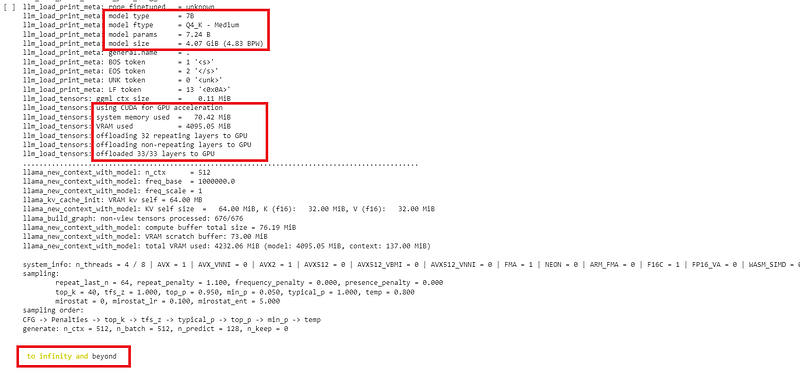
Step 4: Push the quantized models to the Hugging Face hub
Now, we are ready to push our quantized models to the Hugging Face hub to share with the community (and myself). This step assumes that you have already created an account on Hugging Face.
First, log into the Hugging Face hub, then create an empty repo by invoking the create_repo function on HfApi. Finally, we upload our new gguf files by calling api.upload_folder. See the code snippet below.
!pip install -q huggingface_hub
from huggingface_hub import create_repo , HfApi
from google.colab import userdata

username = "wenqiglantz" #change to your own username

# Defined in the secrets tab in Google Colab
api = HfApi(token=userdata.get("HF_TOKEN"))

# Create empty repo
api.create_repo(
    repo_id = f"{username}/{MODEL_NAME}-GGUF",
    repo_type="model",
    exist_ok=True,
)

# Upload gguf files
api.upload_folder(
    folder_path=MODEL_NAME,
    repo_id=f"{username}/{MODEL_NAME}-GGUF",
    allow_patterns=f"*.gguf",
)
Log into the Hugging Face hub to verify that those two gguf quantized models have been uploaded successfully under my account.
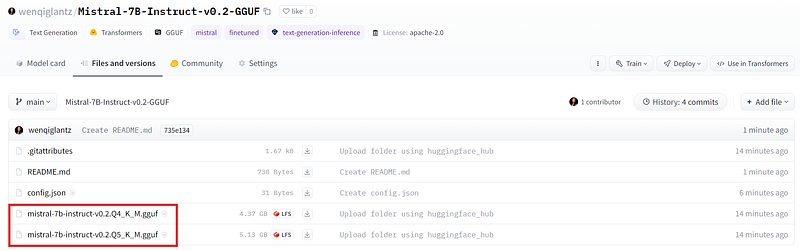
The next step is properly populating the model card by adding a README.md file. We can mimic the README.md from the base model mistralai/Mistral-7B-Instruct-v0.2’s Hugging Face repo, especially the language, tags, and license sections. See below my sample README.md, you can customize it as you prefer.
---
license: apache-2.0
pipeline_tag: text-generation
tags:
- finetuned
inference: false
base_model: mistralai/Mistral-7B-Instruct-v0.2
model_creator: Mistral AI_
model_name: Mistral 7B Instruct v0.2
model_type: mistral
prompt_template: '<s>[INST] {prompt} [/INST]
  '
quantized_by: wenqiglantz
---
# Mistral 7B Instruct v0.2 - GGUF

This is a quantized model for `mistralai/Mistral-7B-Instruct-v0.2`. Two quantization methods were used:
- Q5_K_M: 5-bit, preserves most of the model's performance
- Q4_K_M: 4-bit, smaller footprints, and saves more memory

<!-- description start -->
## Description

This repo contains GGUF format model files for [Mistral AI_'s Mistral 7B Instruct v0.2](https://huggingface.co/mistralai/Mistral-7B-Instruct-v0.2).

This model was quantized in Google Colab.
Now, let’s check our model on the hub:
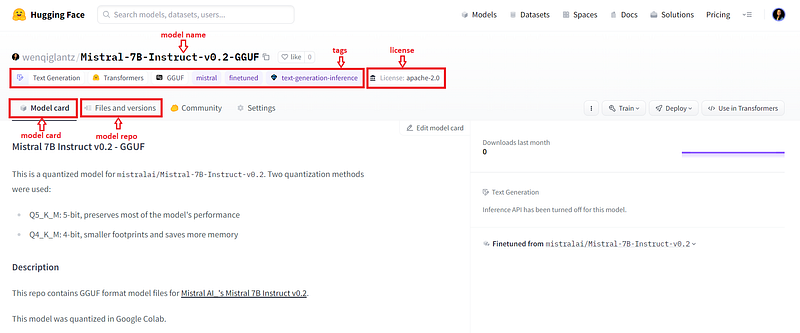
We have successfully uploaded our quantized models for Mistral-7B-Instruct-v0.2 to the Hugging Face hub. Nice! :-)
AutoGGUF
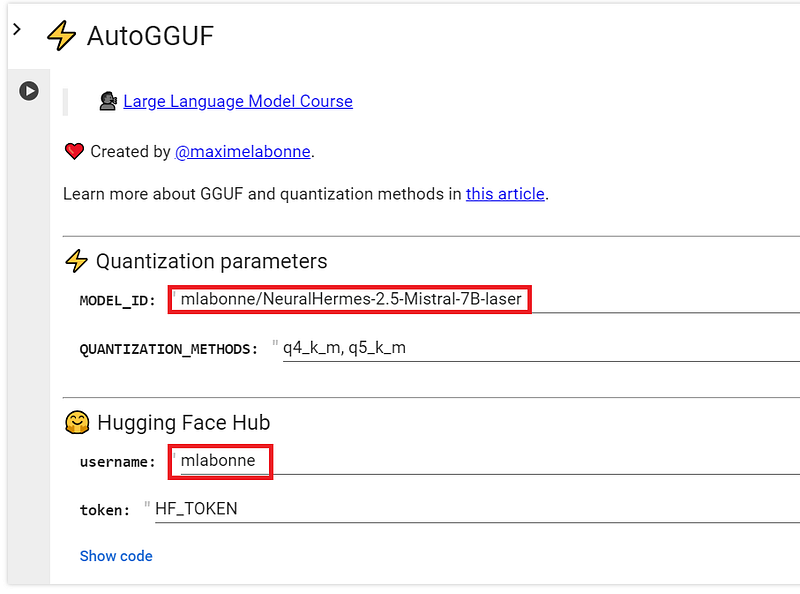
AutoGGUF is a neat tool from Maxime Labonne’s popular llm-course repo. This tool literally allows you to quantize your model in GGUF format in one click! Simply change the MODEL_ID and username fields, see the screenshot below, and click the run button to quantize your model and upload it to the Hugging Face hub.
Evaluating the Quantized Models
The quantization process may impact the model accuracy by a slight margin — that’s my assumption; how much is the margin exactly? I am curious. Let’s evaluate the quantized models and see how they compare with the base model.
We turn to EDD (Evaluation-Driven Development) methodology for help. Let’s use LlamaIndex’s Evaluation modules. With the latest introduction of the LlamaPack RagEvaluatorPack, the evaluation has been simplified a great deal. We evaluate a model by invoking the following two modules from LlamaHub:
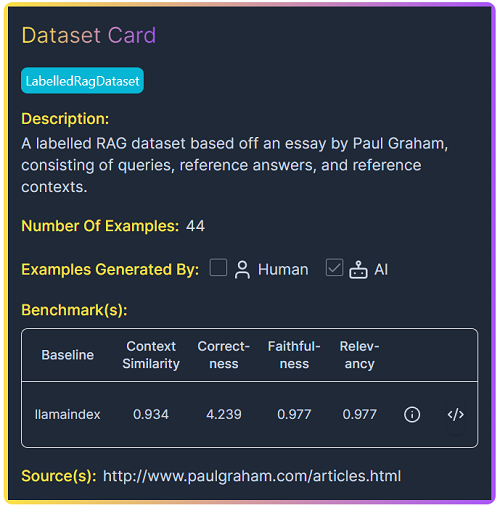
RagEvaluatorPack: a LlamaPack for evaluating your RAG pipeline. It takes in thequery_engine,rag_dataset, andjudge_llmas input, runs through a set of evaluation metrics, and gets the benchmark scores on your RAG pipeline.LabelledRagDataset: We use the Paul Graham Essay Dataset, a labeled RAG dataset based on an essay by Paul Graham. See its dataset card below.
Now, let’s dive into the evaluation implementation details.
Step 1: Evaluate the 5-bit quantized model
We first use LlamaIndex’s LlamaCPP wrapper class to define our llm by passing in the gguf model URL from the Hugging Face hub, where we uploaded our quantized models in the above section.
For the embedding model, we use UAE-Large-V1, which ranks 2nd on the MTEB leaderboard at this writing.
# define llm by calling LlamaCPP, pass in the gguf file from hugging face hub
llm_q5 = LlamaCPP(
    model_url="https://huggingface.co/wenqiglantz/Mistral-7B-Instruct-v0.2-GGUF/resolve/main/mistral-7b-instruct-v0.2.Q5_K_M.gguf"
)

# define ServiceContext
service_context_q5 = ServiceContext.from_defaults(
    llm=llm_q5,
    embed_model="local:WhereIsAI/UAE-Large-V1"
)
We then download both the Llama dataset and RagEvaluatorPack. From the dataset, the pack uses SimpleDirectoryReader to load the data into documents_q5 and then construct the VectorStoreIndex from the documents_q5.
Once query_engine is defined, we construct RagEvaluatorPack and kick off the evaluation with a one-liner: rag_evaluator_pack_q5.run(). We use gpt-4–1106-preview (gpt-4 turbo) as our evaluation judge_llm (be sure to add your OPENAI_API_KEY in your Colab secrets tab). See the code snippet below:
# download and install RagEvaluatorPack
RagEvaluatorPack = download_llama_pack(
  "RagEvaluatorPack", "./rag_evaluator_pack"
)

# download a LabelledRagDataset from llama-hub
rag_dataset_q5, documents_q5 = download_llama_dataset(
    "PaulGrahamEssayDataset", "./paul_graham"
)

# build index from the source documents
index_q5 = VectorStoreIndex.from_documents(documents=documents_q5)

# define query engine
query_engine_q5 = index_q5.as_query_engine(service_context=service_context_q5)

# construct RagEvaluatorPack
rag_evaluator_pack_q5 = RagEvaluatorPack(
    query_engine=query_engine_q5,
    rag_dataset=rag_dataset_q5,
    judge_llm=OpenAI(temperature=0, model="gpt-4-1106-preview")
)

# run eval
benchmark_df_q5 = rag_evaluator_pack_q5.run()
print(benchmark_df_q5)
In my case, this step took over 3 hours to complete (perhaps due to gpt-4 turbo rate limits?). But we finally harvested a set of nice metrics; see the red highlights in the screenshot below. There is an option to trigger the arun() function of the pack to run the evaluation asynchronously, however, in our case, since we defined our llm with LlamaCPP for quantized models and HuggingFaceLLM for the base model, see step 4 below; neither of those classes offer async completion endpoint as of this writing, so we will stay with the run() function call to run the evals.
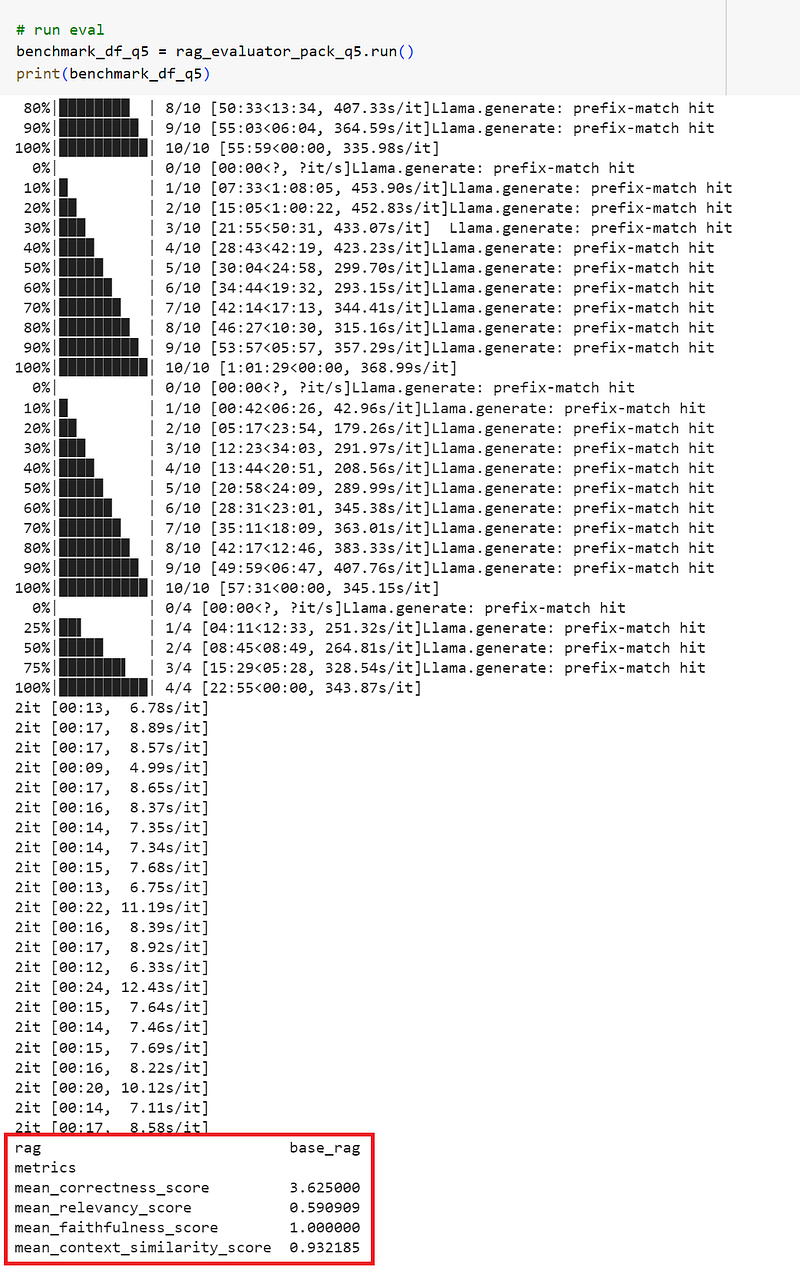
We learn from the metrics above that the evaluation captured the mean scores for correctness, relevancy, faithfulness, and context similarity. Let’s revisit the meaning for those metrics:
- Correctness: assess the relevance and correctness of a generated answer against a reference answer.
- Relevancy: measure if the response and source nodes match the query.
- Faithfulness: measure if the response from a query engine matches any source nodes.
- Context similarity: evaluate the quality of a question-answer system via semantic similarity.
We will use these metrics to compare with that from the 4-bit quantized model and the base model.
Step 2: Evaluate the 4-bit quantized model
We now define the llm and service_context for our 4-bit quantized model, see the code snippet below:
llm_q4 = LlamaCPP(
    model_url="https://huggingface.co/wenqiglantz/Mistral-7B-Instruct-v0.2-GGUF/resolve/main/mistral-7b-instruct-v0.2.Q4_K_M.gguf"
)

service_context_q4 = ServiceContext.from_defaults(
    llm=llm_q4,
    embed_model="local:WhereIsAI/UAE-Large-V1"
)
Similar to the 5-bit model evaluation, we download the RagEvaluatorPack and the dataset, build the index, define the query engine, construct the evaluator pack, and finally kick off the evaluator. We get the following results:
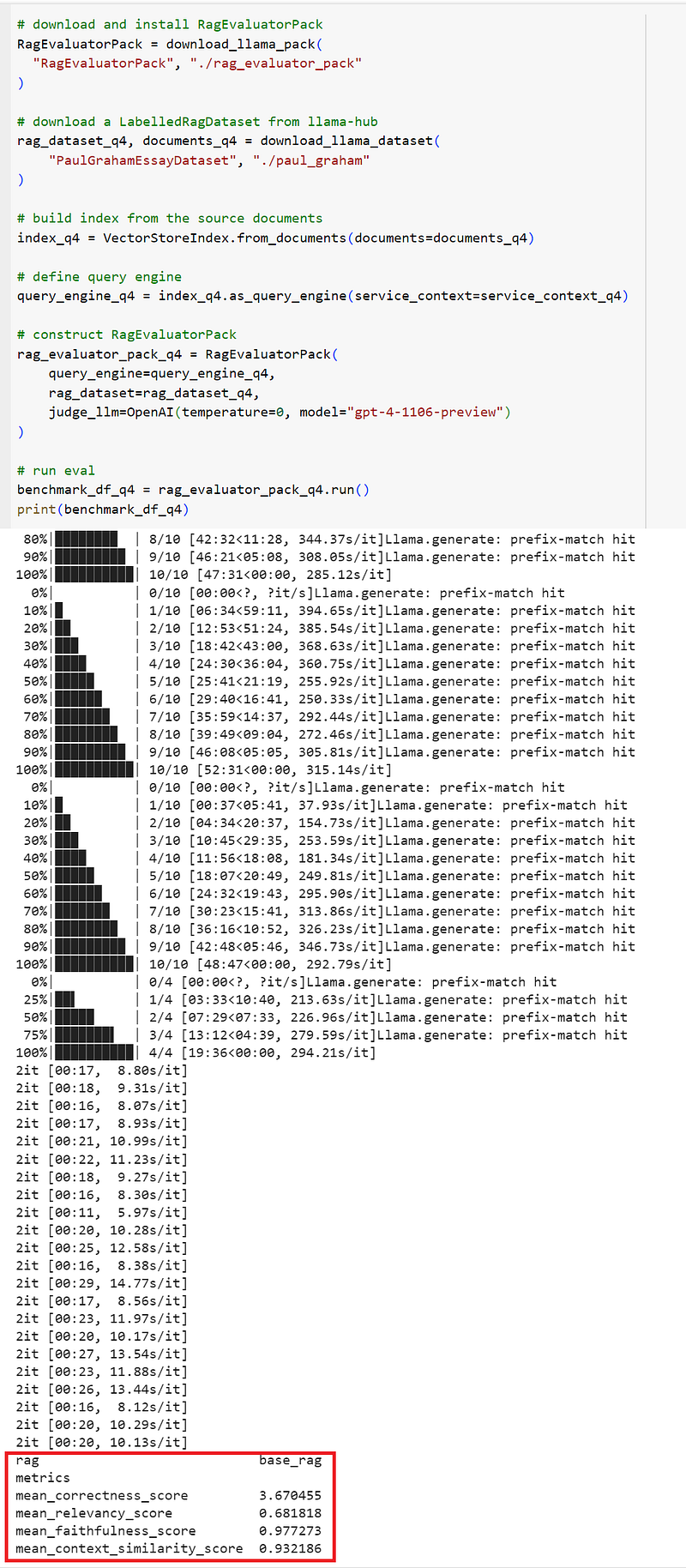
Step 3: Evaluate the base model
It’s the turn for the base model to be evaluated. We use LlamaIndex’s HuggingFaceLLM to download the base model locally, along with the embedding model. See the code snippet below.
llm_base = HuggingFaceLLM(model_name="mistralai/Mistral-7B-Instruct-v0.2")

service_context_base = ServiceContext.from_defaults(
    llm=llm_base,
    embed_model="local:WhereIsAI/UAE-Large-V1"
)
The same drill here: we download the RagEvaluatorPack and the dataset, build the index, define the query engine, construct the evaluator pack, and finally kick off the evaluator. We get the following results:
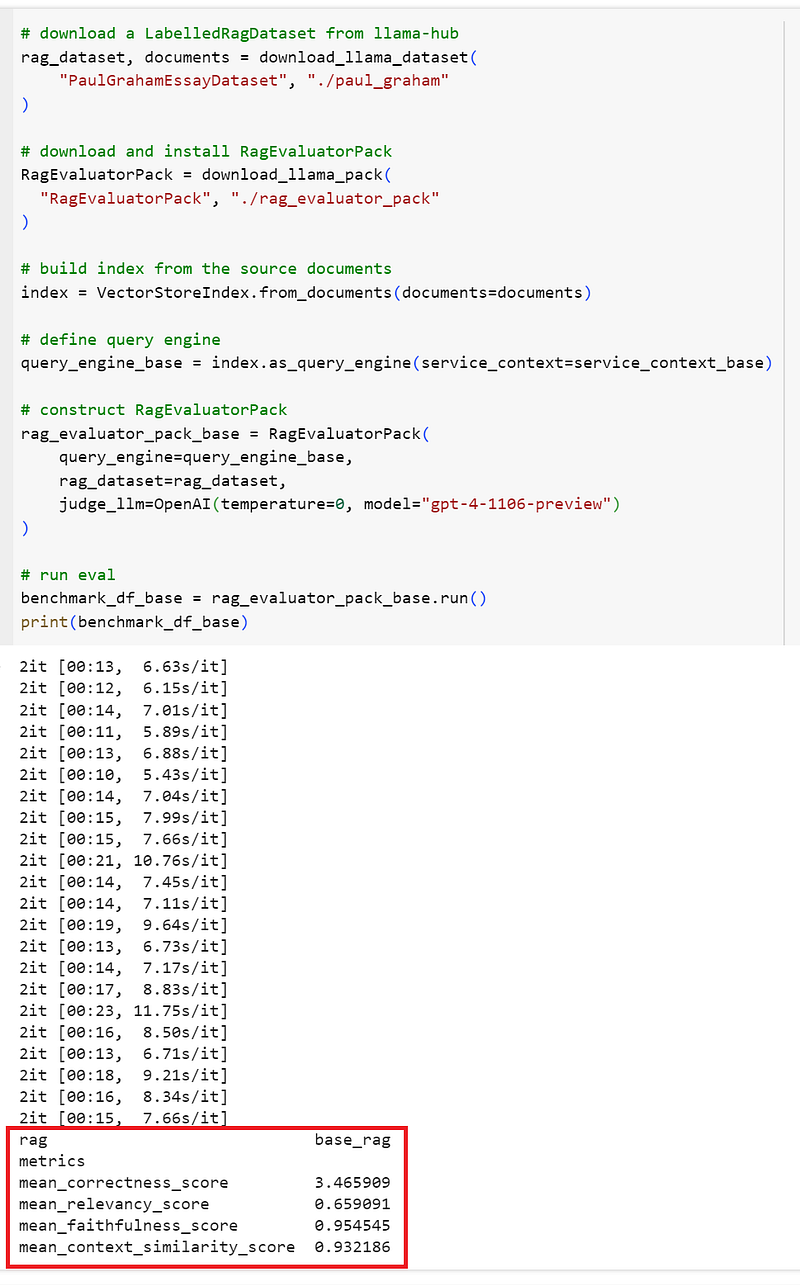
Key Takeaways
#1: Quantized models shrink significantly in size
Let’s first examine the model size difference among those three models. The 4-bit model is the smallest, with just over 4GB, smaller than the 5-bit model of nearly 5GB. The base model is over three times than the 4-bit model in size, over 13GB.
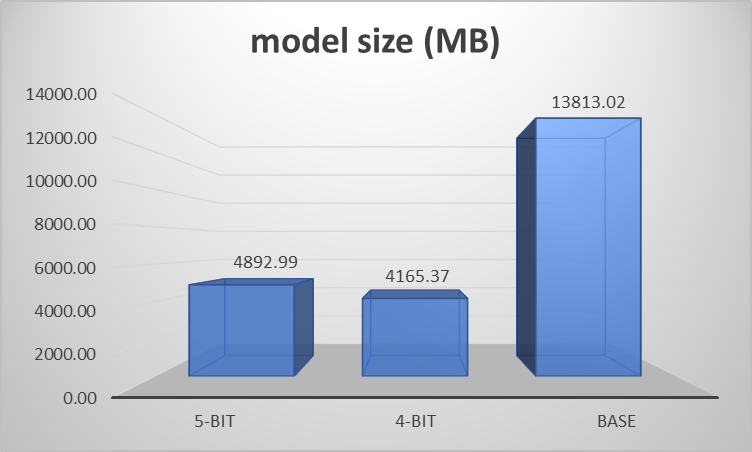
#2: The 4-bit quantized model outperforms both the 5-bit and base models in certain categories
Let’s put the evaluation scores for the metrics for all three models side by side, and examine closely:
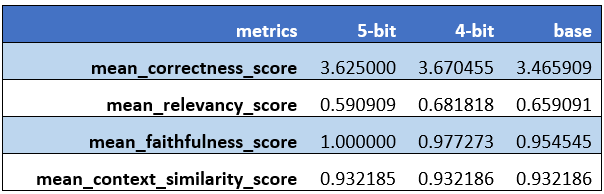
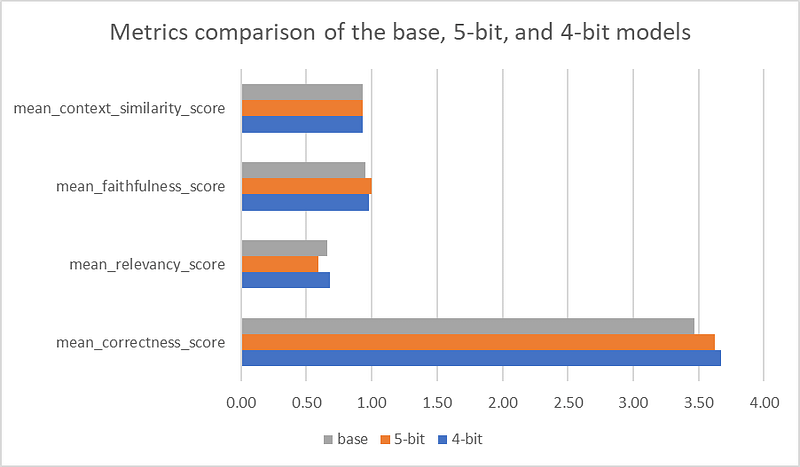
Interesting findings! The 4-bit quantized model had the most optimal performance:
- Best correctness and relevancy scores compared to the 5-bit and the base models.
- Faster inference time (even though we were not able to capture the exact seconds or milliseconds).
- CPU inference, no need for GPU even though we have the option to offload some layers of the model to GPU for even faster inference.
But I had expected the 4-bit quantized model to lose some accuracy, and the 5-bit is supposed to perform better than the 4-bit model (although the 5-bit model did have the highest faithfulness score, but it also had the lowest relevancy score, and lower correctness score than the 4-bit model). Why are we seeing a different result?
Diving Deeper
The scores from the evaluations don’t lie. So was my assumption of the 4-bit quantized model losing accuracy incorrect? Let’s first turn to a few papers.
The paper titled “The case for 4-bit precision: k-bit Inference Scaling Laws” states the following:
Our main finding is that 4-bit parameters yield optimal performance for a fixed number of model bits across all model scales and model families tested.
This paper goes as far as recommending “By default, use 4-bit quantization for LLM inference as it offers the total model bits and zero-shot accuracy trade-offs”. The paper concludes:
Here we presented a large-scale study of 35,000 zero-shot experiments on a wide variety of LLMs and parameter scales to analyze the scaling behavior and trade-offs between the number of parameters, quantization bit precision and zero-shot accuracy during inference. We find that 4-bit quantization is almost universally optimal to reduce the model bits and maximize zero-shot accuracy.
Another paper titled “Pareto-Optimal Quantized ResNet Is Mostly 4-bit” states:
After running experiments on ResNet using different precisions and numbers of parameters, we determined that 4-bit and 8-bit models strongly Pareto-dominate bfloat16 models, and mostly 4-bit models outperform 8-bit models.
Yet another paper titled “Do Emergent Abilities Exist in Quantized Large Language Models: An Empirical Study” states:
Our findings reveal that large models(fine-tuned or not) can well retain emergent abilities with 4-bit weight quantization.
Further investigation helped me understand the reasons why a quantized 4-bit model can outperform its base model:
- Efficiency in Computation and Memory Usage: Quantization reduces the model size and speeds up inference by using lower-precision arithmetic. In some cases, this efficiency can lead to better performance if the original model was constrained by computational resources.
- Regularization Effect: Quantization introduces a form of noise that can act as a regularizer, potentially improving generalization. This could lead to better performance on certain tasks where overfitting is a concern in the base model.
- Hardware Optimization: Certain hardware is optimized for low-precision arithmetic, meaning a quantized model might run more efficiently and with less latency, which is crucial for real-time applications. This improved speed can indirectly contribute to better performance in tasks that benefit from rapid processing.
- Specialized Scenarios: In some specialized tasks or datasets such as our RAG evaluation scenario for Paul Graham’s essay, the fine-grained details captured by a full-precision model may not be necessary, and a quantized model might capture the essential information just as well or even better.
- Model Calibration: The process of quantizing a model involves calibrating it to the lower bit representation, which can sometimes lead to discovering more optimal weight configurations than those found in the original training.
Overall, 4-bit quantization holds exciting potential for model compression and potential performance boosts. However, it’s important to note that quantization typically involves a trade-off between performance and model size/computational efficiency. In many cases, quantization can lead to a decrease in model accuracy, especially for complex tasks that require high precision. The success of a quantized model in outperforming its base model is highly dependent on the specific task, the nature of the dataset, and how well the quantization process is executed.
Summary
We explored quantizing a model with GGUF and llama.cpp in this article. We first looked at the benefits of model quantization. We then dived into how to quantize Mistral-7B-Instruct-v0.2 into both a 5-bit and 4-bit model with GGUF and llama.cpp. We pushed the quantized models to the Hugging Face hub. We finished the experiment by evaluating the quantized models and their base model using LlamaIndex’s RagEvaluatorPack and LabelledRagDataset.
We found out that for our use case, the 4-bit quantized model actually outperformed both the base model and the 5-bit quantized model in categories such as correctness and relevancy, while its size is less than one-third of the base model.
The combo of GGUF and llama.cpp democratizes LLMs by reducing model size and costs, simplifying model loading and saving (single-file model deployment), and making the models more accessible and efficient.
The 4-bit quantized models can bring optimal inference in scenarios when you do not have complex tasks that require high precision, potentially matching or even surpassing the performance of their base models. However, it’s important to note that the success of these 4-bit models can be highly dependent on the specific use case.
The complete source code can be found in my Colab notebooks; see links below. I kept quantization in a separate notebook as it required GPU, while the evaluations of the quantized models and the base model can run on a CPU.
- Quantize Mistral-7B-Instruct-v0.2 using GGUF and llama.cpp.ipynb
- Eval for quantized models for Mistral-7B-Instruct-v0.2.ipynb
- Eval for base model of Mistral-7B-Instruct-v0.2.ipynb
Happy coding!
References:
- Quantize Llama models with GGUF and llama.cpp
- GGML vs. GGUF: Comparing Formats & Top 5 Methods for Running GGUF Files
- llama.cpp GitHub repo
- llama-cpp-python GitHub repo
- llama-cpp-python documentation
- Hugging Face model card for mistralai/Mistral-7B-Instruct-v0.2
- TheBloke/Mistral-7B-Instruct-v0.2-GGUF model card
- RAG Evaluator LlamaPack
- LlamaIndex Evaluation Modules
- Introducing Llama Datasets
- Paul Graham Essay Dataset
- Which Quantization Method is Right for You? (GPTQ vs. GGUF vs. AWQ)
- The case for 4-bit precision: k-bit Inference Scaling Laws
- Pareto-Optimal Quantized ResNet Is Mostly 4-bit
- Do Emergent Abilities Exist in Quantized Large Language Models: An Empirical Study


