avatarInformula

Free AI web copilot to create summaries, insights and extended knowledge, download it at here

2333

Abstract

n class="hljs-name">a</span>></span> <span class="hljs-tag"></<span class="hljs-name">td</span>></span> <span class="hljs-tag"></<span class="hljs-name">tr</span>></span> </pre></div><p id="2e26">As a result, we can parse it based on this structure to extract the link values as follows.</p><div id="8230"><pre>table = soup.find(<span class="hljs-string">'table'</span>)

links = [] <span class="hljs-keyword">for</span> tr <span class="hljs-keyword">in</span> table.findAll(<span class="hljs-string">"tr"</span>): trs = tr.findAll(<span class="hljs-string">"td"</span>) <span class="hljs-keyword">for</span> each <span class="hljs-keyword">in</span> trs: <span class="hljs-keyword">try</span>: link = each.find(<span class="hljs-string">'a'</span>)[<span class="hljs-string">'href'</span>] links.append(link)
<span class="hljs-keyword">except</span>: <span class="hljs-keyword">pass</span></pre></div><p id="0ac3">Then, we can attach this information to the Dataframe we created via Pandas (read_html).</p><div id="bffb"><pre>df[<span class="hljs-string">'Link'</span>] = links</pre></div><p id="64c7">In addition, we add one more part to break the loop if the pulled data frame is blank so we don’t need to wait till the script run through all the unnecessary steps.</p><div id="e024"><pre> <span class="hljs-keyword">if</span> (<span class="hljs-built_in">len</span>(df) == <span class="hljs-number">0</span>): <span class="hljs-keyword">break</span></pre></div><p id="9308">Here is the full scripts for your reference.</p><div id="1f58"><pre><span class="hljs-keyword">from</span> datetime <span class="hljs-keyword">import</span> date <span class="hljs-keyword">from</span> datetime <span class="hljs-keyword">import</span> timedelta <span class="hljs-keyword">import</span> pandas <span class="hljs-keyword">as</span> pd <span class="hljs-keyword">import</span> requests <span class="hljs-keyword">import</span> sqlite3 <span class="hljs-keyword">from</span> google.colab <span class="hljs-keyword">import</span> drive <span class="hljs-keyword">from</span> bs4 <span class="hljs-keyword">import</span> BeautifulSoup

con = sqlite3.connect(<span class="hljs-string">'/content/drive/MyDrive/data/Stock.db'</

Options

span>)

<span class="hljs-keyword">for</span> i <span class="hljs-keyword">in</span> <span class="hljs-built_in">range</span>(<span class="hljs-number">1</span>, <span class="hljs-number">100</span>): url = <span class="hljs-string">'https://markets.businessinsider.com/bonds/finder?p='</span>+ <span class="hljs-built_in">str</span>(i) +<span class="hljs-string">'&borrower=&maturity=midterm&yield=5&bondtype=6%2C7%2C8%2C19&coupon=5&currency=333&rating=&country=18'</span>

df = pd.read_html(url)[<span class="hljs-number">0</span>]

response = requests.get(url) soup = BeautifulSoup(response.text, <span class="hljs-string">'html.parser'</span>) table = soup.find(<span class="hljs-string">'table'</span>)

links = [] <span class="hljs-keyword">for</span> tr <span class="hljs-keyword">in</span> table.findAll(<span class="hljs-string">"tr"</span>): trs = tr.findAll(<span class="hljs-string">"td"</span>) <span class="hljs-keyword">for</span> each <span class="hljs-keyword">in</span> trs: <span class="hljs-keyword">try</span>: link = each.find(<span class="hljs-string">'a'</span>)[<span class="hljs-string">'href'</span>] links.append(link)
<span class="hljs-keyword">except</span>: <span class="hljs-keyword">pass</span>

df[<span class="hljs-string">'Link'</span>] = links df[<span class="hljs-string">'As_Of'</span>] = today

<span class="hljs-keyword">if</span> (<span class="hljs-built_in">len</span>(df) == <span class="hljs-number">0</span>): <span class="hljs-keyword">break</span>

df.to_sql(<span class="hljs-string">'Corporate_Bond_Markets_Insider_2'</span>, con, if_exists=<span class="hljs-string">'append'</span>)

con.close()</pre></div><figure id="97d6"><img src="https://cdn-images-1.readmedium.com/v2/resize:fit:800/1*KTQrmss7l-FRqkpaZuKgpg.png"><figcaption></figcaption></figure><p id="4880">Thank you. In the next article, we will show how to use this hyper link to grab more detailed information for the attracting bond candidates. More to come!</p><p id="9d66">If you want to support Informula, you can buy us a coffee here :)</p><p id="2d7e"><a href="https://www.buymeacoffee.com/Informula">𝗕𝘂𝘆 𝗺𝗲 𝗮 𝗰𝗼𝗳𝗳𝗲𝗲</a></p></article></body>

How to Extract Bonds Information on Markets Insider via Python? Part 2

Previously on the How to Extract Corporate Bonds Information on Markets Insider via Python? Part 1, we discussed how to extract bond information and store it into SQLite DB. In this article, we will further discuss on how to extract hyper link for each item so that we can enter it to pull in-depth information.

We will leverage BeautifulSoup to parse the response and grab the hyper link information. Let’s take a page as an example:

import pandas as pd
import requests
from bs4 import BeautifulSoup

url = 'https://markets.businessinsider.com/bonds/finder?p=1&borrower=&maturity=midterm&yield=0&bondtype=2%2C3%2C4%2C16&coupon=0&currency=333&rating=&country=18'

df = pd.read_html(url)[0]

response = requests.get(url)
soup = BeautifulSoup(response.text, 'html.parser')

We can find the target information is located under <table> -> <tr> -> <td>-><a> => href.

<table class="table">
...
  <tr class="table__tr">
    <td class="table__td">
    <a href="/bonds/dl-inflation-prot_secs_1828-Bond-2028-us912828y388">
    United States of America</a>
    </td>
  </tr>
  

As a result, we can parse it based on this structure to extract the link values as follows.

table = soup.find('table')

  links = []
  for tr in table.findAll("tr"):
      trs = tr.findAll("td")
      for each in trs:
          try:
              link = each.find('a')['href']
              links.append(link)               
          except:
              pass

Then, we can attach this information to the Dataframe we created via Pandas (read_html).

df['Link'] = links

In addition, we add one more part to break the loop if the pulled data frame is blank so we don’t need to wait till the script run through all the unnecessary steps.

 if (len(df) == 0): 
    break

Here is the full scripts for your reference.

from datetime import date
from datetime import timedelta
import pandas as pd
import requests
import sqlite3
from google.colab import drive
from bs4 import BeautifulSoup

con = sqlite3.connect('/content/drive/MyDrive/data/Stock.db')

for i in range(1, 100):
  url = 'https://markets.businessinsider.com/bonds/finder?p='+ str(i) +'&borrower=&maturity=midterm&yield=5&bondtype=6%2C7%2C8%2C19&coupon=5&currency=333&rating=&country=18'

  df = pd.read_html(url)[0]

  response = requests.get(url)
  soup = BeautifulSoup(response.text, 'html.parser')
  table = soup.find('table')

  links = []
  for tr in table.findAll("tr"):
      trs = tr.findAll("td")
      for each in trs:
          try:
              link = each.find('a')['href']
              links.append(link)               
          except:
              pass
             
  df['Link'] = links
  df['As_Of'] = today

  if (len(df) == 0): 
    break

  df.to_sql('Corporate_Bond_Markets_Insider_2', con, if_exists='append')

con.close()
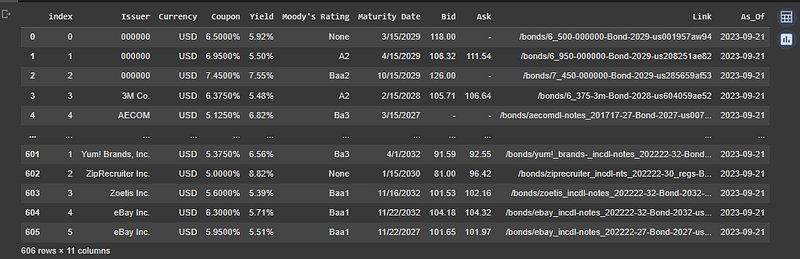
Thank you. In the next article, we will show how to use this hyper link to grab more detailed information for the attracting bond candidates. More to come!

If you want to support Informula, you can buy us a coffee here :)

𝗕𝘂𝘆 𝗺𝗲 𝗮 𝗰𝗼𝗳𝗳𝗲𝗲

Python
Bonds
Investing
Data
Beautifulsoup
Recommended from ReadMedium