
Deduplication in BigQuery Tables: A Comparative Study of 7 Approaches
Analyzing and comparing 7 ways of deduplicating rows in a BigQuery table.
TL;DR: Use the QUALIFY clause and go to the conclusion.

In this short article, we will dive into some of the different ways to deduplicate rows in a BigQuery table.
Summary Introduction Replicability Method 1: Deleting rows in-place Method 2: Selecting distinct Method 3: Grouping by all keys Technical or functional deduplication? Method 4: Grouping by primary keys Method 5: Ordering by row number Method 6: Qualifying by row number Method 7: Intersecting to itself (for fun) Methods comparison Python implementation Conclusion
BigQuery comes with a lot of features to create many things, in many different manners. Yet, when it comes to production it can be sometimes inadequate or not recommended.
[Want to learn how organizations are using Google Cloud’s BigQuery? Read Built with BigQuery: Lytics launches secure data sharing and enrichment solution on Google Cloud.]
This is why we will go through 7 different approaches to perform deduplication. And, we will explore the reasons to use them (or not), the pros, and the cons.
Bonus 1: A comparison of resources needed for each method. And cost? Bonus 2: A small Python function to embed in your projects. Bonus 3: A lot of other best practices are hidden.
But first, just a simple disclaimer 😜 Opinions are my own and not the views of my employer.
Introduction
Deduplication of rows in a table is the process of identifying and removing duplicate rows in a table. This is often done:
- To improve the performance of queries that use the table. Removing duplicate rows can save storage space and compute resources.
- To ensure that each row in the table is unique, which can make it easier to find and analyze the data. It enforces data integrity constraints, such as primary keys. For instance, you will need this integrity for a
MERGEstatement. - To improve the accuracy of data analysis. Duplicate rows can skew the results of certain types of queries.
- To simplify the data cleaning and preprocessing steps in a data pipeline. Deduplicating rows can be a potential source of errors and inconsistencies.
Replicability
For replicability, I used the BigQuery public table `bigquery-public-data.austin_waste.waste_and_diversion`.
This is a 62.99 MB table with 740,873 rows including 3 duplicated rows.
In fact, it contains more than 3 duplicated rows. We will see why later 👍
Let’s check that.
SELECT
  (SELECT COUNT(1) FROM `bigquery-public-data.austin_waste.waste_and_diversion`)  AS `n_rows`,
  (SELECT COUNT(1) FROM (SELECT DISTINCT * FROM `bigquery-public-data.austin_waste.waste_and_diversion`)) AS `n_distinct_rows`
;
Method 1: Deleting rows in-place
Of course, you “can” use the DELETE statement to remove duplicate rows from a table. This can be done by using a query to identify the duplicate rows (using one of the methods mentioned below), and then remove those rows from the table using the DELETE statement.
This is completely forbidden!
But this is the biggest bad practice you can make. First, you have to keep in mind BigQuery is a warehouse made for analytics.
Compared with traditional row-based RDBMS, which is optimized for transactions (or writes), BigQuery is a column-based data warehouse optimized for reporting workloads (mostly reads and aggregations).
So instead of deleting the rows in-place, go for one of the next methods and create a new table for your purpose.
I will then only introduce ways to create a new table without duplicates in the following sections. Thus, in every SELECT statement below, note you can create a table by simply adding a CREATE TABLE statement.
CREATE OR REPLACE TABLE `<project_id>.<dataset_id>.<table_id>` AS

SELECT
  <your_query>
Method 2: Selecting distinct
You can use the SELECT DISTINCT statement to return only unique rows from a table.
SELECT DISTINCT
  *
FROM `bigquery-public-data.austin_waste.waste_and_diversion`
;
This method is really helpful and good if you want to check as fast as you can your deduplication. But, it comes with a lot of disadvantages.
First, you have to keep in mind, the DISTINCT can slow down query performance. In general, using DISTINCT will have a greater impact when querying large amounts of data.
Second, it requires the fields types to be comparable. In BigQuery, equality is not defined for field types GEOGRAPHY, RECORD, and JSON. Of course, it makes sense. So you can not use a SELECT DISTINCT for a table containing those types.
Third, it is a technical deduplication. I will explain in the next sections what I mean by “technical”.
Short break on the
*wildcard:
It is generally not a good idea to use the
*wildcard in aSELECTstatement because it can make your query harder to read and understand. It does not explicitly show which columns are being selected.
This can make it difficult to maintain and modify the query in the future, especially if the table schema changes. For instance, using explicit fields will not create a breaking change if a field is added to the table or if the fields are reordered.
So, let’s recreate the same
SELECT DISTINCTwith explicit fields.
SELECT DISTINCT
  load_id,
  report_date,
  load_type,
  load_time,
  load_weight,
  dropoff_site,
  route_type,
  route_number
FROM `bigquery-public-data.austin_waste.waste_and_diversion`
;
Method 3: Grouping by all keys
Another option is to use the GROUP BY statement to group together all rows of the specified columns. If you already are a Data Engineer or comfortable with SQL, it will seem absurd to you. But it is not.
SELECT
  load_id,
  report_date,
  load_type,
  load_time,
  load_weight,
  dropoff_site,
  route_type,
  route_number
FROM `bigquery-public-data.austin_waste.waste_and_diversion`
GROUP BY
  load_id,
  report_date,
  load_type,
  load_time,
  load_weight,
  dropoff_site,
  route_type,
  route_number
;
If someone is used to aggregating data in SQL, he can come to this query without having in mind that this is a deduplication.
More than that, it will produce the same result as the SELECT DISTINCT method but is harder to maintain and read. This is the first disadvantage of this method.
The other drawbacks are the same as the SELECT DISTINCT method. It can slow down query performance, requires to not to have types GEOGRAPHY, RECORD, or JSON, and it is still a “technical” deduplication.
Technical or functional deduplication?
This was the second time the technical deduplication came. So it is the time for me to define what I consider to be technical.
Technical deduplication identifies duplicate records (rows) as those with exactly the same values in all columns.
As you already have noticed from the title of this section, I opposed the technical deduplication to the functional deduplication. The main difference resides in the way in which they identify the duplicates.
Functional deduplication identifies duplicate records (rows) as those with the same primary keys.
Example: Your current and previous ID cards are stored as two rows in table. Only your address has changed since, and your ID number is lifetime assigned.
- A technical deduplication will compare every single value (ID number, names, address, creation date, etc.). The address is different, so the two rows are considered as different.
- A functional deduplication will only compare the ID numbers and will considered the two rows as the same. It is an update and the up-to-date row is the most recent creation time.
Technical and Functional deduplication will not produce the same result.
Unlike traditional databases, BigQuery does not have the concept of “primary key” or even “uniqueness”.
A primary key in BigQuery is then only an agreement (a formalization) based on a data model satisfying the company’s specific needs. Generally, this unicity is given by the first field of the table and its name ends with “id”. (load_id for instance)
Note: the primary key can also be given by a combination of fields.
Our `bigquery-public-data.austin_waste.waste_and_diversion` table has a primary key, which is load_id.
SELECT
  (SELECT COUNT(1) FROM `bigquery-public-data.austin_waste.waste_and_diversion`)  AS `n_rows`,
  (SELECT COUNT(1) FROM (SELECT DISTINCT * FROM `bigquery-public-data.austin_waste.waste_and_diversion`)) AS `n_distinct_rows`,
  (SELECT COUNT(1) FROM (SELECT DISTINCT load_id FROM `bigquery-public-data.austin_waste.waste_and_diversion`)) AS `n_distinct_load_id`
;
Some examples on our table.

load_id642844 has two rows with the same values in all fields. So it is a technical duplicate.load_id669142 has two rows with an update on theroute_numberaccording to thereport_datefield. So it is a functional duplicate.load_id658750 has two rows with the same values except for theroute_number. This is neither a technical nor functional duplicate, it is just an error in our data. Unless you have a custom rule to determine which row is valid, a functional deduplication will choose one of the rows arbitrarily.- I let you determine if the
load_id657170 is a technical duplicate, a functional duplicate, or an error. 😜
Note: functional deduplication will also remove technical duplicates “arbitrarily”.
Method 4: Grouping by primary keys
So let’s start our first way to deduplicate rows functionally.
Not too far from the previous GROUP BY method. You can group your rows according to the primary key.
SELECT
  load_id,
  ANY_VALUE(report_date)  AS `report_date`,
  ANY_VALUE(load_type)    AS `load_type`,
  ANY_VALUE(load_time)    AS `load_time`,
  ANY_VALUE(load_weight)  AS `load_weight`,
  ANY_VALUE(dropoff_site) AS `dropoff_site`,
  ANY_VALUE(route_type)   AS `route_type`,
  ANY_VALUE(route_number) AS `route_number`
FROM `bigquery-public-data.austin_waste.waste_and_diversion`
GROUP BY
  load_id
;
This has a huge advantage: everyone knows how to use the GROUP BY statement. But this is the only advantage in my opinion.
(Yes, it also offers the opportunity to deduplicate your data at the same time as aggregating some fields (COUNT, SUM, AVG, etc.). But a common best practice would be first to deduplicate, then to aggregate your data to avoid inaccuracies.)
Note the use of ANY_VALUE. This method is not a good idea because it is not idempotent. It means we can not assure that, applied multiple times, it will not produce the same result.
We can not functionally determine the row to return.
Of course, we can change the ANY_VALUE to a MAX or MIN for instance. But the max report_date is not necessarily on the same row as the max route_number. It still provides inaccuracies and still requires the fields to be comparable. (remember the types GEOGRAPHY, RECORD, and JSON.)
Method 5: Ordering by row number
Ordering by using the ROW_NUMBER function addresses all of the previous concerns about deduplication.
WITH ordered_row AS (
  SELECT
    *,
    ROW_NUMBER() OVER(
      PARTITION BY
        load_id
      ORDER BY
        report_date DESC,
        load_time DESC
    ) AS `rn`
  FROM `bigquery-public-data.austin_waste.waste_and_diversion`
)
SELECT
  * EXCEPT(rn)
FROM ordered_row
WHERE rn = 1
;
The WINDOW clause in BigQuery is the process of performing calculations or aggregations OVER a related group of rows without the need for a self-join. This can be useful for calculating things like running totals or moving averages.
In our example, we apply the ROW_NUMBER analytic (or window) function. Specifically, within a load_id partition, it will assign a discrete incrementing number to the order of the most up-to-date report_date or load_time.
The partition is given by the PARTITION BY statement and the order is given by theORDER BY statement. Note it can handle multiple fields or expressions.
Here is the example for the 4 duplicates we have seen the last time.

You can then select only rows (EXCEPT the temporary rn field) with a ROW_NUMBER of 1, which will include only one unique row per partition.
As I said, it is not a good practice to keep the * wildcard in the SELECT statement. So let’s rework it below. Note you can keep the first * wildcard as the fields will be then explicitly specified.
WITH ordered_row AS (
  SELECT
    *,
    ROW_NUMBER() OVER(
      PARTITION BY
        load_id
      ORDER BY
        report_date DESC,
        load_time DESC
    ) AS `rn`
  FROM `bigquery-public-data.austin_waste.waste_and_diversion`
)
SELECT
  load_id,
  report_date,
  load_type,
  load_time,
  load_weight,
  dropoff_site,
  route_type,
  route_number,
FROM ordered_row
WHERE rn = 1
;
This method has all the ingredients we want for a functional deduplication (and for technical deduplication too as we will see in the next part).
There is still a huge drawback to this method. It is redundant with the twoSELECT statements and it is not easily readable (even repulsive for me).
Method 6: Qualifying by row number
So what about this method using the QUALIFY clause?
SELECT
  load_id,
  report_date,
  load_type,
  load_time,
  load_weight,
  dropoff_site,
  route_type,
  route_number,
FROM `bigquery-public-data.austin_waste.waste_and_diversion`
QUALIFY ROW_NUMBER() OVER(
  PARTITION BY
    load_id
  ORDER BY
    report_date DESC,
    load_time DESC
) = 1
;
But what is this weirdo? 😮
In BigQuery SQL,
- The
WHEREclause is used to filter rows based on a specific condition. It is applied to individual records. - The
HAVINGclause is similar to theWHEREclause, but it is used to filter groups (GROUP BY) of records, rather than individual records. - The
QUALIFYclause is a bit different from theWHEREandHAVINGclauses. It filters the results of window (or analytic) functions. Your window function is requiredSELECTlist or directly in theQUALIFYclause.
So it does exactly the same as the last method and has all its advantages and one more. It is easily readable.
At the top, the
SELECTlists explicitly the fields.
At the bottom, your functional rule of deduplication is defined in the
OVERclause.
Method 7: Intersecting to itself (for fun)
I just wanted to show you the final last method for fun. The only objective here is to prove the list of methods in this article is not exhaustive.
So let’s have some imagination and use the INTERSECT operator.
The INTERSECT DISTINCT joins two query results and then returns only the distinct rows intersecting the two tables. It is a mathematical intersection.
SELECT
  load_id,
  report_date,
  load_type,
  load_time,
  load_weight,
  dropoff_site,
  route_type,
  route_number,
FROM `bigquery-public-data.austin_waste.waste_and_diversion`

INTERSECT DISTINCT

SELECT
  load_id,
  report_date,
  load_type,
  load_time,
  load_weight,
  dropoff_site,
  route_type,
  route_number,
FROM `bigquery-public-data.austin_waste.waste_and_diversion`
;
Of course, this is obvious this method is the worst one. Especially in terms of compute because the table is joined to itself and then it returns the distinct rows.
Methods comparison
Talking about compute, until this section, no test has been made on performance or bytes billed. This is the objective of this section.
I remarked the time elapsed and the slot time consumed varied each time. So for the table result of performance is an average of 10 runs for each method with no BigQuery Cache.
A BigQuery slot is a unit of computational capacity required to execute SQL queries.

One first thing to notice here. The bytes processed are exactly the same. As the BigQuery “On-demand” pricing model (default) charges for the number of bytes processed by each query, it means each of those methods will cost the same.
Then, we clearly see — and this is not a surprise — the DELETE and INTERSECT methods consumed a lot of time.
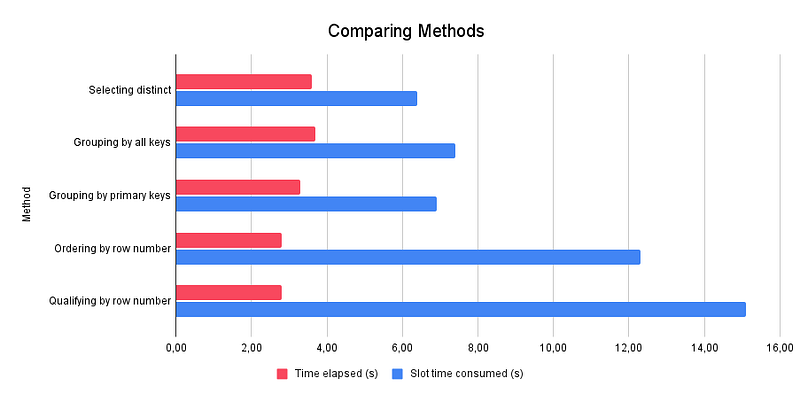
If we focus more on the other methods, we can distinguish two groups.
- The
GROUP BYmethods andSELECT DISTINCTmethod are not time-efficient but it does not consume a lot of Slot time. - The
WINDOWmethods are more time-efficient but consume more slot time.
So, for an “On-demand” pricing model, the WINDOW function is the way to go. As it costs the same, the other point of comparison is the time elapsed. No matter the slot time consumed (meaning it requires more workers for BigQuery).
It costs the same even with more workers.
Note: the results can vary according to the table size or schema.
Python implementation
Before we concluded. I have prepared a short Python script using a Jinja template to automate the best deduplication method we found.
Simply give the table reference and optionally the functional rule of deduplication.
Of course, feel free to improve it by adding more features, creating a .sql file instead of this QUERY_TEMPLATE variable, etc.
pip install jinja2
from jinja2 import Template
from typing import Optional, Union, List

QUERY_TEMPLATE = '''
SELECT
{%- if fields is none %}
    *
{%- else %}
  {%- for field in fields %}
    {{ field }} {{- ", " if not loop.last else "" }}
  {%- endfor %}
{%- endif %}
FROM `{{ table_reference }}`
{%- if primary_keys is none %}
QUALIFY ROW_NUMBER() OVER() = 1
{% else %}
QUALIFY ROW_NUMBER() OVER(
    PARTITION BY
      {%- for primary_key in primary_keys %}
        {{ primary_key }} {{- ", " if not loop.last else "" }}
      {%- endfor %}
    {%- if ordering_expressions is not none %}
    ORDER BY
      {%- for ordering_expression in ordering_expressions %}
        {{ ordering_expression }} {{- ", " if not loop.last else "" }}
      {%- endfor %}
    {%- endif %}
) = 1
{%- endif -%}
;
'''


def get_deduplication_query(
        table_reference: str,
        fields: Optional[List] = None,
        primary_keys: Optional[Union[str, List]] = None,
        ordering_expressions: Optional[Union[str, List]] = None
    ) -> str:
    """Create a deduplication query for a table given the primary keys and
    the ordering expressions.

    :param fields: Table reference to deduplicate.
    :param table_reference: Table reference to deduplicate.
        must have a `(<projec_id>)?.<dataset_id>.<table_name>` pattern.
    :param primary_keys: Primary key(s) name of the table if exist.
        If not specified, all the fields are considered as a primary key.
    :param ordering_expressions: Field(s) to order on. Can be considered as an expression.
        For instance, you can add " DESC" to the field to invert the order. (ex: "creation_date DESC")
        If not specified, rows are arbitrarily ordered.
    :return: Deduplication query for the table.
    """


    if primary_keys is None:
        # Is not necessary anymore as it will be considered as a primary key
        ordering_expressions = None

    # Create a list if only a string was given
    to_list_if_str = lambda x: [x] if isinstance(x, str) else x

    primary_keys = to_list_if_str(primary_keys)
    ordering_expressions = to_list_if_str(ordering_expressions)

    # Render the Jinja Template
    params = {
        'table_reference': table_reference,
        'fields': fields,
        'primary_keys': primary_keys,
        'ordering_expressions': ordering_expressions,
    }

    query = Template(QUERY_TEMPLATE).render(**params)

    return query


if __name__ == '__main__':
    query = get_deduplication_query(
        table_reference='bigquery-public-data.austin_waste.waste_and_diversion',
        fields=[
            'load_id', 'report_date', 'load_type', 'load_time', 'load_weight', 'dropoff_site', 'route_type', 'route_number'
        ],
        primary_keys='load_id',
        ordering_expressions=['report_date DESC', 'load_time DESC'],
    )
    print(query)
Conclusion
To conclude with the 4 main reasons to choose the QUALIFY method for every deduplication you design.
- It has the best time performance using the full capacity of BigQuery on slot time consumed (distributed workers).
- It permits both homogeneously create technical or your functional deduplication.
- Readability matters. If specified the functional rule is defined in the
OVERclause only. - It does not require the types of fields to be comparable (unless you have a
GEOGRAPHY, aRECORD, or aJSONfield as a primary key, which is not a good practice)
To contrast a little, it still requires familiarity with SQL to understand the use of the QUALIFY clause.


