Deconstructing AWS Lambda Functions
AWS Lambda Functions are basic. It is the simplicity of the Lambda Function which makes it powerful and extensible.
In its basic form a lambda is a linux based container that executes a bootstrap function when a piece of work is queued up for that function.
How is work queued up for a lambda function?
Work is queued up in several different ways. An API Gateway could have a request from an endpoint that is routed to a Lambda function. A Lambda function could be subscribed to an SNS Topic or SQS Queue or one of the many Event Sources.
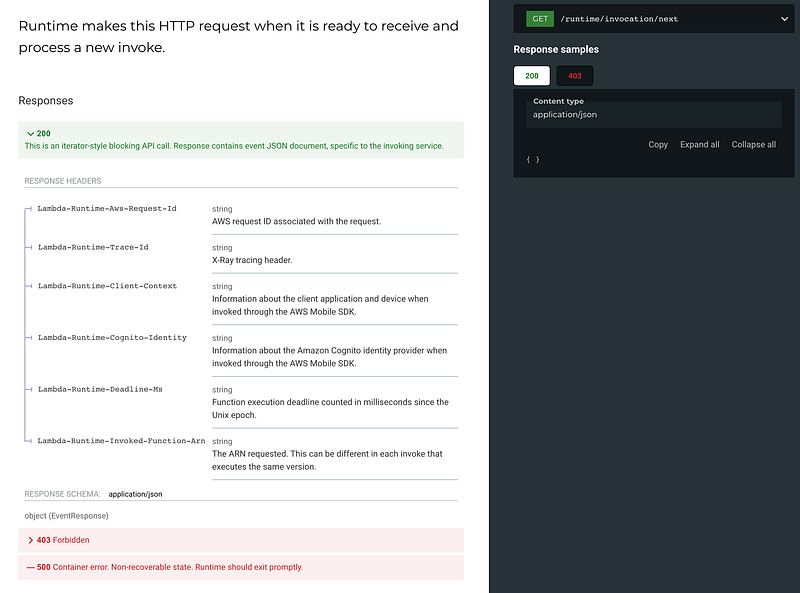
In its most basic form though a lambda makes an HTTP call to an internal AWS service endpoint to look for its work. The endpoint is called the invocation next endpoint and is mapped to a url like this:
http://${AWS_LAMBDA_RUNTIME_API}/2018-06-01/runtime/invocation/nextWhen your Lambda is invoked the container executes the /bootstrap executable that is in the root of the container. Bootstrap can pretty much be any valid linux executable. You can make bootstrap a shell script that executes your runtime of choice.
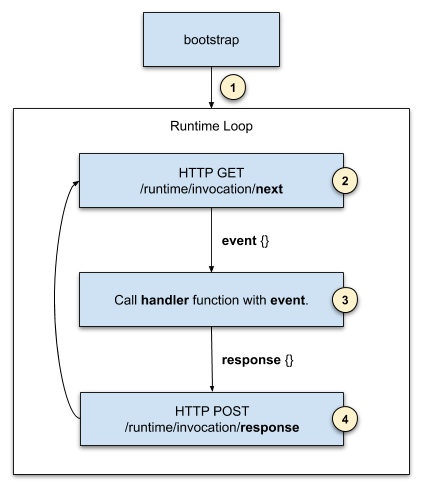
Bootstrap starts up the runtime loop, a small script or application that polls the invocation api for work. The parts of this system are:
- Bootstrap starts the runtime loop(or bootstrap itself is the loop) that polls for work.
- The runtime loop calls the lambda runtime api to get the next lambda unit of work. The unit of work is described in the event object which is returned when the /runtime/invocation/next call completes.
- If the runtime received a 200 response with an event object payload the runtime calls a handler function and passes the event object as an argument.
- The handler returns a result (or blows up with an error) and that result is passed to the /runtime/invocation/{aws-request-id}/response api endpoint. If the handler blew up the /runtime/invocation/{aws-request-id}/error api endpoint is called.
The runtime loop continues this poll, process, respond lifecycle until the lambda coordinator kills the process. This is part of the AWS Lambda infrastructure. Basically this infrastructure tracks the time since that Lambda instance has received it’s last unit or work. By default, if no units of work have been received in a 15 minute time period the coordinator terminates the lambda killing the bootstrap or runtime loop application.
What is the Lambda context and environment?
When the Lambda container starts the Lambda coordinator sets three environment variables that the runtime needs in order to do its job. These environment variables are described in the AWS Documentation here.
_HANDLER — The location to the handler, from the function’s configuration. The standard format is file.method, where file is the name of the file without an extension, and method is the name of a method or function that’s defined in the file.
LAMBDA_TASK_ROOT — The directory that contains the function code.
AWS_LAMBDA_RUNTIME_API — The host and port of the runtime API.
Your runtime uses these three environment variables. The AWS_LAMBDA_RUNTIME_API value is used as the base of the API URL when making the calls to the /runtime/invocation endpoints. So the full URL would look like this http://${AWS_LAMBDA_RUNTIME_API}/2018-06-01/runtime/invocation/next or http://${AWS_LAMBDA_RUNTIME_API}/2018-06-01/runtime/invocation/{aws-request-id}/response. The runtime code uses the _HANDLER environment variable to locate the handler code. You are also given the root path for the lambda task so you can locate the handler executable code and anything else you may need in your runtime.
When your runtime makes the request to /runtime/invocation/next in addition to the event object you are also provided a bunch of HTTP Response Headers. The most important of those headers is the Lambda-Runtime-Aws-Request-Id header. You need this value when making the /runtime/invocation/{aws-request-id}/response or the /runtime/invocation/{aws-request-id}/error endpoint calls.
Prebuilt base images and testing facilities for Custom Runtimes
AWS Provides custom pre-built container images based on Amazon Linux and Amazon Linux 2.
If you are making a custom runtime and are intending to use a supported language you can base your work on the existing runtime clients that AWS Publishes on Github.
For example, you may need to track a different NodeJS version with your lambda. You are leveraging some new feature and AWS has not yet provided you a supported runtime for your lambda. Just clone the NodeJS client and make the targeted changes to suit your needs.
The NodeJS runtime client is defined here. This runtime repo shows you all the internals and breaks down how the runtime client works. You can follow this model if you choose to implement your own language implementation.
AWS Also provides a way to test your new runtime locally. Yes, you can spin up a docker instance of your new runtime and test it locally. This can also be useful for testing your lambda functions. Check out the runtime emulator (note this is already included in the AWS provided language runtimes, you can add it to your own custom runtime or run it separately.) The runtime emulator mocks up the runtime API’s for your own testing.
For further reading follow the Lambda Custom Runtime tutorial below.
There is also an Open API Specification document for the Runtime API. You can use something like Swagger or Redoc to convert it into browsable documentation.
https://docs.aws.amazon.com/lambda/latest/dg/samples/runtime-api.zip