avatarLiu Zuo Lin

Free AI web copilot to create summaries, insights and extended knowledge, download it at here

1534

Abstract

enames)</pre></div><figure id="acb5"><img src="https://cdn-images-1.readmedium.com/v2/resize:fit:800/1*S2l8gdpnOZmggTJgk8aG8w.png"><figcaption></figcaption></figure><p id="53e6">The <code>os.walk</code> function generates 3 variables — <code>root</code>, <code>subfolders</code> and <code>filenames.</code></p><p id="1bb5"><code>root</code> is a string value referring to the file path starting from the <code>"main"</code> folder</p><p id="9f4c"><code>subfolders</code> is a list containing strings, and each string refers to a subfolder inside <code>root</code></p><p id="0a57"><code>filenames</code> is a list containing strings, and each string refers to a filename inside <code>root</code></p><h1 id="e0f7">Getting Every .txt File inside main</h1><p id="1ab7">In order to get the path of every single file inside the folder, we can simple join <code>root</code> and <code>filename</code> together.</p><div id="c655"><pre><span class="hljs-keyword">import</span> os</pre></div><div id="db5b"><pre>for root, subfolders, filenames <span class="hljs-keyword">in</span> os.walk(<span class="hljs-string">"main"</span>): for <span class="hljs-keyword">filename</span> <span class="hljs-keyword">in</span> filenames: filepath = root + <span class="hljs-string">"/"</span> + <span class="hljs-keyword">filename</span> pr<span class="hljs-meta">int</span>(filepath)</pre></div><div id="0db6"><pre> # <span class="hljs-keyword">do</span> stuff <span class="hljs-keyword">with</span> filepath</pre></div><figure i

Options

d="d953"><img src="https://cdn-images-1.readmedium.com/v2/resize:fit:800/1*6AyZGeZgtOUOS9sEapEPCA.png"><figcaption></figcaption></figure><h1 id="4263">Dealing with Files We Don’t Care About</h1><p id="aef7">Sometimes we might have random autogenerated files here and there for some reason — <code>pycache</code>, <code>.DS_Store</code> and all these other stuff. To stop our code from reading them accidentally, we can use a simple if statement to filter them out</p><div id="0502"><pre><span class="hljs-keyword">import</span> os</pre></div><div id="2a4d"><pre>for root, subfolders, filenames <span class="hljs-keyword">in</span> os.walk(<span class="hljs-string">"main"</span>): for <span class="hljs-keyword">filename</span> <span class="hljs-keyword">in</span> filenames: filepath = root + <span class="hljs-string">"/"</span> + <span class="hljs-keyword">filename</span> pr<span class="hljs-meta">int</span>(filepath)</pre></div><div id="9b13"><pre> <span class="hljs-keyword">if</span> filename[-<span class="hljs-number">4</span>:] != <span class="hljs-string">".txt"</span>: <span class="hljs-keyword">continue</span>

    # <span class="hljs-keyword">do</span> stuff <span class="hljs-keyword">with</span> filepath</pre></div><h1 id="2792">Conclusion</h1><p id="ad5f">If you didn’t already know about this function, I hope that this makes your life easier!</p><p id="3779"><i>More content at <a href="http://plainenglish.io/"><b>plainenglish.io</b></a></i></p></article></body>

Deal with Multi-Level Folders in Python with os.walk

Let’s say we have a multi-level directory full of files that we want to analyze.

main
  |- A
    |- 1.txt
    |- 2.txt
  |- B
    |- 3.txt
    |- C
      |- 4.txt

These can be images, audio files, CSV files, or whatever you wish to analyze, but for demonstration purposes here, I’ll use .txt files. Here, the main folder contains multiple .txt files in different folders.

The os.walk Function

The os.walk function essentially looks through everything in the "main" folder — every file, folder, subfolder and file within each subfolder.

import os
for root, subfolders, filenames in os.walk("main"):
    print(root, subfolders, filenames)
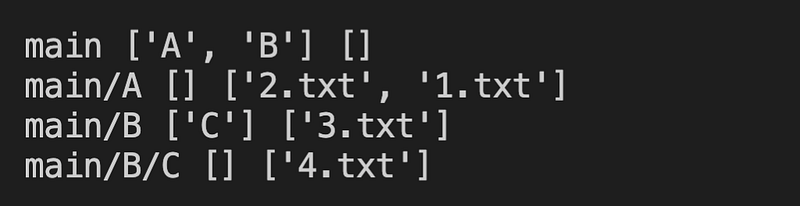
The os.walk function generates 3 variables — root, subfolders and filenames.

root is a string value referring to the file path starting from the "main" folder

subfolders is a list containing strings, and each string refers to a subfolder inside root

filenames is a list containing strings, and each string refers to a filename inside root

Getting Every .txt File inside main

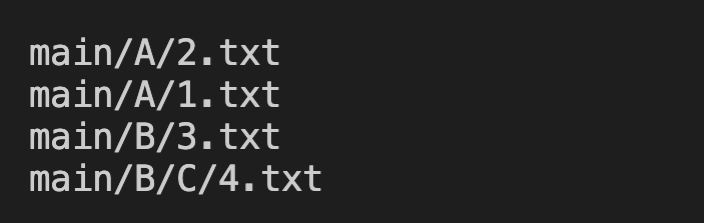
In order to get the path of every single file inside the folder, we can simple join root and filename together.

import os
for root, subfolders, filenames in os.walk("main"):
    for filename in filenames:
        filepath = root + "/" + filename
        print(filepath)
        # do stuff with filepath
Dealing with Files We Don’t Care About

Sometimes we might have random autogenerated files here and there for some reason — __pycache__, .DS_Store and all these other stuff. To stop our code from reading them accidentally, we can use a simple if statement to filter them out

import os
for root, subfolders, filenames in os.walk("main"):
    for filename in filenames:
        filepath = root + "/" + filename
        print(filepath)
        if filename[-4:] != ".txt":
            continue
 
        # do stuff with filepath

Conclusion

If you didn’t already know about this function, I hope that this makes your life easier!

More content at plainenglish.io

Python
Programming
Coding
Python3
Software Development
Recommended from ReadMedium