
Day 17: GitLab CI/CD Pipelines

GitLab CI/CD pipelines is essential for automating testing, building, and deploying your applications. GitLab CI/CD allows you to define tasks, known as jobs, within a pipeline, helping teams to continuously integrate and deliver changes quickly and efficiently.
In this blog, we will dive into the basics of GitLab CI/CD pipelines, explore advanced use cases, and show you how to build powerful pipelines with real-world examples.
1. What Are GitLab CI/CD Pipelines?
GitLab CI/CD pipelines are a sequence of automated jobs that GitLab runs whenever code changes are pushed to a repository. These jobs can include:
- Building your code.
- Running tests to ensure everything works as expected.
- Deploying the application to production or staging environments.
The pipeline is defined using a YAML file called .gitlab-ci.yml, which lives in the root directory of your GitLab repository.
2. Basic Example: A Simple GitLab CI/CD Pipeline
Let’s start by creating a basic pipeline that runs a job to test and build a simple Node.js application.
Step 1: Create the .gitlab-ci.yml File
stages:
  - test
  - build
test_job:
  stage: test
  image: node:14
  script:
    - npm install
    - npm test
build_job:
  stage: build
  image: node:14
  script:
    - npm run build
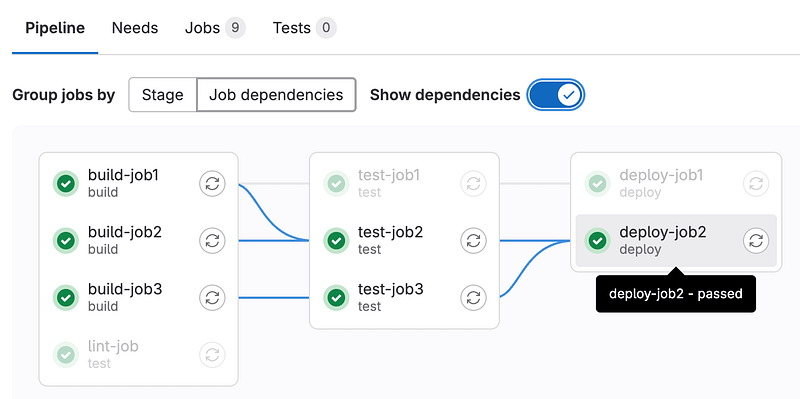
This simple pipeline defines two stages: test and build. For each stage, there is a corresponding job (test_job and build_job) that runs on a Node.js 14 image. When code is pushed, GitLab automatically executes these jobs in the defined order.
3. Advanced Example: Multi-Environment Deployment with GitLab CI/CD
Now, let’s move to an advanced use case where you need to deploy your application to different environments like staging and production.
Step 1: Define Environments in .gitlab-ci.yml
stages:
  - test
  - build
  - deploy
test_job:
  stage: test
  image: node:14
  script:
    - npm install
    - npm test
build_job:
  stage: build
  image: node:14
  script:
    - npm run build
  artifacts:
    paths:
      - dist/
deploy_staging:
  stage: deploy
  environment:
    name: staging
    url: https://staging.example.com
  script:
    - echo "Deploying to Staging..."
    - scp -r dist/* [email protected]:/var/www/html
  only:
    - develop
deploy_production:
  stage: deploy
  environment:
    name: production
    url: https://production.example.com
  script:
    - echo "Deploying to Production..."
    - scp -r dist/* [email protected]:/var/www/html
  only:
    - master
Explanation:
- Test Stage: Run unit tests to ensure the code is working as expected.
- Build Stage: Builds the application and saves the artifacts (in this case, the
dist/directory). - Deploy Staging: Deploys the application to the staging server only when changes are pushed to the
developbranch. - Deploy Production: Deploys the application to production when changes are pushed to the
masterbranch.
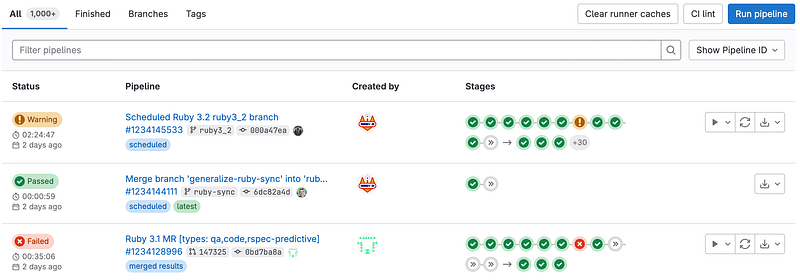
Pipeline Flow:
- Push to
developbranch → Deploy to staging. - Merge to
masterbranch → Deploy to production.
4. Using GitLab Variables for Dynamic Configuration
In complex CI/CD pipelines, you often need to use GitLab CI/CD variables to manage sensitive data like credentials, API keys, or environment-specific configurations.
Example: Using GitLab Variables to Securely Deploy
Let’s modify our previous deployment example to securely use credentials with GitLab CI/CD variables.
Step 1: Set Up GitLab CI/CD Variables
In your GitLab project, go to Settings > CI/CD > Variables and add the following variables:
STAGING_USER: The SSH user for the staging server.STAGING_HOST: The host address for the staging server.PRODUCTION_USER: The SSH user for the production server.PRODUCTION_HOST: The host address for the production server.
Step 2: Update the .gitlab-ci.yml to Use Variables
deploy_staging:
  stage: deploy
  environment:
    name: staging
    url: https://staging.example.com
  script:
    - echo "Deploying to Staging..."
    - scp -r dist/* $STAGING_USER@$STAGING_HOST:/var/www/html
  only:
    - develop
deploy_production:
  stage: deploy
  environment:
    name: production
    url: https://production.example.com
  script:
    - echo "Deploying to Production..."
    - scp -r dist/* $PRODUCTION_USER@$PRODUCTION_HOST:/var/www/html
  only:
    - master
By using GitLab variables, we ensure that sensitive information like server credentials is not hardcoded into the pipeline but securely stored in GitLab’s variable management system.
5. Advanced Use Case: Parallel Execution and Matrix Builds
In large projects, it’s common to run multiple jobs in parallel or test your application across different environments and configurations. GitLab CI/CD supports parallel jobs and matrix builds for such use cases.
Example: Running Tests in Parallel Across Different Node Versions
stages:
  - test
test_job:
  stage: test
  image: node:$NODE_VERSION
  script:
    - npm install
    - npm test
  parallel:
    matrix:
      - NODE_VERSION: ["12", "14", "16"]
Explanation:
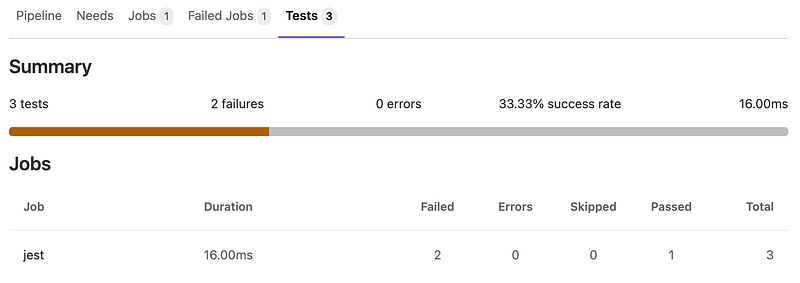
- This pipeline will run
test_jobin parallel across Node.js versions 12, 14, and 16. - The
parallelkeyword with amatrixallows you to run the same job across multiple configurations, ensuring compatibility with different environments.
6. Monitoring Pipeline Status and Artifacts
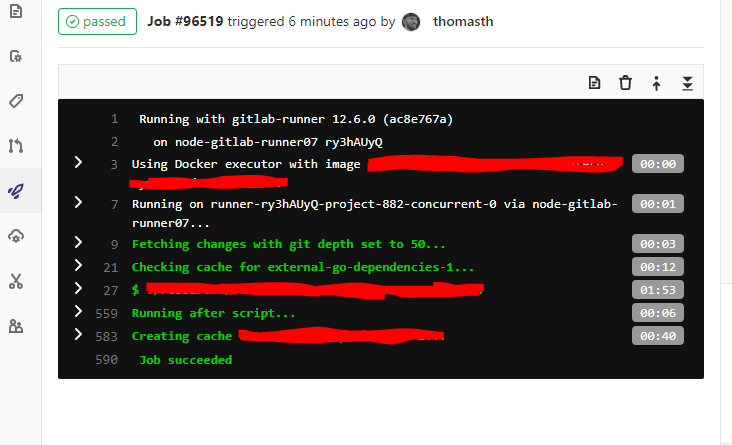
After running pipelines, GitLab provides various ways to monitor the status of your jobs and review the generated artifacts.
- Artifacts: Output files from jobs (e.g., built code, test reports).
- Logs: Each job in a pipeline generates logs, allowing you to track execution and debug errors.
You can view the artifacts by clicking on the “Artifacts” section within the pipeline-interface in GitLab.
7. GitLab CI/CD with Docker: Containerized Pipelines
In modern DevOps environments, pipelines often run inside Docker containers to provide a clean and reproducible environment. Let’s look at how you can use Docker images in your GitLab CI/CD pipeline.
Example: Running a Docker Container in a GitLab Pipeline
stages:
  - build
  - deploy
build_job:
  stage: build
  image: docker:19.03
  services:
    - docker:19.03-dind
  script:
    - docker build -t my-app .
    - docker tag my-app myregistry.com/my-app:latest
    - docker push myregistry.com/my-app:latest
Explanation:
- Docker Image: The pipeline runs inside a Docker 19.03 image.
- Docker in Docker (DinD): We use the
docker:dindservice to run Docker commands within the pipeline. - Script: Builds a Docker image of the application, tags it, and pushes it to a Docker registry.
GitLab CI/CD pipelines are incredibly powerful for automating everything from code testing to deployment. Understanding how to create robust, scalable pipelines that support parallelism, secure variables, and multi-environment deployment is crucial for maintaining an efficient workflow.
This guide has covered a range of use cases, from simple pipelines to advanced automation examples using GitLab CI/CD variables, parallel jobs, and Docker-based pipelines. With these skills, you can create fully automated CI/CD workflows that ensure high-quality software delivery.


