
Databricks Workspaces - Explained
Databricks workspaces serve as a unified hub encompassing all features and assets(such as clusters, sql endpoints, catalogs, groups, notebooks, schemas, tables, views, repos etc) within the Databricks platform. To utilize Databricks, you must create at least one workspace. These workspaces offer a structured organization where specific users can be assigned to designated spaces. The relationship between users and workspaces follows a one-to-many model, allowing a user to access one or more workspaces. Think of a workspace as a logical environment group, providing a structured and isolated environment within a single Databricks subscription. This design ensures efficient collaboration and resource management across different tasks and user groups.
Databricks Account vs Workspace
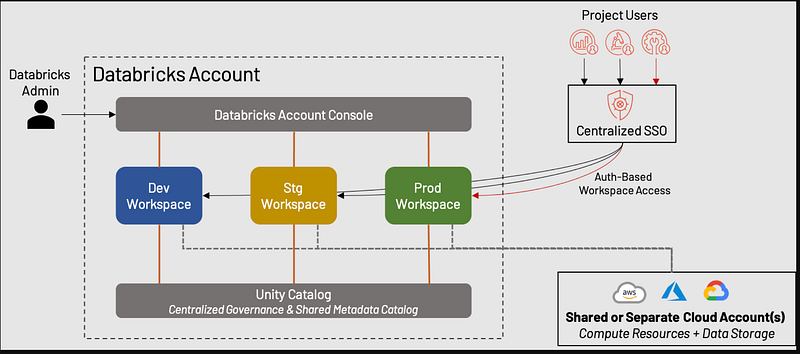
A Databricks account represents a single entity that can include one or more workspaces. For instance, a company like ABC Inc., looking to leverage Databricks for its data and AI initiatives, would obtain a Databricks account subscription. With this account, the company can create numerous workspaces based on its requirements. Workspaces can be structured to mirror typical SDLC environments, such as development, testing, and production. This structuring ensures that developers, testers, and support personnel are part of the respective workspaces, effectively isolating different stages of the development life cycle.
Determining the Number of Workspaces
Determining the number of workspaces for a company involves assessing its size and organizational structure. Here’s a breakdown based on my experience to guide you in creating workspaces:
Note: This assumption is completely my perspective, not a standard
Small Companies (1–100 employees):
- Recommendation: One Workspace
- Explanation: For smaller companies, consolidating all activities into a single workspace is often efficient. This simplifies collaboration and resource management.
Medium Companies (100–1000 employees):
- Recommendation: Three Workspaces (Dev, Test, Prod)
- Explanation: Medium-sized companies benefit from isolating development, testing, and production environments. This promotes organized development processes.
Large Companies (>1000 employees):
- Recommendation: More than Three Workspaces
- Explanation: Larger enterprises may require additional workspaces to cater to various departments or business verticals. For instance, a large banking company could create workspaces for corporate banking, consumer banking, credit cards, loans, and insurances.
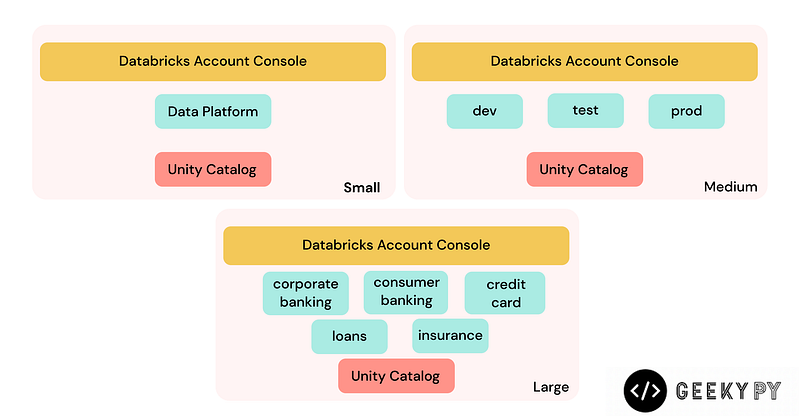
Note: The number of workspaces is entirely dependent on the company’s needs. It’s not uncommon for a single company to have over 70 workspaces. Additionally, consider workspace limits, as each workspace comes with specific constraints. You can find details on workspace limits here. These limits play a crucial role in determining the appropriate number of workspaces for your organization.
Pro Tip: You have the flexibility to create Unity Catalog at the account level, making it shareable across different workspaces. This allows you to generate schemas, tables, and views in one workspace and seamlessly access them from another workspace within the same account.
Prerequisites for Creating a Workspace
Let’s delve into the prerequisites for creating a workspace. As mentioned earlier, you’ll need a Databricks account subscription, essentially an admin account provided by Databricks for your company. This account acts as the administrative hub for managing your Databricks resources.
In addition to the Databricks account, you’ll also require a cloud provider account. This account is essential for provisioning the necessary compute resources within the Databricks environment. As of now, Databricks supports three major cloud providers: AWS, Azure, and GCP. Your choice of cloud provider is based on your company’s existing infrastructure and preferences.
As of the time of writing this article, it’s mandatory to associate a cloud account when creating a Databricks workspace. This integration ensures seamless access to the computational power needed for your workloads.
An important note is that, with the potential introduction of serverless capabilities, Databricks may evolve to eliminate the necessity of a dedicated cloud account for workspace creation in the future. This shift could bring about more flexibility and ease in setting up workspaces, aligning with the advancements in serverless computing technology.
Different Ways to Create a Workspace in Databricks
Databricks offers flexibility in creating workspaces, accommodating various infrastructure capabilities. Here are different methods to create workspaces:
- Using UI: The Databricks admin account UI enables the straightforward creation of workspaces. Log in to the Databricks root/admin account, click on “Create Workspace,” and fill in the relevant details.
- Using APIs: For teams preferring programmatic deployment, Databricks workspace APIs allow the creation, modification, and deletion of workspaces. These REST APIs can be utilized with any programming language.
- Using Infrastructure as Code frameworks: Leveraging frameworks like Terraform or Bicep provides a cleaner and more readable approach. Databricks Terraform modules are actively maintained and developed.
- Using Cloud Provider Templates: Various cloud providers offer templates that abstract complex details. This approach simplifies the process of creating Databricks workspaces.
Understanding Databricks workspaces is essential for optimizing their use within your organization. If you have any questions or insights, feel free to leave a comment.
Catch you later for more data wizardry! 😄📊🔮 Buy me a coffee


