
Databricks Unity Catalog — all you need to know
In this blog I’ll be exploring the essential features of Unity Catalog and providing you with insights on how to seamlessly integrate it into your organization’s workflow.
This blog is frequently updated with various features or proof of concepts on Unity Catalog, so stay tuned!
Databricks announced exciting new features on the Unity Catalog at the Databricks Summit 2023! This blog I’ve written to share essential foundational knowledge before you delve into evaluating the latest additions to the Unity Catalog.
I have organized the topics and subtopics in a suitable order to help you understand the concept.
- Unity Catalog & component hierarchy - What is a Catalog? - What is a Schema? - Tables — Managed Table — External Table - Functions - Volumes - Databricks Unity Catalog (Metastore) — a catalog of catalogs - Access Connector for Azure Databricks - Storage Credential - External Location
- Unity Catalog in your organization
- Data Modelling & Lineages - Informational Keys — Managed tables — External tables - Visual Data Modelling in Power BI - Data Asset Lineage
- Access Control - Azure AD — Databricks sync - Object Ownership - Object Permissions - Fine-grained Access Control
- Implementing Unity in your Organization
- Update Oct’23: Implementing Row Level Security
- Update Nov’23: Unity Catalog — Data Modelling with Lucid
Let’s start with the foundational components.
Unity Catalog & component hierarchy
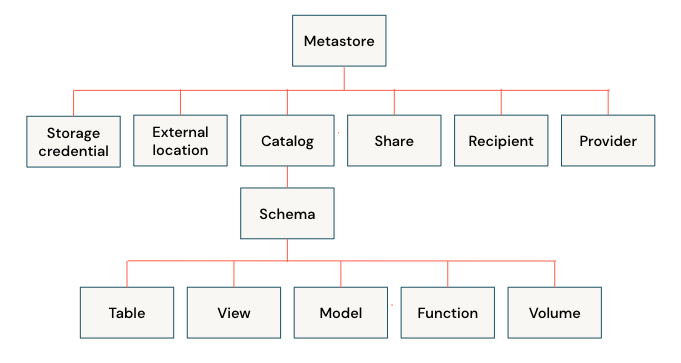
What is a Catalog?
Catalog is a logical container to provide a structured representation of the data stored in a system. Suppose for a Consumer Goods company we create a catalog for Finance. Under Finance, there will be various capabilities.
Inside Unity there are two types of catalogs — hive_metastore and Unity ‘governed’ catalogs.
hive_metastore can be an internal hive metastore which comes bundled with each Databricks workspace. Otherwise, an external hive metastore can be configured and shared across multiple Databricks workspaces.
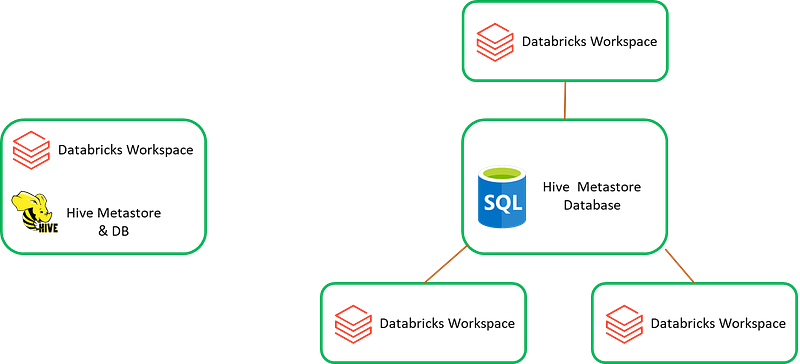
To note, the hive_metastore is not governed by the Unity Catalog.
You can join a table in a Unity Catalog with a table from hive_metastore.
SELECT * FROM hive_metastore.sales.sales_current
JOIN caralog1.schema1.sales_historical
ON hive_metastore.sales.sales_current.order_id = caralog1.schema1.sales_historical.order_id;
What is a Schema?
A schema or database enables users to explore and search for relevant data objects. This is the second level container under a catalog. Inside our Finance catalog we can have schemas each for various business capabilities like — Accounting & Finance Reporting, Budget & Forecasting, Customer Credit & Collections etc.
Tables
A table is a collection of structured data. It creates an abstraction on datalake files. Working with tables and its metadata is much easier than working directly with the files. There are two options you can select from while creating tables in Unity:
Managed Table
- Default way to create table in Unity.
- Unity manages the data lifecycle and file & folder layouts for these tables.
- You should only use Databricks to manipulate files in these tables. If you have a plan to use other tools to amend, don’t configure the table as managed.
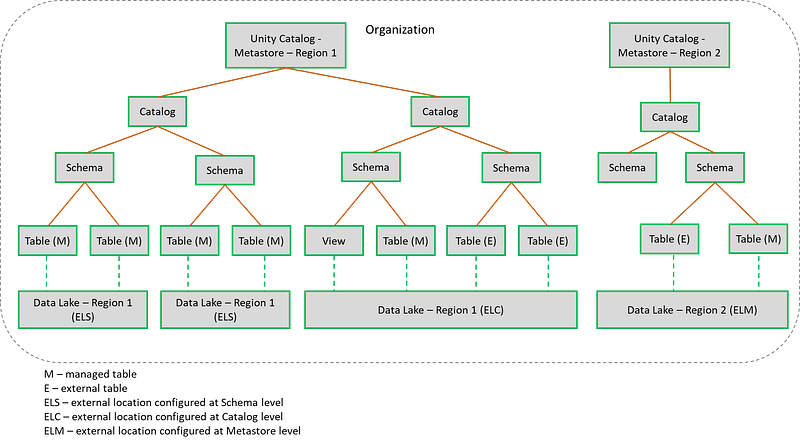
- By default, table data are stored in the root storage location that you configure when you create a metastore. You can optionally (you should) specify storage locations at the catalog or schema levels, overriding the root storage location.
- When dropped, underlying data is deleted from your cloud tenant within 30 days.
CREATE TABLE catalog.schema.department
(
  deptcode  INT,
  deptname  STRING,
  location  STRING
);
External Table
- Data is stored outside of the managed storage location specified for the metastore, catalog, or schema.
- Use external tables only when you require direct access to the data outside of Databricks clusters or Databricks SQL warehouses (e.g. you want to access/amend using Synapse Spark or Microsoft Fabric).
- When you will drop the table, Unity will remove the metadata and will not delete the underlying data. You have to separately clean up the data folder location.
- External table creation SQL command contains a LOCATION clause.
CREATE TABLE catalog.schema.address
(
  empid INT,
  addressid INT,
  street STRING,
  city STRING,
  country STRING
)
LOCATION 'abfss://[email protected]/demostore/address';
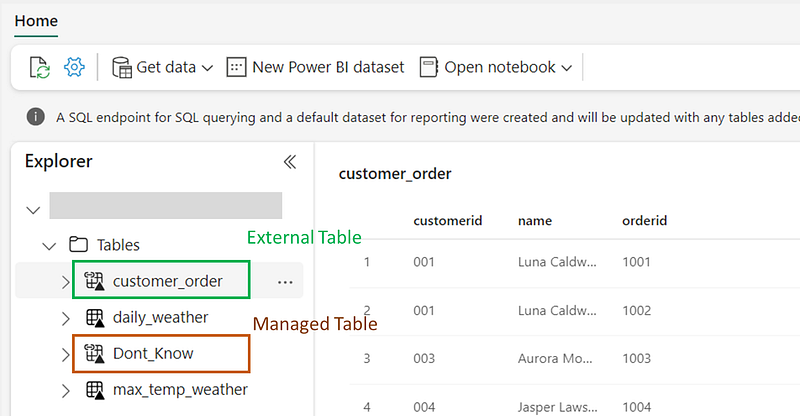
You can connect both the managed and external tables from any other tool like, Microsoft Fabric. However, for the managed tables the table names are not directly reflected in the folder structure, posing a challenge for users seeking to identify specific entity names solely from the folder information. Unity should be the sole interface for interacting with managed tables to maintain data integrity and avoid potential issues.
On the other hand, external tables offer a more flexible approach, enabling seamless data access from external tools and applications. Unlike managed tables, external tables directly reflect the table names in the folder structure, making it easier to understand entity names without inspecting the data.
While managed tables offer a controlled environment within Unity, external tables provides the possibilities for collaboration and integration across diverse platforms.
Not only Tables!
Unity doesn’t only store table definitions under a schema. It stores views, functions, ML models and data volumes.
Functions
Databricks provides a SQL command to register custom functions to schemas governed by Unity.
%sql
CREATE FUNCTION catalog1.schema1.roll_dice()
    RETURNS INT
    LANGUAGE SQL
    NOT DETERMINISTIC
    CONTAINS SQL
    COMMENT 'Roll a single 6 sided die'
    RETURN (rand() * 6)::INT + 1;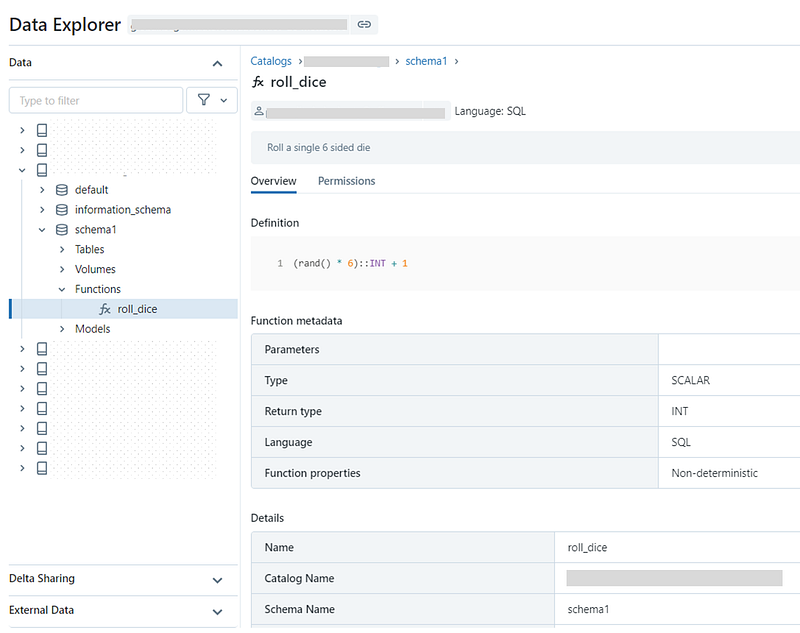
Volumes
- Volumes provide capabilities for accessing, storing, governing, and organizing files.
- Whereas, tables provide governance over tabular datasets, volumes add governance over specially non-tabular datasets like semi-structured and unstructured data but, can even store structured data as well.
- Managed volume vs external volume.
- Managed volume — storage volume created within the default storage location of the containing schema. Lifecycle is managed by Unity.
CREATE VOLUME <catalog>.<schema>.<volume-name>;- External volume — useful by adding governance to data files without migration into Unity. Lifecycle is not managed by Unity.
CREATE EXTERNAL VOLUME <catalog>.<schema>.<external-volume-name>
LOCATION 'abfss://<container-name>@<storage-account>.dfs.core.windows.net/<path>/<directory>';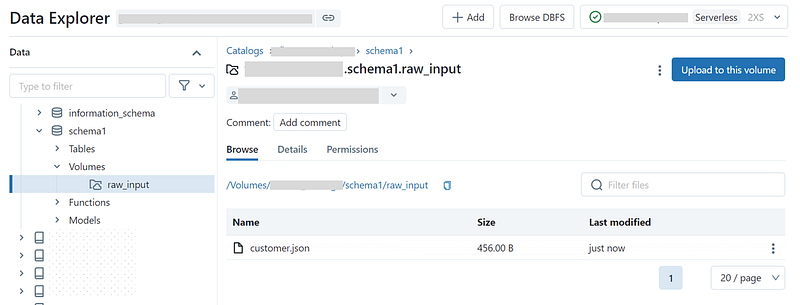
Databricks Unity Catalog (Metastore) — a catalog of catalogs
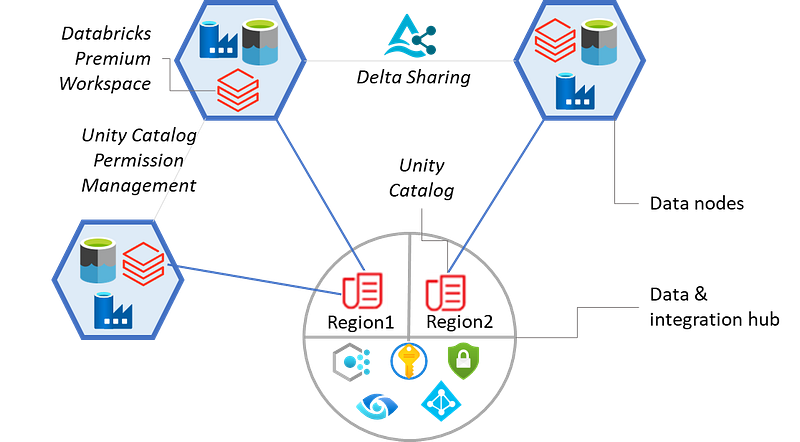
Unity is a catalog of catalogs. There will be a single Unity instance governing all catalogs, schemas, and tables within an organization’s Azure/cloud region.
If an organization data is spread across multiple geographic regions supporting region-specific businesses, your organization Databricks administrator needs to create multiple Unity instances in those regions.
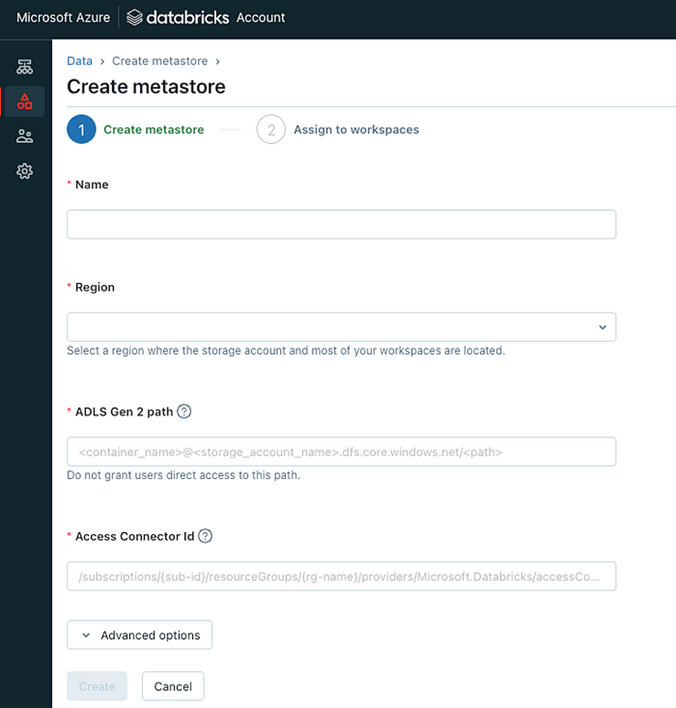
You can use Delta Sharing for sharing data between two metastores.
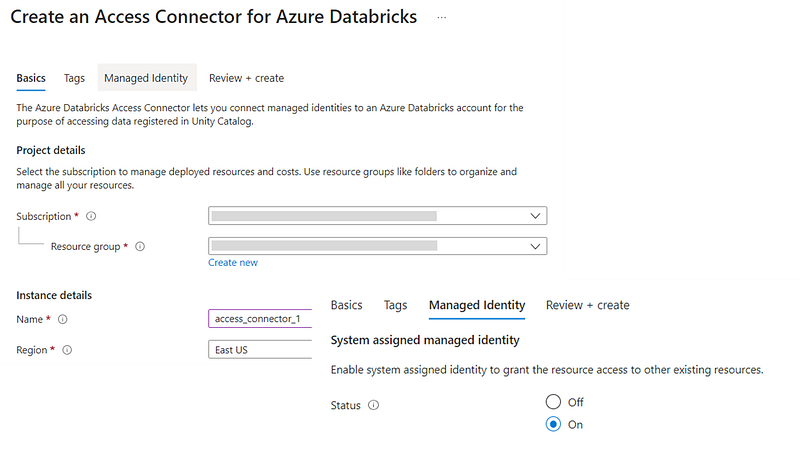
Access Connector for Azure Databricks
Azure Databricks access connector is an Azure resource that lets you connect managed identities to an Azure Databricks account. You can directly assign datalake read/read-write access to the access connector or, add this as a member of an Azure AD Group which already has access to the datalake location. Once done, you configure the access connector into a Storage Credential.
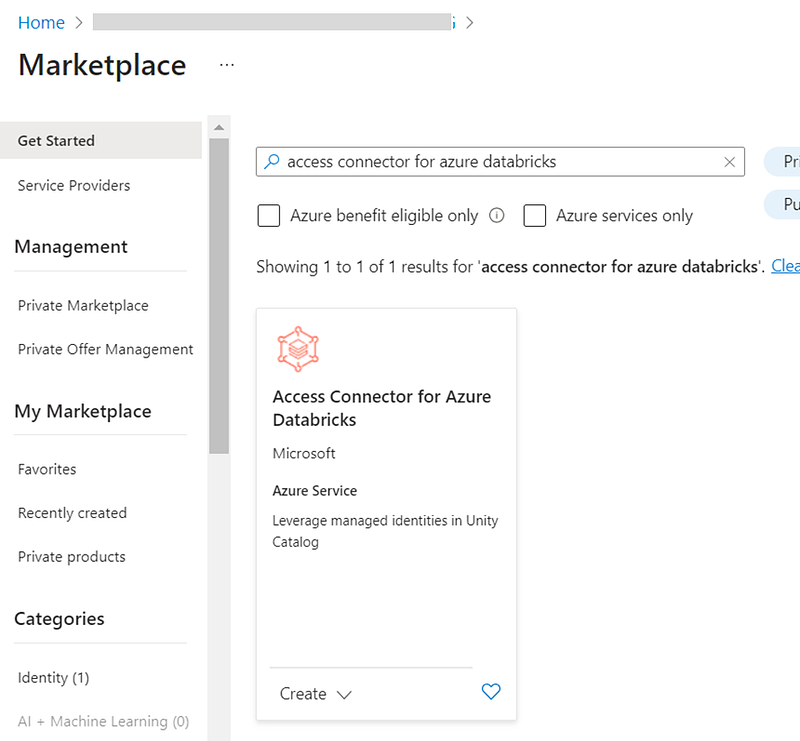
Storage Credential
A Storage Credential points to an Access Connector which has access to the data.
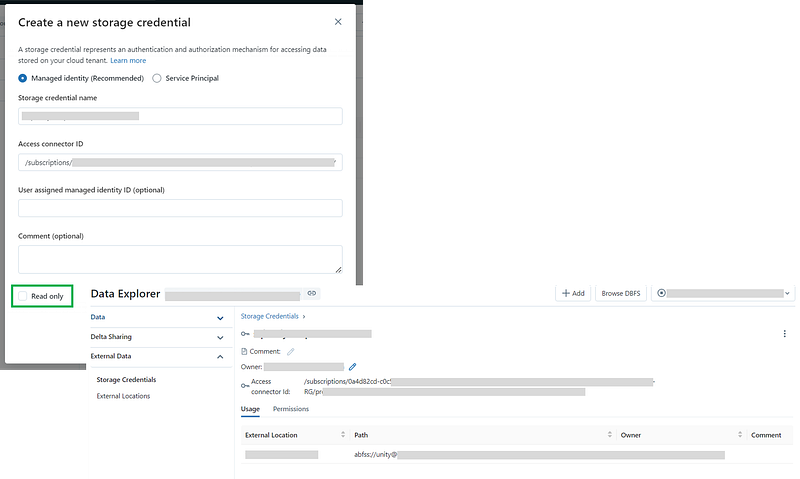
It’s always suggested to configure Unity with a managed identity rather than a service principal as managed identities do not require to maintain credentials or rotate secrets.
External Location
External location points to a datalake location and selects a storage credential which has access to the datalake location.
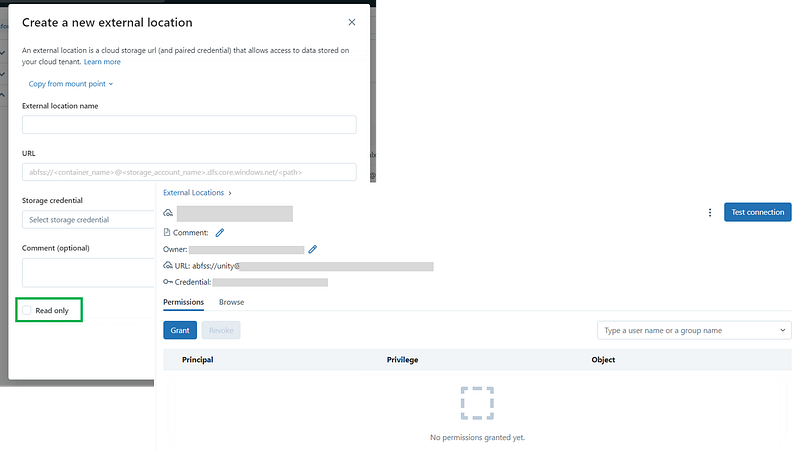
Once configured, you can test the connection to verify your access level.
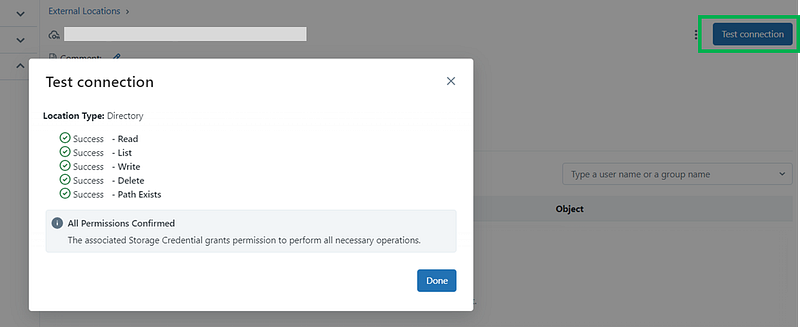
External locations can provide access to a broad location in cloud storage e.g. an entire container (abfss://my-container) or a broad sub directory (abfss://my-container/alotofdata).
When creating a managed table -
- if the schema has an external location configured, table data will be stored into that location.
- if the schema doesn’t have any external location setup but, the catalog has an external location configured, table data will be stored into that location.
- if the catalog doesn’t have any external location setup as well, data will be stored into the datalake location configured at the Unity metastore level.
Unity Catalog in your organization
Unity metastore should be setup as part of the organization/platform/hub level and not at any solution/data domain level. Domains should have their own respective catalogs setup under metastore.
Data Modelling & Lineages
Informational Keys
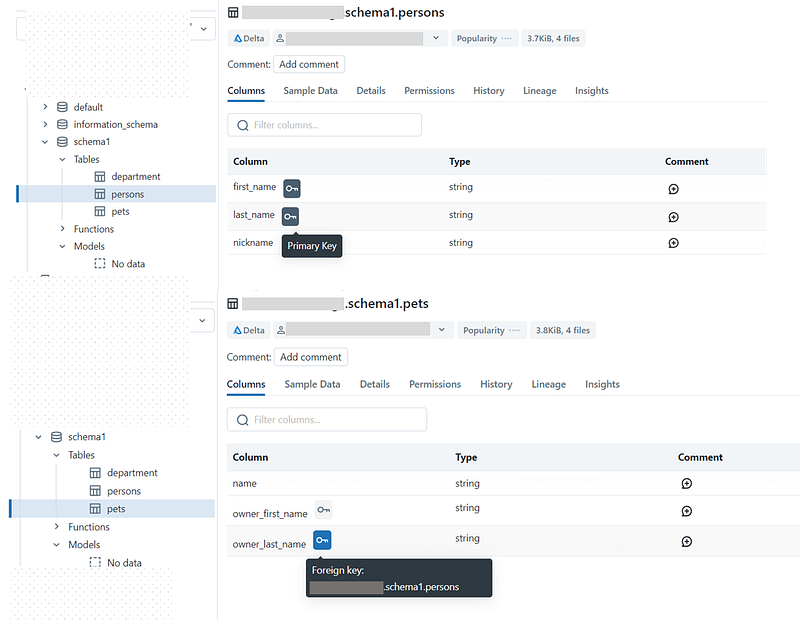
Unity as on now, doesn’t provide any data modelling visual tool to display of data assets relationships. However, Databricks has introduced an informational primary key and foreign key as part of a CREATE TABLE statement (in public preview at the time of this writing). There is no enforcement of these keys.
Managed tables:
%sql
-- Create a table with a primary key
CREATE TABLE catalog1.schema1.persons
(
  first_name STRING NOT NULL,
  last_name STRING NOT NULL,
  nickname STRING,
  CONSTRAINT persons_pk PRIMARY KEY(first_name, last_name)
);
-- create a table with a foreign key
CREATE TABLE catalog1.schema1.pets
(
  name STRING,
  owner_first_name STRING,
  owner_last_name STRING,
  CONSTRAINT pets_persons_fk FOREIGN KEY (owner_first_name, owner_last_name) REFERENCES catalog1.schema1.persons
);
External tables:
%sql
-- Create a table with a primary key
CREATE TABLE catalog2.schema2.customers
(
  customerid STRING NOT NULL PRIMARY KEY,
  name STRING
)
LOCATION 'abfss://[email protected]/demostore/customers';
-- create a table with a foreign key
CREATE TABLE catalog2.schema2.orders
(
  orderid BIGINT NOT NULL CONSTRAINT orders_pk PRIMARY KEY,
  customerid STRING CONSTRAINT orders_customers_fk REFERENCES catalog2.schema2.customers
)
LOCATION 'abfss://[email protected]/demostore/orders’
Visual Data Modelling in Power BI
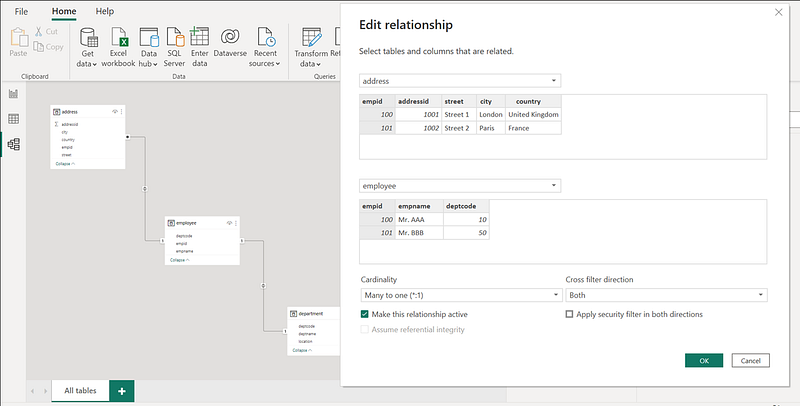
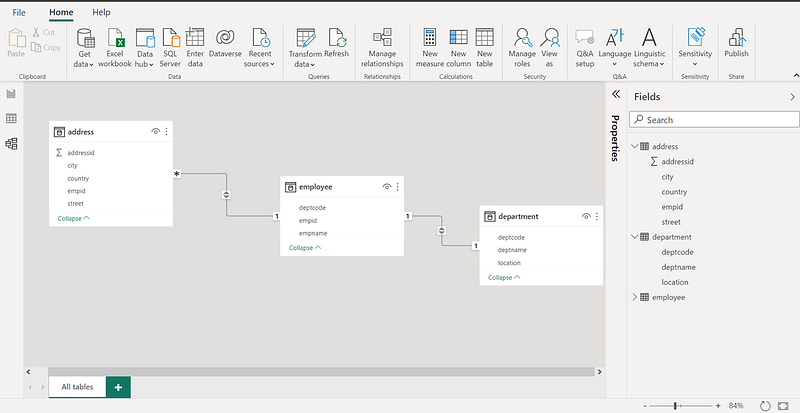
If you are using Power BI for data visualizations, it has an autodetect feature. Power BI Desktop looks at column names in the tables you’re querying to determine if there are any potential relationships and create the relationships visually. However, this may not be perfect and you may have to manually create or edit relationships using the Manage relationships dialog box.
Data Asset Lineage
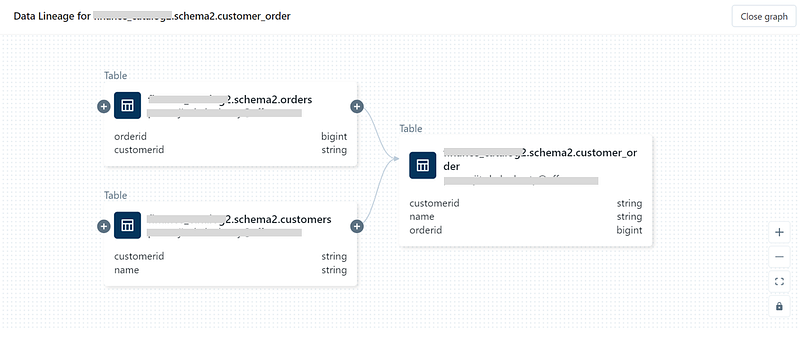
Lineage is a very useful feature in Unity to visualize the source to target data journey.
Let’s create a derived table from two parent tables:
%sql
CREATE TABLE catalog2.schema2.customer_order
(
  customerid STRING,
  name STRING,
  orderid BIGINT,
  CONSTRAINT customer_order_pk PRIMARY KEY(customerid, orderid)
)
LOCATION 'abfss://[email protected]/demostore/customer_order';

INSERT INTO catalog2.schema2.customer_order (customerid, name, orderid)
SELECT cus.customerid, cus.name, ord.orderid FROM
  finance_catalog2.schema2.customers AS cus,
  finance_catalog2.schema2.orders AS ord
WHERE cus.customerid = ord.customerid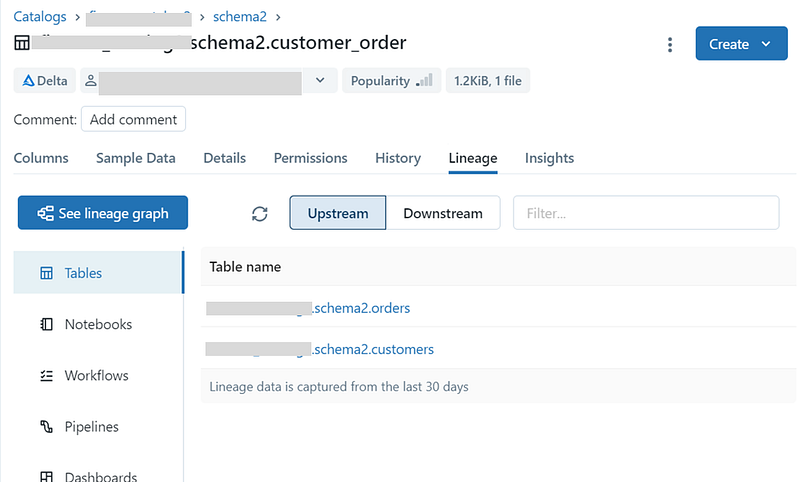
Use the See lineage graph option to explore the lineages.
Access Control
Azure AD — Databricks sync
Preference is to use your Azure AD and sync with your Databricks account. Refer — Provision identities to your Azure Databricks account using Azure Active Directory (Azure AD).
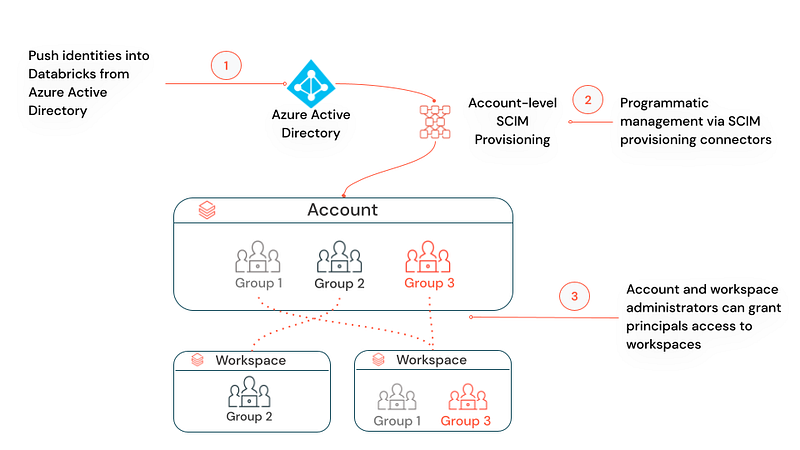
Otherwise, your Databricks account admin has to create groups and assign members in Databricks i.e. to maintain access information in two places — Azure AD for Azure resources and Databricks for Unity components.
Refer the following — Add groups to your account using the account console and Add users, service principals, and groups to an existing group using the account console.
Object Ownership
The principal that creates an object becomes its initial owner. Replace at least Catalog, Schema owners from an individual user to a proper owner group.
Object Permissions
Privileges in Unity are inherited downward i.e. Catalog > Schema > Table. Privileges that are granted on a Unity Catalog metastore are not inherited.
Refer — Privilege types by securable object in Unity Catalog.
Fine-grained Access Control
Fine-grained access is maintained using some functions provided by Unity: current_user(), is_account_group_member(), is_member() and utilizing dynamic views.
Implementing Unity in your Organization
- Decide on the Unity metastore instances you require for your organization based on operating regions. Unity is an Azure tenant level resource. So, workspaces across various Azure subscriptions can be added under a Unity instance. A single instance of Unity for your organization — is a more common scenario.
- Provision Unity metastore in your central data platform or hub Azure Resource Group with an appropriate root ADLS location by your organization Databricks admin [reference].
- Configure an SCIM provisioning connector from Azure Active Directory to your Databricks account [reference]. As part of that, you have to create an Enterprise Application in Azure AD and assign AD Groups. The group names will flow into your Databricks account and you can manage the access to catalogs/schemas/tables.
- Databricks admin to assign Databricks workspaces (premium) to the metastore [reference].
- Databricks admin to grant domain teams/nodes access to create catalogs [reference]. You may configure an appropriate external storage at the catalog level.
- Catalog admin to create schemas or, pass on the appropriate access [reference]. You may configure an appropriate external storage at the schema level as well.
- Create managed or external tables, volumes, view, functions and ML models under a schema. If you are creating external tables, register under a single metastore (e.g. Unity metastore vs external hive metastore). Otherwise, a schema change in one metastore will not be registered with another metastore.
- If required, enable Delta sharing for sharing data between multiple Unity metastores. Technically you can create an external table pointing to data in a different region however, this is not recommended.
Implementing Row Level Security
Discover how to implement row-level security (RLS) for safeguarding sensitive information using Databricks SQL user-defined functions.
Select your Unity Catalog & Schema:
USE <unity_catalog>.<schema>;Sample data preparation:
CREATE TABLE IF NOT EXISTS fact1(name STRING, unit_id INT);
CREATE TABLE IF NOT EXISTS fact2(name string, unit_id INT, reporting_id INT);
CREATE TABLE IF NOT EXISTS fact3(name string, unit_id INT, reporting_id INT, item_id INT);
INSERT INTO fact1 (name, unit_id)
VALUES
('FACT1_001', 1),
('FACT1_002', 2),
('FACT1_003', 3);
INSERT INTO fact2 (name, unit_id, reporting_id)
VALUES
('FACT2_001', 1, 10),
('FACT2_002', 2, 20),
('FACT2_003', 1, 10);
INSERT INTO fact3 (name, unit_id, reporting_id, item_id)
VALUES
('FACT3_001', 1, 10, 100),
('FACT3_002', 2, 20, 200),
('FACT3_003', 1, 30, 200);Data access verification before applying the Row Level Security:
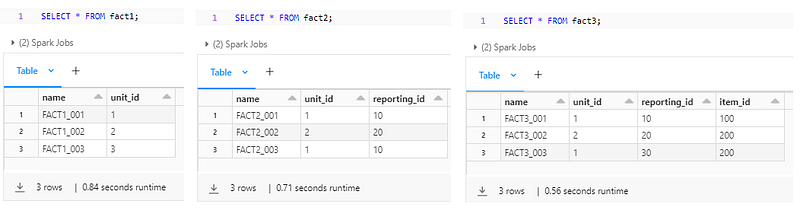
Setting up the access control:
CREATE TABLE IF NOT EXISTS access_control_mapping (
  ad_group STRING,
  unit_id INT,
  reporting_id INT,
  item_id INT
);
CREATE OR REPLACE FUNCTION unit_filter(_unit_id INT)
RETURN
EXISTS (SELECT 1 FROM access_control_mapping mapping
WHERE IS_ACCOUNT_GROUP_MEMBER(mapping.ad_group)
AND unit_id = _unit_id
AND reporting_id IS NULL
AND item_id IS NULL);
CREATE OR REPLACE FUNCTION unit_reporting_filter(_unit_id INT, _reporting_id INT)
RETURN
EXISTS (SELECT 1 FROM access_control_mapping mapping
WHERE IS_ACCOUNT_GROUP_MEMBER(mapping.ad_group)
AND unit_id = _unit_id
AND reporting_id = _reporting_id
AND item_id IS NULL);
CREATE OR REPLACE FUNCTION unit_reporting_item_filter(_unit_id INT, _reporting_id INT, _item_id INT)
RETURN
EXISTS (SELECT 1 FROM corporate_finance_analytics.test_schema.access_control_mapping mapping
WHERE IS_ACCOUNT_GROUP_MEMBER(mapping.ad_group)
AND unit_id = _unit_id
AND reporting_id = _reporting_id
AND item_id = _item_id);Application of the RLS functions to the tables:
ALTER TABLE fact1 SET ROW FILTER unit_filter ON (unit_id);
ALTER TABLE fact2 SET ROW FILTER unit_reporting_filter ON (unit_id, reporting_id);
ALTER TABLE fact3 SET ROW FILTER unit_reporting_item_filter ON (unit_id, reporting_id, item_id);
Updating the access control table with Azure Active Directory Group authorization:
-- AD group should have access to unit_id = 3 for fact1 table
INSERT INTO access_control_mapping VALUES ('<Your AD Group>', 3, null, null);

-- AD group should have access to unit_id = 2 and reporting_id = 20
-- combination for fact2 table
INSERT INTO access_control_mapping VALUES ('<Your AD Group>', 2, 20, null);

-- AD group should have access to unit_id = 1, reporting_id = 30 and
-- item_id = 200 combination for fact3 table
INSERT INTO access_control_mapping VALUES ('<Your AD Group>', 1, 30, 200);
Data access verification after applying RLS:
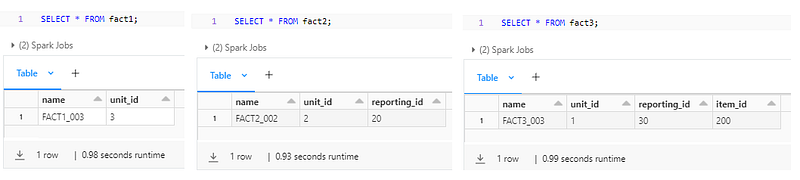
Unity Catalog — Data Modelling with Lucid
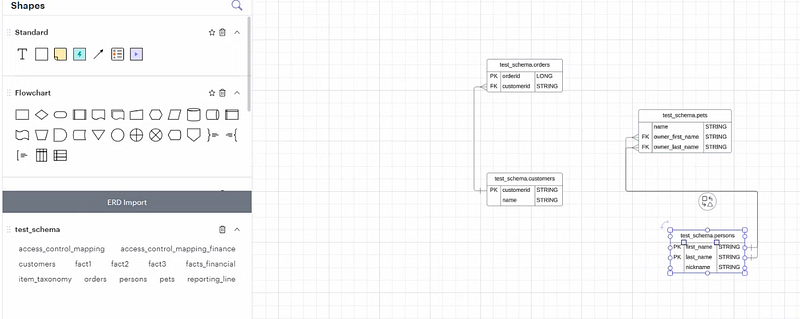
Though in Unity, you can add informational keys, you can’t see a visual representation of the created entities and the relationships among themselves.
Find below the way to import the Unity catalog/schema level metadata into Lucid chart and inspect the entity/relationships visually.
- Open Lucid chart and select a blank diagram.
- Go to File > Import Data
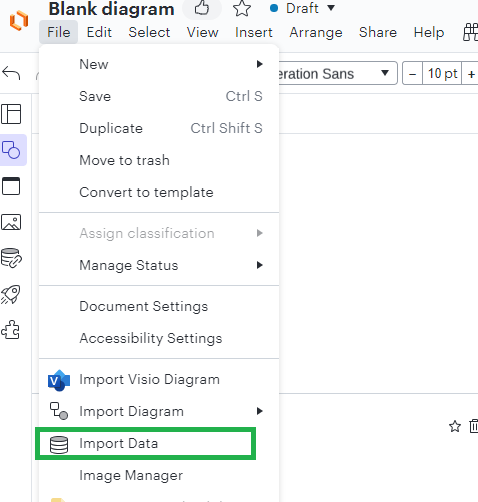
3. Select Entity relationship (ERD) > Import from SQL Database.
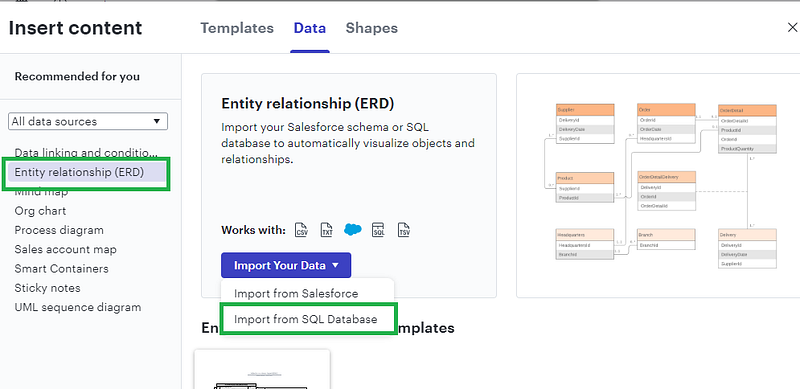
4. Select SQL Server and copy the displayed SQL. SQL Server metadata schema is very similar with Unity Catalog Informational Schema. So, the copied SQL will work in Unity with some minor changes.
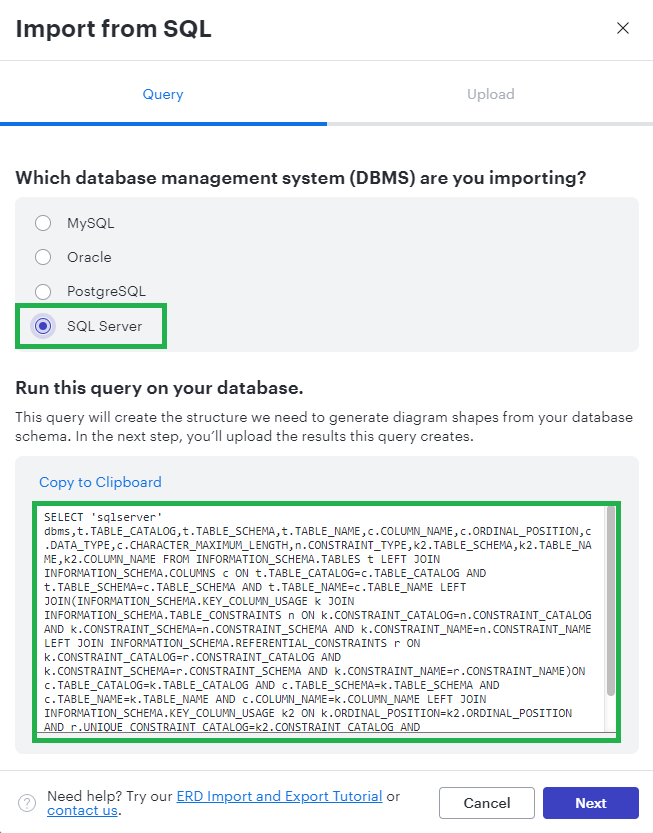
The updated query would look like -
%sql

USE <unity_catalog_name>.information_schema;

SELECT
  'sqlserver' dbms, t.TABLE_CATALOG, t.TABLE_SCHEMA,
  t.TABLE_NAME, c.COLUMN_NAME, c.ORDINAL_POSITION,
  c.DATA_TYPE, c.CHARACTER_MAXIMUM_LENGTH, n.CONSTRAINT_TYPE,
  k2.TABLE_SCHEMA, k2.TABLE_NAME, k2.COLUMN_NAME
FROM
INFORMATION_SCHEMA.TABLES t
LEFT JOIN INFORMATION_SCHEMA.COLUMNS c ON
  t.TABLE_CATALOG=c.TABLE_CATALOG AND
  t.TABLE_SCHEMA=c.TABLE_SCHEMA AND
  t.TABLE_NAME=c.TABLE_NAME
LEFT JOIN(INFORMATION_SCHEMA.KEY_COLUMN_USAGE k JOIN INFORMATION_SCHEMA.TABLE_CONSTRAINTS n ON
  k.CONSTRAINT_CATALOG=n.CONSTRAINT_CATALOG AND
  k.CONSTRAINT_SCHEMA=n.CONSTRAINT_SCHEMA AND
  k.CONSTRAINT_NAME=n.CONSTRAINT_NAME
LEFT JOIN INFORMATION_SCHEMA.REFERENTIAL_CONSTRAINTS r ON
  k.CONSTRAINT_CATALOG=r.CONSTRAINT_CATALOG AND
  k.CONSTRAINT_SCHEMA=r.CONSTRAINT_SCHEMA AND
  k.CONSTRAINT_NAME=r.CONSTRAINT_NAME)ON
  c.TABLE_CATALOG=k.TABLE_CATALOG AND
  c.TABLE_SCHEMA=k.TABLE_SCHEMA AND
  c.TABLE_NAME=k.TABLE_NAME AND
  c.COLUMN_NAME=k.COLUMN_NAME
LEFT JOIN INFORMATION_SCHEMA.KEY_COLUMN_USAGE k2 ON
  k.ORDINAL_POSITION=k2.ORDINAL_POSITION AND
  r.UNIQUE_CONSTRAINT_CATALOG=k2.CONSTRAINT_CATALOG AND
  r.UNIQUE_CONSTRAINT_SCHEMA=k2.CONSTRAINT_SCHEMA AND
  r.UNIQUE_CONSTRAINT_NAME=k2.CONSTRAINT_NAME
WHERE t.TABLE_TYPE IN ('EXTERNAL', 'MANAGED')
AND t.TABLE_SCHEMA = '<unity_schema>';
We can limit the result to a specific schema or all schemas of the Unity Catalog.
5. Download all of the records of the above query execution in your Databricks.
6. Upload the metadata into Lucid.
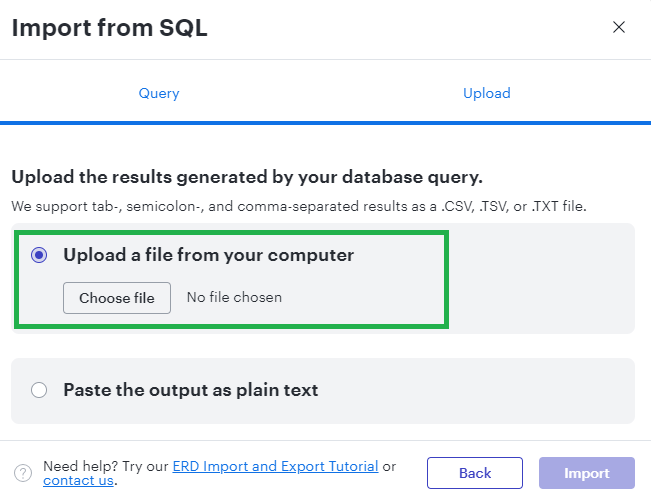
7. You’ll see the entities on the left-side ERD Import menu. Just drag-drop the tables into the canvas and Lucid will automatically assign the relationships.
Thanks for reading!! If you have enjoyed, Clap & Share it!! To see similar interesting posts on Azure, Databricks and other technologies, follow me on Medium & LinkedIn.


