

Databricks SQL Warehouse: A Practical Guide for SQL Users
For users unfamiliar with Databricks, it may make an impression that it’s a platform focused on Python or Scala for data processing. However, with Spark SQL, Databricks has become more friendly for users with SQL experience, but unfamiliar with Python or Scala.
Moreover, with Unity Catalog or Hive Metastore, you can create typical data warehouse objects such as tables, views, and functions. Serverless computing starts in a few seconds, this makes Databricks difficult to distinguish from a powerful data warehousing tool. These capabilities make it easier for SQL users to leverage Databricks for data warehousing and analytics.
SQL Editor in Databricks
The SQL editor in Databricks supports work with Databricks SQL. We can write SQL queries to transform or explore data. As you can notice in the screen below we can list tables, views, or functions available in catalogs, write queries, and select Serverless SQL Warehouse to execute a SQL statement. The SQL editor supports intelligence and assistance that can be helpful in writing queries.

SQL code can be executed in a notebook, using all-purpose clusters or serverless computing. To execute an SQL query in a notebook you need to use the %sql magic command at the top of a cell to let Databricks know that it’s an SQL statement.
Create Tables with Databricks SQL
Databricks SQL offers various ways to create a table in Unity Catalog or Hive Metastore. We can create a table by referencing existing Parquet files, copying an existing table, cloning it, or executing an SQL statement with a DDL (Data Definition Language) definition.
CREATE TABLE clients USING CSV LOCATION '/path/to/clients';


CREATE TABLE clients_copy AS SELECT * FROM clients;
Creating a table based on a file is convenient, but defining a schema is preferred in a data warehousing scenario. A well-defined schema is crucial because it ensures consistent field names and data types. This consistency enables the seamless usage of a data model and integration with business intelligence tools.
CREATE TABLE dbo.clients
(
 client_id bigint GENERATED BY DEFAULT AS IDENTITY PRIMARY KEY,
 region_id bigint,
 client_number string,
 name string,
 email string,
 phone_number string,
 bulding_number string,
 street_name string,
 birth_date date
);

ALTER TABLE clients ADD CONSTRAINT dateWithinRange CHECK (birth_date> '1900-01-01');
Delta tables in Databricks support important data warehousing features, such as identity columns, constraints, and primary/foreign keys. These capabilities help design a data model or migrate from an on-premises database to Databricks. Using these features, you can ensure data integrity, create relationships between tables, and maintain a structured schema that fits traditional data warehousing practices.

DML for Loading Data into Databricks SQL
Databricks supports crucial Data Modification Language (DML) commands for data manipulation. With Databricks SQL and Delta tables, you can perform key DML actions such as updating, deleting, or inserting to modify data in your tables.
VALUES
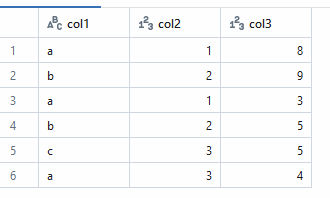
Using the VALUES command, you can define virtual data sets for a test purpose or to enhance your queries. It can be used with a Common Table Expression (CTE) or as a temporal view. This command is helpful when you mock data, perform quick tests, or integrate small datasets into larger queries without creating a table.
with dane (a,b, c) as (
    VALUES    ('a', 1, 8),
              ('b', 2, 9),
              ('a', 1, 3),
              ('b', 2, 5),
              ('c', 3, 5),
              ('a', 3, 4)
              )

select * from dane;

create temp view vdane as
    VALUES    ('a', 1, 8),
              ('b', 2, 9),
              ('a', 1, 3),
              ('b', 2, 5),
              ('c', 3, 5),
              ('a', 3, 4);
             ;

select *
from
vdane
The expected result:
INSERT INTO
Databricks SQL supports the INSERT INTO command only for Delta tables. The command can be helpful in scenarios when you reload data by truncating and inserting or adding new data into a table. This function works similarly to other SQL dialects, but a helpful feature is the ability to map columns by names.
CREATE TABLE dbo.clients
(
 client_id bigint GENERATED BY DEFAULT AS IDENTITY,
 region_id bigint,
 client_number string,
 name string,
 email string,
 phone_number string,
 bulding_number string,
 street_name string,
 birth_date date
);
INSERT INTO with columns names:
INSERT INTO dbo.clients (client_number, name, email, phone_number, bulding_number, street_name, birth_date )
SELECT
 client_number,
 name,
 email,
 phone_number,
 bulding_number,
 street_name,
 birth_date
from
read_files(
'abfss://[email protected]/clients/',
format => 'csv',
header => true,
mode => 'FAILFAST');Inserting data into a table from a CSV file with automated column mapping by name:
INSERT INTO dbo.clients BY NAME
SELECT
client_number,
name,
email,
phone_number,
bulding_number,
street_name,
birth_date
from
read_files(
  'abfss://[email protected]/clients/',
  format => 'csv',
  header => true,
mode => 'FAILFAST');MERGE INTO
The MERGE INTO command is helpful in data warehousing scenarios where we need to retrieve data from sources and update data in a data warehouse or lakehouse. Using merge into command, we have update, insert, and delete commands in one, making it ideal for managing slowly changing dimensions (SCD), upserts, or data refreshing in tables.
CREATE TABLE Employees
(
  EmployeeID int,
  FirstName string,
  LastName string,
  ManagerID int
);
CREATE TABLE silver.raw_Employees
(
EmployeeID int,
FirstName string,
LastName string,
ManagerID int
);
INSERT INTO Employees VALUES (1, 'Harper', 'Westbrook', NULL);
INSERT INTO Employees VALUES (2, 'Liam', 'Carrington', 1);
INSERT INTO Employees VALUES (3, 'Evelyn', 'Radcliffe', 1);
INSERT INTO Employees VALUES (4, 'Mason', 'Albright', 2);
INSERT INTO Employees VALUES (5, 'Isla', 'Whitman', 2);
INSERT INTO Employees VALUES (6, 'Noah', 'Sterling', 3);
INSERT INTO Employees VALUES (7, 'Ruby', 'Lennox', 3);
INSERT INTO Employees VALUES (8, 'Caleb', 'Winslow', 5);
INSERT INTO Employees VALUES (9, 'Avery', 'Sinclair', 6);
INSERT INTO Employees VALUES (10, 'Oliver', 'Beckett', 6);
INSERT INTO raw_Employees VALUES (1, 'Harper', 'Westbrook', NULL);
INSERT INTO raw_Employees VALUES (2, 'Liam', 'Carrington', 1);
INSERT INTO raw_Employees VALUES (3, 'Evelyn', 'Radcliffe', 1);
INSERT INTO raw_Employees VALUES (4, 'Mason', 'Albright', 2);
INSERT INTO raw_Employees VALUES (5, 'Isla', 'Whitman', 2);
INSERT INTO raw_Employees VALUES (6, 'Noah', 'Sterling', 3);
INSERT INTO raw_Employees VALUES (7, 'Ruby', 'Lennox', 3);
INSERT INTO raw_Employees VALUES (8, 'Caleb', 'Winslow', 5);
INSERT INTO raw_Employees VALUES (9, 'Avery', 'Sinclair', 6);
INSERT INTO raw_Employees VALUES (10, 'Oliver', 'Beckett', 6);
INSERT INTO raw_Employees VALUES (11, 'Avery', 'Sinclair', 6);
INSERT INTO raw_Employees VALUES (12, 'Oliver', 'Beckett', 6);To insert all rows from the source table that do not exist in the target table, you can use the following MERGE INTO statement:
MERGE INTO Employees AS target
USING raw_Employees as source
ON target.EmployeeID = source.EmployeeID
WHEN NOT MATCHED THEN INSERT *
To both insert new rows and update existing rows in the target table based on the source table, you can use the following MERGE INTO statement:
MERGE INTO Employees AS target USING raw_Employees as source
  ON target.EmployeeID = source.EmployeeID
  WHEN MATCHED THEN UPDATE SET *
  WHEN NOT MATCHED THEN INSERT *
Loading Files in Databricks SQL
Databricks SQL supports reading files such as CSV, Parquet, Delta, Avro, etc. You can use files as data sources for your ELT/ETL processes, with Databricks SQL handling the data transformation. When you start with Databricks, if you are unfamiliar with Python, you can use an SQL-based approach to load data into tables.
READ_FILES
To load data from CSV file, it’s recommended to use read_files, with this function, it is possible to also work with malformed CSV records by providing mode type (e.g., PERMISSIVE, DROPMALFORMED, FAILFAST). You can control how the system deals with inconsistent or corrupt CSV data.
SELECT * FROM read_files(
  'abfss://[email protected]/clients/',
  format => 'csv',
  header => true,
  mode => 'FAILFAST')
While this function is recommended for CSV files, alternative syntax can be utilized for formats such as Parquet or Delta.
SELECT *
FROM
parquet.`abfss://bronze@xxxxxxxx.dfs.core.windows.net/clients/`
COPY INTO
There is no commonly used function called COPY INTO that can load data directly into a table using SQL syntax. However, you can use this command to load data from CSV, Parquet, or Delta formats into a Delta table. The command can be executed in a Databricks SQL Warehouse, allowing you to ingest data with a simple SQL statement.
CREATE TABLE silver.raw_Employees
(
  EmployeeID int,
  FirstName string,
  LastName string,
  ManagerID int
);

COPY INTO silver.Employees
FROM 'abfss://[email protected]/employees/'
FILEFORMAT = PARQUET;
Basic Aggregations
Databricks SQL with the GROUP BY function supports aggregations as in other SQL dialects. You can group the rows based on a set of specified grouping expressions and compute aggregations on the group of rows based on one or more specified aggregate functions.
GROUP BY
I won’t describe all the capabilities of Databricks SQL aggregation, but I will present a few of the most helpful. The first one is the FILTER command, which you can use to filter out specific values for an aggregation function:
select
department,
sum(salary) filter (WHERE department IN ('IT')) salary

from  Employees
group by department
The second is GROUP BY ALL. This function is another example of how you can simplify SQL statements. Instead of repeating all the columns listed in the SELECT part, you can just use this function:
select
department,
sum(salary) salary

from  Employees
group by all
HAVING
The HAVING clause filters the results produced by GROUP BY based on the specified condition. It’s often used in conjunction with a GROUP BY clause. Here, again, you can find a beneficial feature: instead of copying an aggregation function, you can use its alias.
select
department,
sum(salary) salary

from  Employees
group by all
having salary > 0
JOINS in Databricks SQL
Joins are commonly used in SQL to connect data from two or more tables to get expected results based on join criteria. Databricks SQL implements many helpful features from different SQL dialects that you can find beneficial in your daily work.
I’ll focus here on the most interesting, all-supported joins in Databricks SQL that you will find in the Databricks SQL documentation.
Natural JOIN
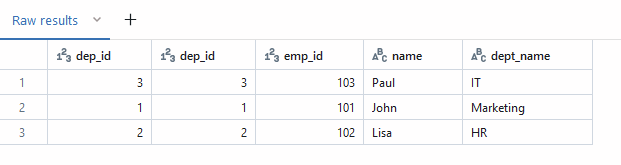
This type of join can simplify a SQL statement; it works in the same way as an INNER JOIN, but the syntax is shorter:
CREATE TEMP VIEW v_employee(emp_id, name, dep_id) AS
     VALUES(105, 'Chloe', 5),
           (103, 'Paul' , 3),
           (101, 'John' , 1),
           (102, 'Lisa' , 2),
           (104, 'Evan' , 4),
           (106, 'Amy'  , 6);


CREATE TEMP VIEW department(dep_id, dept_name) AS
    VALUES(3, 'IT'),
          (2, 'HR'      ),
          (1, 'Marketing'  );


select *
from
v_employee join department using (dep_id, dep_id)
The result:
JOIN LATERAL
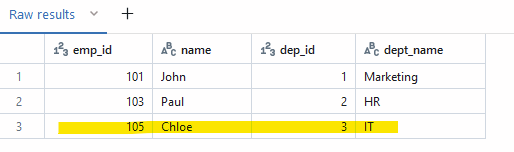
This type of join is useful for scenarios where you need to join a result that needs to be manipulated in the context of the join. In cases where you need to join only the first record when there are duplicates, a lateral join is ideal because it can filter or limit results for each row during query execution.
CREATE TEMP VIEW v_employee(emp_id, name, dep_id) AS
     VALUES(105, 'Chloe', 3),
           (103, 'Paul' , 2),
           (101, 'John' , 1);


CREATE TEMP VIEW department(dep_id, dept_name) AS
    VALUES(3, 'IT'),
          (3, 'ITx'),
          (3, 'ITxc'),
          (2, 'HR'      ),
          (1, 'Marketing'  );


SELECT emp_id, name, dep_id, dept_name
    FROM v_employee employee
    JOIN LATERAL (SELECT dept_name
                    FROM department
                    WHERE employee.dep_id = department.dep_id limit 1);
The result:
ANTI JOIN
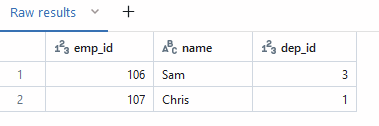
The ANTI JOIN isn’t a part of standard SQL, but it is available in Databricks SQL. Its equivalent is well known as the NOT EXISTS command. This type of join filters out the records that exist in the joined table.
This join can be used to select only new records from a staging table or to find records that don’t exist in other tables. In the example below, you can see how to retrieve new records from the raw_employee table.
CREATE TEMP VIEW v_employee(emp_id, name, dep_id) AS
     VALUES(105, 'Chloe', 3),
           (103, 'Paul' , 2),
           (101, 'John' , 1);


CREATE TEMP VIEW raw_employee(emp_id, name, dep_id) AS
     VALUES(105, 'Chloe', 3),
           (103, 'Paul' , 2),
           (101, 'John' , 1),
           (106, 'Sam' , 3),
           (107, 'Chris' , 1)
           ;


SELECT *
    FROM raw_employee
    ANTI JOIN  v_employee employee  ON employee.emp_id = raw_employee.emp_id;
The result:
SEMI JOIN
The SEMI JOIN works in opposite way to ANTI JOIN , it will select existing records in the joined table. This join works in similar way as the EXISTS command in SQL.
CREATE TEMP VIEW v_employee(emp_id, name, dep_id) AS
     VALUES(105, 'Chloe', 3),
           (103, 'Paul' , 2),
           (101, 'John' , 1);


CREATE TEMP VIEW raw_employee(emp_id, name, dep_id) AS
     VALUES(105, 'Chloe', 3),
           (103, 'Paul' , 2),
           (101, 'John' , 1),
           (106, 'Sam' , 3),
           (107, 'Chris' , 1)
           ;


SELECT *
    FROM raw_employee
    semi JOIN  v_employee employee  ON employee.emp_id = raw_employee.emp_id;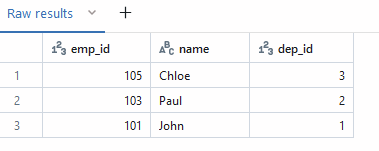
Views in Databricks SQL
Databricks SQL supports a few types of SQL Views.
Temporal View
This view doesn’t store physical data and is accessible only during session execution. It can be used to organize complex queries in small query-able objects.
create temp view sum_employees as
select
department, sum(salary) as salary

from
employees
group by department;

select *

from
sum_employees
View
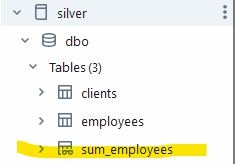
A View in Databricks SQL, as in other SQL engines, stores only the definition of the query used for its creation. This View doesn’t persist data, but its metadata persists in the catalog.
create  view sum_employees as
select
department, sum(salary) as salary

from
employees
group by department;
The view in Catalog:
Materialized View
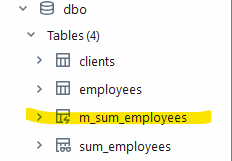
Materialized views in Databricks SQL are Unity Catalog-managed tables that allow you to store results based on a statement used to create the view. They contain a snapshot of the results retrieved from source tables at the moment of creation or refresh. You can manually refresh materialized views or schedule refreshes.
CREATE  MATERIALIZED VIEW m_sum_employees as
select
department, sum(salary) as salary

from
employees
group by department;
The view in the catalog:
It refreshes the materialized view to reflect the latest available data:
REFRESH MATERIALIZED VIEW catalog.schema.view_name;Create and schedule a materialized view to be refreshed daily at midnight.
CREATE MATERIALIZED VIEW daily_sales
  SCHEDULE CRON '0 0 0 * * ? *'
select
department, sum(salary) as salary

from
employees
group by department;
Processing JSON
Databricks SQL supports semi-structured data processing, allowing you to transform JSON files. You can extract, transform, and manipulate JSON data directly using SQL syntax. This capability is especially helpful when dealing with complex data structures commonly found in JSON files.
CREATE temp view currency AS SELECT
'
    {"table":"A","no":"194/A/NBP/2024","effectiveDate":"2024-10-04","rates":
    [
    {"currency":"dolar amerykański","code":"USD","mid":3.9118},
    {"currency":"dolar australijski","code":"AUD","mid":2.6761},
    {"currency":"dolar Hongkongu","code":"HKD","mid":0.5037},
    {"currency":"dolar kanadyjski","code":"CAD","mid":2.8850},
    {"currency":"dolar nowozelandzki","code":"NZD","mid":2.4264},
    {"currency":"dolar singapurski","code":"SGD","mid":3.0170},
    {"currency":"euro","code":"EUR","mid":4.3130}
    ]
    }

    ' as raw;

SELECT raw:rates[0].code, raw:rates[0].mid FROM currency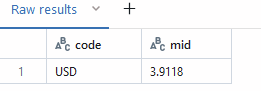
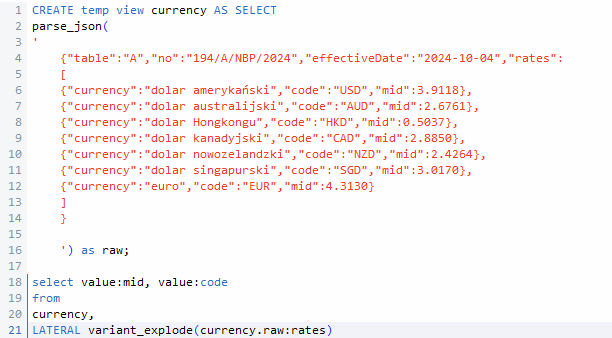
In many cases, it won’t be enough to read just one element from an array. Usually, we need to parse the entire array, and we can achieve this using the LATERAL variant_explode function or other functions that allow us to parse arrays.
This example presents how to create a table with nested data stored as an array containing information about currency rates. The SQL statement parses JSON to extract data about a currency code and currency rate. As you can see, SQL can be helpful for parsing data stored in JSON.
CREATE temp view currency AS SELECT
parse_json(
'
    {"table":"A","no":"194/A/NBP/2024","effectiveDate":"2024-10-04","rates":
    [
    {"currency":"dolar amerykański","code":"USD","mid":3.9118},
    {"currency":"dolar australijski","code":"AUD","mid":2.6761},
    {"currency":"dolar Hongkongu","code":"HKD","mid":0.5037},
    {"currency":"dolar kanadyjski","code":"CAD","mid":2.8850},
    {"currency":"dolar nowozelandzki","code":"NZD","mid":2.4264},
    {"currency":"dolar singapurski","code":"SGD","mid":3.0170},
    {"currency":"euro","code":"EUR","mid":4.3130}
    ]
    }
    ') as raw;

select value:mid, value:code
from
currency,
LATERAL variant_explode(currency.raw:rates)
The result:
Advanced Functions in Databricks SQL
Databricks SQL offers several advanced SQL functions to enhance data querying. You can utilize various functions to work with arrays, window functions, and table datasets.
QUALIFY
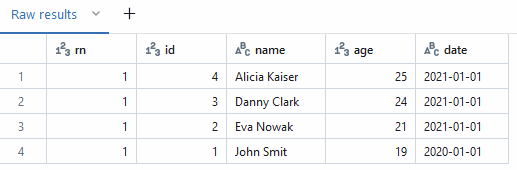
Databricks SQL provides syntax to filter the results of window functions such as ROW_NUMBER(), RANK(), and DENSE_RANK(). Typically, to filter the results of a window function, we need to use a sub-query or common table expression (CTE). The QUALIFY command allows users to filter the results directly on it.
with dane (id, name, age, date) as
(
select 1, 'John Smit', 19, '2020-01-01'
UNION ALL
select 2, 'Eva Nowak', 21, '2021-01-01'
UNION ALL
select 3, 'Danny Clark', 24, '2021-01-01'
UNION ALL
select 4, 'Alicia Kaiser', 25, '2021-01-01'
UNION ALL
select 5, 'John Smit', 19, '2021-01-01'
UNION ALL
select 6, 'Eva Nowak', 21, '2022-01-01'
)


 select
 row_number() over (partition by name order by date) rn,
 *
 from
 dane

QUALIFY rn = 1;
The result:
EXPLODE
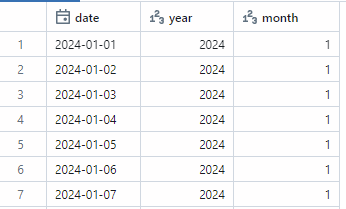
This function transforms an array into rows. Since Databricks doesn’t support recursive Common Table Expressions (CTEs), you can use this function to create a calendar table by combining the SEQUENCE function, which generates an array of values, with the EXPLODE function to transform that array into rows.
select
date,
date_part('YEAR', date) year,
date_part('month', date) month
from (
SELECT
explode(sequence(DATE'2024-01-01', DATE'2024-12-31',INTERVAL 1 DAY)) as  date
) as calendar
The result:
LATERAL VIEW
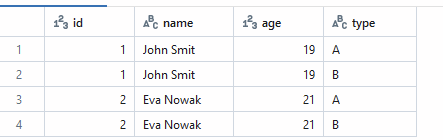
This command can be used with the EXPLODE function, which generates a virtual table containing one or more rows from an array. The LATERAL VIEW applies the exploded rows to each original output row. By using a combination of these functions, you can generate additional rows based on a result and an exploded array.
with dane (id, name, age) as
(
select 1, 'John Smit', 19
UNION ALL
select 2, 'Eva Nowak', 21
)


select
*
from
dane

LATERAL VIEW EXPLODE(ARRAY('A', 'B')) as type
The Result:
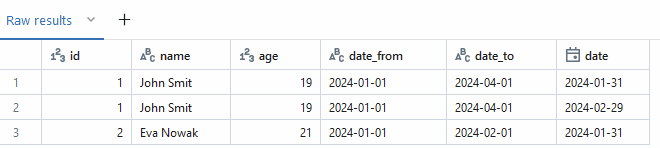
You can use LATERAL VIEW to create a snapshot table based on a table with Slowly Changing Dimensions (SCD2). Using the query below, you can generate a snapshot table that captures end-of-month data for analysis or visualizations.
with dane (id, name, age, date_from, date_to) as
(
select 1, 'John Smit', 19, '2024-01-01', '2024-04-01'
UNION ALL
select 2, 'Eva Nowak', 21, '2024-01-01', '2024-02-01'
)


 select
*
 from
 dane

 LATERAL VIEW EXPLODE(sequence(DATE'2024-01-31', DATE'2024-03-30',INTERVAL 1 MONTH)) as date
 where
date between date_from and date_to
The result:
CLUSTER BY
This command in Databricks SQL is used to partition data based on a specified expression and to sort the data within each partition. With CLUSTER BY, you can simplify SQL statement queries.
with dane (a,b, c) as (
    VALUES    ('a', 1, 8),
              ('b', 2, 9),
              ('a', 1, 3),
              ('b', 2, 5),
              ('c', 3, 5),
              ('a', 3, 4)
              )


select *
from
dane
CLUSTER BY a
The result:
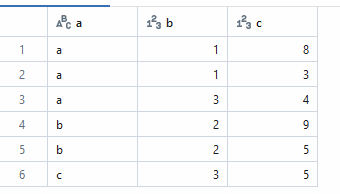
Table Functions
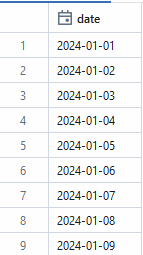
The table values function (TVF) in Databricks SQL can be useful for generating a set of rows based on input parameters. These functions return a table, allowing users to create reusable logic.
Below, you can find an example of a TVF in Databricks SQL that generates a calendar table based on input start and end dates:
CREATE OR REPLACE FUNCTION date_func(from_date date, to_date date)
RETURNS TABLE
    RETURN SELECT date  FROM explode(sequence(DATE'2024-01-01', DATE'2024-12-31',INTERVAL 1 DAY)) AS T(date)


select * from date_func('2024-01-01','2024-01-31')
The result:
Parameters
Databricks SQL gives us the ability to parameterize code using parameters or identifiers. We can make the code more generic and flexible or use parameters for ETL orchestration. This feature can be useful with Databricks workflows, where we can pass a parameter value from another task in a loop.
IDENTIFIER
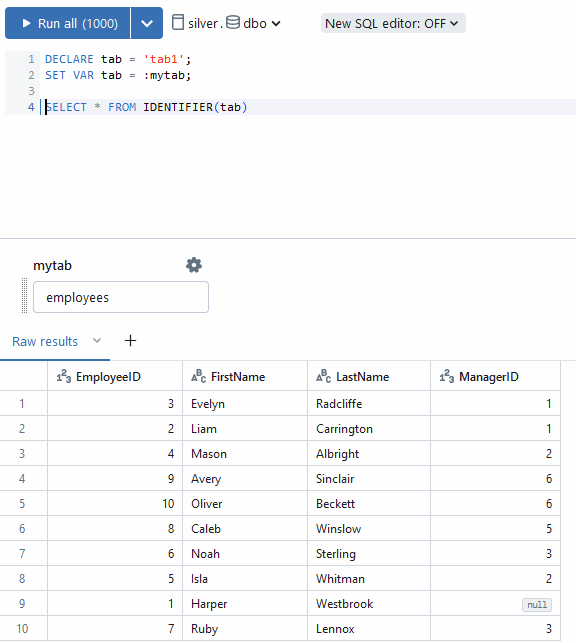
The IDENTIFIER clause allows us to parameterize the name of a table, column, function, field, or schema. It's easy to manage how it can be useful with notebook parallelization for different environments or to load multiple tables.
Below, you can find an example of selecting a table based on a parameter passed by a user.
Parameters
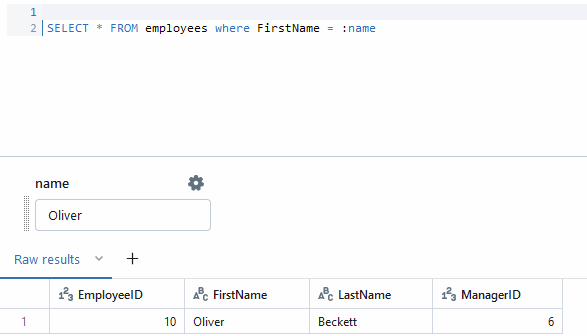
In Databricks SQL, parameters work as placeholders, allowing you to pass values into SQL queries. These values can be used for filtering data, performing calculations, or configuring source tables. Parameters help make SQL queries more flexible and reusable by allowing external values (from users or APIs) to be injected into the query execution.
You can use parameters to filter data based on user input or API-provided values. This snippet of code demonstrates how to use a parameter for data filtering.
Parameters can also be used to pass dynamic values into calculations:
SELECT EmployeeID * :value, * FROM employees 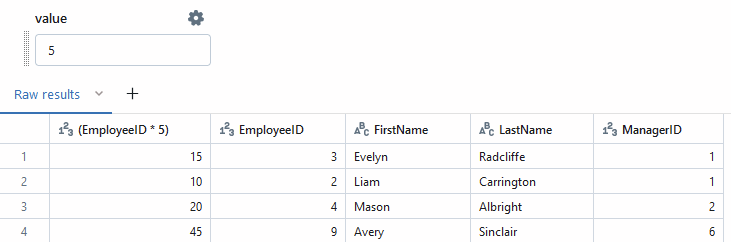
EXECUTE IMMEDIATE
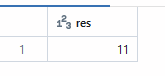
The EXECUTE IMMEDIATE function allows you to execute a string containing an SQL statement dynamically. This function is beneficial in cases where you need to generate SQL statements programmatically.
DECLARE sqlStr = 'SELECT SUM(c1) FROM VALUES(?), (?) AS t(c1)';
DECLARE arg1 = 5;
DECLARE arg2 = 6;
DECLARE res INT;

EXECUTE IMMEDIATE sqlStr into res USING arg1 , arg2;
select res;
The result:
One powerful use case for the EXECUTE IMMEDIATE function is the ability to dynamically generate SQL queries based on values retrieved from a result. We can imagine a scenario where we read a parameter from a configuration or metadata table to create a query that retrieves the required data. This is particularly useful in data pipeline scenarios where you need to incrementally load new or changed data using a reference value, such as the last processed record ID.
DECLARE sqlStr = 'SELECT max(c1) FROM VALUES(1), (2) AS t(c1)';

DECLARE res INT;

EXECUTE IMMEDIATE sqlStr into res ;
select res;

DECLARE sql1 = 'SELECT count(*) FROM employees WHERE employeeID > ? ';

EXECUTE IMMEDIATE sql1 into res USING res ;
select res;
Thanks For Reading!
If you found this article insightful, I invite you to show your appreciation by liking it on LinkedIn and clicking the “clap” button. Your support is greatly appreciated.


