
Data Reconciliation in Python : Comparing Datasets for Accurate Insights
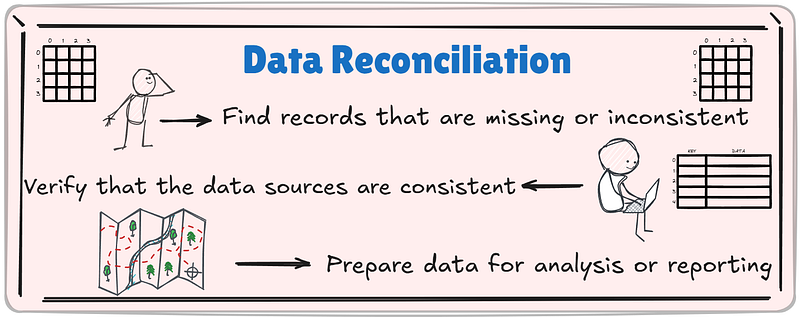
In the world of data science and analytics, ensuring consistency between datasets is a crucial task. Data reconciliation helps identify discrepancies, align datasets, and ensure data quality. This article demonstrates the best practices for data reconciliation using Python.
What is Data Reconciliation?
Data reconciliation involves comparing two or more datasets to:
- Detect missing or mismatched records.
- Ensure consistency between data sources.
- Align data for reporting or analysis.
Let’s understand wit the help of an example with different solutions :
Example 1 : Two dataframes with reconciliation column key containing Matched/Mismatched elements, with reports
Assume that the transaction amount from the same account should be the same even though we obtain the data from two distinct sources.
Source_a and source_b are 2 different dataframes coming from 2 different sources.
import pandas as pd

source_a = pd.DataFrame({
    'Transaction_ID': ['TXN001', 'TXN002', 'TXN003', 'TXN004'],
    'Account_Number': [12345, 12346, 12347, 12348],
    'Date': ['2023-01-01', '2023-01-02', '2023-01-03', '2023-01-04'],
    'Amount': [500.00, 1500.00, 750.00, 300.00]
})

source_b = pd.DataFrame({
    'Transaction_ID': ['TXN005', 'TXN006', 'TXN007', 'TXN008'],
    'Account_Number': [12345, 12346, 12349, 12347],
    'Date': ['2023-01-01', '2023-01-02', '2023-01-05', '2023-01-03'],
    'Amount': [500.00, 1500.00, 100.00, 700.00]
})

display(source_a)
display(source_b)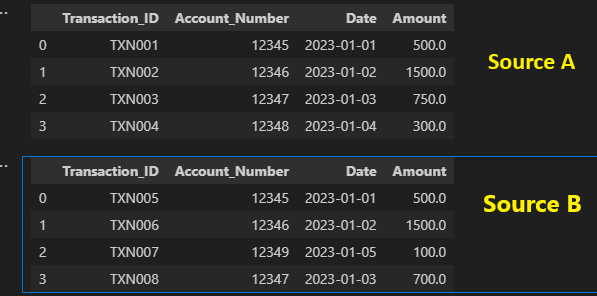
Let’s Perform an outer join to combine both datasets and identify mismatches and matches, then create reconciliation report.
Mismatches
There are 2 solutions below :
Solution A :
reconciled = pd.merge(source_a, source_b, on='Account_Number', how='outer', suffixes=('_SourceA', '_SourceB'), indicator=True)

mismatches = reconciled[reconciled['_merge'] != 'both']
display(mismatches)
Solution B :
Let’s take the same source_a, source_b and then get the mismatches.
pd.concat([source_a,source_b],axis=0).drop_duplicates(subset='Account_Number',keep=False)
Solution C:
Let’s take the same source_a, source_b and then get the mismatches.
import numpy as np
diff = np.setxor1d(np.array(source_a.Account_Number), np.array(source_b.Account_Number))
pd.concat([source_a.loc[source_a['Account_Number'].isin(list(diff)),:],source_b.loc[source_b['Account_Number'].isin(list(diff)),:]])Matches
To reconcile values in matching records:
value_discrepancies = reconciled[
    (reconciled['_merge'] == 'both') &
    (reconciled['Amount_SourceA'] != reconciled['Amount_SourceB'])
]
display(value_discrepancies)
Reconciliation report
Create a reconciliation report like below :
print(f"Total Transactions in Source A: {len(source_a)}")
print(f"Total Transactions in Source B: {len(source_b)}")
print(f"Mismatched Transactions: {len(mismatches)}")
print(f"Value Discrepancies: {len(value_discrepancies)}")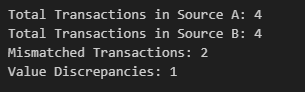
Example 2 : Combine two DataFrame objects by filling null values in one DataFrame with non-null values from other DataFrame
Let’s use the same dataframe and give some null values to the data
import pandas as pd

source_a = pd.DataFrame({
    'Transaction_ID': ['TXN001', 'TXN002', 'TXN003', 'TXN004'],
    'Account_Number': [12345, 12346, 12347, 12348],
    'Date': [np.nan, '2023-01-02', '2023-01-03', '2023-01-04'],
    'Amount': [500.00, 1500.00, np.nan, 300.00]
})

source_b = pd.DataFrame({
    'Transaction_ID': ['TXN005', 'TXN006', 'TXN007', 'TXN008'],
    'Account_Number': [12345, 12346, 12349, 12347],
    'Date': ['2023-01-01', '2023-01-02', np.nan, '2023-01-03'],
    'Amount': [500.00, np.nan, 100.00, 300.00]
})

display(source_a)
display(source_b)source_a.combine_first(source_b,)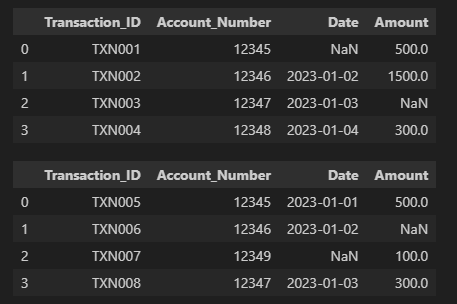
We’ll use combine_first method to fill up the not null values.
source_a.combine_first(source_b)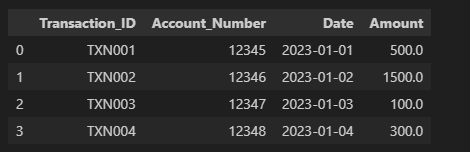
Find the code in Github Repo : Github Link
Best Practices for Data Reconciliation
- Use Unique Keys: Ensure datasets have unique identifiers (e.g., Transaction IDs).
- Standardize Data: Align formats for dates, numbers, and text.
- Automate the Process: Create reusable scripts to save time.
- Validate Regularly: Periodic reconciliation minimizes errors.
Conclusion
Data reconciliation is essential for maintaining the integrity of financial data. Python, with its powerful libraries, makes this process efficient and scalable. By following the steps outlined above, you can easily find and resolve discrepancies in your datasets.
If you like my article give a clap and reach out to my socials for data engineering related : Medium | Youtube | Instagram | Twitter | Facebook | Linked-In


