
Data Augmentation Techniques for Audio Data in Python
How to augment audio in waveform (time domain) and as spectrograms (frequency domain) with librosa, numpy, and PyTorch

Deep Learning models are data-hungry. If you don’t have a sufficient amount of data, generating synthetic data from the available dataset can help improve the generalization capabilities of your Deep Learning model. While you might already be familiar with data augmentation techniques for images (e.g., flipping an image horizontally), data augmentation techniques for audio data are often lesser known.
This article will review popular data augmentation techniques for audio data. You can apply data augmentations for audio data in the waveform and in the spectrogram:
- Audio Data Augmentations for Waveform (Time Domain) ∘ Noise injection ∘ Shifting time ∘ Changing speed ∘ Changing pitch ∘ Changing volume (not recommended)
- Audio Data Augmentations for Spectrograms (Frequency Domain) ∘ Mixup ∘ SpecAugment
For the data augmentations, we will use librosa, which is a popular library for audio processing, and numpy.
import numpy as np
import librosa
If you are already working with PyTorch, you could also use torchaudio as an alternative.
Audio Data Augmentations for Waveform (Time Domain)
This section will discuss popular data augmentation techniques you can apply to the audio data in the waveform. You can use the load() method from the librosa library to load the audio file as a waveform.
PATH = "audio_example.wav" # Replace with your file here
original_audio, sample_rate = librosa.load(PATH)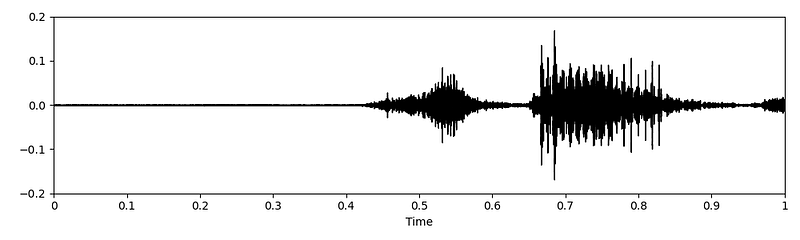
The following code implementations are referenced from Kaggle Notebooks by kaerururu [7] and CVxTz [5].
Noise injection
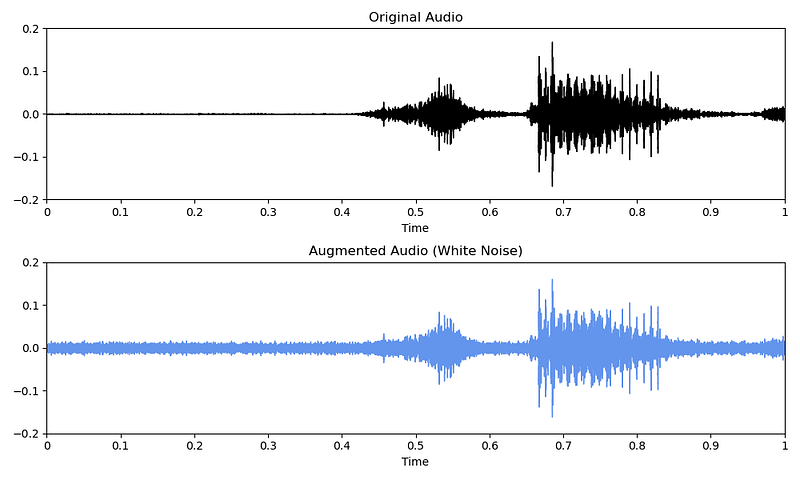
A popular data augmentation technique is to inject some sort of noise into the original audio data.
You can choose from many different types of noise:
- White noise
# Code copied and edited from https://www.kaggle.com/code/kaerunantoka/birdclef2022-use-2nd-label-f0
noise_factor = 0.005
white_noise = np.random.randn(len(original_audio)) * noise_factor- Colored noise (e.g., pink, brown, etc.)
# Code copied and edited from https://www.kaggle.com/code/kaerunantoka/birdclef2022-use-2nd-label-f0
import colorednoise as cn

pink_noise = cn.powerlaw_psd_gaussian(1, len(original_audio))- Background noise
# Load background noise from another audio file
background_noise, sample_rate = librosa.load("background_noise.wav")
Once you have defined the type of noise you want to inject, you add the noise to your original waveform audio. Of course, you can use all different types of noises for your data augmentations. Below, you can see an example of noise injection with white noise.
augmented_audio = original_audio + noise
Shifting time
With the roll() function from the numpy library, you can shift the audio in time.
# Code copied and edited from https://www.kaggle.com/code/CVxTz/audio-data-augmentation/notebook
augmented_audio = np.roll(original_audio, 3000)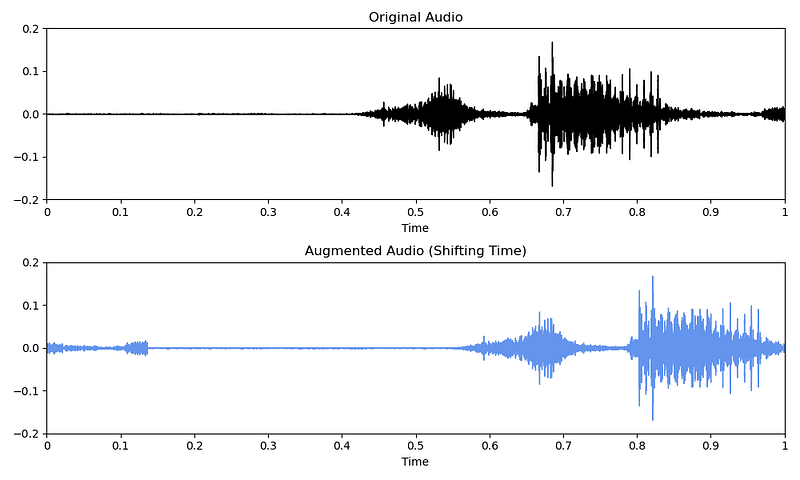
Note that the audio will wrap around if you don’t have enough trailing silence. Depending on your sound type, this data augmentation might not be recommended in this case (e.g., human speech).
Changing speed
You can also increase (rate>1) or decrease (rate<1) the speed of the audio with the time_stretch() method from the librosa library.
# Code copied and edited from https://www.kaggle.com/code/CVxTz/audio-data-augmentation/notebook
rate = 0.9
augmented_audio = librosa.effects.time_stretch(original_audio, rate = rate)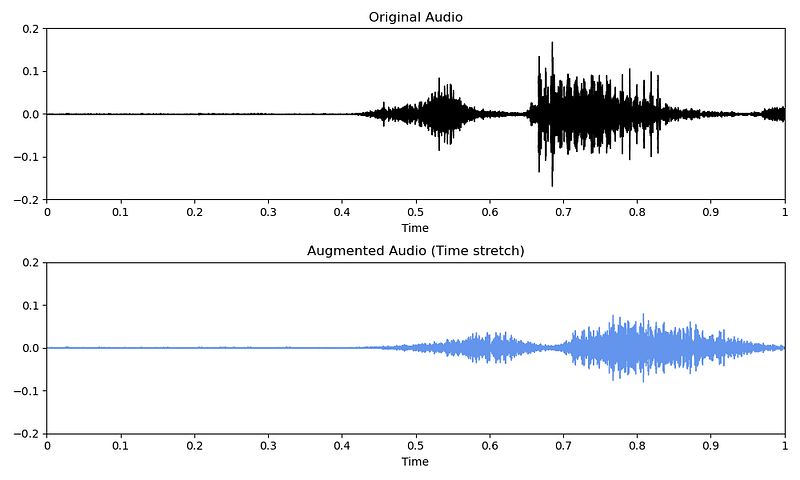
Changing pitch
Or you can modify the pitch of the audio with the pitch_shift() method from the librosa library.
# Code copied and edited from https://www.kaggle.com/code/CVxTz/audio-data-augmentation/notebook
augmented_audio = librosa.effects.pitch_shift(original_audio, sampling_rate, pitch_factor)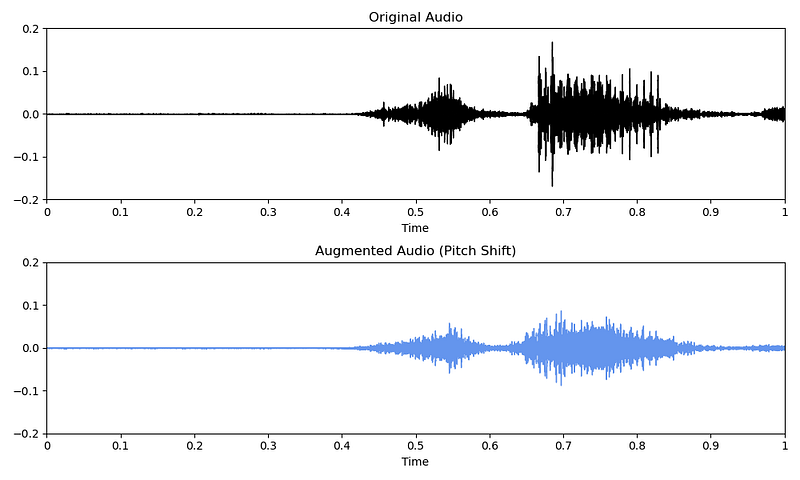
Changing volume (not recommended)
You could also augment the waveform in terms of volume. However, if you are going to convert the waveform into spectrograms later on, volume augmentation will be ineffective as the amplitude is not considered in the frequency domain.
# Increase volume by 5 dB
augmented_audio = original_audio + 5

# Decrease volume by 5 dB
augmented_audio = original_audio - 5
Audio Data Augmentations for Spectrograms (Frequency Domain)
When modeling audio data with a Deep Learning model, it is a popular method to convert the audio classification problem into an image classification problem. For this, the waveform audio data is converted to a Mel spectrogram. If you need a refresher on Mel spectrograms, I recommend the following article:
You can convert audio in waveform into a Mel spectrogram with the melspectrogram() and power_to_db() methods from the librosa library.
original_melspec = librosa.feature.melspectrogram(y = original_audio,
                                                  sr = sample_rate,
                                                  n_fft = 512,
                                                  hop_length = 256,
                                                  n_mels = 40).T

original_melspec = librosa.power_to_db(original_melspec)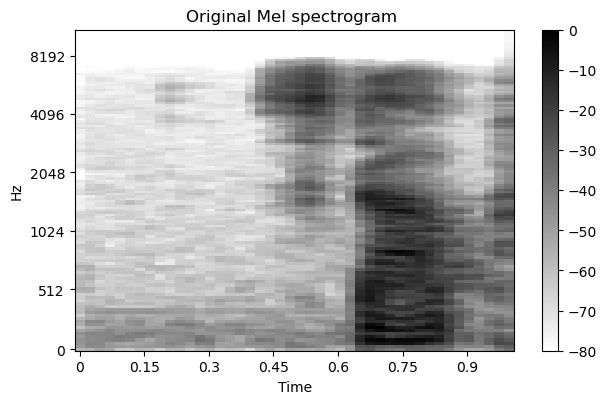
Although you now have an image classification problem, you must be careful when selecting image augmentation techniques for spectrograms. E.g., horizontally flipping the spectrogram would substantially change the information contained in the spectrogram and thus is not recommended.
This section will discuss popular data augmentation techniques you can apply to the audio data as a Mel spectrogram.
The following code implementations are referenced from Kaggle Notebooks by kaerururu [7] and DavidS [6].
Mixup
Simply put, Mixup [4] combines two samples by overlaying them and giving the new sample two labels.
# Code copied and edited from https://www.kaggle.com/code/kaerunantoka/birdclef2022-use-2nd-label-f0
def mixup(original_melspecs, original_labels, alpha=1.0):
    indices = torch.randperm(original_melspecs.size(0))

    lam = np.random.beta(alpha, alpha)

    augmented_melspecs = original_melspecs * lam + original_melspecs[indices] * (1 - lam)
    augmented_labels = [(original_labels * lam), (original_labels[indices] * (1 - lam))]

    return augmented_melspec, augmented_labels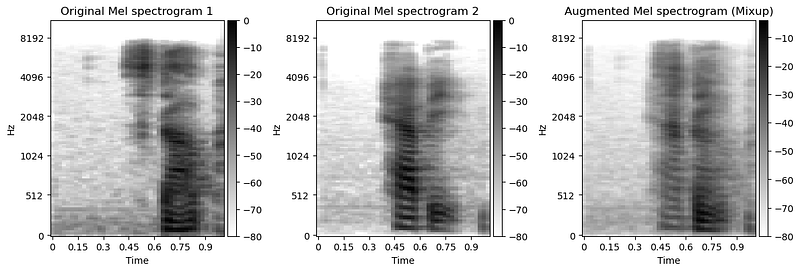
Alternatively, you could also try other data augmentation techniques used in computer vision, like cutmix [3].
SpecAugment
SpecAugment [2] is to spectrograms what cutout is to regular images. While cutout blocks out random areas in an image, SpecAugment [2] masks random frequencies and time periods.
# Code copied and edited from https://www.kaggle.com/code/davids1992/specaugment-quick-implementation
def spec_augment(original_melspec,
                 freq_masking_max_percentage = 0.15,
                 time_masking_max_percentage = 0.3):

    augmented_melspec = original_melspec.copy()
    all_frames_num, all_freqs_num = augmented_melspec.shape

    # Frequency masking
    freq_percentage = random.uniform(0.0, freq_masking_max_percentage)
    num_freqs_to_mask = int(freq_percentage * all_freqs_num)
    f0 = int(np.random.uniform(low = 0.0, high = (all_freqs_num - num_freqs_to_mask)))

    augmented_melspec[:, f0:(f0 + num_freqs_to_mask)] = 0

    # Time masking
    time_percentage = random.uniform(0.0, time_masking_max_percentage)
    num_frames_to_mask = int(time_percentage * all_frames_num)
    t0 = int(np.random.uniform(low = 0.0, high = (all_frames_num - num_frames_to_mask)))

    augmented_melspec[t0:(t0 + num_frames_to_mask), :] = 0

    return augmented_melspec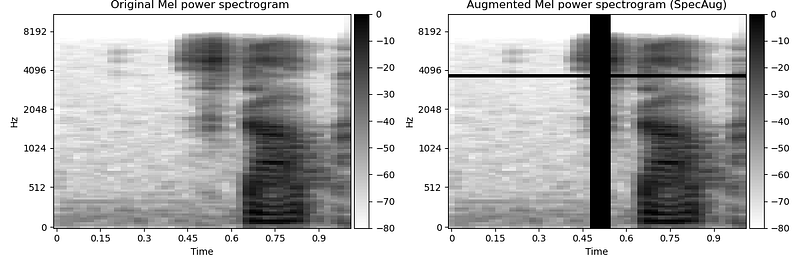
Alternatively, if you are using Pytorch, you could also use the TimeMasking and FrequencyMasking augmentations from torchaudio:
import torch
import torchaudio
import torchaudio.transforms as T

time_masking = T.TimeMasking(time_mask_param = 80)
freq_masking = T.FrequencyMasking(freq_mask_param=80)

augmented_melspec = time_masking(original_melspec)
augmented_melspec = freq_masking(augmented_melspec)
Summary
Data augmentations for audio data can be applied to the audio data in the time domain (waveform) as well as the frequency domain (Mel spectrogram). To successfully apply data augmentations to the audio data in a Deep Learning setting, you have to consider the following processing steps:
- Load audio file as waveform (time domain)
- Apply data augmentation to the waveform
- Convert audio from waveform to spectrogram (frequency domain)
- Apply data augmentations to the spectrogram
This article has covered different data augmentation techniques for audio data in the waveform. It is important to note that some data augmentation techniques, such as augmenting the volume, are ineffective when converting the waveform to spectrograms later on because the amplitude is not considered in the frequency domain.
Although you could technically apply all image augmentation techniques to spectrograms, not all of them will make sense. E.g., flipping them vertically or horizontally would change the meaning of the spectrograms. Additionally, a variant of the popular cutout image augmentation tailored for spectrograms masks whole timestamps and frequencies.
Enjoyed This Story?
Subscribe for free to get notified when I publish a new story.
Find me on LinkedIn, Twitter, and Kaggle!
References
Dataset
[1] Warden P. Speech Commands: A public dataset for single-word speech recognition, 2017. Available from http://download.tensorflow.org/data/speech_commands_v0.01.tar.gz
License: CC-BY-4.0
Literature
[2] Park, D. S., Chan, W., Zhang, Y., Chiu, C. C., Zoph, B., Cubuk, E. D., & Le, Q. V. (2019). Specaugment: A simple data augmentation method for automatic speech recognition. arXiv preprint arXiv:1904.08779.
[3] Yun, S., Han, D., Oh, S. J., Chun, S., Choe, J., & Yoo, Y. (2019). Cutmix: Regularization strategy to train strong classifiers with localizable features. In Proceedings of the IEEE/CVF international conference on computer vision (pp. 6023–6032).
[4] Zhang, H., Cisse, M., Dauphin, Y. N., & Lopez-Paz, D. (2017) mixup: Beyond empirical risk minimization. arXiv preprint arXiv:1710.09412.
Code
[5] CVxTz (2018). Audio data augmentation in Kaggle Notebooks (accessed March 24, 2023).
[6] DavidS (2019). SpecAugment quick implementation in Kaggle Notebooks (accessed March 24, 2023).
[7] kaerururu (2022). BirdCLEF2022 : use 2nd label f0 in Kaggle Notebooks (accessed March 24, 2023).


