
Data Augmentation in NLP Using Back Translation With MarianMT
Increase the size of your training data using Neural Machine Translation Framework from Hugging Face Transformers
Introduction
Getting an accurate model is not a straightforward path. In fact, different approaches have been identified to help improve models’ performance, and one of them is about getting more quality data, which is indeed not an easy process. In this article, we will explore data augmentation, an approach that creates new data from the original data.
Different technics exist, but we will focus on the back translation one, by understanding how it works and implementing it.
What is back translation — why MarianMT?
The goal of this section is to understand the back translation concept and figure out how MarianMT can be useful.
Back translation
The back translation concept is straightforward and consists of three main steps.
- Temporary translation: translate each of the original training labeled data into a different language. In our case, it will be from English to French.
- Back translation: translate back each of those translated data into the original language, meaning a translation from French to English.
- Duplicate removal: at the end of the process, we will have for each original text data, its corresponding back-translation. The goal here is to keep only one occurrence of each duplicate.
Marian MT
This is the framework that will the used for translating the original text to a target language and vice-versa as stated in the first two steps of the previous section.
MariamMT is an efficient Machine Translation framework. It uses the MarianNMT engine under the hood, which is purely developed in C++ by Microsoft and many academic institutions such as the University of Edinburgh, Adam Mickiewicz University in Poznań. The same engine is currently behind the Microsoft Translator service.
The NLP group from the University of Helsinki open-sourced multiple translation models on Hugging Face Transformers. MarianMT is one of those models previously trained using Marian on parallel data collected at Opus.
Implementation of back translation
Before diving into the implementation, it is important to understand the following prerequisites.
If you prefer video, you can watch the video walkthrough of the article:
Prerequisites and helper functions
The goal of this section is to install, import all the libraries, set up all the candidate models, and implement the helper functions needed for the experimentation.
Useful libraries
There are overall two important libraries
transformersin order to use the MarianMTModel and MarianTokenizersentencepiecerequired for MarianMT to work.
Note: After installing these libraries, make sure to restart your notebook so that all the changes are taken into consideration.
Candidate models
All model names from Hugging Face use the following format Helsinki-NLP/opus-mt-{src}-{tgt}where {src} and {tgt}correspond respectively to the source and target languages. Their value is a two digits code representing the language. You can find here the list of the language codes. For our case, we will have two candidate models.
The configuration of each model requires two main classes, MarianTokenizer used to load the right tokenizer and MarianMTModelused to load the pre-trained model.
Helsinki-NLP/opus-mt-en-frthe first model translating French to English.Helsinki-NLP/opus-mt-en-fr, the first model translating English to French.
Helsinki-NLP/opus-mt-fr-en, the second model translating French to English.
Now that we are done with the configuration of the two models, we can proceed with the implementation of the back translation feature.
Below is the list of text that will be used to perform the translation.
But, to be able to properly implement the translation feature, we need to add the special token >>{tgt}<< in front of each text that needs to be translated. Remember that {tgt} is either fr or en. It will look like this for our previous list:
Below is the helper function to complete such a task. It takes the original text as input and adds the special token at the beginning of each text as shown previously.
Below is the result we get after executing the function.

We can proceed with the implementation of the function responsible for the translation of the batch of texts. It takes in parameter the batch of texts to translate, the target language model, and the language code.
Here is the result of the translation from English to French generated by lines 14 and 15.

The exact same function perform_translation can be used to translate back the previous result (French) to English. We just need to provide the right parameters, corresponding to the information of the second model.
Here is the result of the translation from English to French.

I did the back translation, so what?
Something interesting happened here. As you can see from the result of the back translation, the third text’s translation is exactly the same as the one in the original texts.
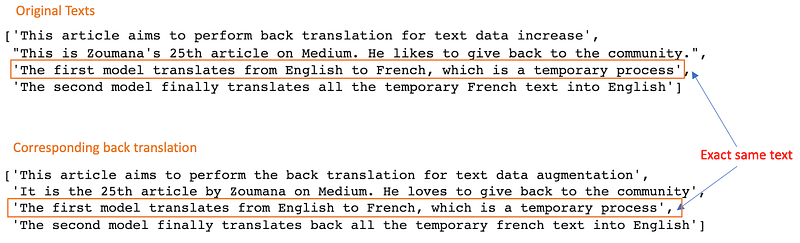
Here is where the duplicate suppression feature occurs. It takes as parameters two lists, the original texts, their back translation then combines them by keeping only one occurrence of the duplicates.
Final augmentation feature
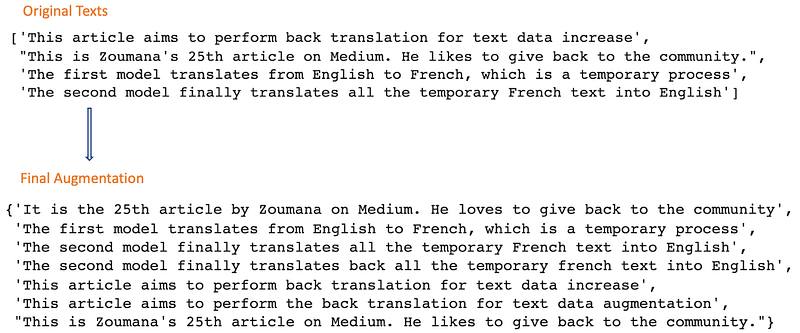
We can combine all the previous helper functions to create a single function that returns the augmented texts, corresponding to the original texts combined with their back translations.
Below you can see the final result corresponding to the augmentation of the original texts. We moved from 4 to 7 texts equivalent to about a 70% increase, which is significant at a large data scale.
Conclusion
Congratulations! 🎉 🍾 You have just learned how to increase your original training data. I hope you have enjoyed reading this article, and that it gave you the skills needed to improve your model performance. Please find below additional resources to further your learning.
Feel free to add me on LinkedIn or follow me on Twitter, and YouTube. It is always a pleasure to discuss AI, ML, Data Science, NLP stuffs!
Source code of the article on Github
MarianMT documentation on Hugging Face
Bye for now 🏃🏾


