
Dart on AWS Lambda
Dart on AWS Lambda
Article here: https://flatteredwithflutter.com/dart-on-aws-lambda/
We will cover briefly:
- Dart runtime for AWS Lambda
- Write lambda (using Dart)
- Adding a POST endpoint
- Deploy lambda on AWS
Note: This article assumes the reader has an AWS account and knows about the serverless framework
Dart runtime for AWS Lambda
With the introduction of custom AWS Lambda runtimes, it is possible to implement a runtime in any programming language.
AWS Lambda provides an HTTP API for custom runtimes to receive invocation events and send response data back within the Lambda execution environment.
Using the custom AWS Lambda runtime, we can also run Dart on Lambda with the recently published runtime for the Dart programming language.
- AWS released a pub package
aws_lambda_dart_runtime that packages the dart runtime to build lambda functions with AWS events. - It shows two ways to deploy the dart based lambda functions
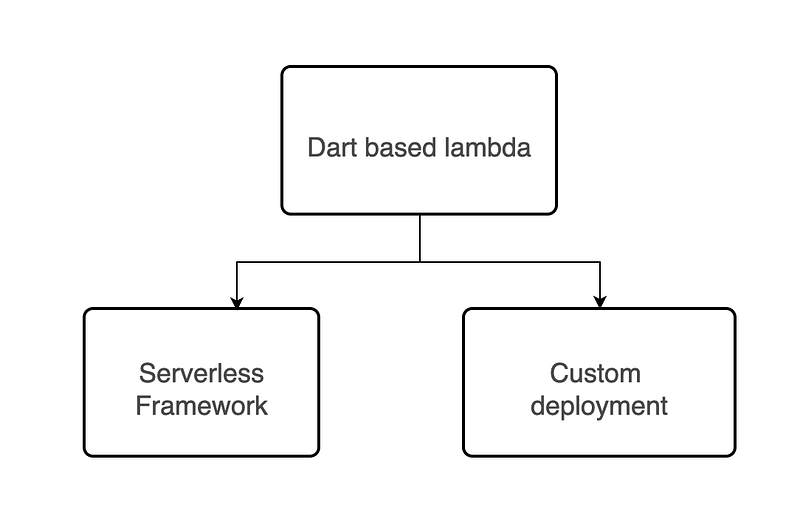
In this article, we will go with the Serverless Framework approach
Write lambda (using Dart)
Pre-Requisite: You should have the aws cli configured in your machine. Check here
We will make use of the serverless framework to write lambda functions.
As per the docs,
Develop, deploy, troubleshoot and secure your serverless applications with radically less overhead and cost by using the Serverless Framework. The Serverless Framework consists of an open source CLI.
Serverless allows us to focus on the code, while it takes care of the setting up policies, and provisioning of required infrastructure onto AWS.
To install serverless, follow here. Personally, I configured using the below
npm install -g serverlessSetup for Dart
- Currently,
serverlesshas no support for dart, but there is a serverless plugin for Dart applications, called serverless-dart We will installserverless-dartusing
npm i -D serverless-dart- Now, this plugin builds the dart lambda using docker, hence we also need to install docker
Note: In case something goes wrong, try installing the
serverlessframework, see above.
Create a Dart Project
Once the above setup is configured, it’s time to create a dart project. We make use of the below
npx serverless install \
  --url https://github.com/katallaxie/serverless-aws-dart \
  --name hello
This will download the source of a sample Dart application and unpack it as a service named hello in a directory called hello
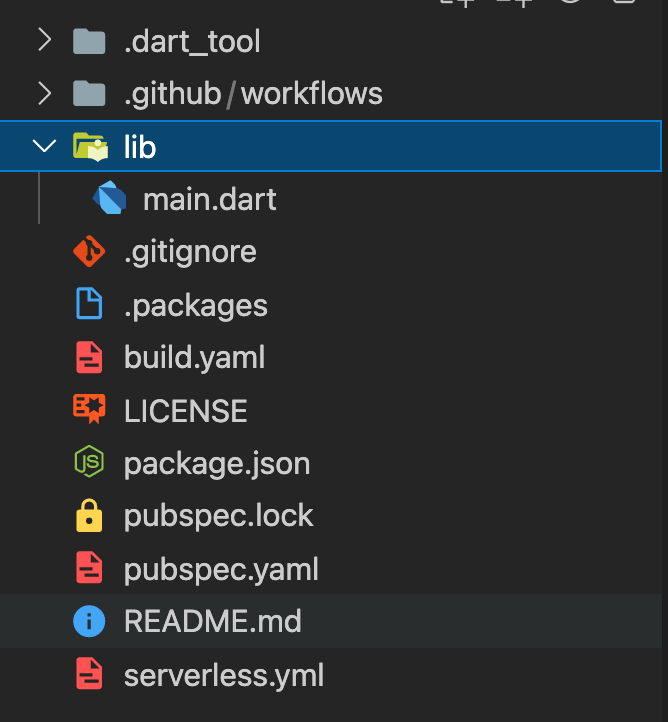
- I didn’t need the
.github/workflowshence, deleted the folder. - If we look into
pubspec.yamlwe will see the packageaws_lambda_dart_runtimeandbuild_runnerunder dev dependencies. We give both a version number.
dependencies:
aws_lambda_dart_runtime: ^1.1.0dev_dependencies:
build_runner: ^2.1.0- Next, we look into the
serverless.ymlwhich is the brain behind this application. We modify the yml file with this
service: hello
provider:
  name: aws
  runtime: dart
  lambdaHashingVersion: 20201221
  memorySize: 128
package:
individually: trueplugins:
- serverless-dartfunctions:
hello:
handler: main.hello
events:
- http:
path: /hello
method: GETservice: Name of the service (hello in our case)
functions: The functions to be exposed, along with their entry points. We currently have a function called hello Inside that, we specify the different configurations.
handler: This is the AWS registered handler and should be the same as inside our main.dart
events: The events that trigger this function. This includes http
http: REST API endpoint (API Gateway v1)
path: Path for this endpoint/hello and method being GET
Note: For detailed description: see here
Inspecting the main dart
We are left with one important file to inspect main.dart . We will change the contents of the file to below
// IMPORT OMITTED FOR BREVITYvoid main() async {
Handler<AwsApiGatewayEvent> helloApiGateway=(context,event) async { final resp = {
'message': 'Hello to ${context.requestId}',
'host': '${event.headers.host}',
'userAgent': '${event.headers.userAgent}',
}; final response = AwsApiGatewayResponse(
body: json.encode(resp),
isBase64Encoded: false,
statusCode: HttpStatus.ok,
headers: {
"Content-Type": "application/json",
},
); return response;
};Runtime()
..registerHandler<AwsApiGatewayEvent>("main.hello", helloApiGateway)
..invoke();
}- Every dart program begins with the call to
mainfunction. - The methods such as Handler, Runtime, etc are present inside the
aws_lambda_dart_runtimepackage.
HelloApiGateway
We define a helloApiGateway which is the handler to be invoked once our API gets hit. This is of the type AwsApiGatewayEvent and exposes two important fields: Context and AwsApiGatewayEvent
- The
Contextcontains the Lambda execution context information. It comprises various parameters such asrequestIdetc. AwsApiGatewayEventis one of the events supported by the package. AnEventis basically an abstraction for every event that can be ingested by a handler. It comprises of implementations such asAwsCognitoEvent,AwsS3Event,AwsKinesisDataStreamEventetc
In our case, we register the event of type AwsApiGatewayEvent Hence, we can extract the details out of the incoming request. These details include headers , body , queryStringParameters etc
- Finally, for sending the response back to the client, we make use of
AwsApiGatewayResponse - We specify the
bodyto the sent, along with the additional parameters such asisBase64Encoded,statusCodeandheaders
Register HelloApiGateway
Once the handler is written, now we need to register it to our Runtime
- This is done using
registerHandlerwhich takes in two required parameters: a string name and our gateway - Under the name, we specify
main.hello(which is the same as specified inside theserverless.yml) - Finally, we call
invoketo run theRuntimein loop and digest events that are fetched from the API.
Adding a POST Endpoint
Inside our serverless.yml add another endpoint for the post-service
functions:
  hello:
    handler: main.hello
    events:
      - http:
          path: /hello
          method: GET
postRequest:
handler: main.postRequest
events:
- http:
path: /postRequest
method: POST- The post body our API accepts is of the following type
// POST BODY TO THE API
{
   "name":"aseem"
}- We will create a new endpoint called
postApiGatewaywhich is also of the typeAwsApiGatewayEvent
Handler<AwsApiGatewayEvent> postApiGateway=(context,event) async { final requestBody = event.body;
final requestModel = postRequestModelFromJson(requestBody); final responseBody = ResponseModel(
message: 'Hello ${requestModel.name} from AWS Lambda!!',
); final response = AwsApiGatewayResponse(
body: responseModelToJson(responseBody),
isBase64Encoded: false,
statusCode: HttpStatus.ok,
headers: {
"Content-Type": "application/json",
},
); return response;
};- We extract the request body from the
eventconvert it into a model and extract the name parameter. - We create
ResponseModelwith the message parameter. - Finally, we convert the model into JSON and send it back as
AwsApiGatewayResponse
Inside our main dart, we register our post handler as
Runtime()
..registerHandler<AwsApiGatewayEvent>("main.hello", helloApiGateway)    ..registerHandler<AwsApiGatewayEvent>(
      "main.postRequest",
      PostRequest().postApiGateway,
)
..invoke();
Note: We specify
main.postRequest(which is the same as specified inside theserverless.yml)
Deploy lambda on AWS
Till now, we have created our lambda function using dart. Now it’s time to deploy it.
Note: Make sure docker is running on your machine
We will create a Makefile and inside it put
.PHONY: build clean deploydeploy:
npx serverless deployremove: npx serverless remove
For deploying the lambda, we can call
make deployIf everything was successful, you should see something like this
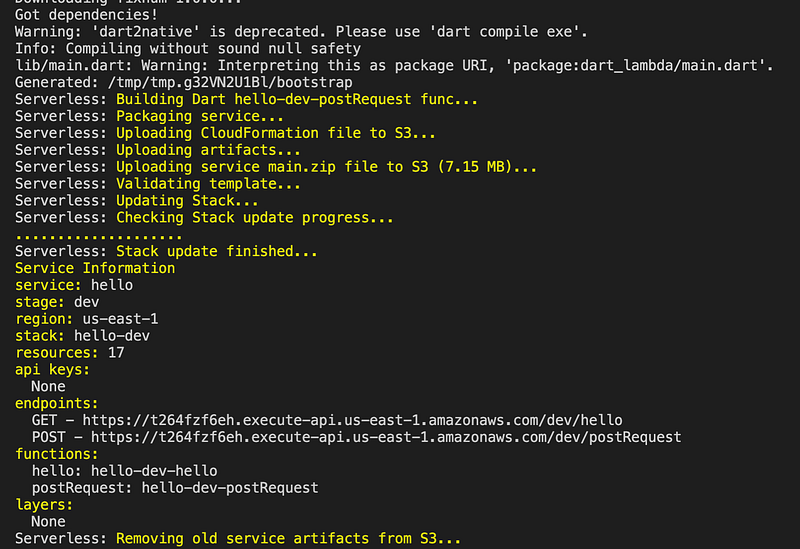
For removing the lambda, we can call
make removeNote: In case you don’t want to create a makefile, simply run
npx serverless deploy
Other articles:

Dart Lambda Get endpointSource CodeFollow Flutter Community on Twitter: https://www.twitter.com/FlutterComm


