avatardavíð matthías

Free AI web copilot to create summaries, insights and extended knowledge, download it at here

1889

Abstract

ticle</li><li>Bible</li></ul><p id="099c">It looks like this:</p><figure id="2c04"><img src="https://cdn-images-1.readmedium.com/v2/resize:fit:800/1*S66L6SUO-dGrfmSzedC6VQ.png"><figcaption>My Today page</figcaption></figure><p id="093b">Very briefly, let me talk you through each one.</p><h2 id="3b54">Daily Log.</h2><p id="9037">In the Daily Log field I insert today’s date by pressing @ and then selecting the date from the pop-up.</p><p id="cc16">I then give the date a supertag of ‘#daily log’ so that I can find all my daily logs in one go should I need to.</p><p id="907d">I use my Daily Log as an interstitial journal, to record my activities and thoughts throughout the day. (<a href="https://readmedium.com/unlock-your-productivity-potential-with-interstitial-journalling-cb70b3e79410">I wrote about interstitial journalling here</a>.)</p><p id="6a3a">Each time I write something, I’ll begin by inserting the time (CTRL K and ‘insert current time’).</p><p id="d1ca">That way I have an accurate record of what happened when.</p><p id="e906">Anything and everything goes in my Daily Log.</p><p id="c665">Events, work, feelings and thoughts, meeting notes — literally anything.</p><p id="357d">I can move it to a more appropriate place later if I need to.</p><h2 id="3f48">Todos.</h2><p id="3fa2">I have a master Todos page from which I transfer tasks that need to be done today.</p><p id="e69a">Simple as that.</p><p id="7bb1">I make sure I give each task the ‘#todos’ supertag.</p><p id="9c50">This means that if I write a new task in Today, or anywhere else for that matter, the task automatically appears in my master Todos list. So clever.</p><p id="8217">I also have a <i>Priority Todos</i> list. Everything that appears in this list is tagged ‘#priority’ as well as ‘#todos’.</p><h2 id="6331">Schedule.</h2><p id="a25d">Yep, you guessed it. This is where I write out my schedu

Options

le for the day.</p><p id="1892">As well as that, I often make notes about a particular event in an indented node underneath each event.</p><p id="ad9e">Nothing more complicated than that. No supertags are needed here.</p><h2 id="c109">Article.</h2><p id="933d">I’m currently publishing an article on Medium every day, so I’ll write that here, and I’ll give it the supertag ‘#article’.</p><p id="da52">I only have one field in my ‘#article’ supertag at the moment, which is labelled ‘Date published’.</p><p id="7c46">I have a Writing Index page elsewhere, which features, among other things, a calendar view of all my published articles.</p><figure id="cdfa"><img src="https://cdn-images-1.readmedium.com/v2/resize:fit:800/1*L4GkftD1Hp1PH6aCMzlaIg.png"><figcaption>My writing index</figcaption></figure><h2 id="e278">Bible.</h2><p id="de91">I’m getting into the habit of typing out Scripture.</p><p id="bcd2">Doing this helps me internalise it more than simply reading it.</p><p id="6015">So, I’m currently typing out the book of Romans.</p><p id="d326">I’ve created a Romans page in my Library, and Romans is tagged ‘#book of the Bible’.</p><p id="9e60">So if I want to find all chapters from Romans, I’ll just do a CTRL K, find tag ‘#book of the bible’ with text ‘Romans’. Easy.</p><p id="9c28">And that’s that. Nothing more to say. I hope you might find some of this useful in implementing your own daily routine.</p><p id="b45a">There’s so much more to learn, but I feel that Tana is helping my day to day efficiency in a way that other PKM apps have not done so far.</p><p id="70d2">If you have read this and you’re thinking something like, ‘this guy has no idea what he’s doing, why isn’t he doing this or that?’ then please do pass on your Tana tips.</p><p id="38a5">I know I need to learn so much more.</p><p id="b071">All helpful tips in this direction, please!</p></article></body>

Tana Is Full Of Joyful Productivity Magic

How I use Tana for day-by-day productivity.

Photo by me.

Tana is like finding a treasure chest buried in the sand.

First of all comes the excitement of discovering it.

Then the anticipation of opening it and discovering what kinds of treasure might be inside.

But when you come to actually open the chest, you find out it’s going to be a little more involved than you first thought.

This is what Tana is like. For me, anyway.

I’m at the stage where I’ve become more aware of what’s inside, but getting into it is proving challenging.

A little effort was never a bad thing.

Tana is capable of so much, but there is quite a learning curve. It’s all good fun though, right?

I mean, who doesn’t love geeking out with productivity tools?!

So at the moment I’m keeping things simple with Tana. Here’s how I’m using it to organise my day to day life.

Every morning I start with a blank Today page.

One thing I love about Tana is that however much I type in one day, the next day I can start with a completely blank slate.

All the stuff I typed previously is still there — I can browse for it, or use the search box.

I can find whatever I want with ease.

But it’s almost therapeutic to start with an empty page each day.

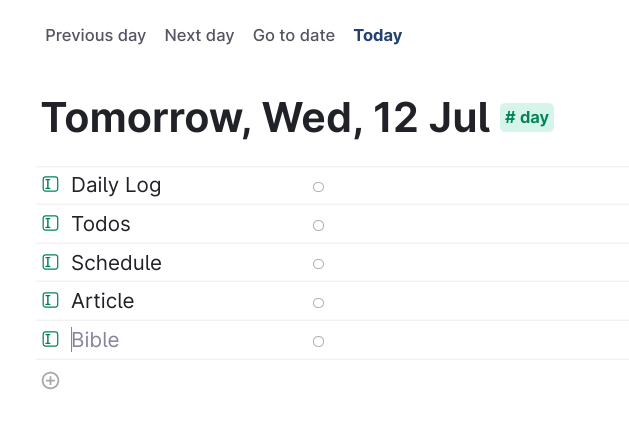
The Today page comes preset with a ‘#day’ supertag. I’ve configured ‘#day’ to include the following fields:

  • Daily log
  • Todos
  • Schedule
  • Article
  • Bible

It looks like this:

My Today page

Very briefly, let me talk you through each one.

Daily Log.

In the Daily Log field I insert today’s date by pressing @ and then selecting the date from the pop-up.

I then give the date a supertag of ‘#daily log’ so that I can find all my daily logs in one go should I need to.

I use my Daily Log as an interstitial journal, to record my activities and thoughts throughout the day. (I wrote about interstitial journalling here.)

Each time I write something, I’ll begin by inserting the time (CTRL K and ‘insert current time’).

That way I have an accurate record of what happened when.

Anything and everything goes in my Daily Log.

Events, work, feelings and thoughts, meeting notes — literally anything.

I can move it to a more appropriate place later if I need to.

Todos.

I have a master Todos page from which I transfer tasks that need to be done today.

Simple as that.

I make sure I give each task the ‘#todos’ supertag.

This means that if I write a new task in Today, or anywhere else for that matter, the task automatically appears in my master Todos list. So clever.

I also have a Priority Todos list. Everything that appears in this list is tagged ‘#priority’ as well as ‘#todos’.

Schedule.

Yep, you guessed it. This is where I write out my schedule for the day.

As well as that, I often make notes about a particular event in an indented node underneath each event.

Nothing more complicated than that. No supertags are needed here.

Article.

I’m currently publishing an article on Medium every day, so I’ll write that here, and I’ll give it the supertag ‘#article’.

I only have one field in my ‘#article’ supertag at the moment, which is labelled ‘Date published’.

I have a Writing Index page elsewhere, which features, among other things, a calendar view of all my published articles.
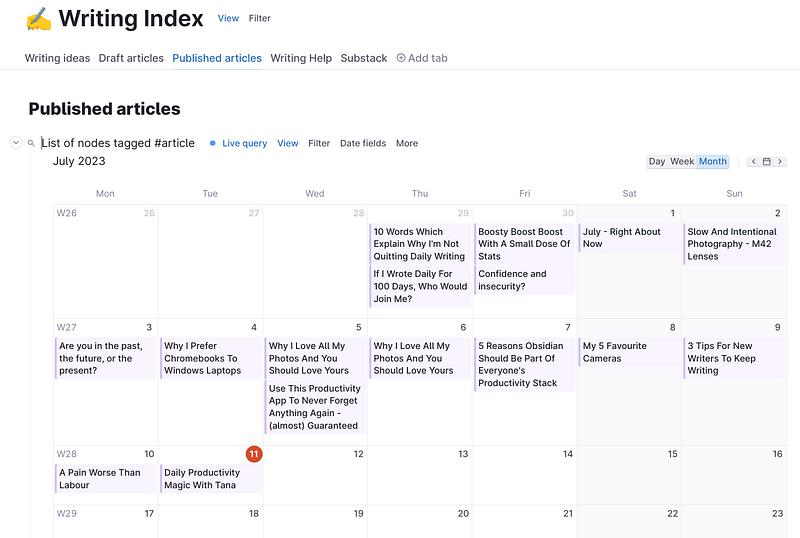
My writing index

Bible.

I’m getting into the habit of typing out Scripture.

Doing this helps me internalise it more than simply reading it.

So, I’m currently typing out the book of Romans.

I’ve created a Romans page in my Library, and Romans is tagged ‘#book of the Bible’.

So if I want to find all chapters from Romans, I’ll just do a CTRL K, find tag ‘#book of the bible’ with text ‘Romans’. Easy.

And that’s that. Nothing more to say. I hope you might find some of this useful in implementing your own daily routine.

There’s so much more to learn, but I feel that Tana is helping my day to day efficiency in a way that other PKM apps have not done so far.

If you have read this and you’re thinking something like, ‘this guy has no idea what he’s doing, why isn’t he doing this or that?’ then please do pass on your Tana tips.

I know I need to learn so much more.

All helpful tips in this direction, please!

Productivity
Tana
Daily Notes
Pkm
Productivity Apps
Recommended from ReadMedium