
The Serverless Toolbox — Tools To Build Serverless Apps With Ease
Do you find yourself rebuilding serverless tools over and over for your side projects? Me too. So I made the serverless toolbox!

I recently wrote about some of the benefits of building a bunch of side projects. I talked about building automations to take over mundane, everyday tasks, but one of the main points I mentioned was nagging at me a bit.
In the post, I spoke about building a “serverless toolbox” as a result of all your side projects. After you build a couple things, you start to identify the functions you rewrite over and over. You identify those patterns and put them together in a “serverless toolbox” to have at your disposal.
Truth time. I did not practice what I preached.
In fact, I got pretty lazy and started implementing some anti-patterns. Like tightly coupling my projects together by calling resources from one stack in another one directly by the ARN. I’m not proud of this, as I like to lead by example, so I decided to make a change.
I’m happy to release the first version of my serverless toolbox — a GitHub repo that deploys a set of functional tools that you can integrate into your applications with loose coupling mechanisms.
Let’s cover some of the available functions.
What’s in the toolbox?
For its initial release, I have included four utility functions you can incorporate into your projects or AWS accounts. All functions are written in Nodejs 18.x.
Ask ChatGPT Function
If you needed a conversational Lambda function that will hold context of your ChatGPT conversations across invocations and execution environments, I have you covered. This function uses Momento Cache to temporarily store your conversation history with ChatGPT and communicates via the OpenAI API. Give it a conversation key and a prompt and it will remember the question and answer the next time you provide the same conversation key. Need to start a new conversation? Give it a new conversation key.
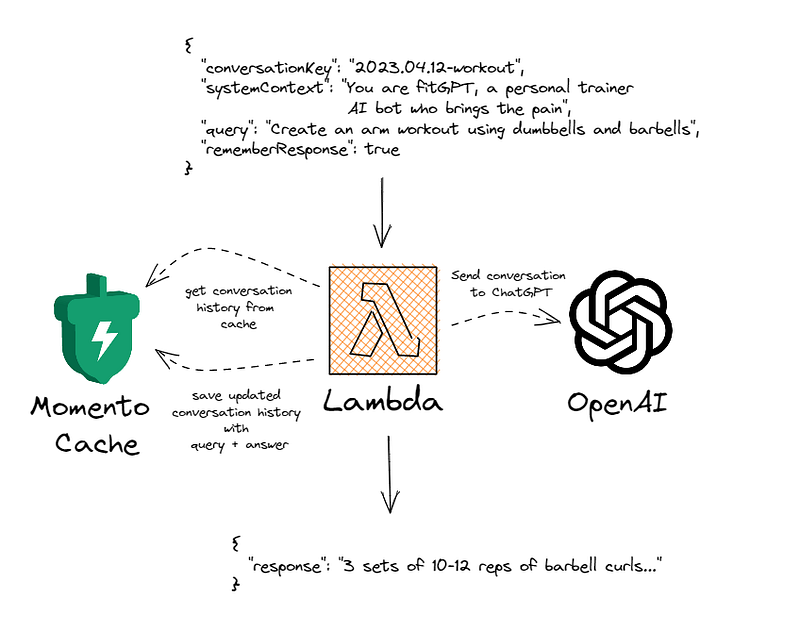
Usage
If you want to use the function in your project in a state machine or put it behind API gateway, you can resolve the ARN for it via SSM. Here is an example of how you would consume it in SAM.
MyFirstStateMachine:
  Type: AWS::Serverless::StateMachine
    Properties:
      Type: STANDARD
      DefinitionUri: workflows/my-definition.asl.json
      DefinitionSubstitutions:
        AskChatGPTFunctionArn: "{{resolve:ssm:/serverless-toolbox/ask-chatgpt}}"
      Policies:
        - Version: 2012-10-17
          Statement:
            Effect: Allow
            Action: lambda:InvokeFunction
            Resource: "{{resolve:ssm:/serverless-toolbox/ask-chatgpt}}"
See It In Action
If you want to see an implementation of this function, you can see it in my serverless-ai-fitness project. It is used in a Step Function workflow to build a workout with the equipment I have available in my home gym. It also creates a warmup and cooldown specifically for the generated workout.
Send API Request Function
This is a function I’ve made probably 10 times. Almost every project I create integrates with some 3rd party API. Sometimes they have SDKs, other times only a REST endpoint is available. This function is used to generically send API requests to a REST (or other web) API. You provide it with auth details, it will fetch your token out of Secrets Manager for you, then it will hit the endpoint and return the response body as the payload. Below is an example payload you can provide to the function.
{
  "secretKey": "key-from-auth-token-secret",
  "request": {
    "method": "POST",
    "baseUrl": "https://api.medium.com/posts",
    "headers": {
      "x-custom-header": "value"
    },
    "body": {
      "title": "My title",
      "body_markdown": "## Hello!"
    }
  },
  "auth": {
    "prefix": "Bearer",
    "location": "header",
    "key": "Authorization"
  },
  "query": {
    "custom-value": "anything-you-want"
  }
}
The payload is completely composable, so you can leave out anything that doesn’t work for the endpoint you’re calling. If your request is public, don’t provide auth. Don't have any query string parameters? No problem, don't supply the query object.
Usage
Similar to the Ask ChatGPT function, this is intended to be used in a request/response or synchronous manner. As such, the trigger needs to be manually created, like including it in a Step Function workflow or behind an API Gateway endpoint.
When resolving this ARN, you can use the SSM parameter /serverless-toolbox/send-api-request.
See It In Action
This Lambda function is implemented in my blog crossposting app. It is called from a state machine to post articles to various publications. In this project, I created a Lambda function to generate payloads specifically for this function to use as simply as possible.
Send Email Function
Yes, AWS makes it very easy to use SES (Simple Email Service) for sending emails. That said, I’ve actually found it somewhat difficult to get my account turned on to “production mode” — allowing me to send an email to any address I want. So I tend to use SendGrid for sending emails. This function uses SendGrid to asynchronously send an email in either plaintext or html format. You just need to supply your SendGrid API key.
Usage
Since emails are asynchronous by nature, this function is triggered by an EventBridge event. You publish an event to the default event bus with who to send the email to, the subject, and the content, and your email will be sent for you. Below is an example event you can publish to EventBridge.
{
  "DetailType": "Send Email",
  "Source": "my.app",
  "Detail": {
    "subject": "Dear reader, have you heard of the serverless toolbox?",
    "to": "[email protected]",
    "html": "<h1>Hello!</h1><p>You might not believe this, but sending an email is really <i>this simple</i>!</p>"
  }
}
See It In Action
If you want to see how easy it is to send an email by publishing an event, I have an example in my serverless newsletter app. In a Step Function worklow that reports how my weekly newsletter performed, I gather some analytic details from the SendGrid API, then publish an EventBridge event to send those details to me in a weekly “how did I do” email.
Set Log Retention Function
Did you know when you create a new Lambda function, the CloudWatch logs for it are set to retain forever? Chances are you don’t need those logs forever. But unless you do something about it, you’ll be paying for them indefinitely. So I created a function that runs on a daily timer to set the retention of all your Lambda logs to a configured value. Personally, I keep logs for 3 days before getting rid of them, but the choice is yours.
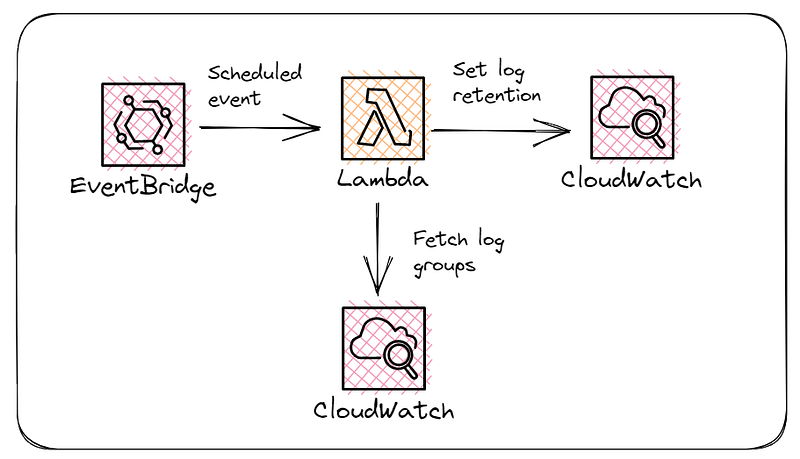
The function will load all Lambda log groups with a retention period that does not match the configured value. It then sets the retention period to whatever you have configured.
Since this runs on a daily timer, there’s nothing for you to do. This will happen automatically after it is deployed. As you create Lambda functions, this will pick the new log groups up automatically and set the retention period on them.
This isn’t something you’d implement in your applications, but it is a good clean-up administrative function to have in your AWS account. If you create hundreds of functions (and actually use them), this will end up saving you quite a bit of money.
Try It Yourself
These are all open-source for you to use! Deploy the toolbox into your AWS account and start using them!
The stack is currently deployed via a SAM template. To deploy into your account you can run the following two commands (assuming you have the SAM CLI installed):
sam build --parallel
sam deploy --guided
The --guided flag will walk you through a wizard to get stack details and deployment parameters from you. If there are any parameters you don't wish to supply, like SendGrid information, you can omit them and the template will not deploy any functions that use them.
I hope you find these useful, it was intended to make building with serverless easier, faster, and more intuitive than before. I will be updating my open-source projects to use the toolbox so you can deploy them easier and have additional references.
As I continue to build and find more overlap with utility functions, I’ll update the repo and make more tools available. If you have any you wish to add, please open up a pull request!
Happy coding!


