
Custom Vision “compact” models
As promised — following the findings in my previous article — we’ll now focus on Custom Vision “compact” models. What are they? Use cases? What is their performance like compared with standard models?

Compact world
A very interesting Custom Vision feature is the possibility of exporting a simplified version of a model to be run in small (IoT) devices or mobile phones outside the Azure environment.
When installed in a device, it would allow obtaining quick inferences (since it doesn’t need to hit an external API) without an internet connection. So an app could provide real-time features and/or have offline support.
How it works
Working with compact models in Custom Vision is not dissimilar to what we are used to when working with other model types. In fact, it’s exactly the same, except for a couple of details we need to take into account:
- Select “compact” when creating a new model, there is a lightweight version for each domain. And don’t worry, you can set this option later so you’ll be able to export it anyway after retraining the model.
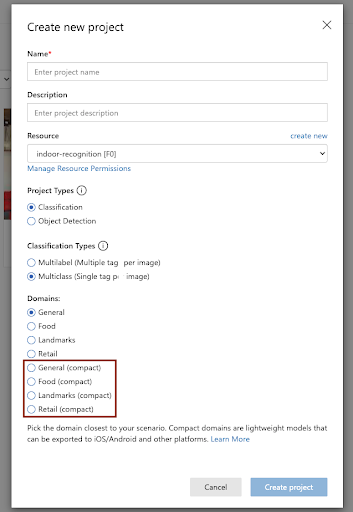
- Upload images, tag and train the model following the standard mechanisms.
- When you are happy with the results, export the model from the tab “Performance”. It seems Microsoft felt generous when building this feature so you’ll be able to export the model to be used in a considerable number of environments with different formats, including well-known open-source platforms like TensorFlow.
- From that point on, the model will be yours to do as you please. You’ll be able to re-train it locally with more images (so you don’t have to pay for extra time in Custom Vision) or run it in an external system.
Testing the model
But everything comes with a cost, so we’ll test the performance of the standalone format of our model to recognise indoor images and compare it with the results obtained as part of the investigation conducted in our previous article.
To follow exactly the same steps, we run again our script to train the model with 2500 images. After 2 iterations, the model presents the following behaviour:
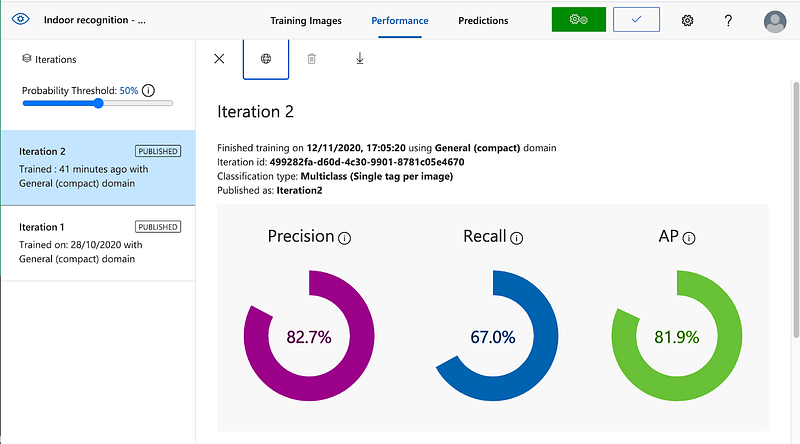
Which shows a considerable decline with respect to the standard model (Precision: 85.6%, Recall: 79.5% and AP: 89.9%) in the AP, Precision and, especially, Recall values. Something we’d expect from a simplified instance.
Now, let’s check the performance of the model and emulate how it would work on a production environment by retrieving API inferences with a separated validation dataset…
- Total: 500
- Correct predictions: 285
- Failed predictions: 215
- Precision: 0.571
- Recall: 0.57
- Average prediction time: 0.29 seconds
…that can be compared with the previous results…
- Total: 500
- Correct predictions: 363
- Failed predictions: 137
- Precision: 0.75
- Recall: 0.73
- Average prediction time: 0.53 seconds
As it can be observed, the Precision and Recall metrics show an additional loss. On the other hand, the average prediction time has been substantially reduced (and the difference would be even more significant when the model is installed on a device, saving the network latency time).
Whether these values are enough or not will depend on the requirements of your application but keep in mind different strategies could be followed at this point to improve the results (like training the model with a bigger dataset or preprocessing the images to find an optimal image configuration).
Using the exported model
To finalise, we’ll explore the format of the Tensorflow exported model.
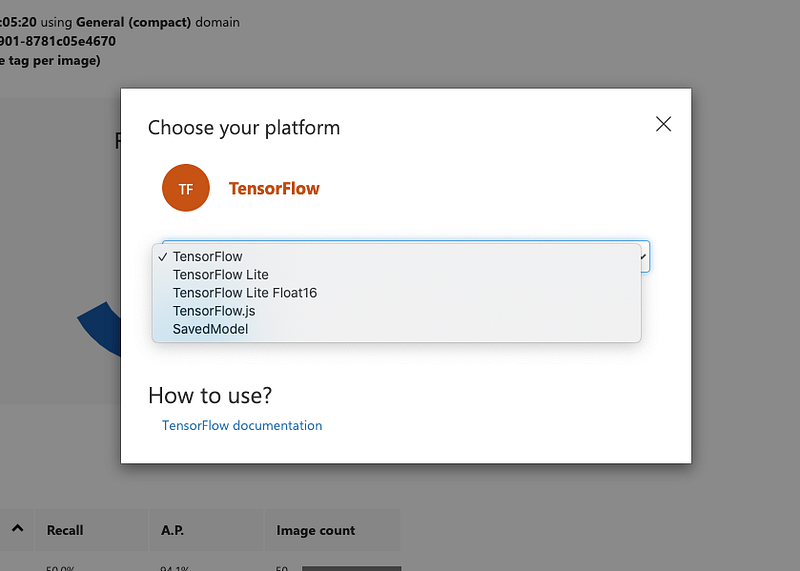
The content of the downloaded folder is composed of 4 files at the same level:
- cvexport.manifest — contains information related to the Custom Vision project and the downloaded folder.
{
  "DomainType": "Classification",
  "Platform": "TensorFlow",
  "Flavor": "TensorFlowSavedModel",
  "ExporterVersion": "2.0",
  "ExportedDate": "2020-11-13T12:02:17.8476449Z",
  "IterationId": "xx-xxx-xxx-xxx",
  "ModelFileName": "saved_model.pb",
  "LabelFileName": "labels.txt",
  "MetadataPropsFileName": "metadata_properties.json",
  "SchemaVersion": "1.0"
}- labels.txt — contains classification labels (in our case a list of different indoor scene categories).
- metadata_properties.json — contains information related to the training and preprocessing of the model.
{
    "CustomVision.Metadata.AdditionalModelInfo": "Additional information about the model",
    "CustomVision.Metadata.Version": "1.1",
    "CustomVision.Postprocess.Method": "ClassificationMultiClass",
    "CustomVision.Postprocess.Yolo.Biases": "null",
    "CustomVision.Postprocess.Yolo.NmsThreshold": "null",
    "CustomVision.Preprocess.CropHeight": "0",
    "CustomVision.Preprocess.CropMethod": "FullImageShorterSide",
    "CustomVision.Preprocess.CropWidth": "0",
    "CustomVision.Preprocess.MaxDimension": "0",
    "CustomVision.Preprocess.MaxScale": "0",
    "CustomVision.Preprocess.MinDimension": "0",
    "CustomVision.Preprocess.MinScale": "0",
    "CustomVision.Preprocess.NormalizeMean": "[0.0, 0.0, 0.0]",
    "CustomVision.Preprocess.NormalizeStd": "[1.0, 1.0, 1.0]",
    "CustomVision.Preprocess.ResizeMethod": "ByShorterSideAlign32",
    "CustomVision.Preprocess.TargetHeight": "224",
    "CustomVision.Preprocess.TargetWidth": "224",
    "Image.BitmapPixelFormat": "Rgb8",
    "Image.ColorSpaceGamma": "SRGB",
    "Image.NominalPixelRange": "Normalized_0_1"
}- model.pb — the trained model in the standard Tensorflow protobuf format. In this tutorial, it can be found how to run it to perform classification inferences. IMPORTANT: the tutorial might be a bit out of date and the model seems to accept 224X224 images instead of 256X256.
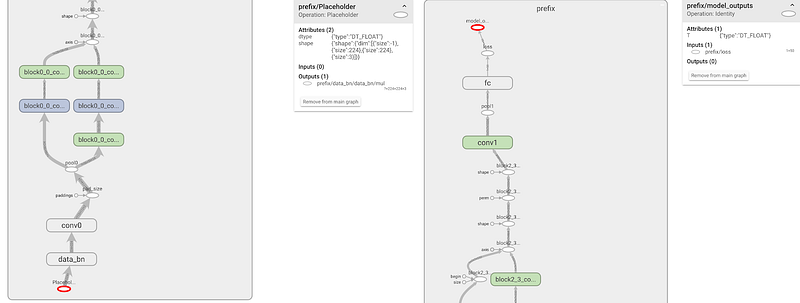
The size of our .pb model is 5.2MB which seems a reasonable size to be stored in a gadget with limited resources.
Conclusion
Even if somewhat limited, I think compact models are an extremely interesting option when planning to be used in small standalone devices, with potentially no internet access. My recommendation is: give it a go, play with them, and find out if their capabilities are suited for your next project.
Originally published at: https://cleverstuff.ai/article/custom-vision-compact-models


