How-to Use Custom View @decorators in Django
Prevent unauthorised users from accessing views and provide feedback using the @decorator method, such as for RECAPTCHA protected form submissions
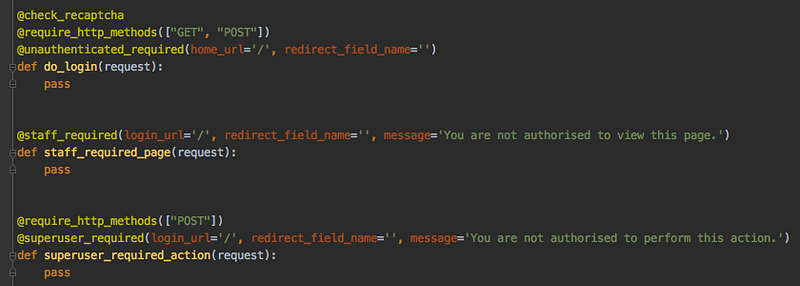
In this article, I will try to outline how you can write your own custom decorators in Django using its user_passes_test function. Decorators are a way to restrict access to views based on the request method or control caching behaviour. This is particularly useful when you want to separate logged-in users from unauthenticated users or create an admin page that only privileged users can access.
Django has several built-in decorators, but their main issue is that they do not provide user feedback. Django also has a built-in messages framework that uses the SESSION_COOKIE to store messages and display them after submitting or reloading webpages as a means of user feedback. We’re going to incorporate this in our custom decorators. We’re also going to use Google’s RECAPTCHA to protect our form submissions from spam and abuse and include this in a decorator.
In full, what we’ll do in this article is:
- Adjust Django’s
user_passes_testso that it provides user feedback using Django’s messages framework - Write three custom decorators:
@superuser_required,@staff_requiredand@unauthenticated_required - Use Google’s
RECAPTCHAto provide a@check_recaptchadecorator for protecting form submissions from abuse
Why Decorators?
Decorators are an easy way to clean up your code and separate the view authentication process from the view functionality. Django has several useful built-in decorators such as @login_required, @permission_required for user permissions and @require_http_methods for restricting request methods (GET|POST).
When you want to perform some sort of custom view authentication, you can do that in the view itself, as shown below. However, when you apply this authentication to several routes, it becomes verbose to copy-paste this example in every route. That’s when I started writing custom decorators since only one line @custom_decorator(args*) was needed to authenticate and protect views.
We’ll write these custom decorators in the decorators.py file in our main app folder so that we can import them in all our apps:
[projectname]/
├── [projectname]/
│   ├── __init__.py
│   ├── decorators.py
│   ├── forms.py
│   ├── models.py
│   ├── settings.py
│   ├── urls.py
│   ├── views.py
│   ├── wsgi.py
└── manage.py
Decorators With User Feedback
First, we’ll adjust Django’s user_passes_test so that it also provides user feedback through the messages framework. We’ll be using this custom function in the decorators that check user authentications.
All we needed to do for this was add lines 26-27, prompting that if our test_function does not hold, we return the argument message through the messages framework with messages.add_message. The redirect_field_name is an argument useful for indicating where the user should be redirected to after, for instance, logging in (for instance, if you’re accessing a login_required route > login page > back to that same route) and the login_url is the route you’re going to be redirected to if the test_function is not passed.
Note: I have my configurations in a config object, where I store keys for my Django project, but also keys for third parties such as Google RECAPTCHA or email clients. Source code comes from the Django project. I’ve set two global default messages that can be overwritten when calling the function user_passes_test.
User Authentication Decorators
Now we’ll use our custom user_passes_test to write our three custom decorators. Using the lambda notation, we can cook up a nameless function that checks for user u whether the user is active, has the superuser property, is_staff, or is_authenticated. These user properties are all coming from Django’s included authentication system. If these properties do not hold, the error message is returned.
We can then use these @decorators in our views. Note that you can chain multiple decorators top-down as shown below.
RECAPTCHA Protected Views
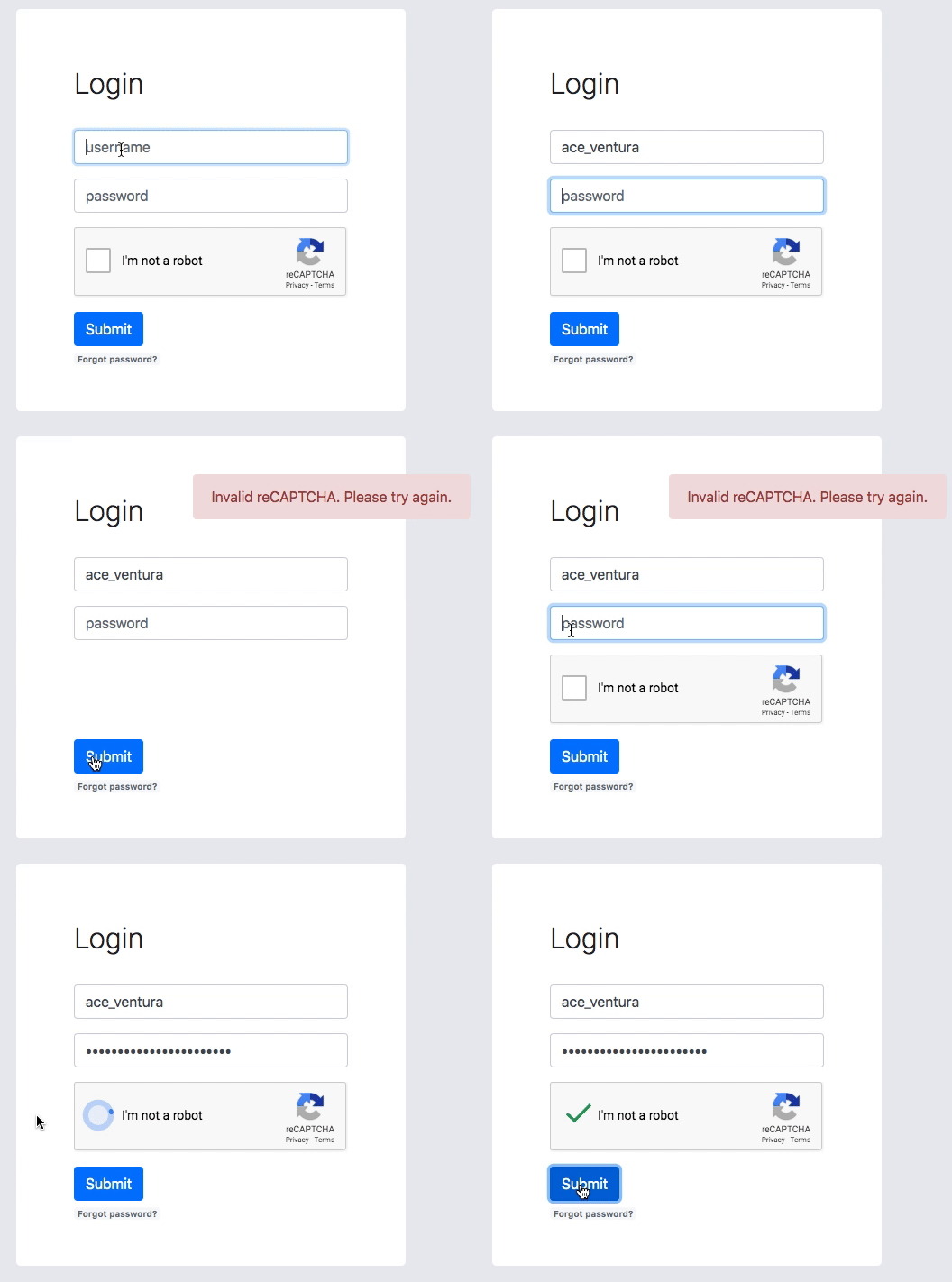
Thanks to Vitor Freitas for the code for this @check_recaptcha decorator. Follow his guide for setting up Google’s RECAPTCHA and setting up the @check_recaptcha, which is super-easy. You have the option to choose RECAPATCHA v2 or RECAPTCHA v3. Read this article if you want to know more about the differences and pros/cons of both. Include the element in the HTML for RECAPTCHAs as such:
What this decorator does is check the RECAPTCHA by sending a request and getting the response from Google. It then sets a key recaptcha_is_valid with a boolean value True|False. We then check this value by calling the key from the request:
@check_recaptcha
@require_http_methods(["GET", "POST"])
def register(request):
    if request.method == 'POST':
        form = LoginForm(request.POST)
        if form.is_valid() and request.recaptcha_is_valid:
            form.save()
Full code for the custom decorators can be found on GitHub. In the next article, we’ll cover a complete user registration route with the @check_recaptcha decorator and email verification. Enjoy the coding!