
Cubit, a simple solution for app state management in Flutter.

[Updated 24/04/2021] Null Safety
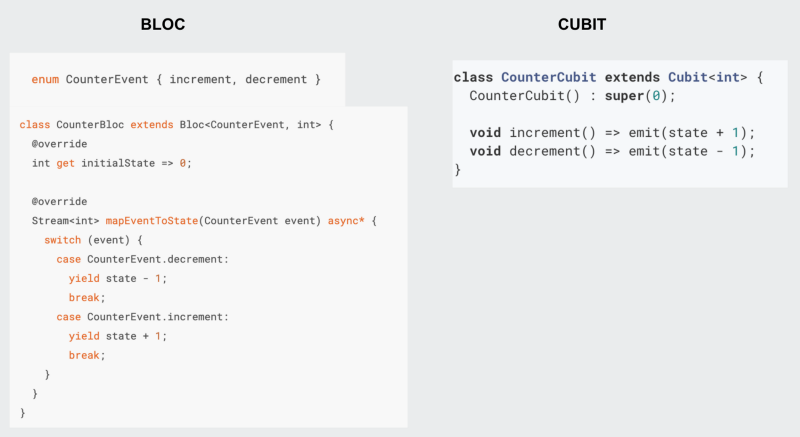
The Cubit is a subset of the famous implementation of BLoC Pattern: bloclibrary.dev, it abandons the concept of Events and simplifies the way of emitting states.
What’s a Cubit?
It’s a class that stores an observable state, the observation is powered by Streams but in such a friendly way that it is not necessary to know reactive programming
Use super() to override the initial state.
How to connect a Cubit to the UI?
Use a Builder similar to StreamBuilder or FutureBuilder.
BlocBuilder<MoviesCubit, MoviesState>(
  builder: (context, state) => Container(),
),
The difference is the possibility of rescuing a Cubit direct from Widget Tree by Providers.
At every state change — using the emit() as said before — , an updated widget is built.
If necessary only listen to the state changes without building a widget, use BlocListener. It’s useful to call side-effects based on the current state, like alerts and navigations.
BlocListener<Cubit, State>(
  listener: (context, state) {
    // do some side effect
  },
),
It’s possible to control when to listen or to build(buildWhen and listenWhen).
BlocConsumer is a mix of builder and listener.
BlocConsumer<Cubit, State>(
  listener: (context, state) {
    // do some side effect
  },
  builder: (context, state) => Container(),
),
How to inject a Cubit in the Widget Tree?
Cubit uses the package provider for dependency injection, that’s familiar to most developers.
The level of accessibility of a Cubit is based on Provider depth.
Example: A cubit injected at MaterialApp it’s available throughout the App.
BlocProvider<Cubit>(
  create: (context) => Cubit(),
  child: Container(),
),
For more information, click here.
Concrete example.
An application shows the weekly trending movies, these movies come from an external API.
Let’s solve it with Cubit.
1 — Representing the movies states:
Write an abstract class called MoviesState that extends Equatable.
abstract class MoviesState extends Equatable {}Equatable is a package to compare Objects by values instead reference but you can override hashcode and == to make a value equity too.
There will be states for InitialList, Loading, Loaded Movies, and Error.
class InitialState extends MoviesState {
  @override
  List<Object> get props => [];
}
class LoadingState extends MoviesState {
@override
List<Object> get props => [];
}class LoadedState extends MoviesState {
LoadedState(this.movies);
final List<MovieModel> movies;
@override
List<Object> get props => [movies];
}class ErrorState extends MoviesState {
@override
List<Object> get props => [];
}2 — Construct a Cubit:
It uses a repository in this example but the choice of external data consult approach is free.
class MoviesCubit extends Cubit<MoviesState> {
  MoviesCubit({required this.repository}) : super(InitialState()) {
    getTrendingMovies();
  }

  final MovieRepository repository;
}
3 — Write the function that will emit the movies:
The function will be the constructor to load the movies at class instantiation.
void getTrendingMovies() async {
  try {
    emit(LoadingState());
final movies = await repository.getMovies(); emit(LoadedState(movies));
} catch (e) {
emit(ErrorState());
}
}4 — Connect Cubit to UI:
There will be a widget for every state, so it’s necessary to handle the type of each emitted state.
BlocBuilder<MoviesCubit, MoviesState>(
  builder: (context, state) {
    if (state is LoadingState) {
      return Center(
        child: CircularProgressIndicator(),
      );
    } else if (state is ErrorState) {
      return Center(
        child: Icon(Icons.close),
      );
    } else if (state is LoadedState) {
      final movies = state.movies;

      return ListView.builder(
        itemCount: movies.length,
        itemBuilder: (context, index) => Card(
          child: ListTile(
            title: Text(movies[index].title),
            leading: CircleAvatar(
              backgroundImage: NetworkImage(movies[index].urlImage),
            ),
          ),
        ),
      );
    } else {
      return Container();
    }
  },
)
Complete example: https://github.com/irvine5k/cubit_movies_app/
WRITE TESTS!
The Cubit tests is a Stream Test, so there’s no secret.
class MockRepository extends Mock implements MovieRepository {}void main() {
late MockRepository movieRepository;
late MoviesCubit moviesCubit;
final movies = [
MovieModel(title: ‘title 01’, urlImage: ‘url 01’),
MovieModel(title: ‘title 02’, urlImage: ‘url 02’),
];
setUp(() {
movieRepository = MockRepository();
when(() => movieRepository.getMovies()).thenAnswer(
(_) async => movies,
);
}); test(‘Emits movies when repository answer correctly’, () async {
moviesCubit = MoviesCubit(repository: movieRepository); await expectLater(
moviesCubit.stream,
emits(LoadedState(movies)),
);
});
}The difference of syntax between Cubit and Bloc
Final considerations
Cubit greatly reduced the complexity of using the Bloc package and its boilerplate.
Its strengths are simplicity, immutability, and interoperability with BLoC.
Want to contact me? My LinkedIN.


