
Cloud (CSPM) and SaaS Security Posture Management (SSPM)
ACM.162 Security posture management products for cloud security — do they work?
~~~~~~~~~~~~~~~~~~~~~~~~~~~~~~~~~~~~~~~~~~~~~~~~~~~~~~~~~~~
⚙️ Check out my series on Automating Cybersecurity Metrics. The Code.
🔒 Related Stories: Multi-Cloud Security | Cloud Governance
💻 Free Content on Jobs in Cybersecurity | ✉️ Sign up for the Email List
~~~~~~~~~~~~~~~~~~~~~~~~~~~~~~~~~~~~~~~~~~~~~~~~~~~~~~~~~~~
In the last post, we performed a blackbox assessment of Okta security at a high level. Specifically, we looked at Okta’s responsibilities to secure the parts of the infrastructure and application code they maintain for us.
Now we need to look at our side of the responsibilities for securing Okta.
How to secure all your cloud platforms
You wish that I could provide a simple check list to address that that heading of this section of my post, don’t you? Don’t we all.
If you heard one of my presentations for IANS Research in 2022 on multi-cloud security (or perhaps saw the slides presented by someone else) one of the first slides you saw was:
***** There is no easy button *****
That’s because you need to evaluate the security controls available to you and potential security gaps for each cloud provider, vendor, or product you choose to use at your organization. They all work differently and have different controls to manage.
Whenever you purchase a new piece of technology, you need to secure it. Securing a new, complex product may be daunting. Some vendors offer tools to try to help. Can we simply use a tool to secure our side of the shared responsibility model? Can a tool examine our cloud account and configure everything for us?
You may have heard of a Cloud Security Posture Management (CSPM) or SaaS Security Posture Management (SSPM) tool. These tools query your cloud environment and and tell you all the things that are misconfigured. In some cases they try to auto-remediate problems. Can we just use one of these tools to tell us everything that is wrong with our integration of Okta and AWS? Better yet, can the tool configure it all securely for us?
Some of these tools will evaluate your cloud environment against the CIS Benchmarks. In my IANS presentation, I pointed out that although the CIS Benchmarks are a great starting point, in some cases there are fewer benchmarks than there are cloud services for AWS, Azure, or GCP. Clearly there’s at least one security control for each cloud service, no? Therefore we can conclude that security configuration settings must exist that the CIS Benchmarks aren’t covering.
That leads to my next observation. You can’t simply buy a tool that monitors the CIS benchmarks for your cloud platform and call it good. These types of tools are usually called Cloud Security Posture Management (CSPM) products. They typically work on Infrastructure as a Service (IAAS) clouds. If you don’t know what that means, check out my post on “what is cloud?”
CSPMs often automate the process of querying your cloud environment using available APIs and provide reports to you about possible misconfigurations. You can buy third-party tools that do this across multiple cloud platforms to get reports about the state of cloud security across multiple environments like AWS, Azure, and Google.
Note that you could do the same for on-premises environments where systems offer APIs to query configuration state, if such APIs exist. So the fact that the tool is called a CSPM means it is limited in it’s scope to query the state of your overall security architecture.
Cloud Native Security Posture Management
You can also use similar functionality from the cloud providers as well. As an example, Azure can monitor the Azure Security Benchmarks (ASB) for you. If you choose to use Azure to monitor security best practices on their platform, some of the findings they report are remediated by signing up for additional Azure security services that cost you money.
If you choose not to use those services because you have some other mitigating solution, you can tune and adjust the engine to disregard the items on the report that are not relevant to your organization. You can also create policies to customize reports to include the specific rules that apply to your organization and compliance requirements.
You can do the similar things on AWS and GCP but Azure’s solution is pretty nice and integrated with their SIEM (Sentinel) in a very interesting approach. That said, I’ve heard mixed reviews. For any product you use, test it out and evaluate it for yourself and your particular environment as I explained in this post (or hire me to do it):
Azure also can become your CSPM for AWS and GCP:
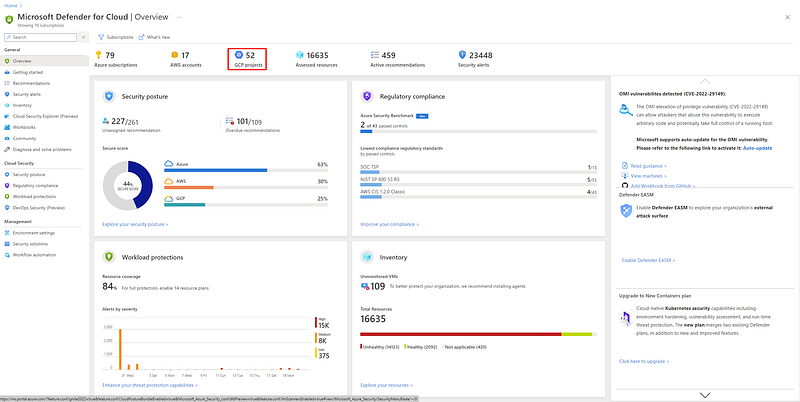
Now my concern with the above option is that you are giving Azure permissions in all your cloud environments to track all your security problems. First of all, is the integration secure? How much network access do you have to grant to make this work? How much IAM access do you need to grant to this tool?
Secondly, what if Microsoft has a breach and all your cloud security problems exist in their cloud? As I’ve written before, Azure has had some security problems so do you want all your eggs in that one basket?
How does Azure protect your data in this CSPM solution so malicious insiders or third-party vendors, or support people cannot access it? These are questions I would be asking.
Any CSPM tool you want to use would require access to your cloud account. It is important to understand how the tool gets access, what it can do, and where the data is transferred and stored. Who has access to it in its final destination within the CSPM tool?
Beyond the basic lists
Although these tools are very, very helpful for monitoring basic security controls — and you will probably want to use some form of this type of tool whether you buy it or use some kind of open source framework— the out of the box rules are not enough. They are a starting point for someone just getting started with cloud security and monitoring the basics. They do not constitute an evaluation of a secure cloud architecture and policy management and compliance (i.e. governance).
How would a CSPM tool analyze your IAM architecture to determine if you have appropriate separation of duties in place to prevent escalation of privileges and account takeover? Most of them will tell you if you’ve given someone full admin access. That’s great but what about the granularity of determining if someone has both the permission to create a user and give that user access? What about all the different ways in which you can grant permissions to a user or application? One tool I reviewed did not look at IAM at all on certain platforms due to Microsoft terms and conditions and acceptable use policy. Can the tool even do what you need it to do, or will you be forced into using a Microsoft specific product if you operate on Azure?
As I’ve been showing you throughout this series, there are many, many security considerations for each service and feature you choose to use on AWS — and I’m not even close to done with what I set out to do. I’ve only touched on a small fraction of available AWS services. We’ve looked at caveats with different types of networking, key management, secrets, and parameter management. We haven’t even scratched the surface of compute resources and web applications. We have a lot more ground to cover.
SAAS Security Posture Management (SSPM)
What about SAAS platforms like Okta? You may have heard of a SAAS Security Posture Management (SSPM) tool. Similar to a Cloud Security Posture Management tool, an SSPM attempts to help you manage the configuration of your SAAS products.
Are these tools effective? Maybe. It depends if they cover the particular SAAS products you use. And every configuration that could produce a security gap that product has to offer. And if they keep up with the third-party provider every time a new feature or configuration option gets released.
The problem with trying to these tools will be that every single SAAS provider is going to work differently. The are going to have different IAM, networking, and encryption controls and options. Some may have a way to call an API to change and monitor the settings. In that case, an SSPM may be able to automatically query and report security problems — if the APIs provide the functionality completely.
Others may only have a manual way to manage settings via a web interface. How is a tool going to evaluate and report on settings in that case? Perhaps a tool can automate and report on some settings and not others. Take a look at how many of the NIST 800–53 controls are manual per AWS Audit Manager:
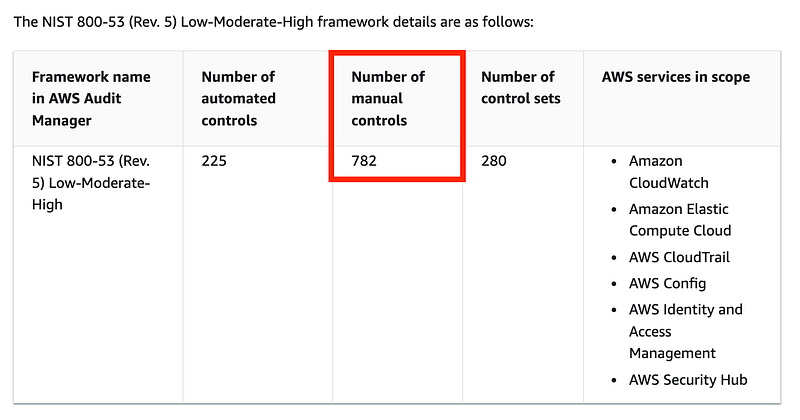
What about the case where the cloud provider adds a new setting that poses a potential security risk. When will the SSPM (or CSPM for that matter) add this new setting to their monitoring and reports?
How is a SSPM going to cover, in depth and in detail, the proper configuration for every single SAAS provider?
Hint: It’s not.
Are you going to restrict your company from using any SAAS product that does not integrate with your SSPM? What if the marketing team wants to use Pandora to play music at a remote marketing event? Is Pandora a SAAS product? It’s software as a service, so technically yes. But does that service pose a risk to your business? It depends. Is it a web application on an IPad that has access to your production network? Is your SSPM going to help you in the scenario where that application has a vulnerability that is used to scan and move laterally through your network and exfiltrate data?
I helped with a SAAS audit for a large company and no single product worked the same way. Only certain high-level policies can apply across the board when it comes to cloud products — IAAS, PAAS or SAAS.
So what should we do. Give up? Stop using cloud products? No! These tools, products, and services are very helpful. They help facilitate business innovation, facilitate business transactions, and may even make your systems and applications more secure, when assessed and configured properly. Read on…
Okta security best practices
If you search the CIS Benchmarks site for Okta — there aren’t any. So how do we know how to properly secure Okta? Well, consider what the CIS Benchmarks are and how they came to be. They are crowd-sourced opinions of how you should properly secure various systems. Where did the people who provided that information get the recommendations they provided?
Most of the time it comes from using the product and reading the documentation as I’m doing in this blog series. In addition, we can watch for security events in the news and from security sources and learn from other people’s mistakes.
For each cloud product you use, you have to RTFM.
Read The Fantabulous Manual.
Dig into the documentation as I’ve been doing in this series. Determine how the system works. Understand what security controls are available to your from the vendor. Think through how you need to properly configure them — and how you will prevent someone from maliciously or inadvertently misconfiguring them. Consider threat models and data flows and security incidents that might similarly affect your organization if you use the product.
As I mentioned in a prior post I’m using Okta Identity Engine so I’m going to head over to the documentation. Scan the menu to get an idea of what Okta has to offer in terms of features and security controls.
The starting point is to scan the menu for security related configuration and options. Looking at the menu below, I might find security information and settings in just about every one of those menu items.
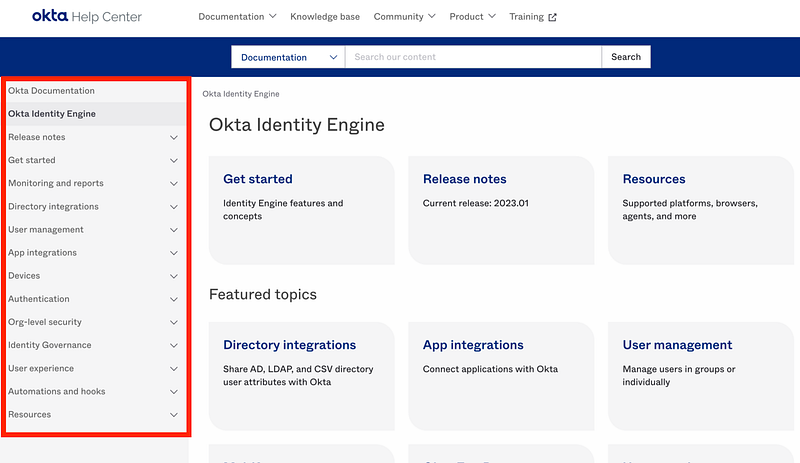
This seems so obvious, right? But how many times have developers, IT, or marketing professionals, for example, jumped in and started using a product without first reviewing this information? Then the security team comes along and gets in the way and slows things down. We have to help people understand this basic premise of securing products they wish to use — before they start using them.
Establish a baseline of basic control requirements and configurations such as properly configuring IAM with a root of trust, zero trust networking, end-to-end and full encryption at rest with NIST recommended encryption algorithms, logging to the company SIEM, etc. Create the general requirements your company has for any new product and train users to evaluate the basic security options of a product based on that list.
Then the security team can come in and take a deeper dive look at the product only if the product can meet baseline security requirements as determined by the business team and the vendor. Once a company starts using a cloud product, the security team and the members of other teams can define a secure configuration and baseline for each product and determine how you will monitor that product for vulnerabilities and configuration changes.
Where should I start?
There’s a lot of documentation for Okta. Where should I start? I could read every line and every detail but as always we are all very busy.
First of all, I’ve narrowed down the specific features of the product I need to evaluate at this point. I took the time to first understand the options available to me. I don’t need to read about every type of integration right now because I’m not using them all. I’m specifically interested in a particular type of integration that applies to using Okta as an IdP for AWS IAM. I will not use other types of configurations without further analysis.
I previously wrote about different ways you can integrate your systems with Okta here:
I already took a look at how Okta secures their side of things to understand what avenues attackers have on their side of the security responsibility model the degree I have visibility:
Considering my side of securing the systems I understand some of the key attack vectors and will start with security controls that give me the most return on my time investment. If I prioritize certain controls I can quickly reduce the number of chances I am giving attackers to get into my account. I wrote about that concept in my book at the bottom of this post.
- Networking. If I can block an attacker’s access to my instance of Okta on the Internet, they can’t scan the system and interact with my data. As we learned in a prior post, Okta takes care to segregate customer data so compromise of another customer should not impact my data. They are improving controls related to third-party access to data, which was the source of the prior data breach. What can I do to ensure that the way I access the system is limited to my own networks? That’s one of the first things I want to find out.
- IAM controls. Next I want to know how granular I can configure the access my users have to configure and manage the Okta system. As mentioned, I am ideally trying to separate duties between creating users and granting them access. Ideally I do not want administrators to be able to get new user passwords either. I will want to lock away the root credentials that could delete the entire account or take some other devastating action.
- MFA. I want to know how I can enforce MFA and with what kinds of devices or software. I would like to know how MFA devices can be added or changed. Can someone call customer support and do that? What steps must be taken before that can happen?
- Logging and Alerts. What kinds of logs and alerts are available on Okta? How will I be able to tell if someone has compromised my account?
Additionally, I already found a list of best practices provided by Okta, so we can go through this list and ensure we have followed all the best practices.
I’ve already done that:
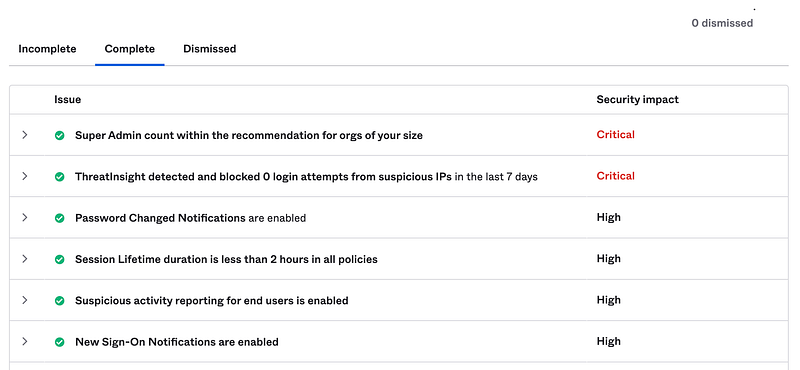
Okta also has a recommended approach to setting up new accounts here which may be useful:
Will a CSPM or SSPM help me with the above?
Perhaps a CSPM or SSPM will have all the configuration monitoring you need for every product you use covering the baseline you have defined. You will need to evaluate those security tools based on the particular products you use and the security settings and configurations that your organization has established. The security settings may be initially based on a broad framework such as the CIS Benchmarks or the Azure Security Benchmark (ASB) for example. But not all tools will have such a benchmark and in the end the benchmarks are usually not enough.
Likely you will need a CSPM or SSPM that allows you to modify the rules and tailor them to your specific requirements and concerns, such as the bullet points I just mentioned when it comes to Okta. The predefined rules will be a helpful starting point and save you a lot of time in many cases. Use them, but take the time to understand and tune them to eliminate false positives and irrelevant alerts and add alerts that are not included that matter to your environment. Also it may not be possible to evaluate every control in an automated fashion. That said, you can still track them using a system that automates your security metrics reporting.
Also consider the security of the CSPM or SSPM itself. I saw a tool advertising that it will help you secure Okta. What sort of permission do you need to give this tool that can see all your Okta configurations? Where is that data that includes any misconfigurations in your Okta implementation stored? Who has access to it? You’ll need to perform a full assessment of that overlay product and it my opinion, it may actually create more security risk that it reduces. Especially if that company is in another country where legal problems could be challenging.
Perhaps your team could instead read the documentation from the vendor and other sources and come up with a secure baseline on your own? If you have questions you can call the vendor or someone like me who can review your configuration and recommend changes or improvements, rather than exposing all your configuration data in this highly critical system to a third-party platform.
Your organizational rules and configurations will be based on understanding of the cloud products you use, your reason for using them and reading the documentation. Understand how the data flows between systems, potential threats, available security settings, who can change them, and how you can monitor the systems. You then define your security architecture and policies based on security principles instead of best practice lists that may be overly complicated with irrelevant findings or lacking the appropriate level of detail to properly secure your specific use case.
I’m going to take a look at the Okta specific controls I mentioned in the above bullet points in upcoming posts, because I think those will be key configurations to improve security before we start integrating with other systems.
Follow for updates.
Teri Radichel | © 2nd Sight Lab 2023
About Teri Radichel:
~~~~~~~~~~~~~~~~~~~~
⭐️ Author: Cybersecurity Books
⭐️ Presentations: Presentations by Teri Radichel
⭐️ Recognition: SANS Award, AWS Security Hero, IANS Faculty
⭐️ Certifications: SANS ~ GSE 240
⭐️ Education: BA Business, Master of Software Engineering, Master of Infosec
⭐️ Company: Penetration Tests, Assessments, Phone Consulting ~ 2nd Sight Lab
Need Help With Cybersecurity, Cloud, or Application Security?
~~~~~~~~~~~~~~~~~~~~~~~~~~~~~~~~~~~~~~~~~~~~~~~~~~~~~~~~~~~~~
🔒 Request a penetration test or security assessment
🔒 Schedule a consulting call
🔒 Cybersecurity Speaker for PresentationFollow for more stories like this:
~~~~~~~~~~~~~~~~~~~~~~~~~~~~~~~~~~~~~~~~~~~~~~~~~~~~~~~~~~~~~
❤️ Sign Up my Medium Email List
❤️ Twitter: @teriradichel
❤️ LinkedIn: https://www.linkedin.com/in/teriradichel
❤️ Mastodon: @teriradichel@infosec.exchange
❤️ Facebook: 2nd Sight Lab
❤️ YouTube: @2ndsightlab


