
Crowning GUI Libraries in Python

This article will introduce you to the primary list of popular libraries for developing graphical user interfaces (GUIs) in Python. The article has five libraries. In a different article I will come up with another five libraries for developing GUIs in Python. So, let’s get started.
Introduction
A User Interface (UI) is the medium through which a user interacts with a computer system or application. It is a combination of hardware and software components that allows users to interact with a computer system or app. The primary goal of a UI is to make the interaction between the user and the computer system as simple and efficient as possible.
Graphical User Interface (GUI) and Character User Interface (CUI) are two types of primary user interfaces.
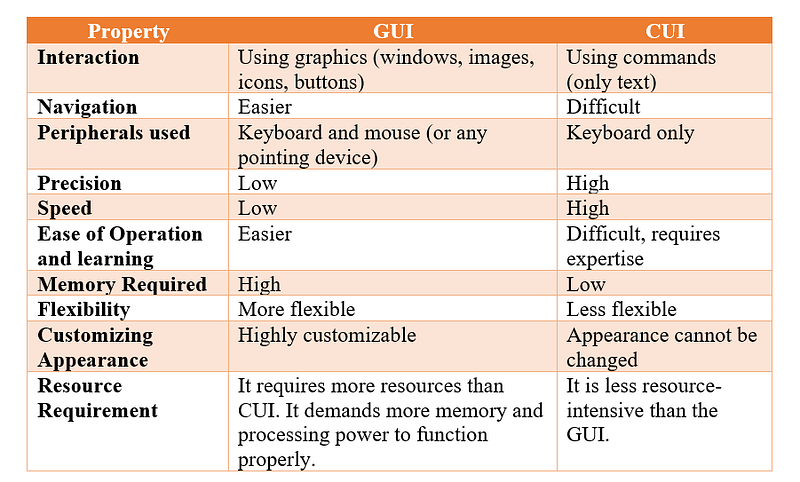
A GUI is a type of user interface where the user interacts with the computer using graphics, such as icons, navigation bars, images, etc. A mouse can be used while using this interface to interact with the graphics. It is a very user-friendly interface and requires no expertise.
On the other hand, a CUI is a user interface where the user interacts with a computer using only a keyboard. To perform any action, a command is required.
CUI is a precursor to GUI and was used in most primitive computers. Most modern computers use a GUI instead of a CUI. However, for some of the administrative tasks that require higher levels of privileges, CUI is still preferred.
The below table shows the differences between GUI and CUI
A GUI, or graphical user interface, is an interactive environment in which users can respond to a variety of scenarios such as forms, documents, and tests.
A GUI can comprise graphical elements such as icons, cursors, and buttons, as well as sounds and visual effects like transparency. A decent GUI is essential for building your platform’s reputation and user base, and the combination of all of these features has a significant impact on the user experience of your application or website.
When designing GUIs, many developers use Python, which has a variety of frameworks/libraries. Python is an interactive programming language that makes it simple to get started with developing GUI frameworks.
Python supports a wide selection of GUI frameworks, including Cross-Platform and Platform-Specific. Let’s explore some of them in the upcoming sections.
1 — PyQt5
PyQt5, developed by Riverbank Computing, is a popular Python GUI framework. It is a free and open-source GUI framework for Python that is widely used by developers. The PyQt package is based on the Qt framework, which is a cross-platform framework used to develop diverse applications across multiple platforms.
PyQt5 is quite popular among developers, and the GUI may be designed using code or a QT designer. QT Development Framework is a visual framework that enables the drag and drop of widgets to create user interfaces.
It offers a rich selection of built-in widgets and tools for custom widgets creation to shape sophisticated GUIs, as well as robust SQL database support to connect to and interact with databases. PyQt5 is implemented as the cross-platform application development framework and is used on Windows, Mac, Android, Linux, and Raspberry PI.
You can install it using the following command:
pip install pyqt5
Here are some of the main advantages of PyQt5:
1 — Coding versatility
2 — Versatile collection of UI components
3 — Plethora of learning resources
4 — Native platform APIs for networking, database management, and many more.
2 — Tkinter
Tkinter is an open-source Python Graphic User Interface library and is another excellent Python GUI framework. Tkinter is a popular Python GUI library for designing desktop applications. It combines the TK and Python standard GUI frameworks.
It is widely recognized for its ease of use and arrives pre-installed in Python, requiring no additional effort from you. It is an excellent option for novices and intermediates due to these qualities, but it cannot handle more complex tasks.
The visual components in Tkinter are referred to as widgets. Tkinter provides a variety of widgets for use in graphical user interface applications, including labels, buttons, text boxes, and checkboxes. Tkinter offers many levels of customization available for each widget.
The button control widgets are used to show and build programs, whereas the canvas widget is used to draw shapes within the application such as lines, polygons, rectangles, and so on.
Tkinter is a built-in Python library that does not require installation, unlike many other GUI frameworks.
The following are some of Tkinter’s primary benefits:
1 — Simple to use and quickly put into action 2 — Stable and adaptable 3 — Included in Python standard installation.
3 — PySide2
PySide2 is a Python binding for the cross-platform GUI toolkit Qt, which is used to build a variety of applications across multiple platforms. It provides the official Python bindings for Qt (PySide2), which allow the usage of its APIs in Python applications, as well as a binding generating tool (Shiboken2) that may be used to expose C++ projects into Python.
In Python community, Qt is regarded as the gold standard for GUI design, and all other Python GUI frameworks are judged against it. This means PySide2 (Qt) gives Python developers access to a diverse set of useful tools and frameworks for quickly and flexibly creating user interfaces.
Some of the major benefits of PySide2 are:
1 — Cross platform 2 — Comprehensive community support and documentation. 3 — Supports Python 3 and Python 2.7.
To install PySide2, you can type-in the below command:
pip install PySide24 — ` Kivy
Kivy is an open-source Python framework for developing GUI apps that work cross-platform, including desktop, mobile, and embedded platforms. It offers a wide range of features such as multi-touch support, hardware-accelerated graphics, and a customizable UI toolkit. Kivy is designed to be easy to use, cross-platform, and fast, with a single codebase that can be deployed on Windows, Linux, macOS, iOS, and Android.
Kivy is released under the MIT License, is 100% free to use, and is professionally developed, backed, and maintained.
Kivy provides a simple and intuitive way to create beautiful and responsive user interfaces.
Kivy is an open-source GUI framework written in Python and Cython that allows you to create some of the most intuitive user interfaces, including multi-touch applications that use a natural user interface (NUI).
Kivyprovides rapid building of applications’ GUI.
An NUI is a type of interface in which the user organically learns about the many interactions offered by a user interface that is often hidden.
Kivy allows interface designers to code once and distribute to numerous platforms, while the built-in support for OpenGL ES 2 enables them to apply cutting-edge visuals and design techniques. Our Android and iOS applications demonstrate the most typical real-world use of the Kivy GUI framework. Other common implementations of the framework can be found in the user interfaces of Linux, Windows, Raspberry Pi, and Mac OS devices. You may easily integrate this framework into your environment by following the installation instructions provided on their website.
The graphics engine of Kivy is built over OpenGL ES 2, using a modern and fast graphics pipeline.
Kivy pros are:
1 — Open source 2 — MIT license 3 — Built-in widgets 4 — Cross platform
Kivy does not come pre-installed with Python.
The below command installs Kivy:
pip install Kivy5 — wxPython
wxPython is a Python wrapper around a C++ library called wxWidgets. It is a cross-platform GUI toolkit that allows developers to create highly graphical user interfaces for their programs using common concepts such as menu bars, menus, buttons, fields, panels, and frames.
wxPython is implemented as a collection of Python extension modules that wrap the GUI components of the popular wxWidgets. wxWidgets is a cross-platform library written in C++.
wxPython is developed by Robin Dunn.
The wxPythontoolkit has many custom widgets included with it, along with dozens of core widgets. wxPython is a cross-platform toolkit. This means that the same program can operate on many platforms without modification. Currently, supported platforms include Microsoft Windows, Mac OS X and macOS, and Linux.
The developer later also created Project Phoenix, a successor to wxPython that supports Python 3. It has been designed from the ground up to provide a cleaner Python implementation of the wxWidgets toolkit.
Advantages:
1 — Open source, cross-platform 2 — Supports Python 2.7 and 3. 3 — Simple to use. 4 — A large library of widgets 6 — Native look and feel 7 — Highly flexible.
8 — A helpful user community.
To install wxPython, simply type-in the below command:
pip install wxPython
Recapitulate
Python has a large library collection for developing Graphical User Interfaces (GUIs), each with its own advantages and disadvantages. In this article, I have highlighted some of the most popular and useful Python Libraries for GUI.
Tkinter is an excellent starting point for newcomers because of its simplicity and use, although PyQt5 and PySide2 provide more advanced features and customization choices. Kivy can be used to create cross-platform programs, but wxPython has a native look and feel on Windows, macOS, and Linux.
Hope! This article is informative and helpful to you in your Python journey.
With that we have reached the end of this article. Thank you once again for reading. If you liked this, don’t forget to 👏 and follow 😍. Also visit us at https://www.devtechie.com


