
Critical Chrome Zero-Day Flaw Found: Update Immediately!
Google Chrome has been hit by a critical zero-day vulnerability
Google Chrome, a web browser used by millions worldwide, has been hit by a critical zero-day vulnerability.
Dubbed CVE-2024–0519, this flaw poses a serious risk to users, as it has already been exploited in the wild.
The vulnerability exists within Chrome’s V8 JavaScript and WebAssembly engine and can lead to severe security breaches, including unauthorized access to sensitive data.
Understanding CVE-2024–0519: The Technical Breakdown
At its core, CVE-2024–0519 is an out-of-bounds memory access vulnerability.
For those not steeped in technical jargon, this means the flaw allows attackers to read parts of the memory that should be off-limits.
This can lead to severe consequences, like obtaining sensitive data or bypassing security mechanisms such as Address Space Layout Randomization (ASLR).
ASLR is a defense strategy that randomly arranges the address space positions of key data areas, making it difficult for attackers to predictably exploit system vulnerabilities.
The vulnerability specifically lies in the V8 engine, a critical component of Chrome responsible for processing JavaScript and WebAssembly.
The exploitation of this vulnerability can lead to heap corruption, a state where an attacker corrupts the memory management of the browser. This can result in a crash or, more worryingly, the execution of malicious code.
The details about the nature of the attacks and the specific threat actors have been withheld to prevent further exploitation.
Immediate Action: Updating Your Chrome Browser
Given the severity of CVE-2024–0519, Google has released updates to patch this vulnerability.
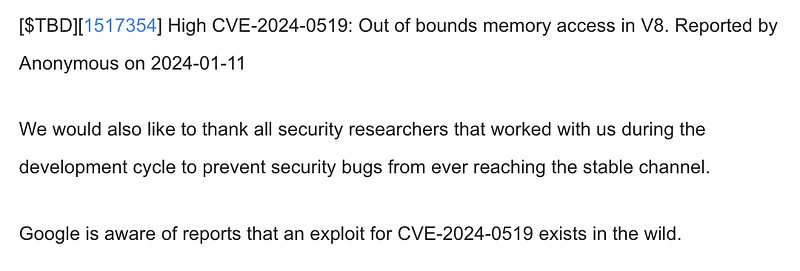
Users are strongly advised to update their Chrome browsers immediately. The updated versions are as follows:
- For Windows: Chrome version 120.0.6099.224/225
- For macOS: Chrome version 120.0.6099.234
- For Linux: Chrome version 120.0.6099.224
Additionally, users of Chromium-based browsers like Microsoft Edge, Brave, Opera, and Vivaldi should also be on the lookout for updates and apply them promptly.
How to Update Google Chrome
Updating Google Chrome is a straightforward process:
- Click the three dots in the top right corner of the Chrome browser.
- Navigate to ‘Help’ and then ‘About Google Chrome’.
- Chrome will automatically check for updates and prompt you to relaunch the browser if an update is available.
It’s important to regularly check for updates, even outside of urgent security alerts, as updates not only fix vulnerabilities but also improve overall performance and functionality.
Stay Informed and Protected
In our interconnected world, the importance of cybersecurity vigilance cannot be overstated.
To stay informed about the latest vulnerabilities and updates, consider bookmarking and regularly visiting reputable sources such as the MITRE’s Common Weakness Enumeration (CWE) and the NIST’s National Vulnerability Database (NVD).
Conclusion: A Proactive Approach to Cybersecurity
The discovery and prompt resolution of CVE-2024–0519 serve as a vital reminder of the importance of proactive cybersecurity measures.
Regularly updating your software, staying informed about potential threats, and understanding the basics of how these vulnerabilities work are key steps in safeguarding your digital life.
Enjoyed the read? For more on Web Development, JavaScript, Next.js, Cybersecurity, and Blockchain, check out my other articles here:
If you have questions or feedback, don’t hesitate to reach out at [email protected] or in the comments section.
[Disclosure: Every article I pen is a fusion of my ideas and the supportive capabilities of artificial intelligence. While AI assists in refining and elaborating, the core thoughts and concepts stem from my perspective and knowledge. To know more about my creative process, read this article.]