avatarMars Escobin

Free AI web copilot to create summaries, insights and extended knowledge, download it at here

3839

Abstract

lass="gist-iframe" src="/gist/mariannetrizha/d8049e187d42d5fa3c0c0a75506b50e0.js" allowfullscreen="" frameborder="0" height="undefined" width="undefined"> </div> </div> </figure></iframe></div></div></figure><p id="a76d">This function would turn a data range into a 1 dimensional array. For example, if we use <i>flatten</i> to get a list of questions from column A1:A99:</p> <figure id="7190"> <div> <div>

            <iframe class="gist-iframe" src="/gist/mariannetrizha/ccd55ef0838d5575b16fdc403806c229.js" allowfullscreen="" frameborder="0" height="undefined" width="undefined">
          </div>
        </div>
    </figure></iframe></div></div></figure><p id="ac44">Let’s examine it using the <i>Logger.log()</i> function. Here, we see that our questions from column A1:A99 have now turned into a one dimensional list:</p><figure id="569a"><img src="https://cdn-images-1.readmedium.com/v2/resize:fit:800/1*mUcZQyoMbiuWHbKhTfyNYg.png"><figcaption></figcaption></figure><p id="e6c4">This is perfect. Now we can easily call a question by passing an index to the accessor, []. For example if I want to get the first question in the list, I just run: <code>questions[0]</code></p><figure id="db9a"><img src="https://cdn-images-1.readmedium.com/v2/resize:fit:800/1*PbGMSKjTPLAqS__DE-Us0g.png"><figcaption></figcaption></figure><p id="9f34">Let’s do the same for column B of TriviaMaster to create an answer list:</p>
    <figure id="6819">
        <div>
          <div>
            
            <iframe class="gist-iframe" src="/gist/mariannetrizha/8edbd337c76f079e56f49782be27151b.js" allowfullscreen="" frameborder="0" height="undefined" width="undefined">
          </div>
        </div>
    </figure></iframe></div></div></figure><p id="13be">I also went ahead and stored the empty “Answered” sheet into a variable. We’re going to need it later.</p>
    <figure id="8fba">
        <div>
          <div>
            
            <iframe class="gist-iframe" src="/gist/mariannetrizha/a5f7265fadc43d7b19f32c664b218213.js" allowfullscreen="" frameborder="0" height="undefined" width="undefined">
          </div>
        </div>
    </figure></iframe></div></div></figure><p id="421b"><b>Hmm. I think we’re almost ready to program our bot! But first a review:</b></p><h1 id="474a">Review</h1><p id="0e93">As I’ve prefaced earlier, our bot will be triggered by any type of message. That is, every time a user sends a message to the bot, the bot will reply. The bot’s reply will depend on whether the user’s message matches the correct answer. To map the correct answer, we will use the <i>getLastRow</i> method and apply it to the “Answered” sheet. That will serve as the index that we’ll pass to our questions and answers list.</p>
    <figure id="1ebe">
        <div>
          <div>
            
            <iframe class="gist-iframe" src="/gist/mariannetrizha/360058bf9715f80c10abcaa597ccafbc.js" allowfullscreen="" frameborder="0" height="undefined" width="undefined">
          </div>
        </div>
    </figure></iframe></div></div></figure><p id="248f">Before we go any further, let’s zoom out a little bit and put everything we’ve discussed so far into a <i>doPost</i> function. The importance of the doPost function is discussed in <a href="https://levelup.gitconnected.com/six-easy-steps-to-create-a-telegram-bot-from-a-google-spreadsheet-b62008d2b81f?source=friends_link&amp;sk=ce655927272aa61841a84ddacef6a78c">Step 7 of this tutorial</a>. This function will determine what our bot will do when it receives <i>contents</i> or messages from the user. We can pull out the user’s Telegram <i>chat_id </i>and the user’s actual <i>text<

Options

/i> message using this function.</p> <figure id="0c3b"> <div> <div>

            <iframe class="gist-iframe" src="/gist/mariannetrizha/d0e1543d54c32be1d17b0ba8b0056875.js" allowfullscreen="" frameborder="0" height="undefined" width="undefined">
          </div>
        </div>
    </figure></iframe></div></div></figure><p id="b390">Now that we have everything we need, let’s write out instructions to our bot for when and if it receives a mesage from any user!</p><h1 id="6afc">Trivia Bot Logic</h1><p id="f3a4">Here is what I want the bot to do:</p><p id="d444">When it receives any kind of message as represented by the variable, <i>contents </i>(this can be a text message, a GIF, a photo, etc)<i>, </i>I want it to:</p><ol><li>Evaluate if the <i>text </i>message associated to that <i>content</i> (if there is) is the same as the correct answer. The correct answer is represented by <i>answers[x]. </i>Again, <i>x</i> is the last row of the ‘Answered’ tab while the variable <i>answers </i>is a one dimensional list of column B1:B99 of our ‘Trivia Master’ tab. If I call on <i>answers[0],</i>it will give me the content of cell B1, if I call on <i>answers[1] </i>it will give me the content of cell B2 and so on.</li><li>If it is the same, I want the bot to append that <i>text</i> message to the ‘Answered’ tab. Appending means that the item will be added to the last row of the sheet.

I also want the bot to send a message to the user and let them know that their answer was correct, as well as pass along the next question (as represented by <i>question[x+1])</i>.</li><li>If it’s not the same, I want the bot to send a message to the user and let them know that their answer was wrong and that they should try again with the current question (as represented by <i>question[x]).</i></li></ol> <figure id="ff1f"> <div> <div>

            <iframe class="gist-iframe" src="/gist/mariannetrizha/5bf6e26473bd91dbe464956039106c95.js" allowfullscreen="" frameborder="0" height="undefined" width="undefined">
          </div>
        </div>
    </figure></iframe></div></div></figure><p id="6d3e">And that’s it! We now have a working trivia bot! You can fill it out with any question and answer pair you want. You can use it for your exam reviews or just for fun! To access this bot, look for @nerd_alert on Telegram. 🤓</p><figure id="a433"><img src="https://cdn-images-1.readmedium.com/v2/resize:fit:800/1*dzMoOMiMG1dl1PKC9BPIQA.gif"><figcaption></figcaption></figure><p id="7d81">In case you got lost along the way, here is the full copy of the code:</p>
    <figure id="603b">
        <div>
          <div>
            
            <iframe class="gist-iframe" src="/gist/mariannetrizha/238e8a1e1bb9494aa7cb21d2fb816079.js" allowfullscreen="" frameborder="0" height="undefined" width="undefined">
          </div>
        </div>
    </figure></iframe></div></div></figure><p id="8401"><i>fin</i></p><p id="6214">P.S. 

If you liked this, you’d likely enjoy:</p><ul><li><a href="https://levelup.gitconnected.com/six-easy-steps-to-create-a-telegram-bot-from-a-google-spreadsheet-b62008d2b81f?source=friends_link&amp;sk=ce655927272aa61841a84ddacef6a78c">How to Create Telegram Bots using Webhooks</a></li><li><a href="https://readmedium.com/telegram-bot-to-track-your-expenses-in-a-spreadsheet-d07393513bd5?source=friends_link&amp;sk=7cf2719a0d14ae6f6f942ea2152810ed">Telegram Bot to Track your Expenses in a Spreadsheet</a></li><li><a href="https://readmedium.com/telegram-inline-keyboards-using-google-app-script-f0a0550fde26">Telegram Inline Keyboards using Google App Script</a></li></ul><p id="3db9">What kind of bot would you like me to try out next?</p></article></body>

Creating your own Trivia Bot on Telegram

Photo by Bohlam Neon from freepik.com

In this tutorial we will create our own trivia bot! The questions and answers will be stored in a Google Spreadsheet and we will write our program inside its script editor. We will be using webhooks to connect to Telegram. If you have no idea how to do this, don’t worry — I wrote a seven step tutorial here.

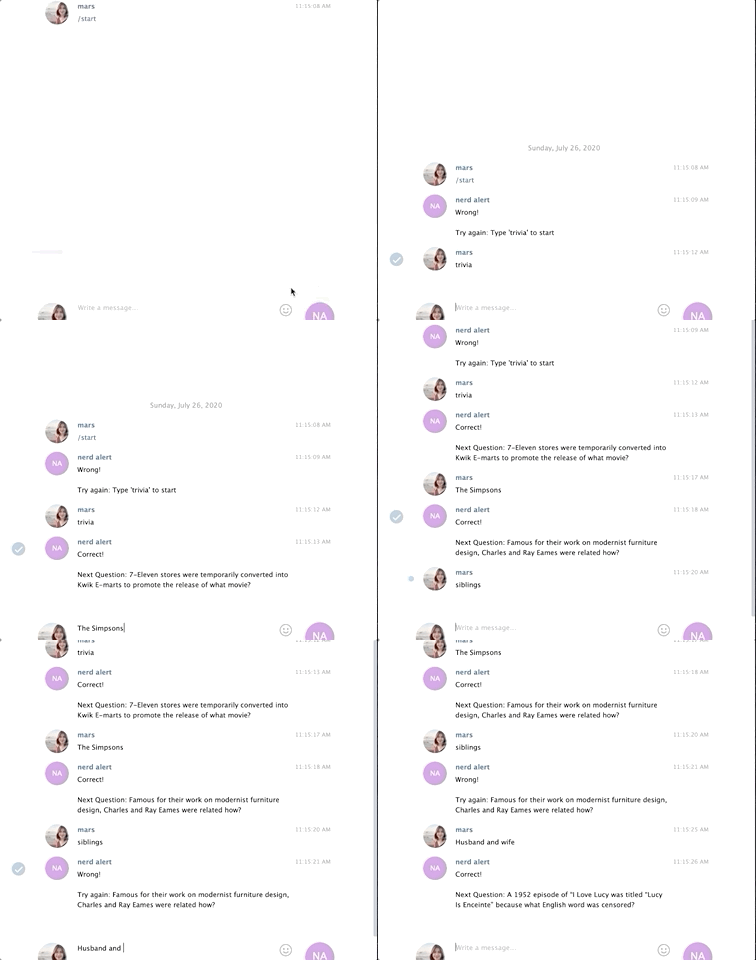
We will trigger the trivia bot by simply sending a message. Our bot will evaluate if the message is the correct answer. If so, it will send the next question; otherwise, it will repeat the current question. Here’s the finish product:
What we’ll need:

If you’re familiar with webhooks or have read my previous tutorial, then you know that we’ll need:

  1. An authorization token from Telegram
  2. A webapp URL
  3. And of course, a set of questions and answers. I got mine from Reddit.

How to set up the bot:

I went ahead and set up the bot by following steps 1–6 of the previous tutorial.

What we did:

✅ Step 1: Obtained an entry pass or an authorization token ✅ Step 2: Pulled up an empty Google Spreadsheet ✅ Step 3: Created a loading dock or a webapp url ✅ Step 4: Stored all relevant links in variables ✅ Step 5: Created a function to set the webhook ✅ Step 6: Created a function to send a message on Telegram

The next step is to type out our questions and answers into the Sheet:
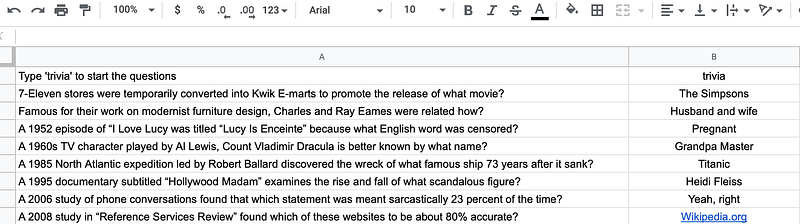
I named this sheet ‘Trivia Master.’ I also created another empty sheet called ‘Answered.’ If a user sends a message and it evaluates as the correct answer, I want the bot to store that message to the “Answered” sheet. We’d want to keep tabs on the number of questions that have been answered correctly so that our bot will know which question to send next.

Next, I’d like to introduce a function that will make calling questions and answers easier than mapping their cell location in the Spreadsheet: the flatten function.

This function would turn a data range into a 1 dimensional array. For example, if we use flatten to get a list of questions from column A1:A99:

Let’s examine it using the Logger.log() function. Here, we see that our questions from column A1:A99 have now turned into a one dimensional list:
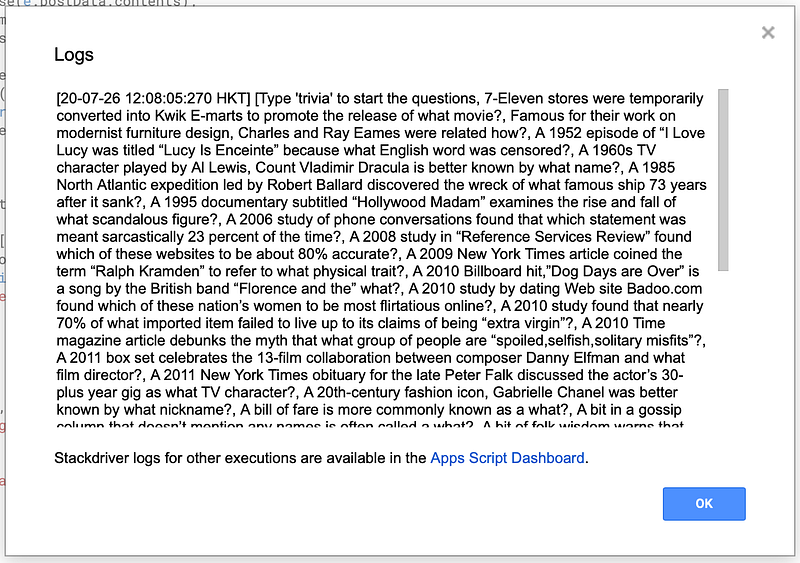
This is perfect. Now we can easily call a question by passing an index to the accessor, []. For example if I want to get the first question in the list, I just run: questions[0]

Let’s do the same for column B of TriviaMaster to create an answer list:

I also went ahead and stored the empty “Answered” sheet into a variable. We’re going to need it later.

Hmm. I think we’re almost ready to program our bot! But first a review:

Review

As I’ve prefaced earlier, our bot will be triggered by any type of message. That is, every time a user sends a message to the bot, the bot will reply. The bot’s reply will depend on whether the user’s message matches the correct answer. To map the correct answer, we will use the getLastRow method and apply it to the “Answered” sheet. That will serve as the index that we’ll pass to our questions and answers list.

Before we go any further, let’s zoom out a little bit and put everything we’ve discussed so far into a doPost function. The importance of the doPost function is discussed in Step 7 of this tutorial. This function will determine what our bot will do when it receives contents or messages from the user. We can pull out the user’s Telegram chat_id and the user’s actual text message using this function.

Now that we have everything we need, let’s write out instructions to our bot for when and if it receives a mesage from any user!

Trivia Bot Logic

Here is what I want the bot to do:

When it receives any kind of message as represented by the variable, contents (this can be a text message, a GIF, a photo, etc), I want it to:

  1. Evaluate if the text message associated to that content (if there is) is the same as the correct answer. The correct answer is represented by answers[x]. Again, x is the last row of the ‘Answered’ tab while the variable answers is a one dimensional list of column B1:B99 of our ‘Trivia Master’ tab. If I call on answers[0],it will give me the content of cell B1, if I call on answers[1] it will give me the content of cell B2 and so on.
  2. If it is the same, I want the bot to append that text message to the ‘Answered’ tab. Appending means that the item will be added to the last row of the sheet. I also want the bot to send a message to the user and let them know that their answer was correct, as well as pass along the next question (as represented by question[x+1]).
  3. If it’s not the same, I want the bot to send a message to the user and let them know that their answer was wrong and that they should try again with the current question (as represented by question[x]).

And that’s it! We now have a working trivia bot! You can fill it out with any question and answer pair you want. You can use it for your exam reviews or just for fun! To access this bot, look for @nerd_alert on Telegram. 🤓

In case you got lost along the way, here is the full copy of the code:

fin

P.S. If you liked this, you’d likely enjoy:

What kind of bot would you like me to try out next?

Programming
Chatbots
Bots
Coding
API
Recommended from ReadMedium