
Creating N-grams using R
We have created a cleaned corpus and we learned how to make a TF-IDF Matrix so now we are ready to start text mining.
N-grams is one of the most useful techniques in text mining. If you have never heard about it, then you might wonder what is N-grams?
N-grams is a sequence of N items in a sample of text. The sequence can be any number. Depending on N, it is called bigrams, trigrams, four grams et cetera.
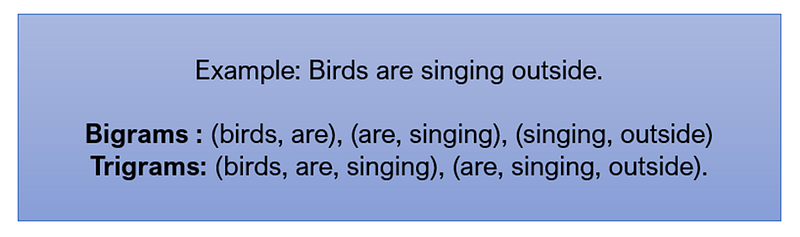
For example, let’s take the sequence: Birds are singing outside.
If we do bigrams conversion of this, we will end up with the following three bigrams: birds_are, are_singing, singing_outside.
If we do trigrams, we will end up with the two trigrams: birds_are_singing, are_singing_outside.
We use N-grams to build a predictive text system that predict the next sequence of words, like typehead systems. Now, let’s look at how we can create N-grams in R.
As we explained earlier, N-grams is a contiguous of N items in a sample text we will now see how we can create it in R.
To generate N-grams from a Corpus of documents, we will use the RWeka package in R. As usual we start by installing the package in R if it’s not already in the environment. So, we use the command install packages.
install.packages(“RWeka”)then we load the library using library or required function.
library(RWeka)To explain the creation of N-grams we use a small demo for the sentence. “Demo of creating N-grams in R”.
demo_string <- “Demo of creating ngrams in R “To get the bigrams which is the sequence of two words we will call the function GramTokenizer. We need to pass the weka control to indicate the number of grams that we want, we specify the minimum and maximum of grams. Seeing that we are interested in Bigrams then we use two in both.
#Bigrams
print(“Bigrams extraction : “)NGramTokenizer( demo_string, Weka_control(min=2,max=2))When we execute the code we see the results in a list of bigrams constructed from our sentence.

We will run the trigrams also, with a minimum and maximum equal to 3. And we can see the results are successful.
#Trigrams
print(“Trigrams extraction : “)
NGramTokenizer( demo_string, Weka_control(min=3,max=3))
The weka library makes it easy for extracting N-grams from a string. In the next section, we will use this library, in conjunction with text frequency, to find the most occurring grams in a Corpus.
Creating an n-gram text frequency matrix
Most practices that used n-grams need analyzing the corpus and extracting counts of each n-gram sequence in the corpus. In this section we will go over the use of ngrams.
We start we loading the same course description from before into the course_desc object, and we inspect it using inspect function to verify the content.
#Load the corpuscourse_desc <- VCorpus(DirSource(“data”))inspect(course_desc[[1]])Next, we will create a function called BigramsTokenizer that takes a string and return the list of bigrams using RWeka function NGramTokenizer.
#Function to generate Bigrams
BigramTokenizer <- function(x) {NGramTokenizer(x, Weka_control(min = 2, max = 2))}
Then, we use the function DocumentTermMatrix to create a Document term matrix. For control we choose the function that we create BigramTokenizer as the tokenize function. So our document term matrix will have the bigrams as tokens instead of one word.
#Generate Document Term matrix from Bigrams
dtm_bigrams = DocumentTermMatrix(course_desc, control = list(tokenize = BigramTokenizer))
#Inspect the Bigrams DTM created
inspect(dtm_bigrams)We can now find the most frequent bigrams using FindFreqentTerms function. We will list all the bigrams that have occurred for three or more times.
#Most frequent terms in the corpus that occured atleast 3 times
findFreqTerms(dtm_bigrams,3)
Let’s run the code and investigate the results.
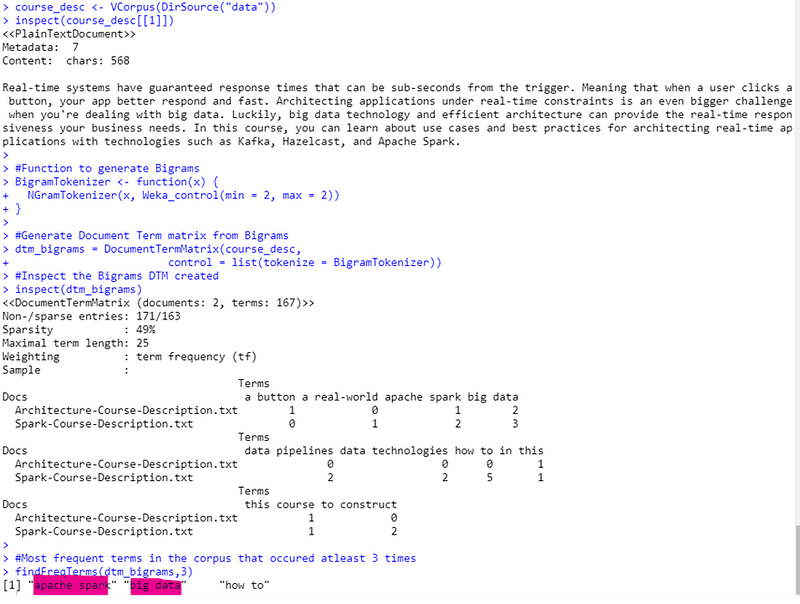
We can see the three most occurred bigrams in the courses which are: Apache Spark, Big data and how to.
When n-grams are used for predicting text, the frequency of all grams plays a big part in choosing the recommendations. In the next section, we will convert this matrix into a n-grams data frame that can be then used for applications like predictive text.
Extracting n-gram pairs
Continuing on the section, we will now extract N-gram pairs from the document or matrix. In the first step, we will remove the sparse terms in the metrics using the remove sparse terms function and inspect the results.
#Remove sparse bigrams
dense_bigrams <- removeSparseTerms(dtm_bigrams , 0.5)inspect(dense_bigrams)Then, we will build a frequency table that summarizes the frequency of ngrams across all documents. Next, we will convert this frequency table into a data frame. This contains the first word, the second word, and the frequency as three columns. We do this by creating an empty data frame with these three columns and then populate data into it. In order to populate this data frame, we iterate through the frequency table vector. For each entry in the vector, we extract the name of the entry which is the bigram. We split the word in the bigrams to extract the first and second words. We also extract the frequency. We form a row for the database using these three columns. Finally, we add that row to the dataframe using the rbind function.
#Generate a frequency table
bigrams_frequency <- sort(colSums(as.matrix(dense_bigrams)),decreasing=TRUE)bigrams_frequency#Convert to data framebigrams_df <- data.frame(first_word=character(), second_word=character(), count=integer())#Iterate through the frequency table to extract datafor ( i in 1:length(bigrams_frequency)) {#Extract the bigram namebigram <- names(bigrams_frequency)[[i]]#Split bigram into wordsbigram_words<-unlist(strsplit(bigram,” “))#Extract countcount=bigrams_frequency[[i]]#Create a row for the dataframebigram_row<-list(first_word = bigram_words[[1]],second_word=bigram_words[[2]],count=count)#Add the row to the dataframebigrams_df<-rbind(bigrams_df, bigram_row, stringsAsFactors=FALSE)}
# Let’s run this code and review the results.print(“Bigrams dataframe :”)bigrams_df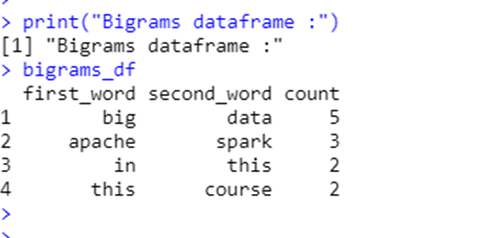
We now have a neat-looking data frame. This data frame can be converted into a look-up table that can then be queried for patterns and frequencies of specific words or word sequences.
This table is now ready to use for text applications.


