
Creating Meeting Minutes using OpenAI GPT-3 API
Create Meeting Minutes from Microsoft Teams/Zoom’s Meeting Transcript using OpenAI GPT-3 API
UPDATED: The article includes the ChatGPT API option (model=”gpt-3.5-turbo”).
I have played many roles in my career, and one of them was a project manager. It can be an exciting role, but one aspect of it was very time-consuming and tedious, and it all centered around meetings.

Scheduling meetings and creating meeting minutes after the meeting is very time-consuming. Scheduling meetings with the internal team is not that difficult, but when you have to schedule meetings with external teams, it becomes an exercise in endless frustration.
For example, if you need to schedule a meeting with eight people and you find an open date/time slot for six out of the eight, then you will have to contact the other two people personally to reschedule their meetings so that you can schedule the meeting at that date/time. This is a persistent challenge, as some people seem to be fully booked for the next two years. For these people, you have to contact them personally every time to reschedule their other meeting(s). While attempting to free up that date/time slot for those two people, the date/time slot slowly fills up for the other six people, creating a never-ending cycle of frustration.
Furthermore, creating meeting minutes can also pose challenges in terms of accuracy and consistency. To ensure that all important information is accurately recorded, one must pay close attention during the meeting and take thorough notes. This can be difficult if the meeting is lengthy or fast-paced. Additionally, formatting the minutes in a clear and concise manner, while including all necessary information, requires attention to detail and a good understanding of what should be included. Despite these challenges, creating meeting minutes is an important task that helps to keep everyone accountable and ensures that follow-up actions are taken in a timely manner.
I don’t think there’s an AI available that can schedule a meeting, especially with people who are fully booked for two years. However, with Microsoft’s recent announcement, AI may be able to create meeting minutes for me. Microsoft launched Teams Premium with features powered by OpenAI, including an intelligent recap feature that automatically generates notes, tasks, and highlights from meetings on February 3, 2023.
At first glance, Microsoft Teams Premium seems like a good deal at $7 per user per month, but it can be quite costly. For example, if your organization has 1,000 Microsoft Teams users, the cost would be $7,000 per month or $84,000 per year. For this reason, I’ve decided to create a similar solution using the same OpenAI technology, the GPT-3 API.
Solution Overview
Both Microsoft Teams and Zoom record meetings and output a meeting transcript via WebVTT file with .vtt file extension. Web Video Text Tracks Format (WebVTT) is a format for displaying timed text tracks (such as subtitles or captions) using the
The file looks like this:
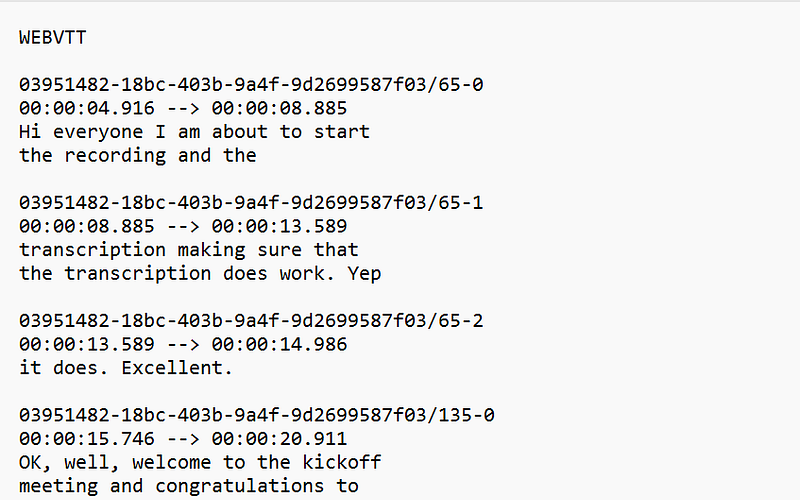
The advantage of this file is that both Microsoft Teams and Zoom automate the most challenging aspect of creating meeting minutes by transcribing the audio to text when the meeting is recorded. With this task taken care of, the solution becomes simple: we just need to clean up the file by removing any non-transcription lines and send it to the OpenAI GPT-3 API to summarize the meeting and extract the action items from the meeting transcript.
Please refer to both Microsoft Teams documentation and Zoom documentation on how to export .vtt file from their respective applications:
- Audio transcription for cloud recordings (https://support.zoom.us/hc/en-us/articles/115004794983-Audio-transcription-for-cloud-recordings)
- View live transcription in a Teams meeting (https://support.microsoft.com/en-us/office/view-live-transcription-in-a-teams-meeting-dc1a8f23-2e20-4684-885e-2152e06a4a8b)
There may be other considerations to take into account, but we’ll address those when the time comes. For now, let’s start working on creating a solution to generate meeting minutes using AI.
Prerequisites
You will need to sign up with OpenAI to use their GPT-3 API.
OpenAI
Before we start, you will need to sign up with OpenAI. To sign up with OpenAI, go to https://openai.com/api/ and click on the “SIGN UP” button.
OpenAI (https://openai.com/api/)
Please note that you may need to provide payment information, such as a credit card since this is paid service, unlike ChatGPT demo.
Code
This code was developed using Google Colab to test its feasibility. If you believe this tool could be useful, please leave a comment so I can commence developing a distributable executable that can be used by anyone.
Prerequisites
The following are prerequisites for this tutorial:
- Python Package:
nltk (Natural Language Toolkit) - Python Package:
re (Regular expression operations) - Python Package:
openai
- Install Python Packages
%%writefile requirements.txt
openai
nltk
re
%pip install -r requirements.txt
2. Import Python Packages
import platform
import os

import openai

import re
from os.path import splitext, exists

import nltk
nltk.download('punkt')
from nltk.tokenize import word_tokenize

print('Python: ', platform.python_version())
print('re: ', re.__version__)
print('nltk: ', nltk.__version__)
3. Clean Meeting Transcript from either Microsoft Team or Zoom, encoded as WEBVTT file.
These two functions clean up .vtt file and then produce a clean text file with the same filename with an extension of .txt. These functions are revised versions of the code copied from https://github.com/vuanhtuan1012/vtt2text/tree/51beb090e1383dc2d32f03e39730092869f656cf.
def clean_webvtt(filepath: str) -> str:
    """Clean up the content of a subtitle file (vtt) to a string

    Args:
        filepath (str): path to vtt file

    Returns:
        str: clean content
    """
    # read file content
    with open(filepath, "r", encoding="utf-8") as fp:
        content = fp.read()

    # remove header & empty lines
    lines = [line.strip() for line in content.split("\n") if line.strip()]
    lines = lines[1:] if lines[0].upper() == "WEBVTT" else lines

    # remove indexes
    lines = [lines[i] for i in range(len(lines)) if not lines[i].isdigit()]

    # remove tcode
    #pattern = re.compile(r'^[0-9:.]{12} --> [0-9:.]{12}')
    pattern = r'[a-f\d]{8}-[a-f\d]{4}-[a-f\d]{4}-[a-f\d]{4}-[a-f\d]{12}\/\d+-\d'
    lines = [lines[i] for i in range(len(lines))
             if not re.match(pattern, lines[i])]

    # remove timestamps
    pattern = r"^\d{2}:\d{2}:\d{2}.\d{3}.*\d{2}:\d{2}:\d{2}.\d{3}$"
    lines = [lines[i] for i in range(len(lines))
             if not re.match(pattern, lines[i])]

    content = " ".join(lines)

    # remove duplicate spaces
    pattern = r"\s+"
    content = re.sub(pattern, r" ", content)

    # add space after punctuation marks if it doesn't exist
    pattern = r"([\.!?])(\w)"
    content = re.sub(pattern, r"\1 \2", content)

    return content


def vtt_to_clean_file(file_in: str, file_out=None, **kwargs) -> str:
    """Save clean content of a subtitle file to text file

    Args:
        file_in (str): path to vtt file
        file_out (None, optional): path to text file
        **kwargs (optional): arguments for other parameters
            - no_message (bool): do not show message of result.
                                 Default is False

    Returns:
        str: path to text file
    """
    # set default values
    no_message = kwargs.get("no_message", False)
    if not file_out:
        filename = splitext(file_in)[0]
        file_out = "%s.txt" % filename
        i = 0
        while exists(file_out):
            i += 1
            file_out = "%s_%s.txt" % (filename, i)

    content = clean_webvtt(file_in)
    with open(file_out, "w+", encoding="utf-8") as fp:
        fp.write(content)
    if not no_message:
        print("clean content is written to file: %s" % file_out)

    return file_out
filepath = "/content/drive/MyDrive/Colab Notebooks/minutes/data/Round_22_Online_Kickoff_Meeting.vtt"
vtt_to_clean_file(filepath)4. Count the Number of Tokens
OpenAI GPT-3 is limited to 4,001 tokens per request, encompassing both the request (i.e., prompt) and response. We will be determining the number of tokens present in the meeting transcript.
def count_tokens(filename):
    with open(filename, 'r') as f:
        text = f.read()
    tokens = word_tokenize(text)
    return len(tokens)
filename = "/content/drive/MyDrive/Colab Notebooks/minutes/data/Round_22_Online_Kickoff_Meeting.txt"
token_count = count_tokens(filename)
print(f"Number of tokens: {token_count}")
5. Break up the Meeting Transcript into chunks of 2,000 tokens with an overlap of 100 tokens
We will be dividing the meeting transcript into segments of 2,000 tokens, with an overlap of 100 tokens to avoid losing any information from the split.
def break_up_file(tokens, chunk_size, overlap_size):
    if len(tokens) <= chunk_size:
        yield tokens
    else:
        chunk = tokens[:chunk_size]
        yield chunk
        yield from break_up_file(tokens[chunk_size-overlap_size:], chunk_size, overlap_size)

def break_up_file_to_chunks(filename, chunk_size=2000, overlap_size=100):
    with open(filename, 'r') as f:
        text = f.read()
    tokens = word_tokenize(text)
    return list(break_up_file(tokens, chunk_size, overlap_size))
filename = "/content/drive/MyDrive/Colab Notebooks/minutes/data/Round_22_Online_Kickoff_Meeting.txt"
chunks = break_up_file_to_chunks(filename)
for i, chunk in enumerate(chunks):
print(f"Chunk {i}: {len(chunk)} tokens")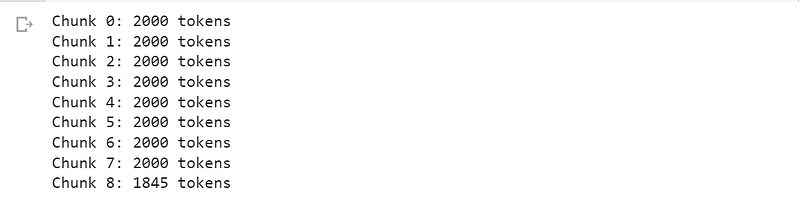
6. Set OpenAI API Key
Please note that OpenAI’s API service is not free, unlike ChatGPT demo. You will need to sign up for a service with them to get an API key, which requires payment information.
It is expected that using their service to create meeting minutes will range from $.25 to $1.00.
Set an environment variable called “OPEN_API_KEY” and assign a secret API key from OpenAI (https://beta.openai.com/account/api-keys).
os.environ["OPENAI_API_KEY"] = 'your openai api key'openai.api_key = os.getenv("OPENAI_API_KEY")7. Function to Convert the NLTK Tokenized Text to Non-Tokenized Text
We will need to convert the tokenized text from NLTK to non-tokenized text, as the OpenAI GPT-3 API does not handle tokenized text well, which can result in a higher token count exceeding 2,000.
def convert_to_prompt_text(tokenized_text):
    prompt_text = " ".join(tokenized_text)
    prompt_text = prompt_text.replace(" 's", "'s")
    return prompt_text
8. Summarize the Meeting Transcript one chunk (of 2,000 tokens) at a time.
Option 1: model=”text-davinci-003"
filename = "/content/drive/MyDrive/Colab Notebooks/minutes/data/Round_22_Online_Kickoff_Meeting.txt"

prompt_response = []

chunks = break_up_file_to_chunks(filename)
for i, chunk in enumerate(chunks):
    prompt_request = "Summarize this meeting transcript: " + convert_to_prompt_text(chunks[i])

    response = openai.Completion.create(
            model="text-davinci-003",
            prompt=prompt_request,
            temperature=.5,
            max_tokens=500,
            top_p=1,
            frequency_penalty=0,
            presence_penalty=0
    )

    prompt_response.append(response["choices"][0]["text"].strip())
Option 2: model=”gpt-3.5-turbo”
filename = "/content/drive/MyDrive/Colab Notebooks/minutes/data/Round_22_Online_Kickoff_Meeting.txt"

prompt_response = []

chunks = break_up_file_to_chunks(filename)
for i, chunk in enumerate(chunks):
    prompt_request = "Summarize this meeting transcript: " + convert_to_prompt_text(chunks[i])

    messages = [{"role": "system", "content": "This is text summarization."}]
    messages.append({"role": "user", "content": prompt_request})

    response = openai.ChatCompletion.create(
            model="gpt-3.5-turbo",
            messages=messages,
            temperature=.5,
            max_tokens=500,
            top_p=1,
            frequency_penalty=0,
            presence_penalty=0
    )

    prompt_response.append(response["choices"][0]["message"]['content'].strip())
9. Consolidate the Meeting Transcript Summaries
Option 1: model=”text-davinci-003"
prompt_request = "Consoloidate these meeting summaries: " + str(prompt_response)

response = openai.Completion.create(
        model="text-davinci-003",
        prompt=prompt_request,
        temperature=.5,
        max_tokens=1000,
        top_p=1,
        frequency_penalty=0,
        presence_penalty=0
    )
meeting_summary = response["choices"][0]["text"].strip()
print(meeting_summary)Output:
This meeting was a gathering of representatives from various universities to discuss their ALG grants. Each team is transforming a textbook into an open stacks book and developing instructional videos, interactive simulations, laboratory activities, and new grading systems. The teams are from the University of West Georgia, Clayton State University, University of North Georgia, Georgia Gwinnett College, and Georgia Gwinnett College. The projects range from transforming a Spanish textbook, a microbiology course, an introductory physics course for biology students, a survey of chemistry course for allied health majors, and an introduction to anthropology textbook. They also discussed the new ALG website that they have been working on with feedback from users and the new mega menu, the resources available on manifold, which is connected to the library discovery system, and the Galileo Open Learning Materials repository, the ALG tracking spreadsheet, where they track data such as the grant number, the type of grant, the course name, and the USG subject area, the sustainability survey, which is used to check in and see if the work done on the project is still ongoing, and the resources available to help create open textbooks, including training resources and entries on Open ALG. This meeting also discussed procedures for submitting documents and materials, reporting deadlines, and other important information related to the ALG grantees, such as how to submit photos, syllabi, and other documents, the Service Level Agreement (SLA) between the USG and the institution, and the process of sending out dates and budgets to business or grants office contacts and the steps that need to be taken in order to pay invoices. The teams are hoping to have the books ready for the spring semester and the meeting concluded by wishing everyone a happy holiday.Option 2: model=”gpt-3.5-turbo”
prompt_request = "Consoloidate these meeting summaries: " + str(prompt_response)
messages = [{"role": "system", "content": "This is text summarization."}]
messages.append({"role": "user", "content": prompt_request})

response = openai.ChatCompletion.create(
        model="gpt-3.5-turbo",
        messages=messages,
        temperature=.5,
        max_tokens=1000,
        top_p=1,
        frequency_penalty=0,
        presence_penalty=0
    )
meeting_summary = response["choices"][0]["message"]['content'].strip()
print(meeting_summary)10. Get Action Items from Meeting Transcript
Option 1: model=”text-davinci-003"
filename = "/content/drive/MyDrive/Colab Notebooks/minutes/data/Round_22_Online_Kickoff_Meeting.txt"

action_response = []

chunks = break_up_file_to_chunks(filename)
for i, chunk in enumerate(chunks):
    prompt_request = "Provide a list of action items with a due date from the provided meeting transcript text: " + convert_to_prompt_text(chunks[i])

    response = openai.Completion.create(
            model="text-davinci-003",
            prompt=prompt_request,
            temperature=.5,
            max_tokens=500,
            top_p=1,
            frequency_penalty=0,
            presence_penalty=0
    )

    action_response.append(response["choices"][0]["text"].strip())
Option 2: model=”gpt-3.5-turbo”
filename = "/content/drive/MyDrive/Colab Notebooks/minutes/data/Round_22_Online_Kickoff_Meeting.txt"

action_response = []

chunks = break_up_file_to_chunks(filename)
for i, chunk in enumerate(chunks):

    prompt_request = "Provide a list of action items with a due date from the provided meeting transcript text: " + convert_to_prompt_text(chunks[i])
    messages = [{"role": "system", "content": "This is text summarization."}]
    messages.append({"role": "user", "content": prompt_request})

    response = openai.ChatCompletion.create(
            model="gpt-3.5-turbo",
            messages=messages,
            temperature=.5,
            max_tokens=500,
            top_p=1,
            frequency_penalty=0,
            presence_penalty=0
    )

    action_response.append(response["choices"][0]["message"]['content'].strip())
10. Consolidate the Meeting Transcript Action Items
Option 1: model=”text-davinci-003"
prompt_request = "Consoloidate these meeting action items: " + str(action_response)

response = openai.Completion.create(
        model="text-davinci-003",
        prompt=prompt_request,
        temperature=.5,
        max_tokens=500,
        top_p=1,
        frequency_penalty=0,
        presence_penalty=0
    )
meeting_action_items = response["choices"][0]["text"].strip()
print(meeting_action_items)Option 2: model=”gpt-3.5-turbo”
prompt_request = "Consoloidate these meeting action items: " + str(action_response)
messages = [{"role": "system", "content": "This is text summarization."}]
messages.append({"role": "user", "content": prompt_request})

response = openai.ChatCompletion.create(
            model="gpt-3.5-turbo",
            messages=messages,
        temperature=.5,
        max_tokens=500,
        top_p=1,
        frequency_penalty=0,
        presence_penalty=0
    )
meeting_action_items = response["choices"][0]["message"]['content'].strip()
print(meeting_action_items)Output:
Action Items:
1. Introduce participants and have everyone share a greeting - Due Date: Immediately
2. Go through ALG website - Due Date: Immediately
3. Go over grant procedures - Due Date: Immediately
4. Go over OER repositories - Due Date: Immediately
5. Go over grant deadlines and reporting guidelines - Due Date: Immediately
6. Go over Manifold repository - Due Date: Immediately
7. Go over project page - Due Date: Immediately
8. Submit report by December 19th - Due Date: December 19th
9. Put resources up for download - Due Date: ASAP
10. Create entries in Open ALG and Manifold - Due Date: ASAP
11. Create a new ALG website - Due Date: End of January/Beginning of February
12. Create a mega menu - Due Date: End of January/Beginning of February
13. Create a new Data Page - Due Date: End of January/Beginning of February
14. Create a new ALG Events Page - Due Date: End of January/Beginning of February
15. Create an Accessibility Guide - Due Date: End of January/Beginning of February
16. Contact project leads yearly for sustainability survey - Due Date: Ongoing
17. Begin hiring process for Program Manager (January 2021)
18. Develop demonstration videos for laboratory techniques for UWG project (Due Date: TBD)
19. Develop group work activities for UWG project (Due Date: TBD)
20. Redevelop laboratory component for UWG project (Due Date: TBD)
21. Generate a OER textbook for Clayton State project (Due Date: TBD)
22. Develop specification based grading system for UNG project (Due Date: TBD)
23. Transform introduction to anthropology textbook for GGC project (Due Date: TBD)
24. Hire students to write vignettes and case studies for GGC project (Due Date: TBD)
25. Transform algebra based physics one course for GGC project (Due Date: TBD)
26. Develop instructional video library for GGC project (Due Date: TBD)
27. Develop problem solving library for GGC project (Due Date: TBD)
28. Develop quiz library for GGC project (Due Date: TBD)
29. Develop virtual lab experience for GGC project (Due Date: TBD)
Copy and paste both the meeting summary and the meeting action items to Microsoft Word’s Meeting Minute template document and distribute the meeting minutes to meeting partcipants.
I hope you have enjoyed this article. If you have any questions or comments, please provide them here.
Resources
- Colab Notebook (https://github.com/sungkim11/ai-playground)
- Web Video Text Tracks Format (WebVTT) (https://developer.mozilla.org/en-US/docs/Web/API/WebVTT_API)
- Python Code to Cleanup .VTT file (https://github.com/vuanhtuan1012/vtt2text/tree/51beb090e1383dc2d32f03e39730092869f656cf)
- Introducing Microsoft Teams Premium, the better way to meet (https://www.microsoft.com/en-us/microsoft-365/blog/2022/10/12/introducing-microsoft-teams-premium-the-better-way-to-meet/)
- Audio transcription for cloud recordings (https://support.zoom.us/hc/en-us/articles/115004794983-Audio-transcription-for-cloud-recordings)
- View live transcription in a Teams meeting (https://support.microsoft.com/en-us/office/view-live-transcription-in-a-teams-meeting-dc1a8f23-2e20-4684-885e-2152e06a4a8b)


