
Creating Functions to Use Assumed Role Credentials
ACM.207 Creating functions to assume roles using AWS CLI role profiles
~~~~~~~~~~~~~~~~~~~~~~~~~~~~~~~~~~~~~~~~~~~~~~~~~~~~~~~~~~~
⚙️ Check out my series on Automating Cybersecurity Metrics. The Code.
🔒 Related Stories: Cloud Governance | IAM | AWS Security | Okta
💻 Free Content on Jobs in Cybersecurity | ✉️ Sign up for the Email List
~~~~~~~~~~~~~~~~~~~~~~~~~~~~~~~~~~~~~~~~~~~~~~~~~~~~~~~~~~~ist
In the last post we assumed a role in a remote account. In order to use that role we need to use the credentials returned after assuming the role to perform functions. We could set environment credentials or use them in a role profile.
Moving the assume role code to a function
Recall that we formulated our ARN for the role we wanted to assume. Then we made this call:

I can put that line of code into a shared function and make the session name a parameter.

But in fact, we can move all the code to calculate the role we want to assume to the assume cross_account_role function. Any place I hardcoded the name of the Sandbox account, I can replace with an account name variable and pass that into the function.
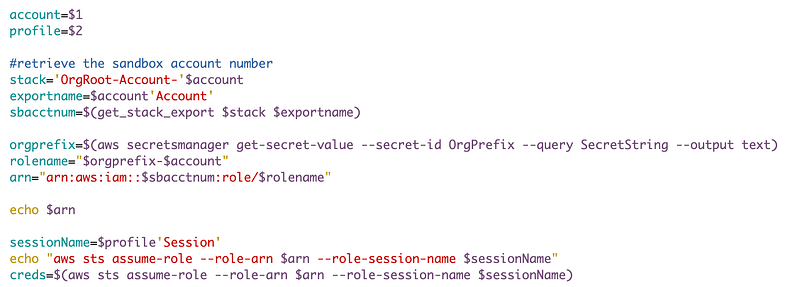
Now we can use the above code to assume any cross account role.
Once we obtain the credentials there are various ways we can use them. For this function, I’m going to set the returned credentials to environment variables. I am doing something similar to what is in the answer to this Stack Exchange question.
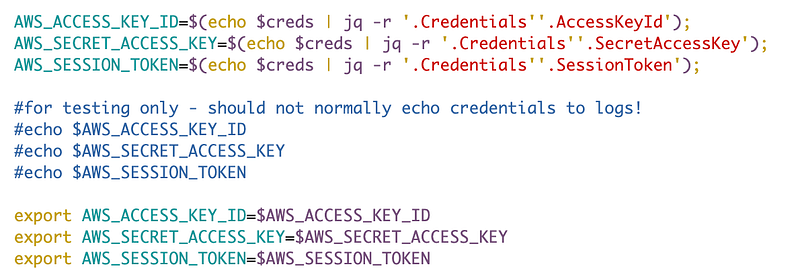
After I execute the above I can check the caller identity to see if the AWS CLI is using the expected credentials:

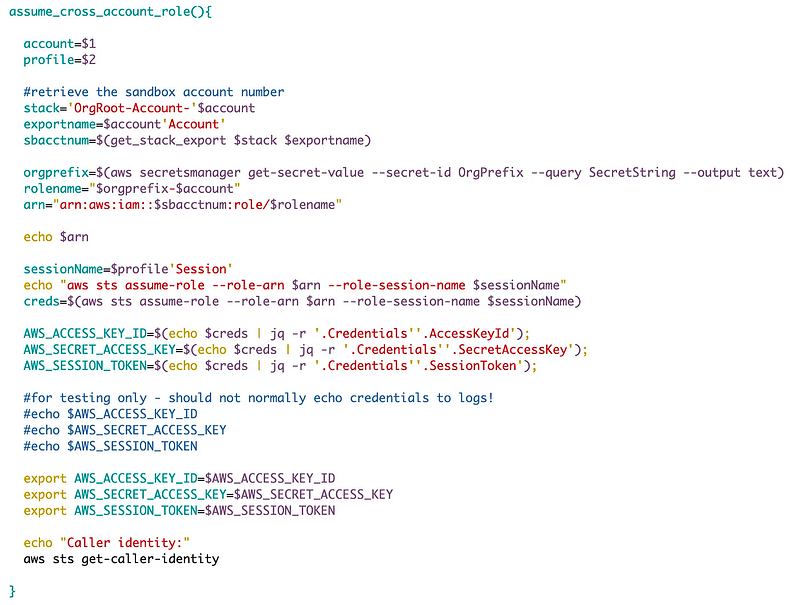
Here’s the complete function:
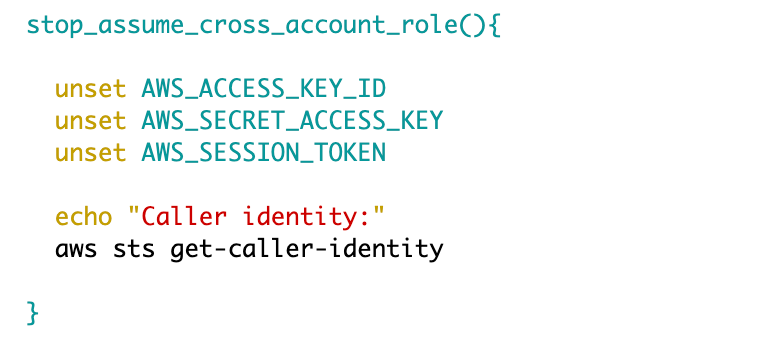
I also want a way to stop assuming the credentials. You can do that by simply unsetting the exported environment variables. I’m going to check the caller identity at the end of this function as well.
Now my deploy script has just a few lines of code:
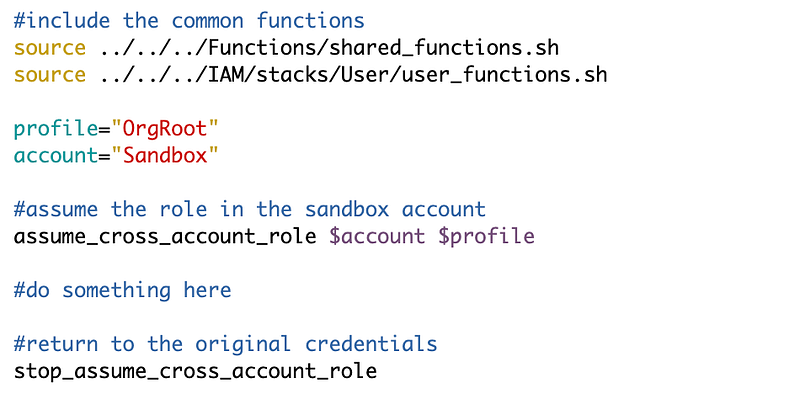
I can run the code to see if I correctly assumed the role, got the expected identity, then unassumed the role and returned to the original identity.
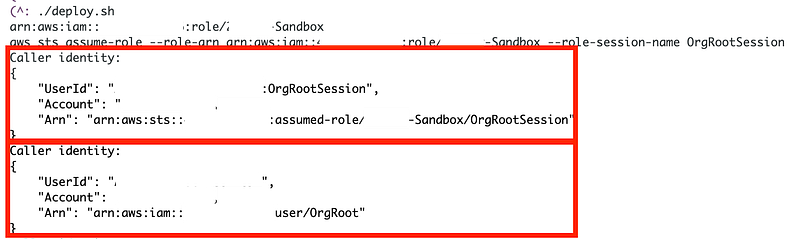
Inspect the output of the two calls to aws sts get-caller-identity below.
I have redacted the accounts but the first call has the account number for my sandbox account and the organization role created in the Sandbox account.
The second call returns the management account number and I’m back to a session for my OrgRoot user in that account.
Now we can run commands using the Sandbox role. But there’s one problem we have to solve. When we call the command to deploy a CloudFormation stack, we pass in a role profile. The CloudFormation stack function uses the role profile both to set the profile to use to execute the CloudFormation stack command, and to name the stack. So in our case, instead of setting environment variables, it would actually be better to create a new role profile.
We could use the AWS CLI configure command with the profile option. The problem with this command is that it is interactive and requires us enter the values interactively:
But we can use the set command in conjucntion with configure:
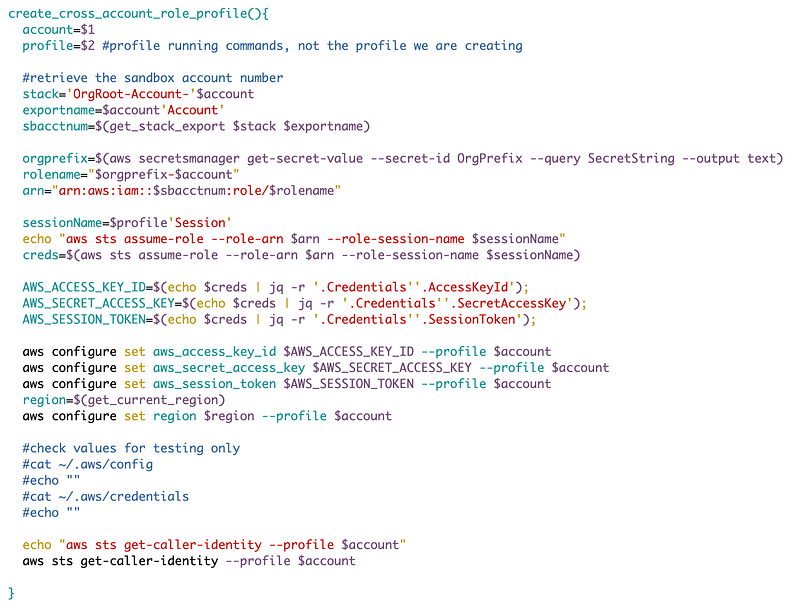
I create a new function to create the role profile. As you can see it is similar to the assume role function I created, except that I am setting the temporary credentials and session token to a role profile.
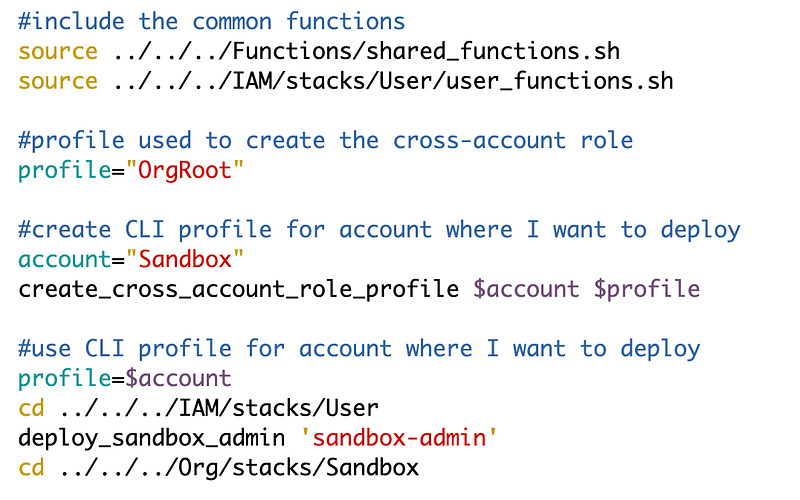
Then I use that role profile to deploy the user template:
However, I have one other thing to fix. I get this IAM Capability error:
An error occurred (InsufficientCapabilitiesException) when calling the CreateChangeSet operation: Requires capabilities : [CAPABILITY_NAMED_IAM]
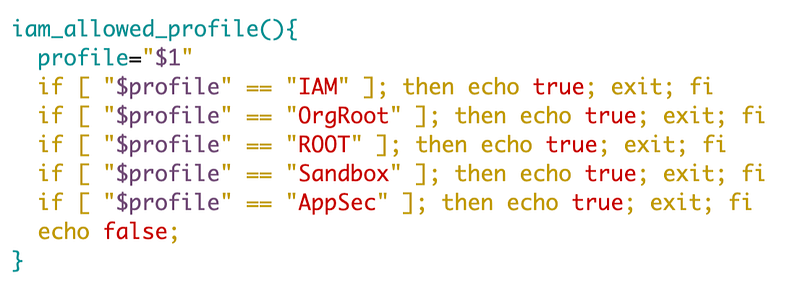
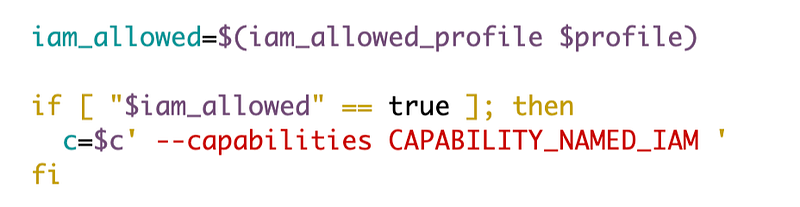
I need to add the IAM capability when the role profile is Sandbox.
My code was getting a little unwieldy so I added a function to check if a particular profile is allowed t deploy templates with IAM capabilities:
I changed the function that deploys templates to use this function:
I run my deploy script again and yay.
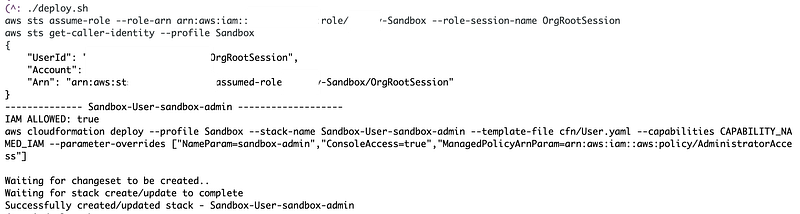
Now if you navigate over to the CloudFormation stacks in the management account you won’t see the stacks. They’ve been created in the Sandbox account. You can login to the Sandbox account as admin to get the user password or the user can just reset the password. I spent a lot of time discussing options for passwords in a prior post and I am going to be testing out primarily using Okta in future posts — unless I find any issues with it upon further testing.
Next up I am going to create a KMS key for use in the Sandbox account with EC2 instances. I described using keys with EC2 instances in the following post. In the next post I try to create a KMS key using a cross-account role. As you will see, that poses a few challenges.
Follow for updates.
Teri Radichel | © 2nd Sight Lab 2023
About Teri Radichel:
~~~~~~~~~~~~~~~~~~~~
⭐️ Author: Cybersecurity Books
⭐️ Presentations: Presentations by Teri Radichel
⭐️ Recognition: SANS Award, AWS Security Hero, IANS Faculty
⭐️ Certifications: SANS ~ GSE 240
⭐️ Education: BA Business, Master of Software Engineering, Master of Infosec
⭐️ Company: Penetration Tests, Assessments, Phone Consulting ~ 2nd Sight Lab
Need Help With Cybersecurity, Cloud, or Application Security?
~~~~~~~~~~~~~~~~~~~~~~~~~~~~~~~~~~~~~~~~~~~~~~~~~~~~~~~~~~~~~
🔒 Request a penetration test or security assessment
🔒 Schedule a consulting call
🔒 Cybersecurity Speaker for PresentationFollow for more stories like this:
~~~~~~~~~~~~~~~~~~~~~~~~~~~~~~~~~~~~~~~~~~~~~~~~~~~~~~~~~~~~~
❤️ Sign Up my Medium Email List
❤️ Twitter: @teriradichel
❤️ LinkedIn: https://www.linkedin.com/in/teriradichel
❤️ Mastodon: @teriradichel@infosec.exchange
❤️ Facebook: 2nd Sight Lab
❤️ YouTube: @2ndsightlab