avatarDeon Christie

Free AI web copilot to create summaries, insights and extended knowledge, download it at here

9358

Abstract

uote id="8393"><p><b>New Writers Welcome.</b></p></blockquote><blockquote id="e8ec"><p><b>Readers Hope.</b></p></blockquote><p id="59d9">Once you are approved as a writer with these large publishers, you will have the option to publish your Medium posts with them. But you need to open the “<b><i>edit article</i></b>” part of your publication.</p><p id="c0da">Then, as seen above, click on the 3 dots to access the “<b><i>add to publication</i></b>” option. When you click on that, all the publishers where you are approved as a recognized writer will open in a drop-down window.</p><p id="9ac3">These all form part of the larger picture, and also the article's main topic. Why you should create a professional profile and the obvious benefits of doing so.</p><div id="0f9d" class="link-block"> <a href="https://deon-christie-online.medium.com/improve-your-english-writing-skills-to-strengthen-your-chances-of-making-money-online-writing-a32539680014"> <div> <div> <h2>Improve Your English Writing Skills To Strengthen Your Chances Of Making Money Online Writing!</h2> <div><h3>Your Reputation Will Only Be As Good As Your Content!</h3></div> <div><p>deon-christie-online.medium.com</p></div> </div> <div> <div style="background-image: url(https://miro.readmedium.com/v2/resize:fit:320/1*fJmwcZ0CYibCWGfbMn9iSQ.png)"></div> </div> </div> </a> </div><h2 id="33c6">Important Bits Of A Professional Profile.</h2><p id="965e">These are the important bits of any professional Medium profile, to the best of my understanding. But does make perfect sense, right? This is just a quick look at the important bits before we get to the step-by-step- part.</p><p id="158f">There are several areas to focus on when completing a professional Medium profile. This is just a summary of the 9 most important bits of a professional Medium profile (<b><i>in my opinion</i></b>).</p><blockquote id="0bc8"><p><b>Cover Image.</b></p></blockquote><blockquote id="d8cc"><p><b>Profile Photo.</b></p></blockquote><blockquote id="2d54"><p><b>Lists.</b></p></blockquote><blockquote id="37a6"><p><b>About.</b></p></blockquote><blockquote id="0cf9"><p><b>Settings.</b></p></blockquote><blockquote id="0fcf"><p><b>Bio.</b></p></blockquote><blockquote id="f5a5"><p><b>Social Linking.</b></p></blockquote><blockquote id="655f"><p><b>High-Quality Useful Posts.</b></p></blockquote><blockquote id="b11f"><p><b>Publication Featured Images.</b></p></blockquote><p id="499a">The “<b><i>about</i></b>” section is accessible directly from your professional Medium profile. Only the about the part is much more lengthy than the Bio. This is where you share who you are, where you come from, <b><i>and what experience you have.</i></b></p><p id="4976">Posting and featured images however are more related to your content but do play a role in recognition. Therefore, forms part of the important bits of a professional profile on Medium.</p><h2 id="2e02">Create Your Medium Profile Step-By-Step.</h2><p id="1d05">There are 2 areas to complete your professional profile on Medium that you must focus on. Account settings and designing your Medium profile. These are separate exercises, and we will cover those under this heading.</p><figure id="f883"><img src="https://cdn-images-1.readmedium.com/v2/resize:fit:800/1*9wVeEMoauK9XjMcpQE3ECw.png"><figcaption><i>Author account screenshot. The image was captured with “Paint 3D”. Shared by <a href="https://deon-christie-online.medium.com/">Deon Christie</a> for demonstration and illustration purposes. The author assumes responsibility for the provenance and copyright. The author assumes responsibility for the authenticity.</i></figcaption></figure><p id="9c66">Your profile display may resemble something similar to the illustrations used for this guide, provided you have already worked on your profile. But whether or not you have one is irrelevant, this will take you step-by-step.</p><p id="cb06"><b><i>AREA 1 — Your Medium Profile Settings</i></b> — This is where you complete your account settings, for which there are a few options. This is where you include a Bio, for instance, a short description that shows beneath your profile picture.</p><p id="c01d">This is where you may also decide to include your blog URL for instance but only include an indexable URL. Avoid link shorteners, own your URL in the Bio section of your Medium profile.</p><blockquote id="edd2"><p><b>Account settings.</b></p></blockquote><blockquote id="3035"><p><b>Account.</b></p></blockquote><blockquote id="b92c"><p><b>Publishing.</b></p></blockquote><blockquote id="e712"><p><b>Notifications.</b></p></blockquote><blockquote id="5953"><p><b>Membership And Payment.</b></p></blockquote><blockquote id="77e5"><p><b>Security And Apps.</b></p></blockquote><p id="b810">Below is an illustration of the account settings window. With your Bio, however, you only have 160 characters, also counting spaces. So be specific when deciding on that. It is <b><i>a 160-character summary of YOU</i></b>!</p><figure id="418c"><img src="https://cdn-images-1.readmedium.com/v2/resize:fit:800/1*WifbZjq4mDh47H6DaxS8rQ.png"><figcaption><i>Author account screenshot. The image was captured with “Paint 3D”. Shared by <a href="https://deon-christie-online.medium.com/">Deon Christie</a> for demonstration and illustration purposes. The author assumes responsibility for the provenance and copyright. The author assumes responsibility for the authenticity.</i></figcaption></figure><p id="34f9">This is also the area where you connect to your other social profiles. Personally, both my Facebook and Twitter profiles are connected to Medium.</p><p id="810a">But you must include your profile picture under settings too. You cannot add a profile picture (<b><i>A Logo Size Picture Works Best For Me in 500 x 500 PNG format</i></b>) when “<b><i>designing your profile</i></b>” with Medium.</p><p id="a4c6">Your profile picture should preferably show your face, why? Because you want people to recognize you on all major networking and writing platforms.</p><p id="6b86">Personally, I use the same profile picture for every networking profile where I also use my real name. Later you will be able to couple your name to digital products and so much more.</p><p id="f828">But that’s another long-term content marketing strategy for another time, we’re already headed toward an eBook…lol!</p><p id="7668">With your settings sorted, your Bio included, and your profile picture is done, we can move on to the “<b><i>design</i></b>” part of your Medium profile.</p><div id="c07c" class="link-block"> <a href="https://deon-christie-online.medium.com/make-money-with-medium-youtube-facebook-twitter-and-free-canva-traffic-5c83a60a2f7c"> <div> <div> <h2>Make Money With Medium, YouTube, Facebook, Twitter, and FREE Canva Traffic.</h2> <div><h3>Stop Looking For Traffic, Just Step In Front Of It!</h3></div> <div><p>deon-christie-online.medium.com</p></div> </div> <div> <div style="background-image: url(https://miro.readmedium.com/v2/resize:fit:320/1*N0ArMe_2evEltY1kxniBgw.png)"></div> </div> </div> </a> </div><p id="d84a"><b>AREA 2 — Your Medium Profile Design</b> — The “<b><i>design</i></b>” part of your Medium profile is your “<b><i>first impression</i></b>” on Medium. And trust me when I say, first impressions count, with everything you do online. Not just with your Medium profile.</p><figure id="b0e9"><img src="https://cdn-images-1.readmedium.com/v2/resize:fit:800/1*XJvWPoIsS2n6DI3XiBNXVA.png"><figcaption><i>Author account screenshot. The image was captured with “Paint 3D”. Shared by <a href="https://deon-christie-online.medium.com/">Deon Christie</a> for demonstration and illustration purposes. The author assumes responsibility for the provenance and copyright. The author assumes responsibility for the authenticity.</i></figcaption></figure><p id="5237">Completing the “<b><i>settings</i></b>” required you to click on the “<b><i>Edit Profile</i></b>” right under your profile image. The “<b><i>design</i></b>” option for your professional Medium profile is accessible by clicking on the 3 dots to the right of your profile name.</p><p id="c273">As seen above, clicking on the 3 dots will provide you with 2 options. “<b><i>Copy Link To Profile</i></b>”, and “<b><i>Design Your Profile</i></b>”. Click on “<b><i>Design Your Profile</i></b>”.</p><figure id="3964"><img src="https://cdn-images-1.readmedium.com/v2/resize:fit:800/1*aqf9RJtWtvqZCzdf8nP-zw.png"><figcaption><i>Author account screenshot. The image was captured with “Paint 3D”. Shared by <a href="https://deon-christie-online.medium.com/">Deon Christie</a> for demonstration and illustration purposes. The author assumes responsibility for the provenance and copyright. The author assumes responsibility for the authenticity.</i></figcaption></figure><p id="931b">Next, a menu to the left will appear, where we are going to start designing your professional Medium profile. Among the design and editing options are the following.</p><blockquote id="233c"><p><b>Colors.</b>

Options

</p></blockquote><blockquote id="b5e8"><p><b>Fonts.</b></p></blockquote><blockquote id="2aee"><p><b>Header.</b></p></blockquote><blockquote id="8dec"><p><b>Blogroll.</b></p></blockquote><p id="b1cb">Colours are selectable for the “<b><i>Accent</i></b>” or “<b><i>Header</i></b>” sections. But under “<b><i>Colors</i></b>” you can also select your Medium profile background colour. To me, this is rather important.</p><p id="e52e">Remember that colour can create a certain mood, color can make you feel inspired, sad, excited, peaceful, content, etc. Colour form part of the psychological aspect of your professional Medium profile design.</p><p id="b95f">Selecting the right Fonts means contributing to readability. Therefore also to user experience (<b><i>UX</i></b>). Apart from load speed, this is the most important part of getting recognized by search engines.</p><p id="30c1">Personally, I use the “<b><i>Sans-Serif 1</i></b>” font with Medium. The options are limited though, leaving you with only “<b><i>Serif 1</i></b>”, and “<b><i>Serif 2</i></b>”. I find the first (<b><i>which I selected</i></b>) to be easier to read.</p><figure id="695f"><img src="https://cdn-images-1.readmedium.com/v2/resize:fit:800/1*S0xGs9x5N-2GEcbEmGGCAA.png"><figcaption><i>Author account screenshot. The image was captured with “Paint 3D”. Shared by <a href="https://deon-christie-online.medium.com/">Deon Christie</a> for demonstration and illustration purposes. The author assumes responsibility for the provenance and copyright. The author assumes responsibility for the authenticity.</i></figcaption></figure><p id="8f97">When you click on the “<b><i>Header</i></b>” section as illustrated above. You will have access to a few options in the drop-down menu. The header section is where you will add your professional Medium profile cover image. A dimension of <b><i>1925 x 300 I find works best, in PNG format</i></b>.</p><p id="92fb">Be creative and be sure that the image position is aligned in a central position. You will soon see the importance of that when it comes to profile display on mobile devices.</p><div id="de6f" class="link-block"> <a href="https://deon-christie-online.medium.com/writing-and-making-money-means-10-content-posting-and-90-audience-engagement-1480a8fe8004"> <div> <div> <h2>Writing And Making Money Means 10% Content Posting And 90% Audience Engagement!</h2> <div><h3>It Is All About Your Online Personality And Knowledge!</h3></div> <div><p>deon-christie-online.medium.com</p></div> </div> <div> <div style="background-image: url(https://miro.readmedium.com/v2/resize:fit:320/1*kQDSN44A0DLIMQwBZukXlw.png)"></div> </div> </div> </a> </div><p id="0920">Last but not least, under the “<b><i>Blogroll</i></b>” option design your professional profile on Medium. You want to be sure that is checked. It will allow writers who have most recently published to show up at the top of your feed.</p><h2 id="adbd">Your Cover Image Display On All Devices.</h2><p id="b74a">Once you have designed your profile, you must pay attention to how it displays over all devices. Inside your professional Medium profile design page, you will see 3 little icons at the top.</p><blockquote id="03a1"><p><b>Desktop.</b></p></blockquote><blockquote id="e3c9"><p><b>Tablet.</b></p></blockquote><blockquote id="d1d4"><p><b>Mobile.</b></p></blockquote><p id="9187">Clicking on each image will provide you with a preview of how your profile will appear on all devices. Now you will see the importance of concentrating any text with image design to the centre of the image.</p><p id="8379">Below is an illustration of my profile display on Tablets. It shows but a “<b><i>sample story</i></b>”, but that is because I am currently “<b><i>editing</i></b>”. In editing mode, the publications on your profile will not show, so don’t get alarmed.</p><figure id="a558"><img src="https://cdn-images-1.readmedium.com/v2/resize:fit:800/1*L5GP1b2abLjBmgQ67UZmtA.png"><figcaption><i>Author account screenshot. The image was captured with “Paint 3D”. Shared by <a href="https://deon-christie-online.medium.com/">Deon Christie</a> for demonstration and illustration purposes. The author assumes responsibility for the provenance and copyright. The author assumes responsibility for the authenticity.</i></figcaption></figure><p id="6294">And lastly, below is an illustration of how my Medium profile displays on mobile devices. Notice that the full “<b><i>text message</i></b>” in the image remains 100% visible over all devices.</p><figure id="c0e4"><img src="https://cdn-images-1.readmedium.com/v2/resize:fit:800/1*KnuWAHILQicB60m2TvuR9g.png"><figcaption><i>Author account screenshot. The image was captured with “Paint 3D”. Shared by <a href="https://deon-christie-online.medium.com/">Deon Christie</a> for demonstration and illustration purposes. The author assumes responsibility for the provenance and copyright. The author assumes responsibility for the authenticity.</i></figcaption></figure><p id="d002">As with social feeds and search engine search result pages. The presentation image is used as a thumbnail, cropping it from the sides and using only the direct centre bit.</p><div id="63b2" class="link-block"> <a href="https://readmedium.com/usa-targeted-google-ads-traffic-to-affiliate-links-at-0-012-cents-per-click-3af861946d32"> <div> <div> <h2>USA Targeted Google Ads Traffic To Affiliate Links At 0,012 Cents Per Click!</h2> <div><h3>A Back Door Through YouTube And Canva!</h3></div> <div><p>medium.com</p></div> </div> <div> <div style="background-image: url(https://miro.readmedium.com/v2/resize:fit:320/1*sKiVNYOS_g2TVgBH7DjHrg.png)"></div> </div> </div> </a> </div><p id="8e1d">Be careful that your message does not get partially “<b><i>cut off</i></b>” in feeds when used as a thumbnail. And the thumbnail represents your content. From articles to videos, and social networking.</p><p id="47d9">Absolutely every piece of content you create must be represented by a clear and informative image. Your presentation is what turns a scroll into a click, and a click into a visitor.</p><p id="70ba">Your content must then create enough curiosity and provide an obvious solution, that is when your visitor is more likely to become a buyer. But that too is a topic for another time.</p><p id="488c">If you enjoyed this article or would like to add something I may have missed. Please feel free to start a conversation, and leave us a comment.</p><p id="bfad"><b><i>Do you know the best thing about this traffic? I don’t spend a single penny to get it. I spend about 1–2 hours per week tweaking things. I’ve generated millions of website visitors and seen income returns of over (See For Yourself Inside) per month! — <a href="https://easyinternetmoneyandjobs.com/web-traffic-solutions">Source</a></i></b></p><p id="3f89"><b>AFFILIATE DISCLOSURE</b>: Some of the links in this post are links to affiliate offers. If you visit them to make a purchase, I will earn a commission. The decision is yours, and whether or not you decide to buy something is entirely up to you. All offers come with a full money-back guarantee!</p><div id="4b02" class="link-block"> <a href="https://deon-christie-online.medium.com/about"> <div> <div> <h2>About - Deon Christie - Medium</h2> <div><h3>In 2016 I received Diamond Expert Author Certification from My Ezine Articles Dot Com. While 2014 marks the year I…</h3></div> <div><p>deon-christie-online.medium.com</p></div> </div> <div> <div style="background-image: url(https://miro.readmedium.com/v2/resize:fit:320/0*MRWh0rgUfy79cVQ5)"></div> </div> </div> </a> </div><h2 id="f18d">Free Stuff For My Medium Subscribers.</h2><blockquote id="ba05"><p>All new subscribers on Medium will receive 4 free gifts. 2 of my top traffic eBooks, and 2 free memberships (<b><i>invitation only</i></b>) for buyer traffic tools I use. Subscribe to me (<a href="https://deon-christie-online.medium.com/"><b><i>Deon Christie</i></b></a>) on Medium and your free stuff will be emailed to you asap. Medium has no affiliation, nor do they endorse the free giveaway in any way. It is my personal free giveaway to all new Medium subscribers.</p></blockquote><div id="d93d" class="link-block"> <a href="https://readmedium.com/write-with-us-on-medium-for-a-mutually-beneficial-growth-opportunity-as-writers-4692ce802f6a"> <div> <div> <h2>Write With Us On Medium So We Grow Together!</h2> <div><h3>8 Medium Publications A Chance At Mutual Beneficial Growth!</h3></div> <div><p>medium.com</p></div> </div> <div> <div style="background-image: url(https://miro.readmedium.com/v2/resize:fit:320/1*spdnaw43GVvO59SX-dwdwg.png)"></div> </div> </div> </a> </div></article></body>

Creating A Professional Medium Profile!

Being Professional Matters In A Competitive World!

Medium Non-Members Can Read The Full Story HERE!
The image was designed with Canva by Deon Christie. The author assumes responsibility for the provenance and copyright. The author assumes responsibility for the authenticity

What Will You Learn From This Article?

Why An Active Professional Profile Is So Important.

Your Medium Profile And Content With Publishers.

Important Bits Of A Professional Profile.

Create Your Medium Profile Step-By-Step.

Your Cover Image Display On All Devices.

Why An Active Professional Profile Is So Important.

I just wanted to share this because I noticed so many faceless and incomplete profiles. But this goes for all major networks. Perhaps people need help and don’t quite understand how to put that together.

I know I didn’t understand all the technical stuff when I got started, so, here we are. Allow me to guide you, and you’ll be amazed at the increase in your audience growth.

A professional profile on any platform just attracts a lot more attention. It is of paramount importance, as it is with your content too. Your profile must create curiosity.

Among my 8 top suggestions, you will find the following platforms.

Medium (Lists, Subscribers)

Quora (Spaces)

Facebook (Pages, Groups)

YouTube (Channels, Videos)

Google (Profiles, Google My Business)

Twitter (Followers, Lists)

LinkedIn (Groups, Pages)

Reddit (Sub-Reddits)

A professional profile is important because people are less likely to pay attention to an incomplete, faceless profile. By now, most of my readers know that I had to start over on Medium (long story).

Being back on Medium for 25 days only, I am rather satisfied with the growth and the engagement too. With that, I can assure you that a faceless profile, might not have been able to attract the same attention.
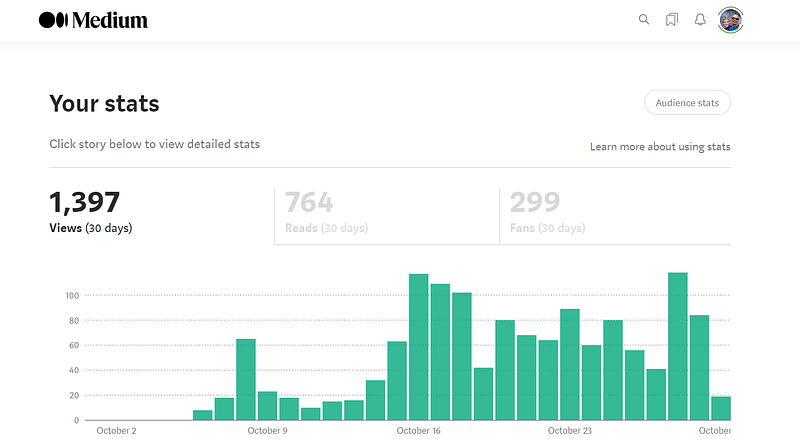
Author account screenshot. The image was captured with “Paint 3D”. Shared by Deon Christie for demonstration and illustration purposes. The author assumes responsibility for the provenance and copyright. The author assumes responsibility for the authenticity.

In a nutshell, a professional profile will attract a lot more attention. Your readers need to know who you are, what you look like, and how useful your content is in solving problems.

Apply these simple 3 requirements and I can assure you of remarkable growth on any platform. By the looks of things, this may well be another piece of long-form content.

Have I mentioned how hard I find it to write short-form content…lol!? When the fountain of ideas is at full capacity, it’s a lot of water (ideas) to cram together in a really tiny container (article) in comparison.
Author account screenshot. The image was captured with “Paint 3D”. Shared by Deon Christie for demonstration and illustration purposes. The author assumes responsibility for the provenance and copyright. The author assumes responsibility for the authenticity.

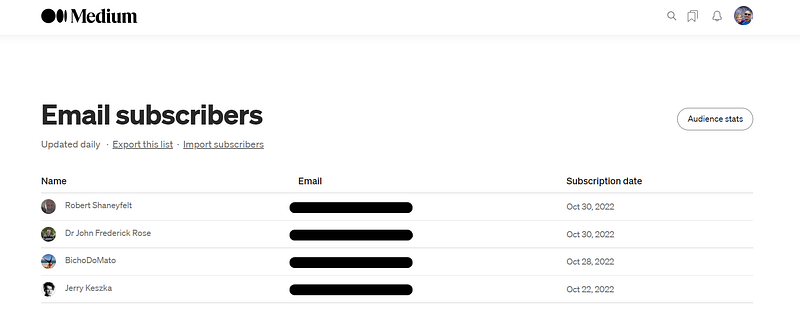
My current subscribers are also among my most engaging readers. Considering this is only day 25. Also, note that these are professional writers who subscribed to receive my publications.

Professional writers, with professional profiles who are all active on Medium on a daily basis. That is really important because your aim is to build a responsive and active audience.

That, however, is a two-way street. Your engagement in return is what keeps your audience growing. There are several reasons why a professional profile is important, but you must also be active.
Author account screenshot. The image was captured with “Paint 3D”. Shared by Deon Christie for demonstration and illustration purposes. The author assumes responsibility for the provenance and copyright. The author assumes responsibility for the authenticity.

You Cannot Get Recognized At The “Party” If You’re Not Present”, I say!

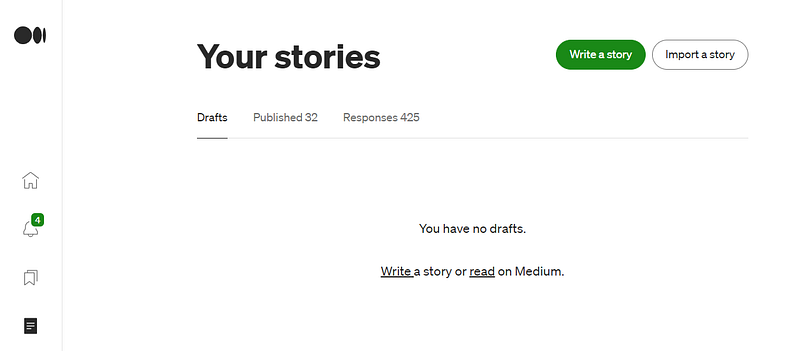
As an example, illustrated above. You can see that from 32 publications, there are 425 responses. Responses are claps, comments, and people sharing your content on their Medium lists.

But also your own comment responses, shares, and claps to other writers. But please be objective, don’t just go sharing, commenting, and clapping on random content. Be specific, and grow a target audience.

By now, I am sure you understand both the importance and potential of a professional Medium profile (or any online profile). Your profile is the heart of your online presence and “image”.

Your Medium Profile And Content With Publishers.

When your content is as professional as your profile says it is, then you may be in for a pleasant surprise. As I have recently discovered, and previously I knew nothing of this advantage on Medium.

You may get invited to join professional publishers on Medium. Or you can apply and get approved. Getting your content on professional publications inside Medium is a huge boost!
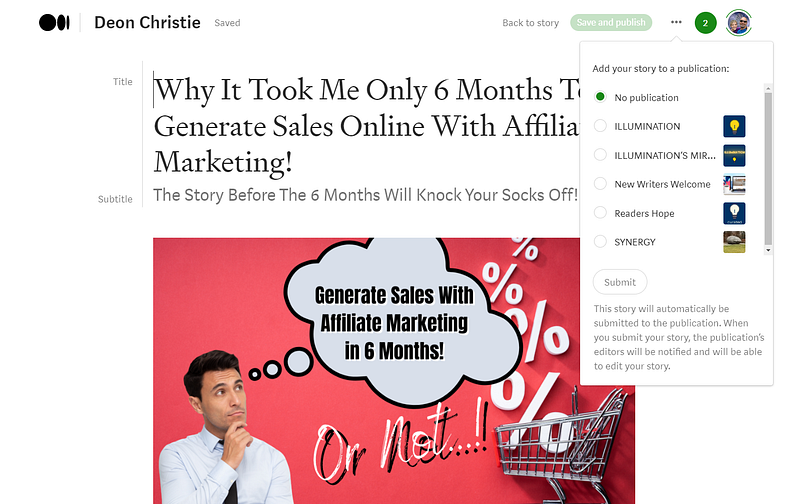
Author account screenshot. The image was captured with “Paint 3D”. Shared by Deon Christie for demonstration and illustration purposes. The author assumes responsibility for the provenance and copyright. The author assumes responsibility for the authenticity.

I was both excited and humbled by getting accepted as a writer by the following publishers on Medium. Because I barely got started on Medium, being back for less than a month.

ILLUMINATION.

ILLUMINATION MIRROR.

SYNERGY.

New Writers Welcome.

Readers Hope.

Once you are approved as a writer with these large publishers, you will have the option to publish your Medium posts with them. But you need to open the “edit article” part of your publication.

Then, as seen above, click on the 3 dots to access the “add to publication” option. When you click on that, all the publishers where you are approved as a recognized writer will open in a drop-down window.

These all form part of the larger picture, and also the article's main topic. Why you should create a professional profile and the obvious benefits of doing so.

Important Bits Of A Professional Profile.

These are the important bits of any professional Medium profile, to the best of my understanding. But does make perfect sense, right? This is just a quick look at the important bits before we get to the step-by-step- part.

There are several areas to focus on when completing a professional Medium profile. This is just a summary of the 9 most important bits of a professional Medium profile (in my opinion).

Cover Image.

Profile Photo.

Lists.

About.

Settings.

Bio.

Social Linking.

High-Quality Useful Posts.

Publication Featured Images.

The “about” section is accessible directly from your professional Medium profile. Only the about the part is much more lengthy than the Bio. This is where you share who you are, where you come from, and what experience you have.

Posting and featured images however are more related to your content but do play a role in recognition. Therefore, forms part of the important bits of a professional profile on Medium.

Create Your Medium Profile Step-By-Step.

There are 2 areas to complete your professional profile on Medium that you must focus on. Account settings and designing your Medium profile. These are separate exercises, and we will cover those under this heading.
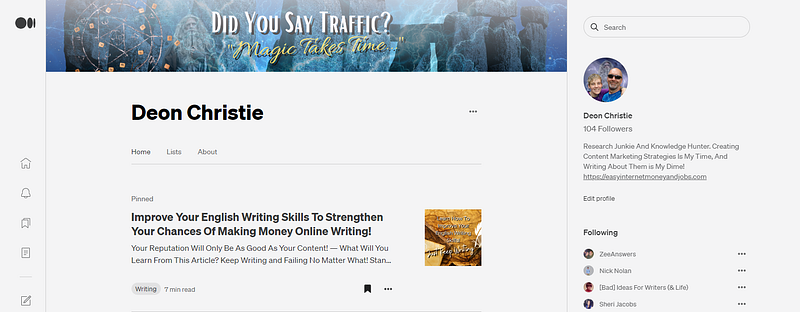
Author account screenshot. The image was captured with “Paint 3D”. Shared by Deon Christie for demonstration and illustration purposes. The author assumes responsibility for the provenance and copyright. The author assumes responsibility for the authenticity.

Your profile display may resemble something similar to the illustrations used for this guide, provided you have already worked on your profile. But whether or not you have one is irrelevant, this will take you step-by-step.

AREA 1 — Your Medium Profile Settings — This is where you complete your account settings, for which there are a few options. This is where you include a Bio, for instance, a short description that shows beneath your profile picture.

This is where you may also decide to include your blog URL for instance but only include an indexable URL. Avoid link shorteners, own your URL in the Bio section of your Medium profile.

Account settings.

Account.

Publishing.

Notifications.

Membership And Payment.

Security And Apps.

Below is an illustration of the account settings window. With your Bio, however, you only have 160 characters, also counting spaces. So be specific when deciding on that. It is a 160-character summary of YOU!
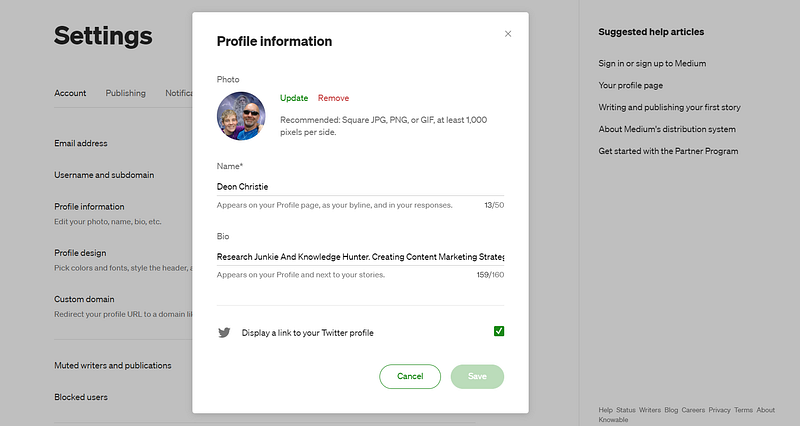
Author account screenshot. The image was captured with “Paint 3D”. Shared by Deon Christie for demonstration and illustration purposes. The author assumes responsibility for the provenance and copyright. The author assumes responsibility for the authenticity.

This is also the area where you connect to your other social profiles. Personally, both my Facebook and Twitter profiles are connected to Medium.

But you must include your profile picture under settings too. You cannot add a profile picture (A Logo Size Picture Works Best For Me in 500 x 500 PNG format) when “designing your profile” with Medium.

Your profile picture should preferably show your face, why? Because you want people to recognize you on all major networking and writing platforms.

Personally, I use the same profile picture for every networking profile where I also use my real name. Later you will be able to couple your name to digital products and so much more.

But that’s another long-term content marketing strategy for another time, we’re already headed toward an eBook…lol!

With your settings sorted, your Bio included, and your profile picture is done, we can move on to the “design” part of your Medium profile.

AREA 2 — Your Medium Profile Design — The “design” part of your Medium profile is your “first impression” on Medium. And trust me when I say, first impressions count, with everything you do online. Not just with your Medium profile.
Author account screenshot. The image was captured with “Paint 3D”. Shared by Deon Christie for demonstration and illustration purposes. The author assumes responsibility for the provenance and copyright. The author assumes responsibility for the authenticity.

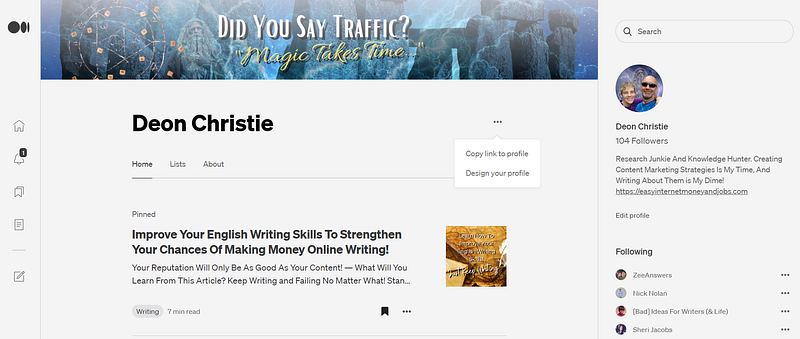
Completing the “settings” required you to click on the “Edit Profile” right under your profile image. The “design” option for your professional Medium profile is accessible by clicking on the 3 dots to the right of your profile name.

As seen above, clicking on the 3 dots will provide you with 2 options. “Copy Link To Profile”, and “Design Your Profile”. Click on “Design Your Profile”.
Author account screenshot. The image was captured with “Paint 3D”. Shared by Deon Christie for demonstration and illustration purposes. The author assumes responsibility for the provenance and copyright. The author assumes responsibility for the authenticity.

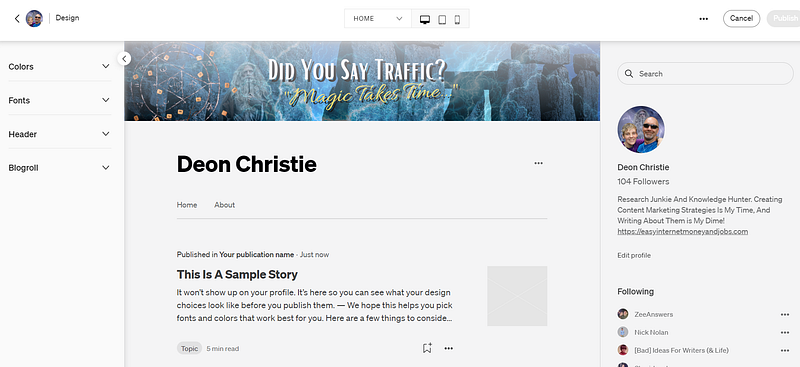
Next, a menu to the left will appear, where we are going to start designing your professional Medium profile. Among the design and editing options are the following.

Colors.

Fonts.

Header.

Blogroll.

Colours are selectable for the “Accent” or “Header” sections. But under “Colors” you can also select your Medium profile background colour. To me, this is rather important.

Remember that colour can create a certain mood, color can make you feel inspired, sad, excited, peaceful, content, etc. Colour form part of the psychological aspect of your professional Medium profile design.

Selecting the right Fonts means contributing to readability. Therefore also to user experience (UX). Apart from load speed, this is the most important part of getting recognized by search engines.

Personally, I use the “Sans-Serif 1” font with Medium. The options are limited though, leaving you with only “Serif 1”, and “Serif 2”. I find the first (which I selected) to be easier to read.
Author account screenshot. The image was captured with “Paint 3D”. Shared by Deon Christie for demonstration and illustration purposes. The author assumes responsibility for the provenance and copyright. The author assumes responsibility for the authenticity.

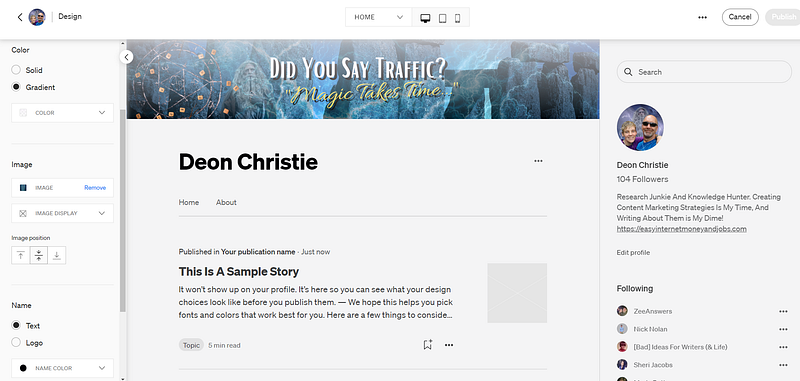
When you click on the “Header” section as illustrated above. You will have access to a few options in the drop-down menu. The header section is where you will add your professional Medium profile cover image. A dimension of 1925 x 300 I find works best, in PNG format.

Be creative and be sure that the image position is aligned in a central position. You will soon see the importance of that when it comes to profile display on mobile devices.

Last but not least, under the “Blogroll” option design your professional profile on Medium. You want to be sure that is checked. It will allow writers who have most recently published to show up at the top of your feed.

Your Cover Image Display On All Devices.

Once you have designed your profile, you must pay attention to how it displays over all devices. Inside your professional Medium profile design page, you will see 3 little icons at the top.

Desktop.

Tablet.

Mobile.

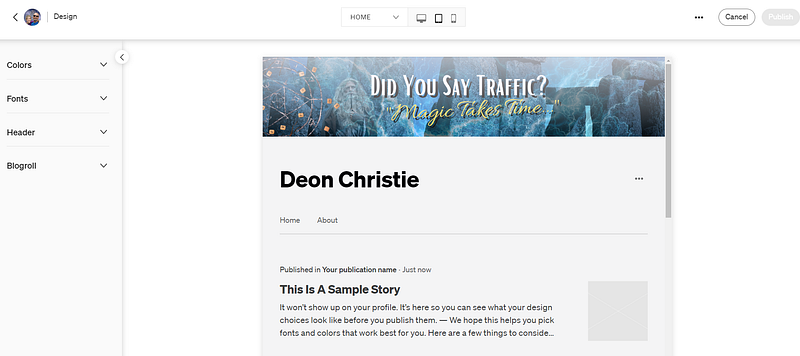
Clicking on each image will provide you with a preview of how your profile will appear on all devices. Now you will see the importance of concentrating any text with image design to the centre of the image.

Below is an illustration of my profile display on Tablets. It shows but a “sample story”, but that is because I am currently “editing”. In editing mode, the publications on your profile will not show, so don’t get alarmed.
Author account screenshot. The image was captured with “Paint 3D”. Shared by Deon Christie for demonstration and illustration purposes. The author assumes responsibility for the provenance and copyright. The author assumes responsibility for the authenticity.

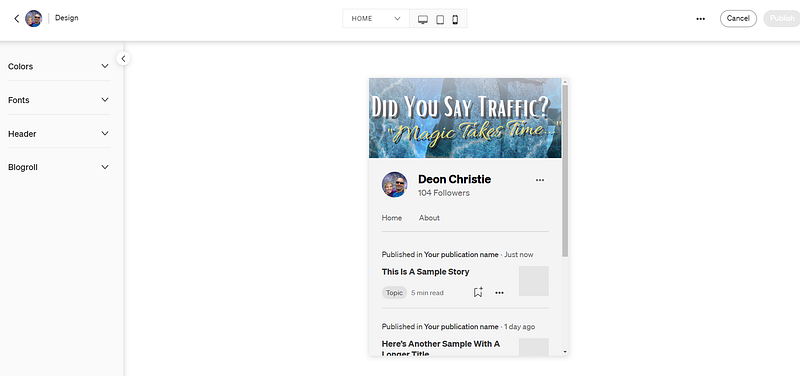
And lastly, below is an illustration of how my Medium profile displays on mobile devices. Notice that the full “text message” in the image remains 100% visible over all devices.
Author account screenshot. The image was captured with “Paint 3D”. Shared by Deon Christie for demonstration and illustration purposes. The author assumes responsibility for the provenance and copyright. The author assumes responsibility for the authenticity.

As with social feeds and search engine search result pages. The presentation image is used as a thumbnail, cropping it from the sides and using only the direct centre bit.

Be careful that your message does not get partially “cut off” in feeds when used as a thumbnail. And the thumbnail represents your content. From articles to videos, and social networking.

Absolutely every piece of content you create must be represented by a clear and informative image. Your presentation is what turns a scroll into a click, and a click into a visitor.

Your content must then create enough curiosity and provide an obvious solution, that is when your visitor is more likely to become a buyer. But that too is a topic for another time.

If you enjoyed this article or would like to add something I may have missed. Please feel free to start a conversation, and leave us a comment.

Do you know the best thing about this traffic? I don’t spend a single penny to get it. I spend about 1–2 hours per week tweaking things. I’ve generated millions of website visitors and seen income returns of over (See For Yourself Inside) per month! — Source

AFFILIATE DISCLOSURE: Some of the links in this post are links to affiliate offers. If you visit them to make a purchase, I will earn a commission. The decision is yours, and whether or not you decide to buy something is entirely up to you. All offers come with a full money-back guarantee!

Free Stuff For My Medium Subscribers.

All new subscribers on Medium will receive 4 free gifts. 2 of my top traffic eBooks, and 2 free memberships (invitation only) for buyer traffic tools I use. Subscribe to me (Deon Christie) on Medium and your free stuff will be emailed to you asap. Medium has no affiliation, nor do they endorse the free giveaway in any way. It is my personal free giveaway to all new Medium subscribers.

Writing
Marketing
Medium
Sales
Content Marketing
Recommended from ReadMedium