
MULTIPLAYER GAME
Creating a Multiplayer Game with Socket.IO, Express.js and Phaser 3
Step-by-step guide to implement a simple multiplayer car game
In this article, we will explain how to implement a simple multiplayer car game. We’ll use Socket.IO for real-time communication between clients and servers, Express.js to construct the web app, and Phaser 3 as the HTML5 game engine.
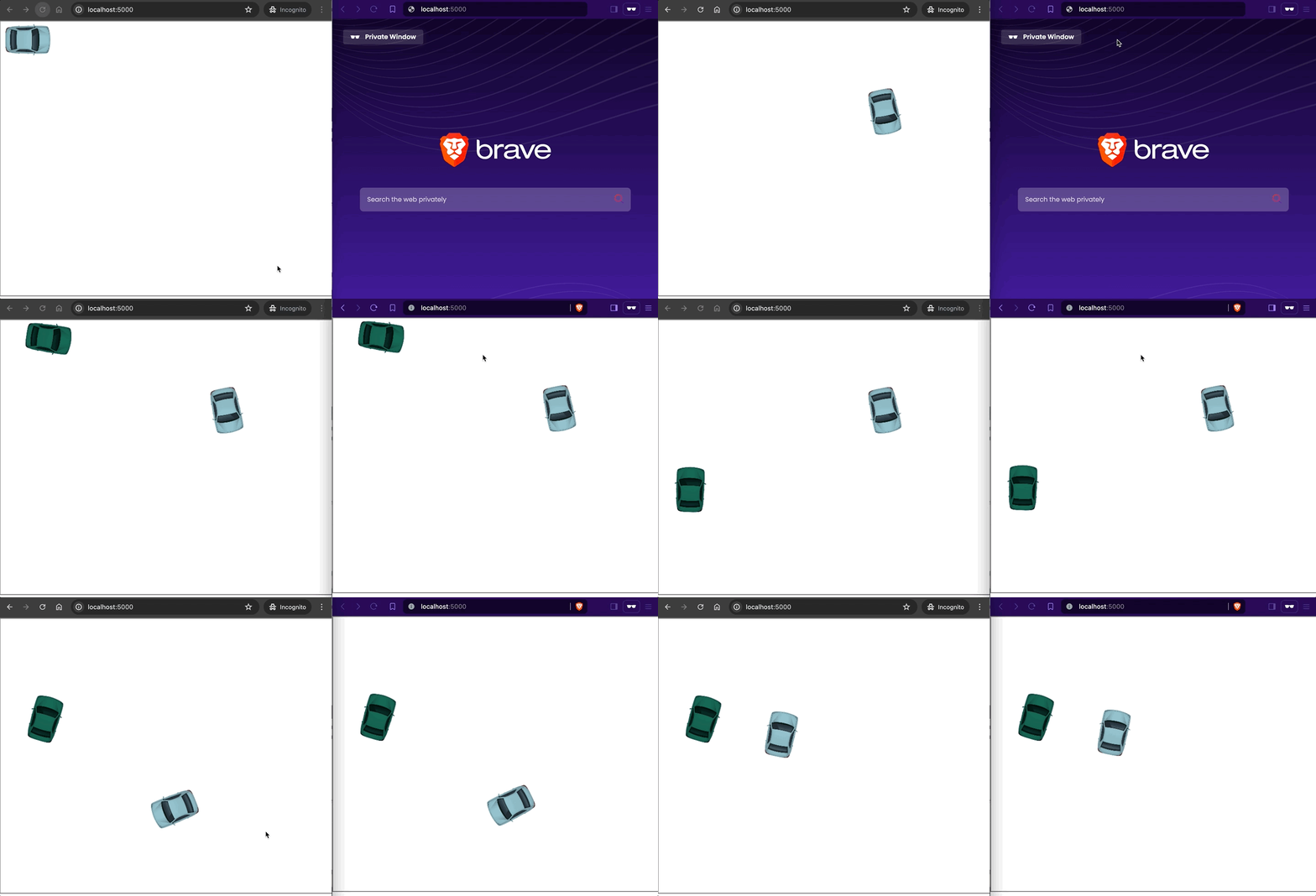
The car game is composed by a server that runs on host localhost and port 5000. Each client connecting to this server will receive a car with keyboard controls. From there, the client can drive its car on an empty terrain, which can later be customized using your own creativity. Clients will constantly communicate with the server, informing it when they connect, sending their location, and indicating when they disconnect. The server will handle all player connections, movements, and disconnections, broadcasting them to all online players.
Here will be the final result:
Before we continue, I’d like to introduce a game engine I’ve developed called Box2DCreateJS. Box2DCreateJS combines the capabilities of the Box2D 2D Physics Engine with the CreateJS suite of tools and libraries, making it easy to use. You can learn more about it by following the link below:
Without any further ado, let’s get started!
Prerequisites
If you would like to follow along, you must have Node.js and npm installed on your machine.
Creating the Multiplayer Game
Create root folder and initialize NPM project
Navigate to your workspace. Let’s create a folder called multiplayer-car-game. Then, let’s run the following command inside it:
npm init
This command will ask some questions:
package name: (multiplayer-car-game) // leave the default
version: (1.0.0)                     // leave the default
description:                         // leave it empty
entry point: (index.js)              // set index.html
test command:                        // leave it empty
git repository:                      // leave it empty
keywords:                            // leave it empty
author:                              // leave it empty
license: (ISC)                       // leave the default
It will generate the package.json that describes all the dependencies of the project.
{
  "name": "multiplayer-car-game",
  "version": "1.0.0",
  "description": "",
  "main": "index.html",
  "scripts": {
    "test": "echo \"Error: no test specified\" && exit 1"
  },
  "author": "",
  "license": "ISC"
}
For now, it does not have any dependency. We will add in the coming section.
Add Socker.IO and Express.js dependencies
Inside the multiplayer-car-game root folder, run the command below to add Socker.IO and Express.js dependencies:
npm install express socket.io
Create the server.js
Inside the multiplayer-car-game folder, let’s create the server.js file with the following content:
const express = require('express')
const http = require('http')
const path = require('path')
const socketIO = require('socket.io')

// Creates an Express application instance
const app = express()

// Creates an HTTP server using the Express app
var server = http.Server(app)

// Sets up Socket.IO to work with the HTTP server
// The pingTimeout property is infomed to configue the socket connection
var io = socketIO(server, {
  pingTimeout: 60000,
})

// Sets the port number to 5000 for the Express app
app.set('port', 5000)

// Sets up a static file server to serve files from the static directory
app.use('/static', express.static(__dirname + '/static'))

// Defines a route handler for the root URL (/) that sends the index.html file in response.
app.get('/', function (request, response) {
  response.sendFile(path.join(__dirname, 'index.html'))
})

// Starts the HTTP server on port 5000
server.listen(5000, function () {
  console.log('Starting server on port 5000')
})

var players = {}

// Listens for a new client connection and handles it
io.on('connection', function (socket) {
  console.log('player [' + socket.id + '] connected')

  // Initializes a new player object with a unique ID and random color
  players[socket.id] = {
    rotation: 0,
    x: 60,
    y: 40,
    playerId: socket.id,
    color: getRandomColor()
  }

  // Emits events to inform other clients about the new player
  socket.emit('currentPlayers', players)
  socket.broadcast.emit('newPlayer', players[socket.id])

  // Listens for a client disconnect event and handles it.
  socket.on('disconnect', function () {
    console.log('player [' + socket.id + '] disconnected')

    // Removes the disconnected player
    delete players[socket.id]

    // Broadcasts the disconnected player to all other clients
    io.emit('playerDisconnected', socket.id)
  })

  // Listens for player movement events
  socket.on('playerMovement', function (movementData) {
    // Updates the player's position and rotation
    players[socket.id].x = movementData.x
    players[socket.id].y = movementData.y
    players[socket.id].rotation = movementData.rotation

    // Broadcasts the updated player position to all other clients
    socket.broadcast.emit('playerMoved', players[socket.id])
  })
})

// Generates a random hexadecimal color code
function getRandomColor() {
  return '0x' + Math.floor(Math.random() * 16777215).toString(16)
}
This code, which I’ve commented for clarity, sets up the server-side of a multiplayer car game. It handles player connections, movements and disconnections.
Create the index.html
Inside the multiplayer-car-game root folder, let’s create the index.html file with the following content:
<html>

<head>
    <title>A Multiplayer Game</title>
    <style>
        body {
          margin: 0
        }
        canvas {
          border: 2px solid gray;
        }
    </style>
    <script src="//cdn.jsdelivr.net/npm/[email protected]/dist/phaser.min.js"></script>
    <script src="/socket.io/socket.io.js"></script>
    <script src="/static/game.js"></script>
</head>

</html>
This HTML file prepares everything needed to host the multiplayer car game. It includes Phaser 3 and Socket.IO, and the game’s logic and setup are handled in the game.js file, as explained later.
Create some folders
Inside the multiplayer-car-game root folder, let’s create the folder static. Then, inside the static folder, let’s create the subfolder assets.
Download and save the car image
Download the car image from this link and save it inside the multiplayer-car-game/static/assets subfolder.
Note: the car image was designed by Freepik.
Create the game.js
Inside the multiplayer-car-game/static folder, let’s create the game.js file with the content below:
// Defines the game configuration
var config = {
  type: Phaser.AUTO,
  parent: 'phaser-example',
  width: 800,
  height: 600,
  backgroundColor: '#ffffff',
  physics: {
    default: 'arcade',
    arcade: {
      // debug: true,
      gravity: { y: 0 }
    }
  },
  scene: { preload, create, update }
}

// Creates a new Phaser Game instance using the configuration
var game = new Phaser.Game(config)

// Loads the car image
function preload() {
  this.load.image('car', 'static/assets/car.png')
}

// Initializes the game state when it's created
function create() {
  const self = this

  // Sets up Socket.IO connection
  this.socket = io()
  this.otherPlayers = this.physics.add.group()

  // Handles events for current players
  this.socket.on('currentPlayers', function (players) {
    Object.keys(players).forEach(function (id) {
      if (players[id].playerId === self.socket.id) {
        addPlayer(self, players[id])
      } else {
        addOtherPlayers(self, players[id])
      }
    })
  })

  // Handles events for new players
  this.socket.on('newPlayer', function (playerInfo) {
    addOtherPlayers(self, playerInfo)
  })

  // Handles events for player disconnections
  this.socket.on('playerDisconnected', function (playerId) {
    self.otherPlayers.getChildren().forEach(function (otherPlayer) {
      if (playerId === otherPlayer.playerId) {
        otherPlayer.destroy()
      }
    })
  })

  // Sets up keyboard
  this.cursors = this.input.keyboard.createCursorKeys()

  // Handles events for player moviments
  this.socket.on('playerMoved', function (playerInfo) {
    self.otherPlayers.getChildren().forEach(function (otherPlayer) {
      if (playerInfo.playerId === otherPlayer.playerId) {
        otherPlayer.setRotation(playerInfo.rotation)
        otherPlayer.setPosition(playerInfo.x, playerInfo.y)
      }
    })
  })
}

// Creates and adds the player's car to the game world
function addPlayer(self, playerInfo) {
  self.car = self.physics.add.image(playerInfo.x, playerInfo.y, 'car')
    .setOrigin(0.5, 0.5)
    .setDisplaySize(100, 70)

  self.car.setCollideWorldBounds(true)
  self.car.setTint(playerInfo.color)
  self.car.setDrag(1000)
}

// Creates and adds other players' cars to the game world
function addOtherPlayers(self, playerInfo) {
  const otherPlayer = self.physics.add.image(playerInfo.x, playerInfo.y, 'car')
    .setOrigin(0.5, 0.5)
    .setDisplaySize(100, 70)
    .setRotation(playerInfo.rotation)

  otherPlayer.playerId = playerInfo.playerId
  otherPlayer.setTint(playerInfo.color)
  self.otherPlayers.add(otherPlayer)
}

// Handles game logic and input handling
function update() {
  if (this.car) {
    // It updates the player's car based on keyboard input
    if (this.cursors.left.isDown && (this.cursors.up.isDown || this.cursors.down.isDown)) {
      this.car.setAngularVelocity(-100)
    } else if (this.cursors.right.isDown && (this.cursors.up.isDown || this.cursors.down.isDown)) {
      this.car.setAngularVelocity(100)
    } else {
      this.car.setAngularVelocity(0)
    }

    const velX = Math.cos((this.car.angle - 360) * 0.01745)
    const velY = Math.sin((this.car.angle - 360) * 0.01745)
    if (this.cursors.up.isDown) {
      this.car.setVelocityX(200 * velX)
      this.car.setVelocityY(200 * velY)
    } else if (this.cursors.down.isDown) {
      this.car.setVelocityX(-100 * velX)
      this.car.setVelocityY(-100 * velY)
    } else {
      this.car.setAcceleration(0)
    }

    const currPosition = {
      x: this.car.x,
      y: this.car.y,
      rotation: this.car.rotation
    }

    if (this.car.oldPosition && (
          currPosition.x !== this.car.oldPosition.x ||
          currPosition.y !== this.car.oldPosition.y ||
          currPosition.rotation !== this.car.oldPosition.rotation)) {
      // Sends the player's position to the server
      this.socket.emit('playerMovement', currPosition)
    }

    this.car.oldPosition = currPosition
  }
}
This code, which I’ve commented for clarity, sets up the client-side of a multiplayer car game using Phaser 3, allowing players to control their cars and see the movements of other players in real-time.
Project final structure
By the end, our project should be organized with the following folder and file structure:
.
├── index.html
├── node_modules
│   ├── ...
...
├── package-lock.json
├── package.json
├── server.js
└── static
    ├── assets
    │   └── car.png
    └── game.js
Time to play
Install packages and start the server
In a terminal and inside the multiplayer-car-game folder, run the following command:
npm install
Note: the
npm installcommand just need run once.
Then, execute the command below to start the server:
node server.js
Playing the game
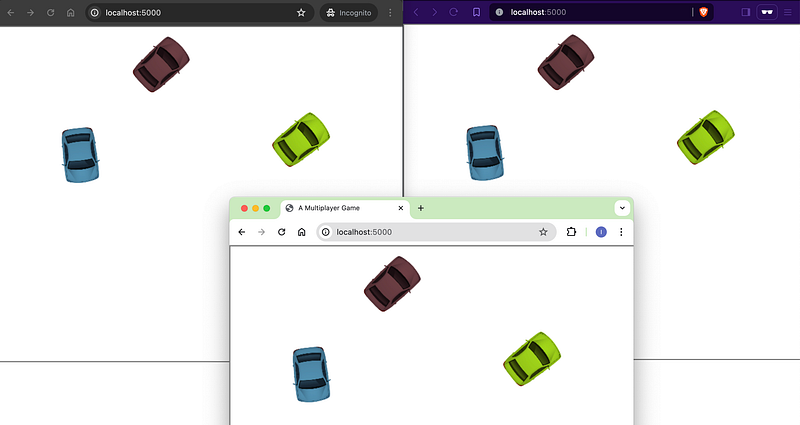
Open two or more separate browsers (e.g., Chrome, Safari, and Firefox) or use different browser profiles (e.g., Chrome, Incognito Chrome, and Firefox) and access http://localhost:5000.
Here is my setup.
Conclusion
In this article, we have shown you how to create a simple multiplayer car game with Socket.IO for real-time communication between clients and servers, Express.js to construct the web app, and Phaser 3 as the HTML5 game engine.
The complete code can be found in the ivangfr/socketio-express-phaser3 GitHub repository.
Additional Readings
Support and Engagement
If you enjoyed this article and would like to show your support, please consider taking the following actions:
- 👏 Engage by clapping, highlighting, and replying to my story. I’ll be happy to answer any of your questions;
- 🌐 Share my story on Social Media;
- 🔔 Follow me on: Medium | LinkedIn | Twitter | GitHub;
- ✉️ Subscribe to my newsletter, so you don’t miss out on my latest posts.


