e substitution in a single job definition. Here we tell our workflow to run in both gke_tf and worker_nodes folder.</li><li>steps: A job contains a series of tasks called steps.</li><li>steps.uses: It specifies the name of the prebuilt actions to be used. You can find a lot of them from GitHub Marketplace here ( <a href="https://github.com/marketplace?type=actions">https://github.com/marketplace?type=actions</a> ).</li><li>steps.run: Specifies the command to be run in the shell.</li><li>steps.if: Prevents a job from running until a condition is met.</li><li>bootstrap.needs: By default, all the jobs run in parallel. This needs section identifies the jobs that should be completed successfully before this job can run.</li></ol><h2 id="24f2">So our GitHub action does the following steps</h2><ol><li><b>Whenever a pull request is raised </b>
a) Checks out the code from the master branch into the ubuntu-latest machine. ( name: Checkout )
b) Checks if our terraform code is formatted properly. ( name: Terraform Format )
c) Initializes the terraform working directory. ( name: Terraform Init )
d) Generates a speculative execution plan, showing what actions Terraform would take to apply the current configuration. ( name: Terraform Plan )</li></ol><p id="18cc">2. <b>Whenever the pull request is merged</b>
a) Creates or updates infrastructure according to Terraform configuration files in the current directory ( name: Terraform Apply )
b) Bootstrapping the cluster by Installing flagger and Istio operator ( name: bootstrap-cluster ). This job waits for the terraform job to be completed before it starts.</p><p id="a089">Let us now raise a Pull request by increasing the worker node count from 1 to 2 in either gke_tf or worker_nodes folder.</p><figure id="24d3"><img src="https://cdn-images-1.readmedium.com/v2/resize:fit:800/1*UVzwlNQv096jzwxR00zWWQ.png"><figcaption>PR showing the status of our checks.</figcaption></figure><figure id="1ed1"><img src="https://cdn-images-1.readmedium.com/v2/resize:fit:800/1*Q-pIrGyUmRpbZwDPfVITKA.png"><figcaption>Terraform plan and format</figcaption></figure><p id="35b4">Since the pull request is not yet merged, it would only check for the formatting issues and executes terraform plan.</p><p id="6d21">Now the pull request has to be merged ( Manually ). How about we automate this too? Yes, you can now enable auto merging of pull requests from the GitHub UI.</p><figure id="9b47"><img src="https://cdn-images-1.readmedium.com/v2/resize:fit:800/1*HToB0NHo3sMYCT9SCZ2-9Q.png"><figcaption>Auto-merging of a Pull request.</figcaption></figure><p id="6790">As soon as our Pull request is merged, our GitHub action will start creating a cluster in your GCP account.</p><figure id="bf5e"><img src="https://cdn-images-1.readmedium.com/v2/resize:fit:800/1*qfz9reYw6cz3jN1_dYCfgQ.png"><figcaption></figcaption></figure><figure id="0763"><img src="https://cdn-images-1.readmedium.com/v2/resize:fit:800/1*yMN_AxARS2aWvnGxqaRR4w.png"><figcaption></figcaption></figure><figure id="071b"><img src="https://cdn-images-1.readmedium.com/v2/resize:fit:800/1*SXzsbJFMxGSpK5iL-s-UYg.png"><figcaption></figcaption></figure><figure id="394e"><img src="https://cdn-images-1.readmedium.com/v2/resize:fit:800/1*TKjRu0hQJpUHPQ6CNG7oeA.png"><figcaption>Creation of the cluster in GCP</figcaption></figure><p id="22fc">If you login into the GCP console you should now be able to see your cluster in the GKE section with a
Options
n additional node group too.</p><h1 id="67c6">Conclusion</h1><p id="7963">Thanks for reading my article. Hope you have liked it. Here are some of my other articles that may interest you.</p><h1 id="339e">Recommended</h1><div id="c99f" class="link-block">
<a href="https://pavan1999-kumar.medium.com/create-a-kubernetes-cluster-using-kind-b364a67437b7">
<div>
<div>
<h2>Create a Kubernetes Cluster using Kind</h2>
<div><h3>How to create a Kubernetes cluster in 5 minutes using kind.</h3></div>
<div><p>pavan1999-kumar.medium.com</p></div>
</div>
<div>
<div style="background-image: url(https://miro.readmedium.com/v2/resize:fit:320/1*tF_VDUSJ4NGFu1p3du898w.png)"></div>
</div>
</div>
</a>
</div><div id="e5f1" class="link-block">
<a href="https://pavan1999-kumar.medium.com/deploying-applications-in-kubernetes-using-flux-a9d171b11917">
<div>
<div>
<h2>Deploying applications in Kubernetes using Flux</h2>
<div><h3>Introduction to Flux</h3></div>
<div><p>pavan1999-kumar.medium.com</p></div>
</div>
<div>
<div style="background-image: url(https://miro.readmedium.com/v2/resize:fit:320/1*tb5YrHjJfb64xQOIncB7pg.png)"></div>
</div>
</div>
</a>
</div><div id="8823" class="link-block">
<a href="https://pavan1999-kumar.medium.com/introduction-to-kustomize-97f990dc2f44">
<div>
<div>
<h2>Introduction to Kustomize</h2>
<div><h3>How to use Kustomize to efficiently manage Your Kubernetes manifests.</h3></div>
<div><p>pavan1999-kumar.medium.com</p></div>
</div>
<div>
<div style="background-image: url(https://miro.readmedium.com/v2/resize:fit:320/0*H9pz5XkillnNoORw.png)"></div>
</div>
</div>
</a>
</div><div id="f119" class="link-block">
<a href="https://pavan1999-kumar.medium.com/deploying-applications-in-kubernetes-using-argo-cd-ab004a8cdb5e">
<div>
<div>
<h2>Deploying applications in Kubernetes using Argo CD</h2>
<div><h3>Deploying applications in Kubernetes using Argo CD</h3></div>
<div><p>
Deploying applications in Kubernetes using Argo CDpavan1999-kumar.medium.com</p></div>
</div>
<div>
<div style="background-image: url(https://miro.readmedium.com/v2/resize:fit:320/1*UW7cwBXan_2TmHr4wDPZDw.png)"></div>
</div>
</div>
</a>
</div><div id="0209" class="link-block">
<a href="https://pavan1999-kumar.medium.com/introduction-to-istio-service-mesh-2bc68d2ffdac">
<div>
<div>
<h2>Introduction to Istio Service Mesh</h2>
<div><h3>What is Istio Service Mesh?</h3></div>
<div><p>pavan1999-kumar.medium.com</p></div>
</div>
<div>
<div style="background-image: url(https://miro.readmedium.com/v2/resize:fit:320/1*Cn7wjhMWDFqGRqib9MNFjw.png)"></div>
</div>
</div>
</a>
</div></article></body>
Creating a GKE Cluster with GitHub Actions
Automating Kubernetes Cluster creation and Bootstrapping using GitHub Actions
GitHub Actions allows you to design your CI and CD workflows directly in your GitHub repositories. GitHub actions are entirely integrated with GitHub. Build, Test, and Deploy can be done directly from GitHub. So your CI/CD workflows can be at the same place where your source code exists. The CI/CD Pipeline can be triggered with events like pull requests or merging of branches etc. In this article, we will be using the GitHub actions to create a GKE Cluster with terraform and bootstrap the cluster with some tools like Istio and flagger.
What is the entire story all about? (TLDR)
GitHub Actions allows you to design your CI and CD workflows directly in your GitHub repositories. Build, Test, and Deploy can be done directly from GitHub.
We will create a GKE Cluster ( Using terraform ) with GitHub actions and bootstrap the cluster by installing components like Istio, Flagger, etc.
Prerequisites
GCP Account
GitHub Account
Any remote backend to store your state ( Optional )
DEMO
In this demo, we are going to provision a GKE cluster first and then add a set of Preemptible nodes to the same provisioned cluster.
You can fork my repo that has both the terraform and GitHub actions file.
This is a sample snippet of my terraform code. This would create a GKE cluster and then add a node pool to the cluster created through our terraform. But how do we automate this? How do we ensure that our terraform code doesn't have any errors? How do we ensure that our terraform code present in the master branch doesn't have any formatting issues? How do we ensure that any pull request raised to the master branch are properly tested before merging? And finally, how do we automate the provisioning of the GKE cluster and the node pool? The solution is GitHub Actions.
Let us now take a peek at what our GitHub action is doing here
name: The name of the GitHub Action.
on: The name of the GitHub event that triggers this workflow.
push.paths: The workflow would be triggered if any changes are made to this path.
branches: Trigger the workflow on Push only for the main branch.
pull_request: Trigger the workflow on a pull request event.
jobs: A workflow is made of one or more jobs ( These define the set of steps to be performed ).
jobs.terraform: The id of the job.
jobs.terraform.env: A map of environment variables that are available to all steps in the job.
runs-on: The type of machine on which the job should be running on.
strategy.matrix: A matrix allows you to create multiple jobs by performing variable substitution in a single job definition. Here we tell our workflow to run in both gke_tf and worker_nodes folder.
steps: A job contains a series of tasks called steps.
steps.uses: It specifies the name of the prebuilt actions to be used. You can find a lot of them from GitHub Marketplace here ( https://github.com/marketplace?type=actions ).
steps.run: Specifies the command to be run in the shell.
steps.if: Prevents a job from running until a condition is met.
bootstrap.needs: By default, all the jobs run in parallel. This needs section identifies the jobs that should be completed successfully before this job can run.
So our GitHub action does the following steps
Whenever a pull request is raised
a) Checks out the code from the master branch into the ubuntu-latest machine. ( name: Checkout )
b) Checks if our terraform code is formatted properly. ( name: Terraform Format )
c) Initializes the terraform working directory. ( name: Terraform Init )
d) Generates a speculative execution plan, showing what actions Terraform would take to apply the current configuration. ( name: Terraform Plan )
2. Whenever the pull request is merged
a) Creates or updates infrastructure according to Terraform configuration files in the current directory ( name: Terraform Apply )
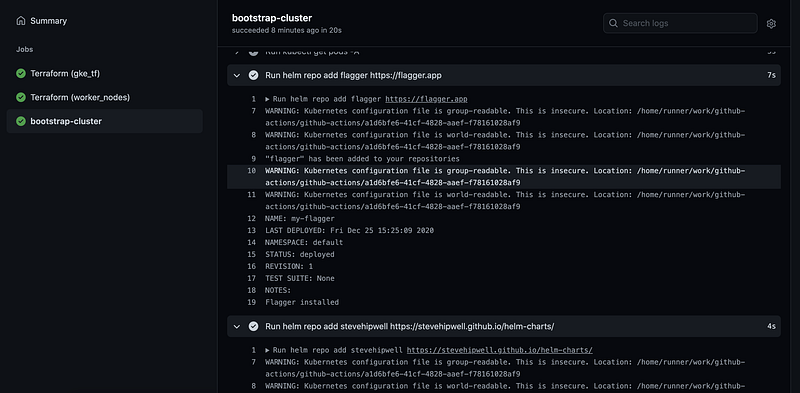
b) Bootstrapping the cluster by Installing flagger and Istio operator ( name: bootstrap-cluster ). This job waits for the terraform job to be completed before it starts.
Let us now raise a Pull request by increasing the worker node count from 1 to 2 in either gke_tf or worker_nodes folder.
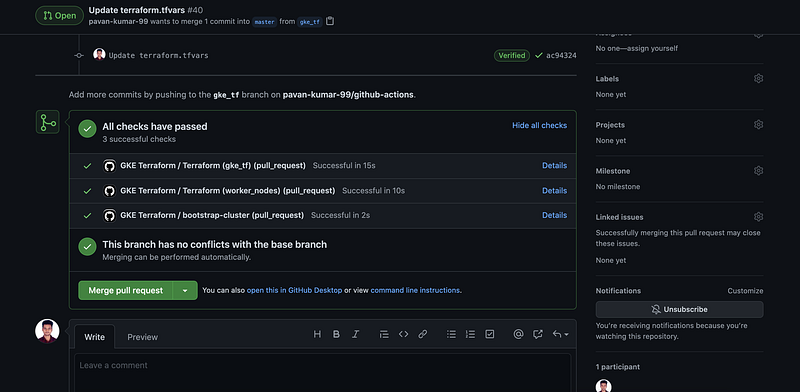
PR showing the status of our checks.Terraform plan and format
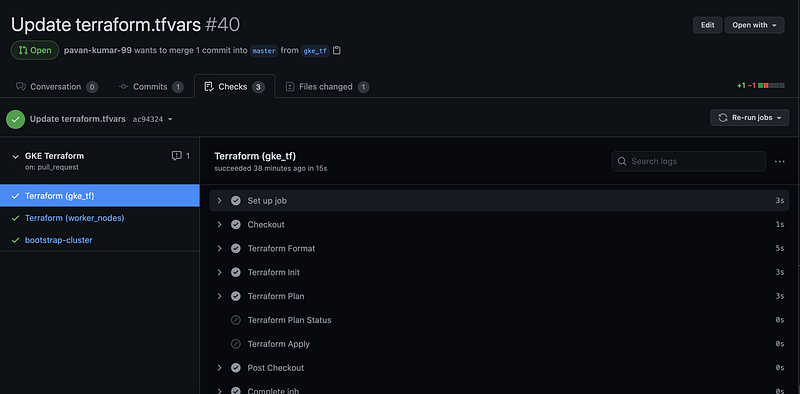
Since the pull request is not yet merged, it would only check for the formatting issues and executes terraform plan.
Now the pull request has to be merged ( Manually ). How about we automate this too? Yes, you can now enable auto merging of pull requests from the GitHub UI.

Auto-merging of a Pull request.
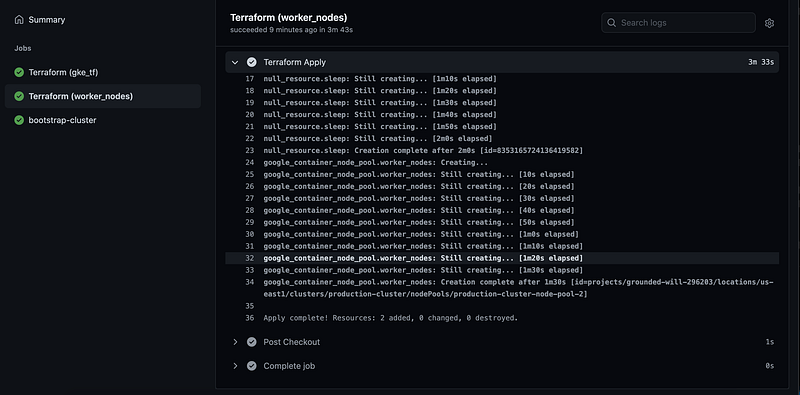
As soon as our Pull request is merged, our GitHub action will start creating a cluster in your GCP account.
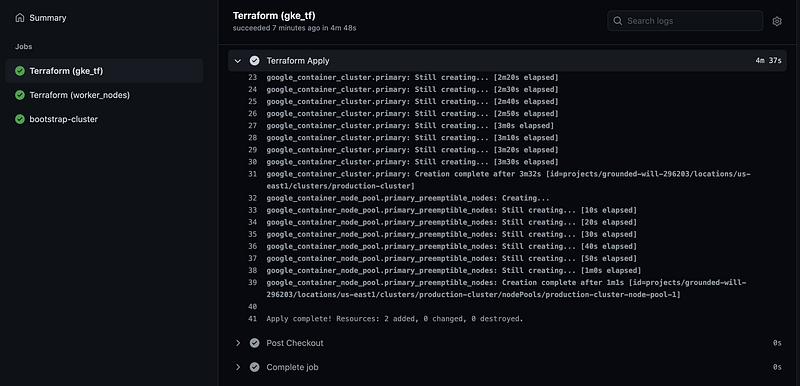
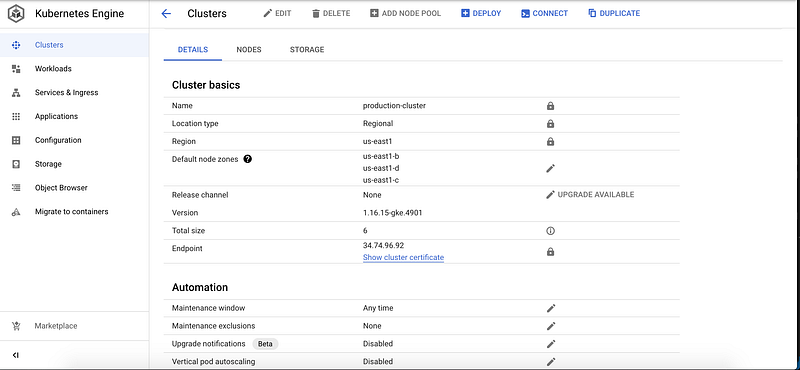
Creation of the cluster in GCP
If you login into the GCP console you should now be able to see your cluster in the GKE section with an additional node group too.
Conclusion
Thanks for reading my article. Hope you have liked it. Here are some of my other articles that may interest you.