
Is it Possible to Create a Chromium-based Browser Extension from Scratch with the help of AI?

Ok, so here’s the deal, for some time now I’ve wanted to create a Browser extension based on Open Source, completely trustworthy from a verification perspective.
Its job is to provide network information, to avoid having to use a PowerShell script to AWS’ API or open up a new browser tab just to ask “What’s my IP address”. An extension should spit that out for me whenever I want, period.
The biggest issue is that there aren’t any major providers’ extensions in the store, so we end up having to rely on sketchy and unverified extension providers… Lots of 5 stars, yeah — but none have Open Source and/or are focused on security nor user privacy.

I’ve taken one of these (from ipinfo.io) through a browser extension risk check using Microsoft Defender for Endpoints’ Vulnerability Management and found that it seems to be pretty high risk :
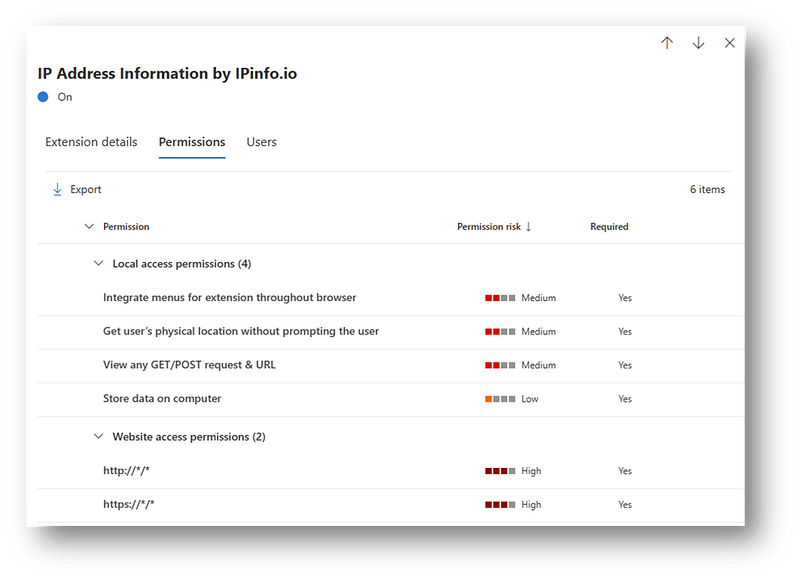
Within Extensions, “Website Access Permissions” are used by Chrome extensions to specify which websites the extension can access and interact with. These permissions are declared in the extension’s manifest file and determine what data and features the extension can access on the specified websites.
There are lots of APIs that offer this information, so gathering the data isn’t an issue, but mostly: How to build and publish a Chromium-based Browser extension, for a non-developer?
Said project would be daunting, should we live in a world where we relied on books and search based web (i.e. 2021). But it’s the year 2023 and AI has taken over as a valid way to support and ASSIST (I wouldn’t say lead yet) such projects. And this is what I want to test in this article.
Step 1. How to create a Browser extension?
I asked ChatGPT and here’s the answer:
1. Determine the purpose and functionality of your extension: Before you begin building your extension, it’s important to determine what you want it to do and what functionality it should have. This will help you determine the necessary tools and resources you will need.
2. Set up your development environment: You will need a few tools to start developing your extension, including a code editor, a browser, and a way to test your extension. For Chrome extensions, you will need to use the Chrome browser and enable developer mode in the browser settings.
3. Create the basic structure of your extension: Your extension will need some basic files and directories, including a manifest file, background scripts, and HTML and CSS files for the user interface.
4. Write the code: The code for your extension will depend on its purpose and functionality. You may need to use JavaScript, HTML, and CSS to build the user interface and functionality of your extension.
5. Test and debug your extension: Once you have built your extension, you will need to test it to ensure that it works as expected. Use the Chrome browser’s developer tools to debug any issues you encounter.
6. Publish your extension: Once your extension is ready to be released, you will need to publish it on the Chrome Web Store. You will need to create an account and follow the guidelines and requirements for publishing your extension.
Right… so:
Step “1” is done.
Step “2” is also done, in my Dev rig I use VS code and a Chromium-based browser already and intending to use IPinfo.io as the backend provider.
Installed Node.js, with Chocolatey, Python (for the sake of doing it) and GIT to complement my setup.
Just missing some packages that are needed (after learning in upcoming steps) — so added webpack-dev-server and had to move on with this warning, attempting to run
npm audit fix - - forcedidn’t solve the issue.
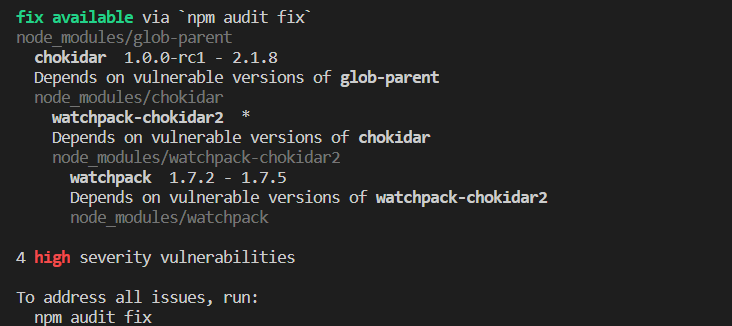
Had to troubleshoot some fun issues —

With which chatGPT had some thoughts
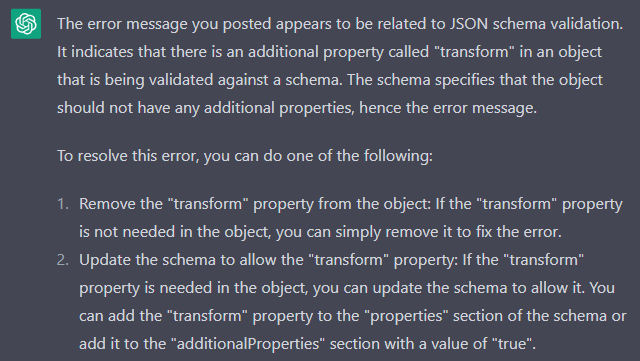
At this stage, I was unable to pinpoint the issue (might be an outdated implementation?) I switched to a different github repo for Chome extention boilerplate: lxieyang/chrome-extension-boilerplate-react: A Chrome Extensions boilerplate using React 18 and Webpack 5. (github.com)
Indeed, this repo has less outdated packages:
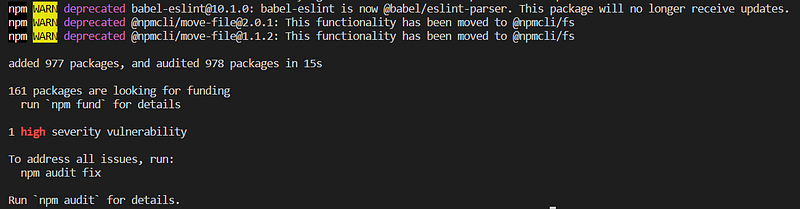
And could be “fixed”:

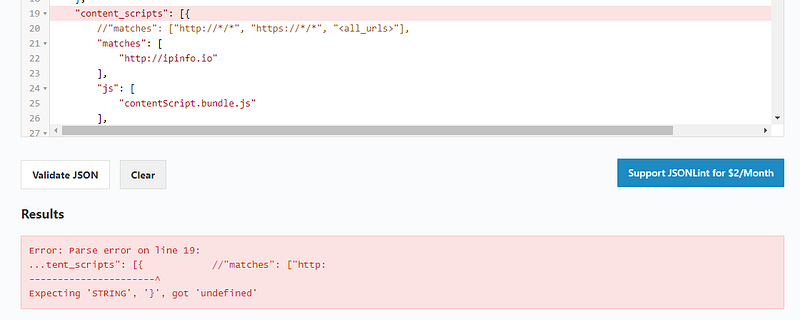
Trying to run it led to some JSON issue:

Which I could validate the actual character issue with: JSON Online Validator and Formatter — JSON Lint
P.S.: Performing some IT Vendor Risk Management here, who’s ipinfo.io? And what security controls do they implement/abide to?
I don’t have access to a platform check, so relying on public signals here…
According to their own website, ipinfo.io:


Step “3” — I need more details on this… so back to asking it and here are the “deets”:
Manifest file: The manifest file is a JSON file that provides information about your extension, such as its name, version number, description, and icons. It also includes permissions that your extension needs to access certain features or data in the browser. The manifest file is a required component of every Chrome extension.
Background scripts: Background scripts are JavaScript files that run in the background of the browser and provide functionality for your extension. These scripts can be used to respond to events, interact with the browser’s APIs, and communicate with other components of your extension.
HTML and CSS files: If your extension includes a user interface, you will need to create HTML and CSS files to define the layout and styling of your interface. You can use these files to create pop-ups, menus, or other UI components that allow users to interact with your extension.
Other files and directories: Depending on the complexity of your extension, you may need to create other files and directories to support its functionality. For example, you may need to create JavaScript files to handle specific events or interactions, or images to be used as icons or other UI elements.
This seems like a lot of stuff… so wonder if there are templates for these… surely on GitHub! And here’s the answer:
An example is the “Chrome Extension Boilerplate” template, which includes a more extensive set of files and directories to help you build a robust and scalable Chrome extension. This template includes several components, such as a background script, content script, popup UI, options page, and several utility scripts for handling common tasks like storage and messaging.
These templates are open source and can be customized to meet your specific needs. There are also many other templates and frameworks available that can help you get started with building a Chrome extension, depending on your level of experience and the complexity of your project.
Beautiful, looking for this on the web I bumped on FreeCodeCamp’s video on how to build a Chrome extension — added to my sources list…
Build a Chrome Extension — Course for Beginners — YouTube
It was quite helpful and led me to this GitHub page with some code templates.
GitHub — samuelsimoes/chrome-extension-webpack-boilerplate at react
After modifying the GitHub template and a few tweaks I had a working test extension:

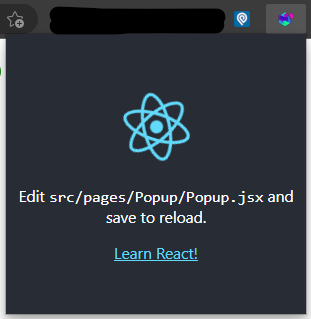
And this took me 3 hours on a Sunday afternoon — fun days.
What’s still left to do
At least the following:
4. Write the code: The code for your extension will depend on its purpose and functionality. You may need to use JavaScript, HTML, and CSS to build the user interface and functionality of your extension.
5. Test and debug your extension: Once you have built your extension, you will need to test it to ensure that it works as expected. Use the Chrome browser’s developer tools to debug any issues you encounter.
6. Publish your extension: Once your extension is ready to be released, you will need to publish it on the Chrome Web Store. You will need to create an account and follow the guidelines and requirements for publishing your extension.
I’d say this would take at least another 6 hours for proper learning, testing and validation.
A task I might leave for another day.
For now, though, I can conclude that with AI assistance, realizing what you wish is possible.
Learn more about my Cloud and Security Projects: https://linktr.ee/acamillo
Consider subscribing to Medium (here) to access more content that will empower you!
Thank you for reading and leave your thoughts/comments!
./references
Scattered throughout the document


